The stakes are real. According to HBR, around one-third of CRM projects fall short of expectations — not because the software is bad, but because the implementation is poorly planned. For Indian MSMEs already managing sales, inventory, billing, and compliance across fragmented tools, a failed CRM rollout means wasted money and more chaos, not less.
This guide walks through the complete CRM implementation process — from pre-implementation planning to post-go-live validation — so your business can deploy with confidence and actually get results.
Key Takeaways
- CRM implementation spans goal-setting, system selection, data migration, configuration, training, and go-live — skipping any phase creates problems in later stages
- Vague goals lead to poor configuration; define measurable outcomes before selecting software
- User adoption is harder than technical setup — plan for it from day one, not after launch
- A phased rollout reduces risk and builds internal confidence before full deployment
- Track KPIs in the first 30–60 days post-launch to confirm your CRM is delivering value — not collecting dust
How to Implement a CRM System
CRM implementation is the end-to-end process of selecting, configuring, migrating data into, and deploying a CRM so it becomes part of daily operations — not a tool that gets set up and forgotten. It covers planning, customisation, training, and rollout, with each phase feeding into the next.
Timelines vary. Small businesses with clean data and minimal integrations can complete implementation in a few weeks. Mid-sized businesses managing multiple departments, legacy data, and custom workflows typically take three to six months. The main drivers are:
- Number of users and departments involved
- Volume and quality of existing data
- Integration complexity with current tools
- Depth of customisation required
Before You Begin: Pre-Implementation Requirements
Define business goals before touching any software. Vague goals like "improve customer service" or "get better at sales" will produce a CRM configured for nothing in particular. Instead, define outcomes you can measure:
- Reduce average sales follow-up time from 48 hours to 24 hours
- Centralise all customer interaction history in one place
- Increase lead-to-opportunity conversion rate by 15% within 90 days
- Eliminate manual tracking of overdue payments
Concrete goals determine which features actually matter during configuration — and which ones you can safely ignore in Phase 1.
Audit your existing processes and data. Before migrating anything, map out your current customer-facing workflows: how leads come in, how follow-ups are tracked, how billing happens. Identify where the CRM will plug in and where it will replace manual steps.
Then assess your data: What customer records exist? Are they in Excel exports, a legacy system like Tally, or scattered across inboxes and WhatsApp threads? How clean are they? According to Validity's 2022 CRM Data Management report, 44% of businesses estimated they lose more than 10% of annual revenue due to poor CRM data. A data audit before migration is not optional.
Assemble the right implementation team. This is where many businesses go wrong — they assign CRM implementation to IT and wonder why sales teams never adopt it. You need:
- A business-side project lead (not just technical)
- Department heads from sales, operations, or finance depending on scope
- An executive sponsor whose active endorsement signals importance to the wider team
Without cross-functional ownership, the CRM gets configured for one department and ignored by everyone else. Once your team and goals are in place, you're ready to move into platform selection and configuration.
Step-by-Step CRM Implementation Process
Step 1 — Choose the Right CRM for Your Business Needs
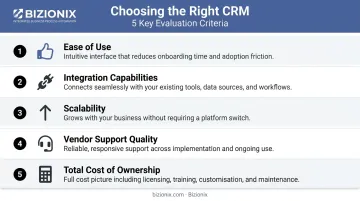
Selection should be driven by the goals you defined above — not by which software has the most features or the most recognisable brand. Key evaluation criteria:
- Ease of use — if your team finds it frustrating, adoption will fail
- Integration capabilities — does it connect with your accounting, billing, and inventory tools?
- Scalability — can it grow with you without a costly re-implementation?
- Vendor support quality — especially important during the first 90 days
- Total cost of ownership — include implementation, training, and ongoing maintenance, not just the subscription fee
For Indian MSMEs managing multiple business functions, integration complexity is a real cost. Connecting a standalone CRM to separate accounting, invoicing, and GST compliance tools requires ongoing maintenance and creates sync errors over time.
Platforms like Bizionix, where CRM is embedded within a unified ERP — alongside accounting, inventory, sales, and GST compliance — eliminate this problem entirely. Customer data, sales orders, and financial records live in one system, updated in real time without manual reconciliation.
Step 2 — Plan, Scope, and Configure
Once the CRM is selected, define your implementation scope clearly: which departments are included in Phase 1, which workflows the CRM will manage, and which data fields are required. Set a realistic timeline with specific milestones.
Configuration work includes setting up contact fields, sales pipelines, user roles, and automation rules. One important warning: resist the temptation to over-customise early. Building complex custom features in the first phase causes delays, budget overruns, and scope confusion. Start with what you actually need to operate, then add complexity in later phases once the team is comfortable.
Step 3 — Execute Data Migration
Data migration is where implementations most commonly run into trouble. The process involves three stages:
- Clean your data — remove duplicates, standardise formats (phone numbers, company names, email addresses), and fill critical gaps before migration begins
- Map your fields — align data from your existing system to the CRM's data structure; mismatched fields cause corrupted records that are difficult to fix post-migration
- Migrate in stages — start with a subset of records (500–1,000 contacts), validate the output, then proceed with the full migration
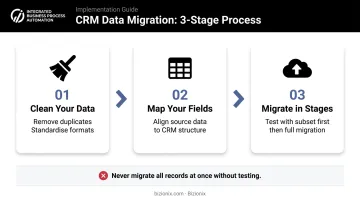
Never migrate all records at once without testing first. A failed bulk migration that corrupts your entire customer database is far harder to recover from than a small test batch that surfaces issues early.
Step 4 — Integrate with Existing Business Systems
Connect the CRM to the tools your team uses every day: email, calendar, billing, invoicing, and support systems. Two categories of integration risk are worth planning for:
- Technical failures — sync errors, duplicate records, data loss during handoffs between systems
- Operational gaps — the CRM doesn't connect to a key workflow, forcing teams to work in two places simultaneously
Native integrations within a unified platform reduce both risks considerably. When CRM, sales, invoicing, and accounts all run on the same database, there's no sync required — the data is simply already there.
Step 5 — Train Your Team
Training is the most underfunded and underplanned part of most CRM implementations. Research from CSO Insights found that only 8.7% of companies exceeded expectations for CRM training — yet among those high-training firms, 71.2% had more than 90% of reps actively using the CRM. More training, higher adoption. The correlation is consistent.
Effective training looks like:
- Role-specific sessions, not generic product demos — a sales rep and a finance manager need entirely different training
- Hands-on practice with actual business data, not sample records
- Reference documentation available after training ends
- A designated internal point of contact for questions post-launch

Address change management directly. Employees resist new CRM tools for predictable reasons: it adds steps to their workflow, the personal benefit isn't obvious, or they weren't consulted during setup.
Counter this with visible leadership endorsement. When managers actively use the CRM in team meetings to review pipeline data, it signals that this is how the business now operates.
Step 6 — Go Live with a Phased Rollout
Launch with one department or one use case — sales lead tracking is a natural starting point — stabilise that phase, then expand from there.
A phased approach lets you:
- Catch configuration issues before they affect the entire organisation
- Build internal confidence and early wins that reduce resistance in later phases
- Demonstrate ROI to leadership before committing to full deployment
Once Phase 1 is stable and the team is comfortable, expand to additional departments or use cases with the benefit of lessons learned.
Post-Go-Live Validation and Performance Tracking
Going live is not the finish line. The first 30–90 days post-launch determine whether your CRM becomes genuinely useful or fades into background noise.
Confirming the System Works as Intended
Before declaring success, verify:
- Workflows are firing correctly at the right pipeline stages
- Data is syncing accurately between integrated systems
- All user roles have the correct access permissions
- Automations are triggering at the right points in the process
Tracking Implementation KPIs
Success must be measured against the goals set before implementation began. Useful metrics to track in the first 30–60 days:
| KPI Category | Example Metrics |
|---|---|
| Adoption | Login frequency, active users, feature usage rates |
| Data quality | Required field completion rate, duplicate record count |
| Sales process | Lead response time, lead-to-opportunity conversion, pipeline stage movement |
| System health | Sync errors, automation failures, support tickets raised |
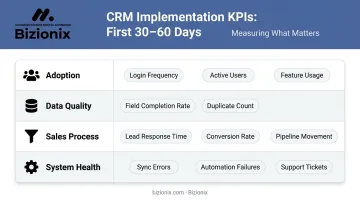
If adoption metrics are low at the 30-day mark, treat it as a signal to investigate immediately. Waiting rarely improves the numbers.
Collecting User Feedback
The people using the CRM daily will surface problems that were invisible during testing. Build a simple feedback loop in the first 90 days using one or more of these approaches:
- Weekly check-ins with team leads to surface friction points early
- Short structured surveys every two weeks sent to active users
- A shared channel or ticket queue for ad-hoc CRM issues
Bottlenecks caught at 30 days are usually fixable with minor adjustments. Left unaddressed until 90 days, they tend to calcify into habits that are much harder to reverse.
Common CRM Implementation Challenges and How to Fix Them
Even well-planned CRM rollouts hit friction. Here are the three most common problems teams encounter — and the targeted fixes that resolve them.
Issue 1: Poor User Adoption
Problem: The CRM is live, but the team continues using spreadsheets, email threads, or personal notebooks.
Likely cause: Users weren't involved in the selection or configuration process; training was insufficient; the CRM adds steps without visible personal benefit.
Fix:
- Run role-specific demonstrations showing how the CRM saves each user's time specifically
- Reconfigure workflows where possible to reduce friction at the points of highest resistance
- Have leadership actively model CRM usage — reviewing pipeline data from the system in team meetings, not from printed reports
Issue 2: Data Migration Errors and Dirty Data
Problem: Post-migration records are incomplete, duplicated, or incorrectly mapped — and the team stops trusting the data.
Root cause: Data wasn't cleaned before migration; field mapping was done hastily; migration was executed all at once without testing.
Fix:
- Run a post-migration audit against a defined sample of records
- Assign a data quality owner responsible for ongoing cleanup
- Set minimum data entry standards for all new records going forward — enforce them through required fields
Issue 3: Scope Creep and Over-Customisation
Problem: The implementation keeps expanding — new features are added mid-project, timelines slip, and the original goals get buried.
Likely cause: Stakeholders add requests during the build phase without evaluating priority; no formal change control process exists.
Fix:
- Lock the scope for Phase 1 and create a documented backlog for future enhancements
- Evaluate every new request against the original business goals
- Move non-essential customisations to Phase 2 — this protects the timeline without dismissing the request
Catching these issues early — before they compound — is what separates a successful CRM rollout from one that stalls mid-implementation.
Pro Tips for a Smooth CRM Implementation
Involve end users before finalising configuration. The people who will use the CRM daily know what information they actually need and what workflows create friction. Running walkthroughs with actual users before finalising the configuration produces far higher adoption than a top-down rollout where the team first sees the system on go-live day.
Document everything as you go. Configuration decisions, data migration logic, role permissions, and training materials should be documented during implementation, not reconstructed afterward. This protects the business when team members change and makes future upgrades far less disruptive.
For Indian MSMEs managing multiple business functions, maintaining separate integrations between a standalone CRM and other tools carries a hidden cost: maintenance effort, subscription fees, and data errors that compound over time. According to RIS, only 13% of surveyed Indian MSMEs use CRM software and only 12% use ERP, despite 95% using at least one basic digital product. That gap means most businesses are managing customer relationships through tools not designed for it.
A platform where CRM is built alongside accounting, inventory, billing, and compliance — like Bizionix — significantly reduces that integration burden and gives every department access to the same real-time data.
Conclusion
Successful CRM implementation is less about which software you choose and more about how you plan, execute, and integrate it into daily workflows. Businesses that define clear goals, align their teams early, and roll out in controlled phases consistently see faster adoption and measurable results than those that treat launch day as the finish line.
Treat CRM implementation as an ongoing process, not a one-time project. The most effective systems evolve with the business through regular user feedback, updated configurations, and performance reviews tied to actual revenue and pipeline goals.
Keep these principles in focus as you move forward:
- Review adoption metrics at 30, 60, and 90 days post-launch
- Collect user feedback consistently — frontline teams surface problems early
- Audit data quality quarterly to keep records accurate and actionable
- Revisit configurations as business processes change or teams scale
Frequently Asked Questions
Frequently Asked Questions
What is the CRM software implementation process?
CRM implementation is the end-to-end process of selecting, configuring, and deploying a CRM system across your business. It covers planning, data migration, training, and rollout — structured to improve customer management and operational efficiency.
What are the 4 types of CRM software?
The four main types are: operational CRM (automating sales, marketing, and service processes), analytical CRM (generating insights from customer data), collaborative CRM (sharing customer information across departments), and strategic CRM (focused on long-term relationship building and retention).
What are the 7 components of CRM software?
Core CRM components typically include: contact and account management, lead and opportunity tracking, sales pipeline management, marketing automation, customer service tools, reporting and analytics, and third-party integrations. Enterprise platforms typically cover all seven; lightweight tools may offer a subset.
What are the 4 stages of CRM implementation?
The four broad stages are: planning and requirements definition, configuration and data migration, training and rollout, and post-launch evaluation and optimisation.
How long does CRM implementation take?
Small businesses with limited integrations and clean data can complete implementation in a few weeks. Mid-sized businesses with multiple departments, legacy data, and complex workflows typically take three to six months. A phased rollout approach helps manage this timeline by breaking the deployment into manageable stages.
What are the biggest challenges in CRM implementation?
The most common failure points are poor user adoption, data quality issues during migration, scope creep, inadequate training, and lack of executive support. All five trace back to the same root cause: insufficient planning before implementation begins.