Introduction
Picture this: You're the owner of a growing manufacturing business in Pune. Your accountant maintains ledgers in Tally, your warehouse manager tracks inventory in Excel, your HR team uses Google Sheets for payroll, and your sales team sends invoices through WhatsApp. Every month-end becomes a nightmare of chasing numbers across systems, discovering stock mismatches, finding unpaid invoices that slipped through the cracks, and realizing your cash position is far worse than you thought.
That operational chaos has a real cost. Data gaps lead to missed payments, duplicate orders, and compliance errors that trigger GST notices — all while your team burns hours every week just keeping the numbers straight instead of growing the business.
Enterprise Resource Planning (ERP) software solves this by replacing fragmented tools with one unified platform. Every department — finance, inventory, HR, sales, procurement — works from the same real-time database, so nothing falls through the gaps.
This guide covers what ERP is, how it works, why Indian MSMEs need it, and how to know when your business is ready to make the switch.
Key Takeaways
- ERP integrates finance, inventory, HR, sales, and procurement into one system with a shared database
- Cloud ERP now represents 70% of the market—lower cost, no IT infrastructure, accessible anywhere
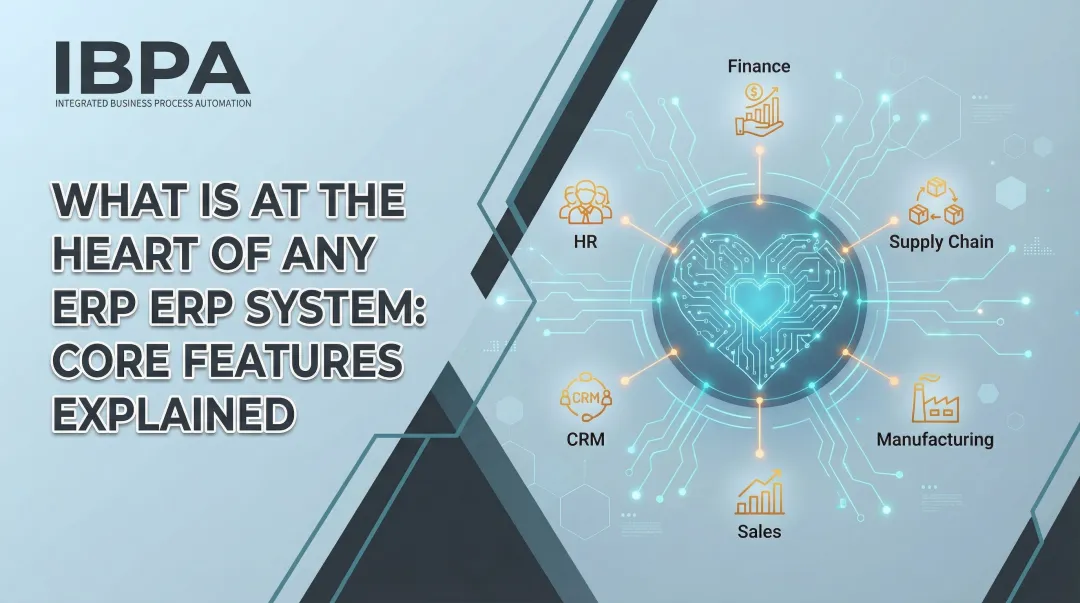
- Five core modules—financial accounting, supply chain, HR, sales, and procurement—cover every major business function in one platform
- Indian MSMEs crossing ₹5 crore turnover face mandatory e-invoicing—ERP handles this automatically
- Studies show businesses achieve 200%+ ROI within 16 months after replacing fragmented legacy systems with ERP
What Is ERP?
Enterprise Resource Planning (ERP) is software that integrates an organization's core business processes—accounting, procurement, supply chain, HR, manufacturing, and sales—into one unified system with a shared central database. Instead of maintaining separate tools for each department and manually reconciling data across disconnected spreadsheets, ERP creates a single source of truth where information flows automatically between functions.
When your sales team creates an invoice, it instantly updates inventory levels, generates accounting entries, populates GST returns, and reflects in cash flow reports. No manual data entry, no department-to-department coordination required. Duplication drops, errors reduce, and every decision is grounded in accurate, real-time data.
ERP's roots go back further than most people expect:
- 1913: Engineer Ford Whitman Harris develops the Economic Order Quantity (EOQ) model, a paper-based production scheduling method
- 1964: Black and Decker becomes the first company to adopt a Material Requirements Planning (MRP) system, an early computerized business application
- 1990s: Gartner coins the term "enterprise resource planning" as manufacturers and non-manufacturers alike adopt the technology for broader operational efficiency
The global ERP market reached $66 billion (USD) in 2024. What started as a manufacturing scheduling tool now runs finance, HR, sales, and operations for businesses ranging from single-location MSMEs to large multinationals.
How ERP Systems Work
ERP operates through modular architecture: each module covers a specific business area (finance, HR, supply chain, sales), but all modules share a common central database. When data is entered in one module, it automatically updates across the entire system. For example, when the warehouse receives inventory against a purchase order, the system simultaneously updates stock levels, creates accounting entries for inventory value, updates vendor payment obligations, and makes the stock available for sales order fulfillment.
A shared database means no one maintains duplicate records across separate tools. The finance team sees the same inventory numbers as the warehouse manager. Sales teams access real-time stock availability. HR costs flow directly into financial reports. Because everyone works from the same data, reconciliation disappears — and decisions get faster.
Deployment Models: On-Premise, Cloud, and Hybrid
ERP systems are deployed in three main ways, each suited to different business needs:
Cloud ERP is now the dominant model, representing 70% of the total market. Hosted by the vendor and accessed through a web browser, cloud ERP requires no on-premise servers or IT infrastructure. Businesses pay subscription fees (typically monthly or annual) and benefit from automatic updates, lower upfront costs, and access from anywhere with internet connectivity. For Indian MSMEs, cloud ERP offers the fastest path to implementation: typical onboarding takes 3–6 months, compared to 12–18 months for on-premise systems.
On-Premise ERP is installed on company-owned servers within the business's physical location. It offers maximum control over data and customization, but demands significant upfront investment in hardware, software licenses, and IT staff. Implementation costs can reach ₹10 lakh to several crores. On-premise deployments are declining as legacy systems face end-of-support (SAP ECC support ends in 2027), pushing more businesses toward cloud alternatives.
Hybrid ERP combines both approaches, keeping some functions on-premise (often for regulatory or data sovereignty reasons) while moving others to the cloud. Currently, 88% of cloud ERP buyers are deploying or operating hybrid environments. For companies with complex legacy infrastructure or compliance requirements that mandate on-site data control, hybrid acts as a practical transitional step.
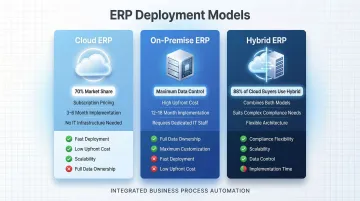
For growing Indian MSMEs, cloud ERP is the practical choice. It eliminates infrastructure costs, provides instant access to updates (including critical GST compliance changes), and scales as the business growswithout requiring replacement or major re-implementation.
The 5 Core Components of an ERP System
Modern ERP systems are built around five functional modules that cover essential business operations. Most platforms offer modular implementation, allowing organizations to start with critical areas and expand over time as needs evolve.
Financial Accounting and Management
Financial management forms the backbone of any ERP system. This module handles the general ledger, accounts payable and receivable, expense management, budgeting, and financial reporting. Every transaction—whether a sale, purchase, payment, or payroll entry—flows through the financial module, creating a complete audit trail.
For Indian businesses, financial modules must cover built-in GST compliance. Key requirements include:
- Automated tax calculations with HSN/SAC codes
- GSTR-1 and GSTR-3B return preparation
- TDS and TCS functionality
- Direct e-invoicing integration with IRN generation
A properly configured ERP automatically generates Invoice Reference Numbers (IRN) when creating sales invoices—mandatory for businesses with turnover exceeding ₹5 crore.
The financial module also produces real-time reports—profit and loss statements, balance sheets, cash flow analysis, and management dashboards—eliminating the traditional month-end delays that plague businesses using fragmented systems.
Inventory and Supply Chain Management
This module manages stock levels, tracks goods movement across warehouses, handles purchase orders, and supports demand forecasting. For businesses dealing with physical products, inventory management prevents two costly problems: overstocking (which ties up cash and risks obsolescence) and stockouts (which lose sales and damage customer relationships).
ERP inventory systems provide real-time visibility into stock positions across multiple locations, track material consumption in production, generate automated reorder alerts, and maintain complete traceability—showing exactly which batch or serial number went to which customer.
Cross-module integration keeps inventory data synchronized. When sales creates an invoice, stock levels update instantly. When the warehouse receives goods, they become immediately available for order fulfillment.
For Indian operations, inventory modules must support e-way bill generation directly from delivery transactions, ensuring compliance with GST transport documentation requirements.
Human Resources and Payroll
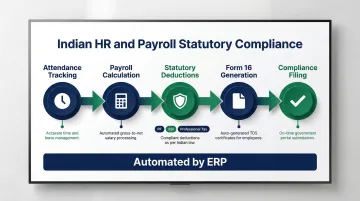
The HR module consolidates employee records, payroll processing, attendance tracking, leave management, and benefits administration in one place. Instead of maintaining separate Excel files for each HR function, everything flows through a unified system that ensures accuracy and compliance.
For Indian businesses, HR modules must handle statutory requirements including Provident Fund (PF), Employee State Insurance (ESI), Professional Tax, and Form 16 generation for income tax purposes. Integrated attendance systems feed directly into payroll calculations, ensuring that salaries reflect actual working days, overtime, and leave balances. This reduces manual HR work, eliminates calculation errors, and provides complete audit trails for compliance verification.
Sales and Order Management
Sales and order management connects the full order-to-cash cycle—from quote creation and order entry through to invoicing and payment collection. Sales teams gain real-time visibility into inventory availability, eliminating the common problem of promising delivery dates without knowing if stock exists.
When a sales order is created, the ERP checks inventory, reserves stock, calculates pricing with appropriate GST rates, and generates delivery documentation.
Upon dispatch, the system creates GST-compliant invoices with IRN and QR codes, updates accounts receivable, and tracks payment status. The result: fewer billing errors, accurate delivery timelines, and faster cash collection.
Procurement and Vendor Management
Procurement modules handle purchase requisitions, vendor selection, purchase order approval workflows, goods receipt, and invoice matching. This ensures teams buy within budget, avoid duplicate orders, and maintain accurate vendor records.
The three-way matching process—comparing purchase orders, goods receipt notes, and vendor invoices—prevents payment errors and unauthorized purchases. For Indian businesses, procurement modules must handle GST on purchases, reverse charge mechanism (RCM) for unregistered vendors, and TDS deduction where applicable. Integration with inventory and finance ensures that received goods immediately update stock levels and create corresponding accounting entries without manual intervention.
Key Benefits of ERP for Growing Businesses
For growing businesses, ERP creates value across three areas that compound over time: operations become leaner, costs come down, and the system scales as the business does.
Operational efficiency comes from eliminating data silos. When finance, sales, inventory, and HR all work from the same database, management gets accurate, real-time reports without chasing numbers across departments or reconciling conflicting spreadsheets. Decision-making accelerates because data is trustworthy and immediately available. Teams spend less time on coordination and more time on value-adding work.
Cost reduction happens through automation and consolidation. Repetitive tasks—invoicing, reconciliation, payroll processing, order entry—run automatically, cutting labor costs and minimizing errors that cause penalties or revenue leakage. Replacing multiple standalone tools with one unified platform also reduces IT and licensing overhead.
The ROI data backs this up. According to Nucleus Research, modern cloud ERP deployments deliver an average ROI exceeding 200% with a 16-month payback period. Epicor Kinetic benchmarks show 270% ROI with a 20-month payback — figures that reflect what structured automation delivers across mid-sized organizations.
Scalability ensures the system grows with the business. As companies add new entities, locations, or product lines, a properly designed ERP expands without requiring replacement. Multi-company management features allow holding companies and franchise networks to operate multiple entities from a single platform while maintaining separate compliance and financial records for each. This scalability is particularly valuable in India, where successful MSMEs often expand into new states or establish separate GST entities—situations that overwhelm fragmented systems but are handled seamlessly by modern ERP.
ERP also enforces best practices and simplifies regulatory compliance. Automated audit trails, standardized approval workflows, and built-in compliance checks make GST filing, financial reporting, and statutory requirements easier to manage — replacing the guesswork of manual processes with reliable, auditable records.
Key compliance capabilities most Indian MSMEs rely on:
- Automated GST return preparation and e-invoicing with IRN generation
- Standardized approval workflows that create defensible audit trails
- Built-in validation checks that catch errors before filing
- Real-time financial reports aligned with statutory reporting periods
ERP vs. CRM vs. Accounting Software: What's the Difference?
These three categories are frequently confused, but they serve distinct purposes and cover different business functions.
Accounting software handles only financial transactions—general ledger, accounts payable, accounts receivable, and basic financial reporting. It tracks money in and money out but doesn't manage inventory, procurement, HR, or operations. Think of it as a subset of ERP functionality, not a substitute. Businesses managing physical products, employees, and complex operations will quickly outgrow it.
ERP manages back-office operations across the entire organization. It includes accounting but extends to supply chain, inventory, procurement, manufacturing, HR, and payroll—all integrated into one system. ERP serves as the operational backbone, creating a single source of truth for internal business processes. Finance, operations, and supply chain teams are the primary users.
CRM (Customer Relationship Management) focuses on front-office, customer-facing processes: sales pipeline management, marketing campaigns, customer service, and relationship tracking. CRM helps businesses acquire and retain customers by managing interactions, tracking leads, and automating follow-ups. Sales, marketing, and support teams are the primary users.
Here's a quick comparison:
| Tool | Primary Focus | Who Uses It |
|---|---|---|
| Accounting Software | Financial transactions only | Finance teams |
| ERP | End-to-end back-office operations | Finance, ops, supply chain |
| CRM | Customer-facing sales and marketing | Sales, marketing, support |
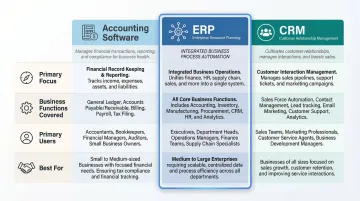
Many organizations use ERP and CRM together. ERP handles internal operations; CRM drives customer growth.
When integrated, they create a unified "lead-to-cash" workflow — a sales order created in the CRM automatically triggers inventory checks, production planning, and invoicing in the ERP. This eliminates redundant data entry, reduces errors, and shortens the order-to-cash cycle.
Choosing the right tool comes down to scope:
- Accounting software — sufficient if you only need to track financial transactions
- ERP — necessary when you're managing inventory, procurement, people, and operations alongside finance
- ERP + CRM — the right combination when customer relationship management and sales pipelines also need to scale
Signs Your Business Is Ready for an ERP
Several operational warning signs indicate a business has outgrown its current tools and needs a unified ERP system:
- Scattered data, manual rework: Information lives across spreadsheets, apps, and chat threads. Teams re-enter the same data into multiple systems, and month-end closing takes days because numbers must be pulled from different sources and reconciled by hand.
- No real-time visibility: Answering "What's our cash position?" or "Can we fulfill this order?" means chasing staff for updates. By the time a financial report is compiled, it's already outdated—slowing decisions and increasing the risk of costly mistakes.
- No accountability trail: When processes span multiple tools, it's impossible to know who did what and when. Approvals happen over WhatsApp or email with no structured audit trail, creating compliance risk and operational chaos.
- Compliance strain: Frequent tax authority queries, inconsistent GST filings, and difficulty producing audit-ready reports all signal that manual processes can't handle regulatory complexity.
India-Specific Triggers
For Indian MSMEs, certain regulatory and operational thresholds make ERP adoption particularly urgent:
E-invoicing compliance is one of the clearest triggers. Businesses with Annual Aggregate Turnover (AATO) exceeding ₹5 crore must generate e-invoices with Invoice Reference Numbers (IRN) for all B2B, B2G, and export transactions. Under Rule 48(5) of the CGST Rules, an invoice issued without an IRN is not treated as a valid invoice, making it ineligible for Input Tax Credit claims.
Key thresholds to know:
- ₹5 crore+ AATO: Mandatory e-invoicing for B2B, B2G, and export transactions
- ₹10 crore+ AATO (from April 1, 2025): E-invoices must be reported within 30 days of the invoice date — the IRP rejects older submissions
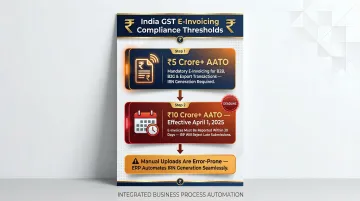
Manual portal uploads are error-prone and time-consuming. ERP systems with direct API integration to the Invoice Registration Portal — like Bizionix — generate IRNs automatically, validate data before submission, and flag issues before they become compliance failures.
Multi-entity operations create their own pressure point. Managing multiple branches, GST entities, or subsidiaries through separate tools leads to reconciliation nightmares. Businesses operating across states or running franchise networks need a system that provides both entity-level isolation and consolidated oversight from a single login.
Growth-driven complexity is often the final trigger. As headcount approaches 100 or operations expand across locations, manual coordination breaks down. Reporting takes days instead of hours, and teams work from conflicting information. At that point, current tools can no longer manage the complexity growth creates.
If you're managing more than two or three departments manually, running multiple locations, or facing compliance issues from inconsistent records, it's worth evaluating ERP. Growth creating operational chaos is the signal most businesses wait too long to act on.
Frequently Asked Questions
What is an ERP system and what does it do?
ERP (Enterprise Resource Planning) is software that integrates core business functions—finance, inventory, HR, sales, and procurement—into one unified system. Every department works from a shared, real-time database, while routine processes like invoicing, payroll, and order fulfillment run automatically, reducing manual errors and improving efficiency.
How is an ERP system different from CRM and accounting software?
ERP covers end-to-end internal business operations including finance, supply chain, HR, and procurement. Accounting software handles only financial transactions—ledgers and basic reporting. CRM focuses on customer-facing activities like sales pipelines and marketing. ERP is the broader operational platform that often works alongside or includes both accounting and CRM functionality.
What are some examples of ERP systems?
Well-known ERP platforms include SAP S/4HANA Cloud, Oracle Fusion Cloud ERP, Oracle NetSuite, Microsoft Dynamics 365, and Odoo. For Indian MSMEs, platforms like Bizionix are built specifically with GST compliance, e-invoicing automation, and multi-entity management at MSME-friendly pricing starting at ₹999 per year.
What are the 5 components of an ERP system?
The five core components are: financial accounting, inventory and supply chain management, human resources and payroll, sales and order management, and procurement. Most ERP systems are modular, so businesses can start with what they need and expand as they grow.
What is an ERP system in management accounting?
In management accounting, ERP acts as the central system for budgeting, cost tracking, and financial reporting. It gives management accountants consolidated, accurate data from across the business—so planning and performance analysis rely on live figures, not manually gathered spreadsheets.