As teams grow and customer volumes increase, these informal systems collapse. Leads go cold. Sales reps duplicate work. No one knows which deals need attention today.
A CRM (Customer Relationship Management) system fixes this by centralising all customer data, interactions, and sales activity in one place. The payoff is measurable: Nucleus Research found that CRM returns an average of USD 3.10 for every USD 1 spent, with 51% of that ROI coming from time savings and process efficiency — not just revenue.
For Indian MSMEs navigating GST compliance, multi-department coordination, and rapid growth, choosing the right CRM — or deciding whether a CRM alone is enough — is one of the most consequential software decisions a business will make.
Key Takeaways
- A CRM centralises contacts, tracks leads, automates follow-ups, and gives sales teams real pipeline visibility from one platform
- The right choice depends on team size, budget, and how far your sales process connects to inventory, finance, and compliance
- Top options covered in this guide: Zoho Bigin, HubSpot CRM, Freshsales, Salesforce Starter Suite, and Pipedrive
- Key features to prioritise: contact management, pipeline tracking, automation, mobile access, and integrations
- Indian MSMEs should weigh whether a standalone CRM suffices or an integrated ERP better supports long-term growth
What Is CRM Software and Why Do Small Businesses Need It?
A CRM stores customer information, logs every interaction across the sales cycle, and gives your team a single system to manage leads and relationships. It replaces the patchwork of spreadsheets, email threads, and individual notebooks that most small businesses rely on for far too long.
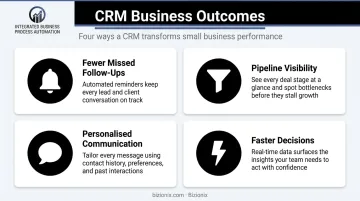
The business outcomes are concrete:
- Fewer missed follow-ups — automated reminders and task assignments replace manual tracking
- Pipeline visibility — know exactly which deals are active, stalled, or at risk
- Personalised communication — full interaction history means reps never ask customers to repeat themselves
- Faster decisions — real data replaces guesswork at the end of each month
Signs Your Small Business Needs a CRM
If the benefits above sound familiar, you're likely already feeling the friction. According to Capterra's CRM Buyer Insights report, 46% of businesses used non-specialised tools before adopting CRM, and 23% had no formal system at all — a pattern especially common among growing MSMEs. Here are the clearest signals it's time to switch:
- Customer data lives in multiple places — email, spreadsheets, WhatsApp, different reps' notebooks
- Sales reps regularly lose track of where a lead stands
- Follow-up timing is inconsistent, and deals go quiet without anyone noticing
- You can't quickly answer: "How many deals are closing this month?"
- Headcount has crossed 3–4 people and manual handoffs are already causing dropped balls
Best CRM Software for Small Businesses in 2025
These five CRMs were selected based on ease of use, pricing transparency, feature depth, scalability, and relevance to small teams — including Indian MSMEs. Pricing is shown in INR where officially available; other tools display USD rates. Each entry covers what the tool does well and who it fits best.
Zoho CRM / Bigin by Zoho CRM
Bigin is Zoho's small-business-focused CRM, built as an entry point for startups and growing SMBs. Zoho is headquartered in Chennai, making it one of the most India-native options on this list — and Bigin is the only tool here with verified INR pricing on an official India-specific pricing page.
Intuitive pipeline management, built-in VoIP calling, and a clear upgrade path to the full Zoho CRM suite make it a natural starting point. Over 50,000 small businesses currently run on Bigin.
| Attribute | Details |
|---|---|
| Key Features | Contact management, pipeline tracking, email integration, VoIP calling, workflow automation, 1,000+ app integrations |
| Pricing (India) | Free (1 user, 500 records) · ₹400/user/month Express · ₹720 Premier · ₹1,080 Bigin 360 — billed annually |
| Capterra Rating | 4.7/5 (730 reviews) · Ease of use: 4.8/5 |
| Best For | CRM beginners, startups, and small teams wanting a simple tool that can scale to the full Zoho suite |
HubSpot CRM
HubSpot CRM is globally popular for one reason: its free tier is genuinely functional. Small businesses with limited budgets can start managing contacts and deals without spending anything, then upgrade as needs grow.
The free plan supports up to 2 users and 1,000 contacts, includes deal pipelines, live chat, meeting scheduling, and email tracking. The ecosystem also covers marketing and customer service tools — a strong fit for teams that want sales and marketing managed together.
| Attribute | Details |
|---|---|
| Key Features | Contact and company management, deal pipeline, email tracking, live chat, meeting scheduler, marketing campaign tools |
| Pricing | Free (up to 2 users, 1,000 contacts) · Starter from USD 7/seat/month (billed annually) |
| Capterra Rating | 4.5/5 (4,458 reviews) · Ease of use: 4.4/5 |
| Best For | Small businesses starting for free, or marketing-first teams that want sales and marketing managed together |
Freshsales CRM (by Freshworks)
Freshsales comes from Freshworks, founded in Chennai — making it another strong India-relevant option. It's designed around ease of use, with minimal setup friction and an AI assistant (Freddy AI) built into paid tiers for deal insights and email suggestions.
A clean interface, a free plan for up to 3 users, and strong onboarding support make it well-suited for small sales teams that want to move fast without extensive configuration.
| Attribute | Details |
|---|---|
| Key Features | Contact and account management, visual sales pipeline, Freddy AI assistant, built-in phone and email, workflow automation, third-party integrations |
| Pricing | Free (up to 3 users) · Growth: USD 9/user/month · Pro: USD 39/user/month — billed annually |
| Capterra Rating | 4.5/5 (621 reviews) · Ease of use: 4.4/5 |
| Best For | Small sales teams prioritising fast setup, ease of use, and AI-assisted lead management |
Salesforce Starter Suite
Salesforce holds 20% global CRM market share and is ranked #1 for CRM applications by IDC. The Starter Suite brings enterprise-grade capabilities — sales, marketing, and service tools — to small businesses at a more accessible price point.
It includes enterprise-grade pipeline tools, built-in AI via Agentforce, dynamic email marketing, and secure payment links — with a direct upgrade path to the full Salesforce platform. Note: Salesforce also offers a separate Free Suite for very small businesses, distinct from the paid Starter Suite.
| Attribute | Details |
|---|---|
| Key Features | Accounts and contacts, opportunity tracking, email integration, marketing campaigns, customer service tools, custom dashboards, Slack integration, 2,000 marketing emails/month |
| Pricing | Starter Suite: USD 25/user/month (paid only; 30-day free trial available, no credit card required) |
| Capterra Rating | 4.4/5 (224 reviews) · Ease of use: 4.4/5 |
| Best For | Established small businesses willing to invest in a premium, scalable platform that grows into mid-market |
Pipedrive CRM
Pipedrive is built around one core idea: sales teams should have complete, visual clarity over every deal in their pipeline. Its drag-and-drop Kanban interface is one of the cleanest in this category.
Beyond the interface, it offers 500+ integrations, an AI sales assistant for lead nurturing and email suggestions, and add-ons for project management and e-signatures. It's best suited for self-sufficient teams comfortable building their own workflow through integrations.
| Attribute | Details |
|---|---|
| Key Features | Visual Kanban deal pipeline, lead management, AI assistant, email integration, activity reminders, custom reports, 500+ integrations |
| Pricing | No free plan; 14-day free trial · Lite: USD 14/seat/month · Growth: USD 39/seat/month — billed annually |
| Capterra Rating | 4.5/5 (3,050 reviews) · Ease of use: 4.5/5 |
| Best For | Sales-driven small teams that want clear pipeline visibility and a self-serve, integration-heavy setup |
Key Features to Look for in a Small Business CRM
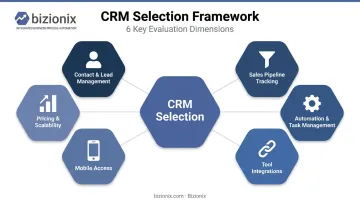
Nearly 100% of prospective CRM buyers seek sales automation, while 37% of active users rank contact management as their most essential daily tool. Both matter. Before you commit to a platform, evaluate it across these six dimensions:
Contact and Lead Management
The foundation of any CRM is a centralised contact database. Every customer detail, interaction history, and lead status should live in one place — not scattered across email threads, spreadsheets, and individual reps' notes.
Sales Pipeline and Deal Tracking
Visual pipeline management (Kanban boards or deal stage views) lets small teams see exactly where every lead stands. This makes prioritising follow-ups straightforward and gives sales managers a reliable revenue forecast at any point in the month.
Automation and Task Management
Automated follow-up reminders, lead assignments, email sequences, and status changes are especially valuable for small teams with limited bandwidth. Even basic automation — like auto-assigning a lead when a form is submitted — frees hours that would otherwise disappear into manual tracking.
Integration with Existing Tools
A CRM only works if it connects to the tools your team already uses. Check for compatibility with:
- Email clients and calendar apps
- Accounting or billing software
- WhatsApp and communication tools
- E-commerce or support platforms
Fragmented connections mean duplicate data entry and blind spots in customer records. Capterra's SMB software research found that 38% of buyers rank integration capability as a critical evaluation factor.
Mobile Access
For field sales teams or businesses with remote staff, mobile CRM access can make or break adoption. Cloud-based CRMs require no IT infrastructure, sync in real time, and work from any device — so reps can update a deal status from a client's parking lot.
Pricing Transparency and Scalability
Don't evaluate a CRM only on its entry-level price. Check:
- Per-user costs as the team grows
- Contact or record limits per pricing tier
- Which features are locked behind higher plans
A tool that costs ₹400/user at 3 users may look very different at 15.
How We Chose the Best CRM for Small Businesses
The evaluation criteria prioritised:
- Ease of setup — no IT department or technical team required
- Feature-to-price ratio — value at the entry tier, not just the premium plan
- Scalability — functional from 1 user to 50 without requiring a platform migration
- Mobile experience — Nucleus Research found mobile CRM capabilities contribute to a 14.6% productivity gain
- Integration depth — how well the CRM connects with tools teams already use
- Customer support quality — especially relevant for first-time CRM users
Common Mistakes to Avoid
- Choosing a CRM by brand recognition rather than fit — a tool built for enterprise sales teams may overwhelm a 5-person business
- Selecting a feature-heavy platform and then using 20% of what you're paying for
- Ignoring whether the CRM connects to your accounting, billing, or GST tools
- Evaluating only the free or entry price, not the per-user cost at full team size
A Note for Indian MSMEs
For businesses managing sales alongside GST compliance, inventory, and multi-department operations, an important question is whether a standalone CRM is the right starting point — or whether a unified platform serves better long-term.
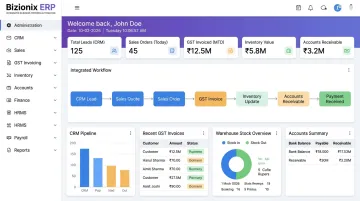
Bizionix is one example worth considering. It's a cloud ERP built for Indian MSMEs, with a CRM and Sales module that connects directly to GST-compliant invoicing, inventory management, accounts, and HRMS. When a sales order is created, it flows automatically to accounting, GST returns are auto-populated, and inventory updates in real time. Replicating that level of cross-department coordination through a standalone CRM plus separate compliance tools typically requires significant manual effort and custom integrations.
Conclusion
There's no single best CRM for every small business. The right choice comes down to team size, sales complexity, budget, and how well the tool fits with the rest of your operations.
Start with a free trial and evaluate based on how your team actually works day-to-day, not based on feature lists. A CRM that works for 5 users today should still serve the business when it reaches 25 — so check scalability before committing.
For Indian MSMEs managing more than just customer relationships — sales, inventory, GST invoicing, expenses, and multi-department operations together — a standalone CRM may not be enough. Bizionix is a unified ERP platform built specifically for this context, replacing 5–6 separate tools with one integrated system.
The NEO plan starts at ₹999/year and includes a 14-day free trial. Reach the team at info@bizionix.com or +91 91779 99277 to get started.
Frequently Asked Questions
What is the best CRM software for a small business?
It depends on your budget, team size, and goals. Bigin by Zoho suits affordability-focused teams, HubSpot CRM works well for those starting free, and Salesforce Starter Suite fits businesses planning significant growth. Freshsales and Pipedrive are strong picks for ease of use and pipeline clarity.
How much does CRM software cost for small businesses?
Costs range from free to paid. Bigin's India pricing runs ₹400–₹1,080/user/month (billed annually). HubSpot and Freshsales both offer free tiers; their paid plans are priced in USD — check each vendor's India pricing page for current INR rates. Always calculate the total cost at your actual team size, not just the per-user entry price.
Is there a free CRM for small businesses?
Yes. HubSpot CRM offers a permanent free plan for up to 2 users with 1,000 contacts. Freshsales offers a free plan for up to 3 users. Bigin by Zoho has a free tier for 1 user with 500 records. All three unlock automation and advanced reporting on paid tiers.
What is the simplest CRM to use for a small business?
Bigin by Zoho and Freshsales consistently score highest for ease of use on Capterra — Bigin at 4.8/5 and Freshsales at 4.4/5. Both offer guided onboarding, clean interfaces, and are designed for small teams without dedicated IT support.
What features should a small business prioritise in a CRM?
Focus on: contact and lead management, visual pipeline tracking, basic workflow automation, email integration, and mobile access. Avoid paying for advanced forecasting, territory management, or enterprise reporting tools that a small team is unlikely to use in the first 12–18 months.
What is the difference between a CRM and an ERP for small businesses?
A CRM manages customer relationships, leads, and the sales pipeline. An ERP integrates those functions with finance, inventory, HR, and operations — making it the better fit for businesses managing complex, multi-department workflows. Once your operational needs outgrow sales tracking alone, an ERP becomes the more practical long-term platform.