Introduction
Picture this: a sales rep follows up on a lead via WhatsApp, logs a note in a personal spreadsheet, and emails a quote — all as separate actions with no connection between them. Three weeks later, a different team member calls the same prospect with no idea about the prior conversation. The deal dies.
This is not a hypothetical. According to Capterra's CRM buyer research, 46% of businesses currently use non-specialised tools to manage customer interactions, and 23% have no system at all. For growing businesses, this fragmentation costs real money and real relationships.
CRM software exists to solve exactly this problem. This article covers what CRM software is, the main types available, its core capabilities, key benefits, and how to pick the right one for your business.
Key Takeaways
- CRM software centralises all customer interactions — from first enquiry to post-sale support — in one platform
- The three main types are operational (automates sales and service processes), analytical (surfaces data insights), and collaborative (shares customer data across departments)
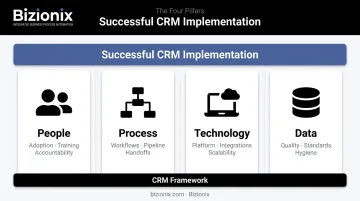
- The four key pillars are people, process, technology, and data; each one matters for successful CRM adoption
- CRM is not just for sales teams; marketing, customer service, and operations all rely on CRM data
- Any business that's outgrown spreadsheet-based customer tracking needs a CRM
What Is CRM Software?
Customer Relationship Management (CRM) software is a digital platform that helps businesses store, organise, and manage every interaction with current and potential customers — from the first enquiry to post-sale support — in one centralised location.
That definition sounds simple, but understanding what CRM replaces makes it concrete. Before CRM, most businesses tracked customers through a mix of physical files, personal spreadsheets, and inbox folders.
Each approach worked well enough for ten customers. At a hundred, things started slipping. At five hundred, critical information lived in the heads of individual employees — and walked out the door with them when they left.
What CRM Actually Does
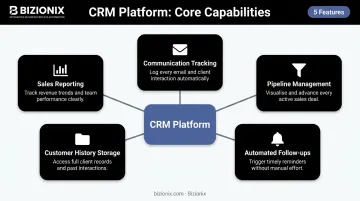
CRM goes well beyond a digital contact list. A properly used CRM platform:
- Tracks every communication with a customer across email, phone, and other channels
- Records where each lead sits in the sales pipeline and what the next action is
- Automates follow-up reminders so nothing falls through the cracks
- Stores purchase history, preferences, and past complaints in one accessible record
- Generates sales performance reports and revenue forecasts
This means every team member — sales, support, or management — sees the same complete picture of each customer relationship, not a fragment of it.
Who Uses CRM Data?
CRM is often introduced as a "sales tool," but that framing is too narrow. In practice, it serves every customer-facing function:
- Sales teams use it to manage leads, track deals, and prioritise follow-ups
- Marketing teams use it to segment audiences and measure campaign response
- Customer service teams use it to resolve issues without asking customers to repeat their entire history
- Management uses it to track team performance and forecast revenue
When every department works from the same customer record, the internal miscommunication that comes from fragmented data disappears.
This shared visibility is now more accessible than ever. Modern cloud-based CRM platforms have removed the old barriers to adoption:
- No on-premise server to maintain or IT team to manage
- Subscription pricing with no large upfront investment
- Access from any device, anywhere — which matters for distributed or mobile sales teams
What Are the Main Types of CRM Software?
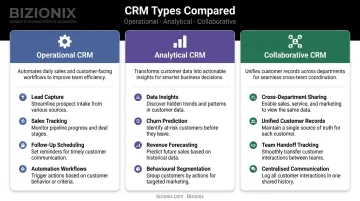
Three main types of CRM systems exist, and while they serve distinct purposes, most modern platforms blend elements of all three. Knowing which type solves your primary problem helps you evaluate options without getting distracted by features you will never use.
Operational CRM
Operational CRM focuses on automating customer-facing business processes — lead capture, sales tracking, follow-up scheduling, and service workflows. It is the most widely adopted type, and it suits businesses that want to reduce manual effort and speed up their sales cycle.
Practical examples:
- A sales team receives new enquiries, and the CRM automatically assigns each lead to the right rep with a follow-up reminder set for 24 hours later
- A service team logs and resolves support tickets without switching between email, spreadsheets, and messaging apps
- Quotes are generated and sent from the same system that tracks whether the prospect opened them
Nearly 100% of CRM buyers prioritise sales automation when evaluating platforms, which reflects how central operational functionality is to the buying decision.
Analytical CRM
Analytical CRM is built around data. It collects customer information from multiple sources, applies reporting and analysis tools, and surfaces patterns in buying behaviour, sales trends, and customer preferences.
This type is particularly valuable for mid-sized businesses with significant customer data, where manual analysis would be impractical. Predictive analytics and AI-powered insights fall under this category. Practical use cases include:
- Identifying which accounts are at risk of churning before they go silent
- Spotting which product lines perform best with a specific customer segment
- Forecasting monthly revenue based on pipeline stage and historical close rates
Collaborative CRM
Collaborative CRM (sometimes called strategic CRM) focuses on sharing customer information across departments so every team works from the same complete picture.
The practical benefit: when a customer calls support, the service rep already sees their purchase history, the last message from the sales team, and any open complaints — without having to ask the customer to re-explain their situation. For growing businesses handling multiple accounts across sales, support, and billing, this shared visibility alone prevents the dropped handoffs that cost deals and damage relationships.
What Are the Key Pillars of CRM?
CRM software delivers results only when it is built on four foundational pillars. Harvard Business Review has reported that roughly one-third of CRM projects fail — and the common thread is rarely the software itself. It is almost always a breakdown in one or more of these pillars.
People
The "people" pillar covers everyone in the CRM ecosystem: the customers whose data is captured, the teams who use the system daily, and the leaders who define the strategy.
User adoption is the most common reason CRM implementations fail. If sales reps log calls inconsistently, or the service team tracks tickets in a separate inbox, the CRM data becomes unreliable. Unreliable data produces bad decisions.
Adoption requires training, accountability, and a system that is genuinely easier to use than the spreadsheet it replaces.
Platforms like Bizionix address this by building role-based access controls directly into the system, so every team member sees relevant data for their role without being overwhelmed by information meant for other departments.
Process
CRM software is only as good as the business processes it supports. This pillar covers how leads are captured and qualified, how they move through the pipeline, how handoffs between teams happen, and how customer issues are escalated and resolved.
The practical advice here: map your existing workflows before selecting a CRM, not after. Choosing a platform and then trying to retrofit your processes around its defaults is a reliable path to low adoption and wasted spend.
Once your processes are mapped, you can evaluate whether a platform's technology actually fits them.
Technology
Technology is the CRM platform itself — its features, integrations, and infrastructure. The right questions to ask:
- Is it cloud-based with mobile access?
- Does it integrate with existing tools (email, billing, accounting)?
- Can it scale as the business grows?
- For Indian businesses — does it support GST compliance workflows?
The right technology fits the business's workflows. When software forces a team to work around its limitations rather than with them, the result is poor adoption — regardless of how many features the platform offers.
Data
Data is the most critical pillar — the entire system is only as useful as the quality of information stored in it.
Gartner's research estimates that poor data quality costs organisations an average of $12.9 million per year (roughly ₹107 crore) — and approximately 59% of organisations do not even measure data quality. For Indian MSMEs, the impact is direct: bad data means inaccurate reports, missed follow-ups, and sales forecasts that bear no relation to reality.
Establishing data entry standards from day one — mandatory fields, consistent naming conventions, regular data hygiene reviews — prevents a problem that becomes exponentially harder to fix as the database grows.
Key Benefits of CRM for Small and Growing Businesses
Operational Efficiency
CRM replaces the fragmented approach to customer management — WhatsApp threads, personal spreadsheets, sticky notes — with a single system where nothing gets lost. When a sales rep leaves the business, their customer history stays in the system. When a follow-up falls due, the system flags it rather than relying on someone's memory.
Salesforce's State of Sales data notes that sales reps currently spend 60% of their time on non-selling tasks, often because they are searching for information, updating multiple systems, or re-entering the same data in different places. A well-implemented CRM reduces that administrative load — freeing reps to spend more time in front of customers.
Revenue and Retention Impact
By tracking every customer touchpoint, businesses can personalise communication, identify upsell opportunities, and catch at-risk accounts before they churn. Complete, accurate customer data — accessible to the right people at the right time — is what makes each of these outcomes possible in practice.
Nucleus Research's analysis of CRM implementations found that CRM delivers nearly 9x return on every rupee invested (the globally cited figure is $8.71 per $1 spent). For Indian MSMEs weighing the cost of a CRM module against the revenue leakage from missed follow-ups and lost accounts, that ratio changes the conversation.
Management Visibility
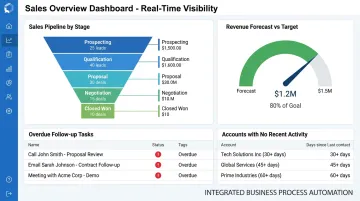
Pipeline dashboards, sales forecasts, and activity reports give business owners real-time visibility into team performance and deal progress. Instead of waiting until the end of the quarter to discover that revenue missed target, managers can see the warning signs mid-quarter and course-correct in time.
Key indicators a CRM surfaces at a glance:
- Open deals by stage and expected close date
- Follow-up tasks overdue or due this week
- Revenue forecast versus target for the period
- Accounts with no activity in the last 30 days
CRM vs. ERP: Do You Need Both?
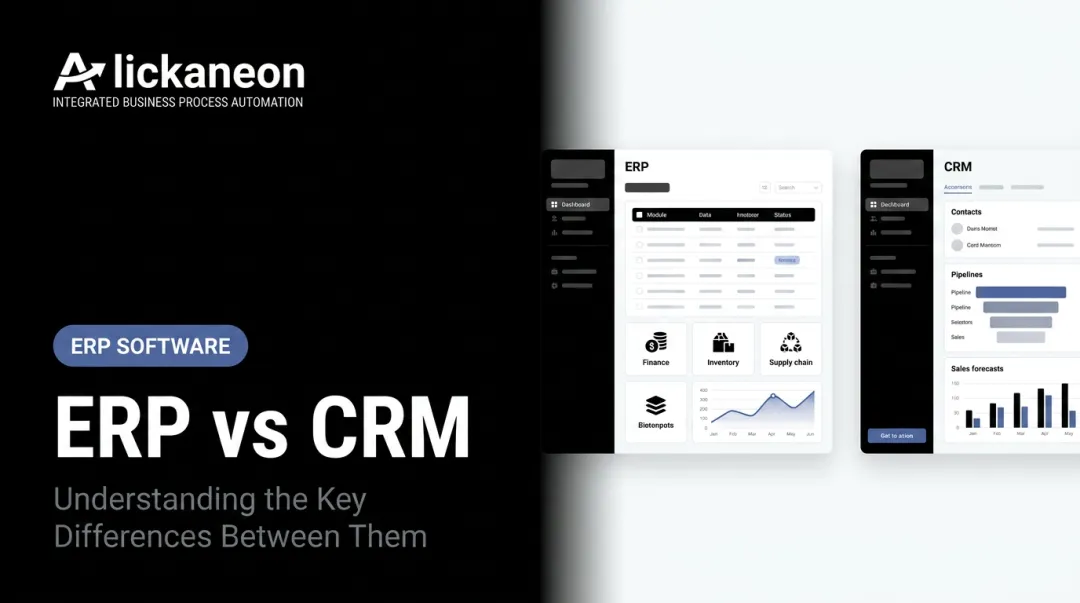
CRM and ERP are frequently confused, but they address different sides of the business:
| CRM | ERP | |
|---|---|---|
| Focus | Customer-facing activities | Internal operations |
| Covers | Leads, deals, service interactions | Inventory, accounting, HR, manufacturing |
| Primary users | Sales, marketing, customer service | Finance, operations, supply chain |
| Core output | Customer relationship data | Operational and financial data |
The integration challenge is where most businesses run into real problems. When CRM and ERP are separate systems, a sales rep quoting a customer may have no visibility into current stock levels. An invoicing team may be unaware of the deal terms the salesperson agreed to. Teams waste time manually re-entering data across platforms and making decisions based on information that is already outdated.
For Indian MSMEs, this problem is especially acute when GST compliance is involved. A sales quote moving to an invoice must carry accurate tax codes — and if that transition requires manual re-entry between a CRM and a separate accounting system, errors accumulate.
The practical fix is a system where CRM and operations aren't separate tools at all. Bizionix builds CRM and sales management into the same platform as inventory, billing, GST compliance, and accounting. A sales order created through the CRM workflow connects to live inventory data and feeds directly into GST-compliant invoicing — no re-entry, no mismatched figures.
How to Choose the Right CRM Software
Step 1: Define What You Actually Need
Before evaluating any platform, document your specific pain points:
- How many leads and customers are you managing monthly?
- Which teams will use the system — sales only, or also service and marketing?
- What is your biggest failure mode today — missed follow-ups, no sales visibility, disconnected service records?
- Do you need it to integrate with specific tools already in use?
This prevents the common mistake of choosing a feature-heavy platform the team will never fully use — and then blaming the software when adoption fails.
Step 2: Evaluate Against the Right Criteria
When comparing options, assess:
- Ease of use — if it takes a week of training to log a lead, adoption will suffer
- Cloud access and mobile availability — essential for any team that is not desk-bound
- Automation depth — follow-up reminders, lead assignment, pipeline stage triggers
- Whether it integrates with the tools already in use: email, accounting, billing, inventory
- Scalability — can it handle double the users and data volume in two years?
- GST compliance — for Indian businesses, this is not optional; it needs to be built in, not bolted on
Step 3: Test Before Committing
Involve actual end users — sales reps and service staff — in the evaluation, not just management. Their feedback on day-to-day usability matters more than feature lists. Use free trials or demos to test real workflows, not just the demo scenarios the vendor prepares.
For growing Indian MSMEs, managing CRM separately from billing, inventory, GST compliance, and accounting creates gaps that slow teams down. Bizionix connects all of these in one platform, starting at ₹999 per year with a 14-day free trial.
Frequently Asked Questions
What is client relationship management (CRM) software?
CRM software is a platform that helps businesses manage all interactions with current and potential customers — centralising contact data, sales activity, and communication history in one place. It improves relationships, reduces missed follow-ups, and gives management visibility into pipeline and team performance.
What are the main types of CRM software?
The three main types are operational (automates sales and service processes), analytical (analyses customer data for insights and forecasting), and collaborative (shares customer information across departments). Most modern platforms combine elements of all three rather than serving a single function exclusively.
What are the key pillars of CRM?
The four pillars are people (users and customers), process (workflows and sales pipeline), technology (the software platform), and data (the customer information that powers decisions). CRM implementations fail when any one of these pillars is weak, regardless of how capable the software is.
How is CRM software different from ERP software?
CRM manages customer-facing activities — leads, deals, and service interactions. ERP manages internal operations — inventory, accounting, manufacturing, and HR. Integrated platforms that combine both give businesses a complete, connected view without manually syncing data across separate systems.
Do small and medium-sized businesses really need CRM software?
Yes — especially once customer volume grows beyond what spreadsheets can reliably manage. CRM prevents missed follow-ups, preserves customer history when staff change, and gives management pipeline visibility without micromanaging the team.