Introduction
Most growing businesses run their sales in one tool, their accounts in another, and their operations in a third. Sales teams need customer data to close deals, finance needs it to raise invoices, and operations needs it to fulfil orders — yet according to a 2023 HubSpot report, sales reps spend over 20% of their week on manual data entry rather than selling. The root cause is almost always the same: customer data scattered across disconnected systems.
When CRM sits outside the ERP, teams manually re-enter customer information across systems, chase approvals across departments, and lose visibility between a customer conversation and the resulting invoice. That gap costs real money — duplicate entries create billing errors, delayed follow-ups lose deals, and no single person can see the full picture of any account.
This guide explains what CRM in ERP actually means, how it works differently from a standalone CRM tool, and why businesses that unify both on a single platform close deals faster, bill more accurately, and scale without adding headcount.
Key Takeaways
- CRM in ERP is a customer relationship module built natively into an ERP system, sharing the same database as finance, inventory, and operations
- Eliminates the disconnect between front-office customer activity and back-office execution
- A single customer record flows from first contact to sales order to invoice to payment collection
- Provides real-time visibility into customer payment status, order history, and delivery timelines without manual syncing
- Best suited for growing businesses, manufacturers, distributors, and service companies juggling customer relationships and operational workflows in one system
What Is CRM in ERP?
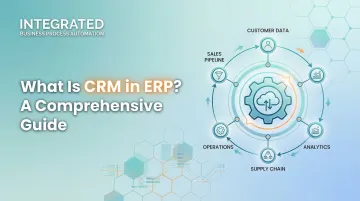
CRM in ERP is a module within an ERP system that manages all interactions with prospects and customers, built on the same shared database as accounting, inventory, and operations rather than existing as a separate application.
Why It Exists: The Operational Gap
When customer data sits in a standalone CRM and order/billing data sits in an ERP, teams must manually transfer information between systems. This creates duplication, delays, and errors that compound as a business grows.
Research shows that companies lose 20% to 30% of their revenue annually due to inefficiencies caused by data silos. To put that in perspective for Indian MSMEs: a business with ₹10 crore in revenue could be losing ₹2–3 crore every year.
What CRM in ERP Is NOT
It is not:
- The same as a full standalone CRM platform like Salesforce or Zoho CRM
- A mere contact directory
- Interchangeable with the ERP system itself—it is a specific module within the ERP architecture with a defined scope
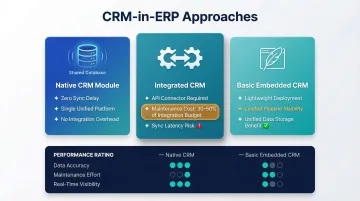
Three Common Approaches to CRM Within ERP Environments
1. Native CRM Module CRM functionality built and maintained within the ERP itself. All customer data, sales records, and business transactions share the same database. Platforms like Bizionix follow this architecture, where the CRM module shares live data with billing, inventory, and operations.
2. Integrated CRM A standalone CRM connected to an ERP via API. This approach requires ongoing technical maintenance, data field mapping, and sync scheduling. Enterprises spend an average of 30–50% of their total integration budget on ongoing maintenance, including API version updates, error resolution, and security patches.
3. Basic Embedded CRM Lightweight contact and order tracking included in the ERP. Offers limited sales pipeline visibility but maintains the advantage of unified data storage.
Each approach has different data synchronisation implications. Native CRM modules eliminate sync delays entirely, while integrated CRMs introduce latency and maintenance overhead.
Why It Remains Relevant
Despite the rise of standalone SaaS CRM tools, operationally intensive businesses consistently choose CRM within ERP over separate solutions. Customer activity (quotes, orders, deliveries, invoices) must be tied together in real time for decisions to be made without delay. A 2025 academic study found that operational efficiency improved by 85% when ERP and CRM were integrated, with response times reduced by 32%.
How Does CRM Work Within an ERP System?
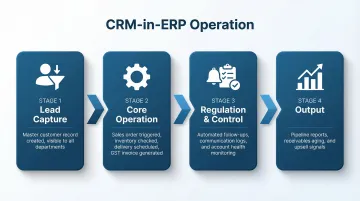
CRM in ERP operates through a defined sequence of stages — from the moment a prospect enters the system to the point where that relationship generates measurable business outcomes. At every stage, the same shared customer record drives the process.
Initiation: Lead Capture and Contact Entry
The process begins when customer or prospect data enters the ERP-CRM through sales team input, lead forms, or import—creating a master customer record immediately visible to all authorised users across departments.
Entry can be manual, automated, or event-triggered. The critical difference versus standalone CRM: data captured during the sales process doesn't need to be manually re-keyed into the ERP before an order can be processed. That data is already in place.
Core Operation: Customer Data in Motion Across the ERP
Once a customer record exists in the ERP, every subsequent business event—a sales quotation, an order confirmation, a delivery, a payment—is linked to that same record. Because everything runs on a single platform, there is no data handoff between systems and no reconciliation required between CRM and ERP records.
What actually happens during execution:
- A prospect converted to a customer triggers a sales order
- The system checks real-time inventory availability
- Delivery scheduling initiates automatically
- A GST-compliant invoice generates—all within the same workflow, without switching platforms
Bizionix handles this through its unified ERP architecture, where the CRM module shares live data with billing, inventory, and operations. A sales manager can see a customer's open orders, outstanding payments, and service history in one dashboard, without needing a separate integration.
Regulation and Control: Tracking, Follow-Up, and Account Monitoring
Once the transaction is underway, the system shifts from execution to relationship management. CRM within ERP handles ongoing customer engagement through:
- Automated follow-up reminders
- Communication logs
- Task assignments
These features ensure no prospect or customer interaction goes untracked without manual tracking effort.
Customer account health monitoring includes:
- Outstanding invoices
- Overdue payments
- Pending service requests
- Delivery status
All visible against the customer record—giving sales, accounts, and operations a shared view of where each relationship stands.
Output: Customer Intelligence and Operational Outcomes
The integrated system ultimately produces:
- Sales pipeline reports
- Customer purchase history
- Receivables aging tied to individual accounts
- Renewal or upsell signals
All generated from live operational data rather than exported spreadsheets.
When the same system that processes orders also holds the customer's payment history and service record, decisions get sharper. A credit manager reviewing an overdue account can see the full purchase relationship in context — not just a receivables line item — which leads to faster, more informed calls. For growing MSMEs managing multiple accounts, that kind of visibility is what separates reactive follow-up from proactive account management.
CRM in ERP vs. Standalone CRM
A standalone CRM manages customer conversations and sales activity well, but operates without knowledge of what is happening in inventory, finance, or operations. A salesperson could promise delivery of an out-of-stock item, or extend credit to a customer with overdue invoices, with no system warning. These blind spots are exactly what CRM-in-ERP is designed to close.
The Integration Challenge
Connecting a standalone CRM to an ERP via API requires:
- Ongoing technical maintenance
- Data field mapping
- Sync scheduling
Even with integration, each system receives updates with a delay — not in real time. This lag compounds into larger problems: Gartner predicts that by 2027, more than 70% of recently implemented ERP initiatives will fail to fully meet their original business case goals, with integration complexity cited as a major hurdle.
Total Cost Comparison
| Cost Driver | Standalone CRM + Separate ERP | Unified CRM-in-ERP |
|---|---|---|
| Implementation | ₹1,00,00,000+ upfront (3–6 month timeline) | Moderate, single data model |
| Maintenance | 30-50% of integration budget annually | Low, vendor-managed updates |
| Data Quality | High risk of duplicates and schema drift | Built-in single source of truth |
| IT Support | Requires dedicated staff or consultants | Significantly reduced overhead |
When Each Model Is Appropriate
Large enterprises with highly specialised sales operations may justify a dedicated CRM alongside their ERP — provided they have the IT resources to manage ongoing integration.
Growing MSMEs, on the other hand, benefit from CRM built natively within their ERP. It:
- Consolidates sales and operations into one system
- Eliminates integration costs and maintenance overhead
- Ensures every team works from the same data without additional configuration
Where CRM in ERP Is Used
CRM in ERP provides the most operational value in workflows where customer data must be visible alongside operational data simultaneously.
Business Workflows That Benefit Most
Three business types gain the most from integrated CRM and ERP:
- Manufacturing companies need real-time visibility into customer orders, production schedules, and inventory availability across the quote-to-dispatch cycle. Platforms like SAP Business One and Acumatica integrate these functions in a single system.
- Distribution businesses require CRM linked directly to multi-warehouse visibility and automated reorder suggestions to manage customer credit limits and reorder patterns effectively. SYSPRO is built for this use case.
- Service-based businesses need customer data connected to project tracking and billing so contracts, renewals, and support requests are handled in one workflow.
The Critical Growth Stage
CRM in ERP becomes critical once a business has grown beyond the point where the owner personally tracks every customer relationship. This typically occurs when managing 30–50 active accounts, multiple sales staff, or recurring fulfilment cycles.
In India, MSME ERP adoption jumps significantly for firms with over 50 employees, where both ERP and CRM adoption reach 26.95%, compared to just 6.28% for micro-enterprises.
For Indian MSMEs Specifically
That growth threshold is particularly relevant for Indian MSMEs, where the cost of maintaining separate sales and accounting tools adds up quickly. CRM in ERP consolidates customer follow-ups, GST-compliant invoicing, and collections into one workflow.
Bizionix is built specifically for this use case. The platform covers the full sales cycle within a single ERP:
- Lead management and follow-up tracking
- Quotations and sales order processing
- GST-compliant invoicing with instant IRN generation via direct IRP connection
69% of digitally active MSMEs reported at least a 10% growth in their customer base after adopting digital solutions, demonstrating the tangible impact of unified business management platforms.
Conclusion
When CRM is built into your ERP, a conversation with a prospect flows directly into an order, a delivery, and a collected payment — with no information re-entered or lost between systems. Businesses that unify these functions gain the ability to act on customer data in real time, reduce billing delays, and maintain the operational consistency that sustains long-term client relationships.
A Forrester Total Economic Impact study found that midmarket organizations achieved a payback period of just 16 months, with time savings of 7 to 15 hours per week for personnel in finance, accounting, supply chain, and logistics due to unified data access and automated workflows.
For growing Indian MSMEs, a unified CRM+ERP platform does more than consolidate tools — it eliminates the friction of disconnected systems, enforces process discipline across teams, and delivers the real-time visibility that makes growth manageable rather than chaotic. The practical gains are measurable:
- No duplicate data entry between sales and finance
- Faster invoice cycles tied directly to confirmed orders
- GST-compliant billing triggered automatically from closed deals
- Full customer history visible at every stage — from lead to payment
Frequently Asked Questions
Is CRM part of ERP?
CRM can be a module within an ERP system, but it is not always included by default. Some ERP platforms have native CRM functionality built in, while others require a separate CRM tool to be integrated via API. The key distinction is whether both share the same database.
What are the three types of CRM?
There are three types of CRM:
- Operational CRM — automates sales, marketing, and service processes
- Analytical CRM — uses customer data to generate insights and forecasts
- Collaborative CRM — shares customer information across departments and communication channels
What are the 4 principles of CRM?
The four core principles are:
- Customer-centricity — placing the customer relationship at the centre of business decisions
- Data integration — consolidating all customer touchpoints into a single record
- Process automation — reducing manual effort across sales and service workflows
- Continuous improvement — using customer insights to refine products, services, and communication
What is the difference between CRM and ERP?
CRM focuses on managing customer-facing interactions—leads, sales, and service—while ERP manages internal business operations including finance, inventory, procurement, and HR. The two are complementary, and when integrated or unified on one platform, they give businesses visibility across both the customer lifecycle and operational execution.
What does CRM do in an ERP system?
Within an ERP, CRM manages customer records, tracks sales pipeline activity, logs communications, automates follow-ups, and connects customer interactions directly to sales orders, invoices, and delivery records—so every team sees the same customer status without needing a separate application.
Can small businesses benefit from CRM in ERP?
Small and mid-sized businesses benefit significantly because a combined CRM+ERP eliminates the need to pay for and manage two separate platforms, reduces manual data entry, and gives owners real-time visibility into both customer relationships and business financials from a single dashboard.