Introduction
Many growing businesses — especially Indian MSMEs managing multiple departments, locations, or entities — run into the same wall: approvals buried in email threads, tasks that fall through the cracks between teams, and managers spending hours on manual follow-ups instead of actual work. The processes holding them back aren't broken because of the people running them — they're broken because there's no system to run them on.
McKinsey research estimates that knowledge workers spend nearly 20% of their working week searching for information and coordinating internally — time that quietly compounds into serious operational drag, especially as headcount and complexity grow.
A configurable workflow engine changes this equation. It lets businesses define, automate, and monitor their own processes without rebuilding software from scratch every time a process changes. What follows breaks down exactly how these engines work, what it takes to build and deploy them, and where they tend to have the biggest impact for businesses ready to move beyond manual coordination.
Key Takeaways
- A configurable workflow engine automates task routing, approvals, and notifications through defined process sequences
- Unlike rigid tools, it lets business users modify workflows without developer involvement
- Core components include a process designer, rule engine, task router, integration layer, and audit dashboard
- Simple workflows can go live in days — cloud-based platforms make deployment faster and less resource-intensive
- For Indian MSMEs, built-in workflow engines within unified ERPs like Bizionix remove the need for third-party integrations from day one
What Is a Configurable Workflow Engine?
A workflow engine is software that orchestrates the movement of tasks, approvals, data, and notifications through a defined sequence — making sure the right action happens at the right time, by the right person or system. It differs from general automation scripts (which are one-off, brittle) and from rigid pre-built tools (which lock you into someone else's process logic).
For growing businesses — especially those managing multi-step approvals, vendor coordination, or compliance-driven processes — the "configurable" part is what separates a tool that fits your operation from one that forces you to fit it.
Fixed vs. Configurable: The Core Distinction
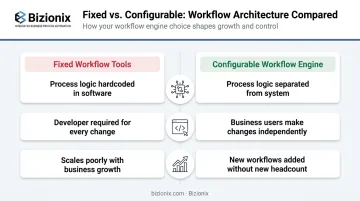
Fixed workflow tools hardcode process logic into the software itself. Changing an approval threshold or adding a new routing step requires a developer — or a support ticket to the vendor.
Configurable workflow engines separate the process logic from the underlying system. Business users — department heads, operations managers, even non-technical administrators — can define rules, routing conditions, and escalation paths through visual designers, configuration panels, or form-based interfaces. No code required for routine changes.
Think of it as the middle ground between a rigid checklist and a months-long custom development project: structured enough to be reliable, flexible enough to evolve as your business does. A purchase order approval flow for a mid-sized distributor, for instance, can be configured, tested, and live in hours — not sprints.
Why Businesses Need a Configurable Workflow Engine
Manual process management creates compounding inefficiencies. A missed approval today becomes a delayed payment next week and a strained vendor relationship next month. The coordination overhead is rarely visible until it's already costing the business significantly.
Compliance and Audit Readiness
For Indian MSMEs, this is non-negotiable. The MCA now mandates audit trail compliance for all companies using accounting software, effective FY 2024. Every transaction and approval must be timestamped and traceable.
A configurable workflow engine creates this trail automatically:
- Every approval, rejection, and escalation is logged with user identity and timestamp
- Procurement decisions carry a documented chain of authority
- GST-related document flows maintain records that satisfy CBIC requirements
- Internal compliance reviews have structured audit histories to reference
Scalability Without Headcount
As businesses add departments, locations, or product lines, manual coordination doesn't scale — it breaks. The usual fix is hiring more coordinators, which adds cost without resolving the coordination bottleneck itself.
A configurable engine scales differently: you add a new workflow definition, not a new person. A distribution company opening a third warehouse doesn't need a new operations coordinator — it needs a new location added to the dispatch workflow.
Cross-Department Information Flow
The silo problem is particularly acute in mid-sized businesses where procurement, finance, inventory, and sales each maintain their own process habits. When these functions operate through a shared, rule-driven process layer, information moves without bottlenecks.
Managers gain real-time visibility into process status instead of chasing status updates through hallway conversations. That visibility includes:
- Which approvals are pending and with whom
- Which tasks are overdue and by how long
- Where delays consistently cluster across the business
Key Components of a Configurable Workflow Engine
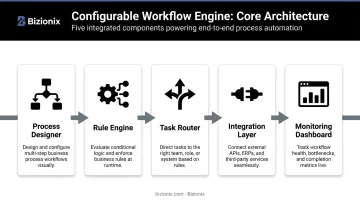
Every effective workflow engine shares five core components. Understanding these helps when evaluating platforms or building internal capability.
| Component | Function |
|---|---|
| Process Designer | Visual interface to map workflows — drag-and-drop, BPMN diagrams, or form-based |
| Rule Engine | Conditional logic layer governing routing decisions and branching |
| Task Router | Determines who receives which task and when; manages escalations |
| Integration Layer | Connects the engine to ERP, CRM, accounting, and communication tools via APIs |
| Monitoring Dashboard | Real-time visibility into workflow status, bottlenecks, and audit history |
Process Designer and Rule Engine
A good process designer lets non-technical users — not just IT teams — map their own processes. Department heads should be able to draft a workflow for leave approvals or purchase requests without writing a line of code.
The rule engine is what gives that workflow intelligence. For example: "If purchase order value exceeds ₹1 lakh, route to Senior Manager for approval; below that threshold, auto-approve." This logic is configured through the interface, not hardcoded. Without this capability, every routing change requires a developer — which defeats the purpose of a configurable system.
Task Router and Integration Layer
The task router ensures no work item sits unassigned. It can operate on role-based logic (any manager in Finance), skill-based routing, workload distribution, or time-bound escalation — automatically escalating to the next approver if the first hasn't acted within a set window.
Once tasks are routed, the integration layer determines whether the workflow actually closes the loop. A workflow engine that can't pull data from your ERP or push updates to your accounting system creates a new manual step rather than eliminating one. Businesses running a unified platform — like Bizionix, which embeds workflow automation within its all-in-one ERP — avoid this entirely. The process logic and the business data live in the same system, so there's no integration gap to bridge.
Designing and Building Custom Workflows: A Step-by-Step Approach
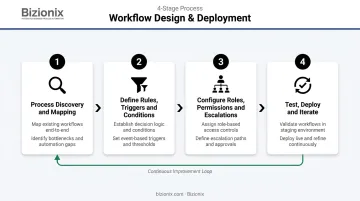
Process Discovery and Mapping
Before configuring anything, document how the process actually runs — not how it's supposed to run. These two are frequently different, and that gap is where most redesigns fail.
Useful tools for this stage:
- Process flowcharts
- Swimlane diagrams (showing which team handles what)
- Stakeholder interviews with actual process participants
Identify every step, every decision point, every handoff, and every system touched. Gaps found here are inexpensive to fix; the same gaps discovered after deployment cost significantly more — in time, rework, and user trust.
Defining Rules, Triggers, and Conditions
Translate the mapped process into the engine's logic language:
- What starts the workflow — a form submission, document upload, date trigger, or system event
- What conditions govern routing — value thresholds, role hierarchies, approval states
- What constitutes completion or failure — explicit end states, not assumed ones
Vague rules produce unreliable workflows. If a routing condition is ambiguous, the engine either routes incorrectly or stalls for manual intervention — undermining the automation entirely.
Configuring Roles, Permissions, and Escalations
Assign who can initiate, approve, delegate, or terminate each step. Then configure escalation paths: if an approver hasn't acted within a set number of hours, the task automatically moves to the next level.
This keeps processes moving without a manager having to chase down every delayed approval by hand.
Testing and Iterating
Run simulated scenarios before going live — and make sure actual end-users are part of that process, not just the technical team. Users surface friction that configuration teams miss. Cover these edge cases at minimum:
- Missing or incomplete data submissions
- Rejected approvals and re-routing logic
- Dual-approver scenarios and tie-breaking rules
- System timeouts and fallback behaviour
After deployment, use monitoring dashboards to identify where tasks consistently stall, where errors recur, or where users bypass the workflow. Treat the first deployment as a baseline and build a continuous improvement cycle from real usage data.
Deploying Your Workflow Engine: Key Considerations
Cloud vs. On-Premises
| Factor | Cloud | On-Premises |
|---|---|---|
| Deployment speed | Days to weeks | Weeks to months |
| Infrastructure cost | Lower (subscription model) | Higher upfront |
| Remote accessibility | Built-in | Requires VPN/setup |
| Data residency | Depends on provider | Full control |
For most Indian MSMEs — especially those with distributed teams or multiple locations — cloud-based deployment is the practical choice. NASSCOM's SMB cloud adoption research confirms that cloud-first approaches deliver faster time-to-value for growing businesses in India.
Change Management and User Adoption
A well-configured workflow engine fails if staff bypass it. The technical deployment is only half the project.
Effective adoption strategies include:
- Communicating why the workflow exists (not just how to use it)
- Training users at each role level, not just administrators
- Designating internal process champions who support colleagues during transition
- Starting with one high-impact workflow before rolling out across departments
Integration From Day One
Deploying a workflow engine that doesn't connect to existing ERP, accounting, or HR systems creates a new silo instead of eliminating one. Integration should be a launch requirement, not a future phase.
Bizionix handles this by design. Workflows run natively within the ERP — not alongside it — which means:
- Procurement approvals execute within the same platform as inventory and finance data
- Document management and operational processes connect directly to HR records
- No third-party integrations to maintain, and no data to re-enter between systems
Real-World Use Cases Across Business Functions
Most process breakdowns happen not because of bad intent, but because there's no enforced structure. Here's how a configurable workflow engine solves that across three common business functions.
Procurement and Approvals
A configurable workflow engine transforms purchase order management from an email thread into a controlled, auditable process:
- Multi-level PO approvals based on value thresholds
- Vendor onboarding checklists with task assignment by role
- Payment release workflows with finance sign-off requirements
- Full audit trail for every approval decision
HR and Employee Lifecycle
HR workflows are often the most inconsistently executed in mid-sized businesses — because they depend heavily on which manager is handling the case.
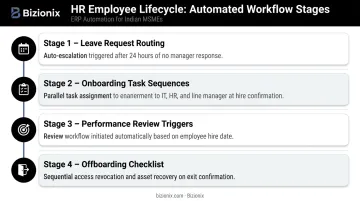
A configured engine standardises this:
- Leave request routing with automatic escalation if unapproved after 24 hours
- Onboarding task sequences assigned to IT, HR, and line managers simultaneously
- Performance review cycle triggers based on hire date
- Offboarding checklists ensuring access revocation, asset recovery, and final settlement happen in sequence
Operations and Cross-Department Coordination
Beyond HR and finance, workflow engines deliver some of their clearest value on the operations floor. For manufacturing, distribution, or service businesses, the engine can coordinate across departments without anyone manually chasing handoffs.
Typical operations workflows include:
- Production order releases triggered by confirmed purchase orders
- Quality check sign-offs before dispatch authorisation
- Dispatch confirmations with automatic customer notification
- Exception alerts when any step exceeds its expected completion window
Frequently Asked Questions
What is a workflow engine used for?
A workflow engine automates the movement of tasks, approvals, and notifications through a defined process sequence — ensuring work progresses on time, by the right person, with a full audit trail. It eliminates manual chasing and gives every team member clear ownership of their step.
What is the difference between a configurable workflow engine and a BPM tool?
BPM (Business Process Management) platforms are broader tools for process modelling, analysis, and governance. A workflow engine is the execution layer — it actually runs the processes. Most BPM platforms include a workflow engine, but the two are not interchangeable.
Can small and mid-sized businesses benefit from a configurable workflow engine?
MSMEs managing multi-department operations, approval hierarchies, or compliance workflows see real gains from workflow automation. Modern cloud-based engines are affordable and don't require large IT teams to deploy or maintain.
What are the key components every configurable workflow engine should have?
Five essentials: a visual process designer, a rule engine for conditional logic, a task router with escalation support, an integration layer connecting to existing systems, and a monitoring/audit dashboard for real-time visibility.
How long does it take to deploy a custom workflow engine?
Simple workflows can go live in days. Enterprise-wide deployments with complex integrations may take several weeks. Cloud-based platforms with pre-built ERP integrations — or native workflow capabilities — cut that timeline by weeks.
What should I look for when choosing a workflow engine for my business?
Prioritise ease of configuration (no-code or low-code), integration with your ERP and accounting tools, scalability, and compliance capabilities. The license fee is rarely the largest cost — implementation and ongoing support typically outweigh it.