Introduction
A purchase order sits unprocessed for three days because no one knew who was supposed to approve it. A new hire spends two weeks shadowing a colleague just to understand "how things work here." A shipment goes out without a quality check because someone skipped a step that existed only in someone's memory.
These aren't isolated incidents. They're symptoms of the same underlying problem: processes that live in people's heads instead of the system.
According to a 2023 SME and Laserfiche study, 62% of manufacturing professionals reported work delays tied to operational data gaps. The fix is making the system do the enforcing—not hiring more managers or writing longer SOPs.
This article covers what configurable workflows are, how they differ from rigid alternatives, the four main workflow types, and a practical implementation guide for Indian MSMEs managing multi-department operations.
Key Takeaways
- Configurable workflows let businesses define steps, rules, and approvals inside their software—no custom coding required
- They reduce manual errors by automating transitions and enforcing required actions before a process moves forward
- Unlike fixed workflows, configurable ones adapt to how your business actually works
- Implementation follows a five-step process: mapping your process, defining logic, configuring the system, testing, and ongoing monitoring
- Platforms like Bizionix are built on this principle, giving Indian MSMEs enterprise-grade workflow control without SAP-level complexity or cost
What Is a Configurable Workflow?
A configurable workflow is a business process framework built into software that lets organisations define steps, rules, roles, and sequences—without writing a single line of code. The system bends to how your business actually operates.
The Core Components
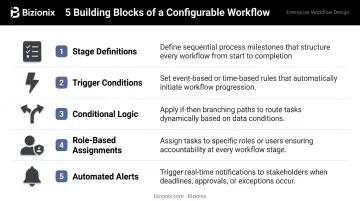
Every configurable workflow is made up of five building blocks:
- Stage definitions — the specific tasks or checkpoints a process moves through
- Trigger conditions — what initiates a step or transition (a form submission, a status change, a date)
- Conditional logic — branching rules that route a process differently based on inputs or context
- Role-based assignments — who is responsible at each stage (by job role, not just individual name)
- Automated alerts — notifications that fire when a task is assigned, delayed, or completed
How It Differs from Hardcoded Workflows
Fixed workflows are baked into the software by the vendor. If your approval process doesn't match what the system expects, you either adapt your process or raise a developer ticket. Configurable workflows sit inside the same system but behave like custom-built logic—adjustable by your operations team, not an IT project.
A practical example: In a manufacturing or distribution company, a purchase order workflow might be configured so that orders under ₹50,000 are auto-approved, orders between ₹50,000 and ₹5 lakh route to the department head, and anything above ₹5 lakh escalates to the CFO. That logic runs automatically—no manual routing, no oversight gaps.
That flexibility is what makes configurable workflows valuable across industries—a single ERP platform can serve a hotel, a distributor, and a CA firm without forcing any of them into the same process template.
Fixed vs. Configurable Workflows: What's the Difference?
Fixed workflows are pre-built. Every user follows the same steps regardless of their industry, team size, or how their business actually runs. These are common in older or basic business software—the kind where you're told "that's just how the system works."
The Cost of Rigidity
Gartner predicts that by 2027, more than 70% of recently implemented ERP initiatives will fail to fully meet their original business goals—citing technology-centric approaches and monolithic systems built on IT-driven assumptions rather than actual business needs as primary causes. Rigid workflows are a textbook example of this failure pattern.
That failure pattern has a structural cause. The table below breaks down exactly where fixed and configurable workflows diverge:
| Dimension | Fixed Workflow | Configurable Workflow |
|---|---|---|
| Who defines the process | The software vendor | Your operations team |
| Flexibility | None without development | Adjustable within the platform |
| Implementation cost | Low initially, high when misfit | Moderate setup, lower long-term cost |
| Business fit | Generic | Matches your actual SOPs |
| Scalability | Forces process rework as you grow | Adapts as the business changes |
For growing MSMEs, this distinction becomes critical. A fixed workflow forces the business to reshape its processes to match the software. A configurable workflow inverts that dynamic: the software adapts to how your business actually runs—whether you're managing a single-location trading firm today or a multi-branch distribution network tomorrow.
The Four Types of Workflows
Configurable workflow systems can support multiple workflow structures. Understanding the four main types helps you choose the right one for each process.
| Workflow Type | How It Works | Typical Use Case |
|---|---|---|
| Sequential | Steps happen one after another; each stage must complete before the next begins | Order placed → invoiced → dispatched → delivered |
| Parallel | Multiple steps run simultaneously, triggered by the same event | Quality inspection and dispatch preparation both start once production completes |
| State Machine | The process moves between states in any direction based on conditions, not a fixed sequence | A sales lead moves from "Proposal Sent" back to "Negotiation" — mirroring how real sales cycles work |
| Rules-Driven | The next step is determined entirely by data inputs or business rules | A complaint above a set value threshold auto-escalates to a senior manager; no manual decision needed |
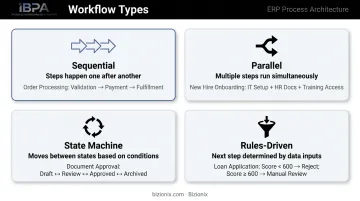
Most businesses use a combination of all four within a single operation. A purchase order, for instance, might be sequential in structure but rules-driven at the approval stage. Configurable workflow systems let you mix and match these types across procurement, billing, and operations — adapting each process to how your business actually runs, not how a fixed template assumes it should.
Why Configurable Workflows Matter for Growing Businesses
As a business scales, institutional knowledge becomes a liability. "How we do things here" stops being a cultural asset the moment it exists only in someone's head—or in a WhatsApp thread from 2021.
Processes Move Into the System
Configurable workflows transfer process knowledge from people into the platform. Every team member—from a 10-year veteran to a first-week hire—follows the same defined steps. The system enforces the sequence, not a manager's memory.
Organisations with standardised onboarding processes report 50% greater new-hire productivity, according to Microsoft. For MSMEs with high staff turnover or multiple locations, this alone justifies the investment.
Errors and Missed Steps Drop Significantly
With automated triggers and role-based alerts, the system ensures every required action happens when it's supposed to. A step can't be skipped because no one remembered to send an email. The workflow won't advance until the required action is completed.
Gartner's research estimates poor data quality costs organisations an average of $12.9 million per year—driven largely by manual processes, missed steps, and inconsistent execution. For MSMEs, the numbers are smaller but the proportional damage is often higher.
Where Bizionix Fits In
Bizionix is a cloud ERP built specifically for Indian MSMEs, with configurable workflows embedded across its core modules:
- Procurement — approval chains before purchase orders are raised
- Sales — stage-by-stage quote and order progression
- Inventory — controlled stock movements with role-based access
- Billing — validation steps before invoices are issued
- HRMS — structured leave, attendance, and payroll approvals
- Document approvals — routed sign-offs without manual follow-up
Each module enforces process discipline so employees follow defined steps rather than individual preferences. For businesses that have outgrown spreadsheets but can't justify SAP-level costs, this is where ERP moves from concept to daily practice.
Only 12% of Indian MSMEs currently use ERP software, according to RIS research—meaning most are still running on manual processes, spreadsheets, and institutional memory. Configurable workflows are the mechanism that closes that gap.
How to Implement a Configurable Workflow: A Step-by-Step Guide
Step 1 — Map Your Existing Process
Before configuring anything, document how the process actually works today — not how it's supposed to work on paper. Interview the people who execute each step daily, not just the managers who oversee them. For each task, capture:
- Who owns it
- What triggers the transition to the next step
- Where delays or inconsistencies regularly appear
Skipping this step is the single most common reason workflow implementations fail. You can't automate a process you don't understand.
Step 2 — Define Your Workflow Logic
Translate the mapped process into structured rules:
- What are the stages, in what order?
- What conditions govern each transition (approval thresholds, status changes, time triggers)?
- Which role is responsible at each stage?
- Are there parallel paths or branching logic based on data inputs?
Document this before touching the platform. The configuration is only as good as the logic behind it.
Step 3 — Configure Within Your Platform
Use the workflow configuration tools in your ERP to build what you've defined. In a platform like Bizionix, this means setting up stages, creating trigger conditions, assigning roles, and enabling automated notifications — all without developer involvement.
Your operations team handles this directly through the platform's interface — no IT change requests, no development backlog.
Step 4 — Test With Real Scenarios
Before going live, run the configured workflow against actual business scenarios:
- Standard cases (the 80% path)
- Edge cases (large-value transactions, exceptions, incomplete data)
- Multi-department handoffs where delays commonly occur
Fix logic gaps now. Errors in production cost far more than time spent testing.
Step 5 — Monitor, Measure, and Refine
Once live, the work isn't done — it shifts from building to observing. Use the system's reporting tools to track workflow performance. Bizionix's live dashboards show you exactly where delays are accumulating, which approvals are being skipped, and which stages consistently generate errors — so you can act before small bottlenecks become larger problems.
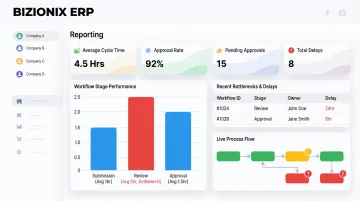
Treat this as ongoing, not a one-time task. Workflows need to evolve as your business changes.
Common Mistakes to Avoid When Configuring Workflows
Most workflow configuration failures trace back to a handful of repeatable mistakes. Avoiding these from the start saves significant rework later.
Over-engineering from the start. Accounting for every possible exception upfront produces logic so complex it breaks easily and becomes impossible to maintain. Start with the 80% case—the most common process path—and add exceptions iteratively based on what actually happens in practice.
Skipping the process mapping step. Configuring a workflow based on how managers think the process works—rather than how it works on the ground—results in automation that creates new problems instead of solving old ones. The people executing each step daily are the real source of truth, not the org chart.
Treating configuration as a one-time event. Workflows become outdated the moment the business changes. New products, new departments, new compliance requirements—all of these need workflow updates. Without periodic review, configured workflows gradually recreate the same bottlenecks they were meant to eliminate.
Frequently Asked Questions
What is a configurable workflow?
A configurable workflow is a business process sequence built into software that organisations can customise—defining stages, triggers, roles, and rules—without custom development. The system adapts to how the business actually operates rather than requiring the business to adapt to the software.
What are the four types of workflows?
The four types are Sequential (steps happen in order), Parallel (multiple steps run simultaneously), State Machine (steps transition based on conditions), and Rules-Driven (the next step is determined by data inputs or business rules). Most businesses use a combination of these, and configurable systems let you build each type based on what the process actually requires.
What are the 8 stages of workflow?
The eight stages are: define objectives, design the structure, select tools, implement and integrate, define monitoring and error handling, test and validate, deploy, and optimise. These apply equally to initial setup and ongoing refinement as business needs change.
What is the difference between a configurable workflow and custom software development?
Configurable workflows are built using settings within an existing platform—no coding required, adjustable by your operations team. Custom software development builds new functionality from scratch, requiring developers, significantly higher cost, and ongoing technical maintenance.
Can configurable workflows work across multiple departments or business units?
Yes. Each workflow stage can be assigned to different roles across sales, finance, warehouse, or operations. Platforms like Bizionix also support multi-entity configurations, where separate companies or branches can run distinct workflows within the same system while sharing a unified view at the management level.
How do configurable workflows help reduce errors in day-to-day operations?
By automating step transitions, sending role-based alerts, and requiring actions to be completed before a process moves forward, configurable workflows remove the reliance on memory and manual follow-up. Nothing gets skipped because the system won't advance until the required step is done.