As businesses add departments, locations, and headcount, the informal coordination methods that once worked start creating bottlenecks. The answer most businesses reach for is a workflow management system (WMS). But here's the problem: not every WMS delivers on its promise. Many offer a polished interface over what amounts to a glorified to-do list — missing the automation, visibility, and integration capabilities that make a real difference.
This article outlines the 10 features that separate a functional WMS from one that actually transforms operations, with specific attention to what Indian MSMEs need to get right.
Key Takeaways
- A WMS defines, automates, and tracks business processes — from purchase approvals to vendor onboarding — end to end.
- Choosing the wrong system adds administrative complexity rather than reducing it; the feature checklist matters before you buy.
- Ten features separate functional workflow tools from ones that create more overhead: no-code builders, automation with conditional logic, real-time dashboards, SLA alerts, audit trails, and five others covered below.
- Indian MSMEs operating across locations or managing GST compliance have two additional requirements that most generic checklists overlook entirely.
What Is a Workflow Management System?
A workflow management system is software that maps, executes, and monitors the sequence of tasks required to complete a repeatable business process. The Workflow Management Coalition (WfMC) defines it as a system that "completely defines, manages and executes workflows" — with execution order driven by workflow logic rather than manual coordination.
In practice, that means everything from purchase approvals and vendor onboarding to invoice processing and employee leave requests moves through a defined digital path, with each step triggered automatically and every action recorded.
Why WMS Adoption Is Accelerating
The numbers reflect a significant shift. According to Grand View Research, the global WMS market was valued at USD 9.54 billion in 2022 and is projected to reach USD 86.63 billion by 2030 — a 33.3% CAGR. That growth is being driven by businesses recognising that managing multi-department, multi-location operations through email and spreadsheets doesn't scale.
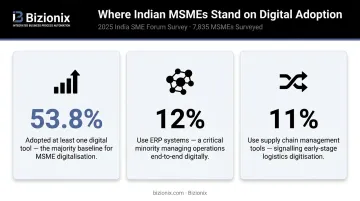
In India, the gap is especially visible. A 2025 survey of 7,835 MSMEs by the India SME Forum found that while 53.8% had adopted at least one digital tool, only 12% use ERP systems and 11% use supply chain management tools. Most are still running complex operations on disconnected systems.
WMS vs. Project Management: Not the Same Thing
A WMS governs repeatable, ongoing processes — approval chains, procurement cycles, leave requests — that follow predictable steps and repeat dozens of times a month. Project management software handles unique, one-time deliverables where requirements shift and team compositions change.
Many growing businesses buy a project management tool and wonder why their approval workflows still break down. The two tools solve different problems. A WMS enforces consistency across recurring operations — something project tools are never designed to do.
10 Essential Features Every Workflow Management System Should Have
Any system missing more than two or three of these features should be reconsidered before purchase. These aren't advanced capabilities — they're the baseline.
1. Visual, No-Code Workflow Builder
A workflow builder is only useful if the people who understand the process can actually build it. That means a drag-and-drop, visual interface — no coding required, no IT ticket to raise every time a process needs updating.
The market has moved firmly in this direction. Forrester reports that 87% of enterprise developers now use low-code platforms for at least some work, with the combined low-code and digital process automation market reaching USD 13.2 billion by end of 2023.
What the builder must support:
- Linear flows for straightforward approvals
- Branched logic for multi-scenario routing
- Multi-step sequences with conditional triggers
- Modification by process owners, not developers
If your operations manager needs to submit an IT request every time a workflow step changes, your system will fall behind your business almost immediately.
2. Task Management and Assignment
Every task in a workflow needs an owner, a deadline, and a reminder. Without these three elements, you're back to the "I thought you were handling it" problem that informal processes create.
Strong task management means:
- Clear ownership assigned to individuals or teams
- Automated due-date reminders so tasks don't sit idle
- Dependencies that prevent Task B from starting until Task A is approved
- A unified manager view showing who owns what across all active workflows
McKinsey research indicates that cross-cutting management processes consume 40–65% of management and overhead time — and process redesign can reduce that workload by more than 15% in the first year. Clear task ownership is where that reduction begins.
3. Workflow Automation with Conditional Logic
Automation is the core value proposition of a WMS. The system triggers the next step automatically — routing documents to the right approver, sending follow-up reminders, escalating overdue items.
Conditional (branching) logic extends this further. One workflow handles multiple scenarios based on data inputs — for example:
- A purchase request under ₹10,000 routes to the department head
- Anything above routes to the CFO for sign-off
- Requests from specific vendors trigger a compliance review step
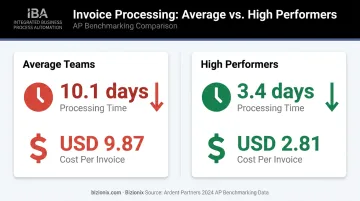
Ardent Partners' 2024 AP benchmarking data shows average invoice processing takes 10.1 days at a cost of USD 9.87 per invoice. High-performing teams complete the same invoice in 3.4 days at USD 2.81 — largely through automated routing and reduced exception handling.
4. Real-Time Reporting and KPI Dashboards
Without reporting, a WMS is a black box. You know tasks went in; you're not sure what happened next or where things slowed down.
Real-time dashboards should answer:
- How many workflows are currently active?
- Which are overdue, and by how long?
- Where are bottlenecks forming consistently?
- How long does each step take on average?
KPI-based reporting goes a level further — letting managers set benchmarks (invoice approval within 48 hours, for example) and immediately see when and where those benchmarks are being missed. That visibility replaces guesswork with evidence, making actual process improvement possible rather than theoretical.
5. Flexible Form Builder for Data Capture
Most workflows start with a form — a purchase request, a leave application, a supplier onboarding questionnaire. If that form is a static PDF emailed to someone, the data has to be manually re-entered into every subsequent system. That's where errors compound.
The WMS needs a drag-and-drop form builder that supports:
- Text fields, number inputs, dropdowns
- Date pickers and calculated fields
- File attachments for supporting documents
- Required field validation before submission
Forms should feed data directly into the workflow — no re-entry between steps, no version confusion, no missing attachments discovered three steps later. Poor data quality costs organisations an average of USD 12.9 million per year, according to Gartner research. Structured data capture at the point of entry is the simplest fix.
6. Third-Party Integration Capabilities
Workflows don't operate in isolation. A purchase approval workflow needs to connect with your accounting system. A vendor onboarding flow needs to pull from your ERP. An invoice workflow needs to push data to your GST compliance tool.
A WMS without integrations creates new silos rather than eliminating existing ones. Look for:
- API-based or native connections to the tools you already use
- Coverage across CRM, accounting, ERP, and communication platforms
- For Indian MSMEs: GST accounting software integration and e-invoicing system connectivity
Bizionix connects directly with the government's GST e-Invoice system via API — enabling instant IRN generation, real-time invoice validation, and automatic QR code creation without manual intervention or third-party tools.
Map the integration library against your current tool stack before committing — gaps here are expensive to patch later.
7. Cloud-Based Architecture
For any MSME managing multiple locations, remote teams, or distributed operations, on-premise software is a structural liability. Cloud-first architecture solves several problems at once:
- Accessible from any device or location without VPN dependencies
- No server hardware to buy, maintain, or eventually replace
- Updates rolled out by the vendor, not your IT team
- Data security and backup handled at the provider level, not locally
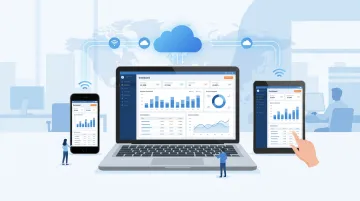
NASSCOM data shows India's public cloud market grew at 44% CAGR from 2016 to 2021, reflecting how quickly cloud adoption has accelerated even in traditionally on-premise-heavy environments. Bizionix is 100% cloud-based, with 24/7 access and multi-entity management under a single login — relevant for business groups and franchise networks managing operations across several locations or GST entities simultaneously.
8. SLA Monitoring, Alerts, and Notifications
SLA (Service Level Agreement) indicators tell you which workflows are on track, approaching their deadline, or already overdue — typically through colour-coded status views (green/yellow/red). Without this, managers default to manually chasing updates, which defeats the purpose of automation.
Smart notifications should be:
- Role-specific, so approvers only see what's relevant to them
- Step-specific, with escalations triggering at the right point — not too early, not too late
- Delivered via email or in-app based on user preference
Notification overload is as much a problem as no notifications. A well-configured alert system means the right person gets reminded at the right time, and managers get escalation alerts only when a deadline is genuinely at risk.
9. Role-Based Access Control
Workflows often contain sensitive information — salary approvals, vendor pricing negotiations, legal documents, credit limits. Not every employee should see every step.
Role-based access control (RBAC) ensures each user sees only the data and workflow stages relevant to their role. A well-implemented RBAC system uses tiered permissions — view, edit, admin — with department or branch-level restrictions that keep sensitive data visible only to those who need it.
Two requirements that are often overlooked:
- Access settings must be easy to modify as teams change, without breaking active workflow instances
- Changes to permissions should not corrupt historical records or create gaps in audit trails
India's Digital Personal Data Protection Act (DPDP) 2023 requires Data Fiduciaries to maintain reasonable security safeguards, with penalties up to ₹250 crore for breaches. RBAC is a foundational control for meeting this obligation.
10. Audit Trail and Compliance Tracking
An audit trail is a time-stamped record of every action in a workflow: who approved, who rejected, what was changed, and when. It's essential for internal accountability and required for regulatory compliance.
For Indian businesses, this is particularly critical:
- GST compliance — CBIC's CGST Act Section 35 requires registered businesses to maintain true and correct records of all transactions, with penalties under Section 122 for failures
- CERT-In requirements — ICT system logs must be maintained for a rolling 180 days
- Audit readiness — records must be retrievable quickly during disputes or regulatory reviews
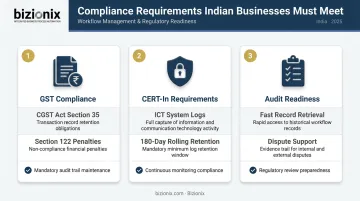
Bizionix maintains full activity logs with complete traceability — recording who did what and when across all workflow actions — and generates audit-ready records specifically designed to support GST filings and regulatory reviews.
How to Choose the Right Workflow Management System
Before evaluating vendors, answer these questions:
- How many processes do you need to automate in the first 90 days? Start with your highest-volume, most error-prone workflows.
- Which existing tools must the WMS connect with? List them before your first demo, not after.
- Can non-technical teams build and modify workflows without IT involvement? Test this during the trial, not just during the sales presentation.
The most common purchasing mistake is a mismatch in scale. Some businesses select enterprise tools their teams can't adopt — too complex, too expensive to configure, too dependent on IT. Others buy lightweight apps that cap out the moment the business adds a department or a second location.
Match the WMS to your current operational scale, but evaluate it against where you expect to be in two to three years.
That scalability question matters especially for Indian MSMEs juggling multiple departments, locations, or business entities. An integrated platform like Bizionix consolidates document workflows, GST-ready accounting, inventory management, HRMS, and operations into a single cloud system — replacing fragmented tool stacks with one unified platform.
At ₹999/year for the NEO plan, it's accessible to small businesses without sacrificing enterprise-grade capability. The Enterprise plan covers custom configurations and priority support for more complex operations.
A unified platform keeps costs lower, eliminates integration gaps, and ensures that workflow automation connects directly to the financial and compliance systems that Indian MSMEs depend on daily.
Conclusion
A workflow management system is only as effective as the features underlying it. Investing in a platform that lacks automation, real-time visibility, or integration capabilities often creates more administrative overhead, not less — teams end up managing both the old process and the new system in parallel.
Use this 10-feature checklist as a baseline requirement, not a wish list. Any shortlisted system should be trialled against at least one real business process before full rollout — not evaluated on demo videos alone.
If you're running a growing Indian enterprise and need a platform that delivers these capabilities without SAP-level complexity or cost, explore Bizionix. Built specifically for Indian MSMEs, it brings workflow automation, GST compliance, and multi-department operations into a single system.
The goal is straightforward: replace fragmented tools and eliminate the manual follow-up that slows growing businesses down.
Frequently Asked Questions
What is workflow management software?
Workflow management software is a digital tool that defines, automates, and monitors sequences of business tasks — ensuring work moves consistently from one step to the next without manual follow-up or missed handoffs. It replaces informal coordination methods like email chains and WhatsApp approvals with structured, trackable processes.
What features should workflow management software have?
The core non-negotiables are a no-code workflow builder, task automation with conditional logic, real-time reporting, role-based access control, third-party integrations, and an audit trail. Any system missing most of these will create new bottlenecks rather than eliminating existing ones.
What is the difference between workflow management and project management?
Workflow management governs repeatable, ongoing processes — like purchase approvals or invoice processing — that follow a consistent structure every time. Project management handles unique, time-bound initiatives with evolving deliverables and changing requirements. Many growing businesses need both but confuse the two, creating gaps in operational coverage.
Do I need technical expertise to set up a workflow management system?
Modern WMS platforms with no-code or low-code builders are designed for non-technical users — process owners and department managers can build and modify workflows without IT involvement. Initial setup may benefit from guided onboarding, but ongoing configuration requires no developer resources.
How does a workflow management system help with compliance?
WMS platforms maintain automated audit trails that record every action, approval, and change with timestamps. For Indian businesses, this directly supports GST record-keeping requirements under CGST Act Section 35 and makes it easier to demonstrate compliance during audits or regulatory reviews.
Can a workflow management system integrate with existing business software?
WMS platforms typically offer API-based or native integrations with CRMs, accounting software, ERP systems, and communication platforms. Verify the integration library against the specific tools your business already uses before purchase — especially if you rely on GST accounting software or inventory management systems that require real-time data exchange.