Introduction
Growing businesses hit a familiar wall: approvals stuck in WhatsApp threads, processes documented in Excel sheets nobody updates, and departments operating in complete isolation. When things break — and they do — nobody can trace what went wrong or why.
This friction is driving serious demand for structured process management tools. According to Grand View Research, the global BPM market was valued at $20.38 billion (USD) in 2024 globally and is projected to reach $61.17 billion by 2030 — a 20.3% CAGR. For Indian MSMEs, this shift is already visible: more businesses are replacing manual workflows with structured platforms that scale.
The stakes for choosing wrong are real. A poor-fit BPM tool means low adoption, wasted budget, and processes that collapse under growth pressure.
This guide compares five leading BPM platforms across features, pricing, and fit, so you can build a confident shortlist.
Key Takeaways
- BPM software helps teams design, automate, monitor, and improve repeatable business processes
- The best tools combine ease of use, automation, integrations, and clear reporting
- Key selection criteria: scalability, no-code/low-code capability, pricing model, and support quality
- Top tools covered: monday.com, Kissflow, Pipefy, Appian, and Bizagi — each suited to different team sizes
- Indian MSMEs can also consider integrated ERP platforms like Bizionix — built for local compliance and end-to-end process management
What Is BPM Software and Why Does It Matter?
BPM (Business Process Management) software helps organisations design, execute, monitor, and continuously optimise their business processes. In practice, it's where approvals, handoffs, and workflows get structured and enforced — turning policy into repeatable execution.
Pure BPM tools focus on process mapping, automation, and monitoring as their core function. Broader ERP platforms include workflow controls as part of an integrated system covering finance, inventory, compliance, and HR alongside process management.
That difference matters when you're evaluating options — because the right fit depends on whether you need a dedicated process layer or an all-in-one operational platform.
Who Is Adopting BPM Now?
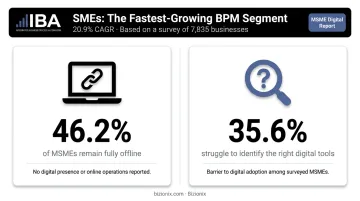
BPM adoption is no longer limited to large enterprises. Fortune Business Insights reports that while large enterprises hold 52.28% of the BPM market, SMEs are the fastest-growing segment at a 20.9% CAGR — driven by affordable cloud-based and low-code platforms that remove the need for heavy IT investment upfront.
For Indian MSMEs specifically, the context is sharp. The India SME Forum's 2025 META Report, which surveyed 7,835 MSMEs, found that 46.2% remain fully offline, and 35.6% find it difficult to identify the right digital tools. That makes tool selection less about features and more about fit — which is exactly what this guide breaks down.
Top BPM Software Tools: Complete Comparison
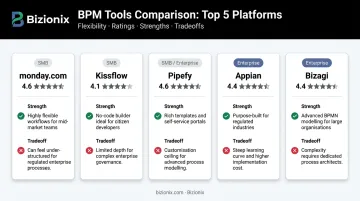
Choosing the right BPM tool depends on your team size, technical capacity, and how complex your processes actually are. These five tools were shortlisted based on market presence, feature depth, Capterra user ratings, and fit across different business sizes.
monday.com
monday.com positions itself as an AI work platform and flexible Work OS used across industries — from operations and product teams to HR and finance. Its strength is in customisation, not deep process modelling.
Why it stands out: No-code automation with if-this-then-that logic, over 27 ways to visualise work (Kanban, Gantt, Calendar, and more), 200+ integrations, and the ability to pull data from multiple boards into unified dashboards.
| Attribute | Details |
|---|---|
| Key Features | No-code automation, 200+ integrations, custom dashboards, OKR tracking, resource management |
| Best For | Mid-sized to enterprise teams managing multi-step cross-functional processes and approvals |
| Pricing | Free plan (up to 2 seats); paid plans from USD $9/seat/month billed annually |
| Capterra Rating | 4.6/5 from 6,035 reviews |
Kissflow
Kissflow is a no-code/low-code workflow and process management platform built for citizen developers — business users who need to automate processes without depending on IT.
Why it stands out: Strong at digitising HR, procurement, and IT workflows quickly; visual process builders; active user community. User-reported concerns include pricing that scales steeply with team size and limited customisation for complex requirements.
| Attribute | Details |
|---|---|
| Key Features | No-code workflow builder, citizen developer support, API integrations, pre-built templates, team collaboration tools |
| Best For | Non-technical teams and mid-sized businesses digitising repetitive departmental workflows quickly |
| Pricing | Plans start from approximately USD $1,500/month; contact vendor for confirmed pricing |
| Capterra Rating | 4.2/5 from 87 reviews |
Pipefy
Pipefy is an AI-enhanced workflow management platform that automates and standardises processes across finance, HR, procurement, and customer service.
Why it stands out: Pre-built workflow templates for common use cases like onboarding and procurement, service portal creation, and solid collaboration between IT and business teams. Users report bugs and per-user cost concerns.
| Attribute | Details |
|---|---|
| Key Features | Pre-built workflow templates, service portals, low-code automation, customisable dashboards, Slack and email integrations |
| Best For | IT and business teams needing structured process standardisation with external-facing service portals |
| Pricing | Starter plan free (up to 10 users); Business and Enterprise plans priced on request |
| Capterra Rating | 4.6/5 from 321 reviews |
Appian
For organisations in regulated industries or those needing rapid enterprise application development, the next two tools operate at a different level of depth and complexity.
Appian is a low-code enterprise BPM platform combining process automation with AI-powered features. It targets large organisations in financial services, healthcare, government, and insurance.
Why it stands out: Rapid application development through its low-code Composer, AI integration for predictive automation, and support for highly regulated industries. Appian is a recognised Leader in both the Forrester Wave: Digital Process Automation Software, Q3 2025 and the 2025 Gartner Magic Quadrant for Business Orchestration and Automation Technologies. Pricing sits on the higher end — less suited for smaller businesses.
| Attribute | Details |
|---|---|
| Key Features | Low-code application development, AI/ML integration, advanced process orchestration, audit trails, enterprise-grade security |
| Best For | Large enterprises in regulated industries needing fast application development with embedded compliance controls |
| Pricing | Standard, Advanced, and Premium tiers available; pricing on request; Community Edition free |
| Capterra Rating | 4.2/5 from 75 reviews |
Bizagi
Bizagi is an AI and low-code BPM suite combining process modelling, simulation, process mining, and end-to-end automation in a single platform — used primarily by medium to large enterprises.
Why it stands out: Strong support for reusable forms and rules (build-once, apply-across), deep customisation via JavaScript and plugins, and pre-built integration connectors. Users have flagged modeller connection issues and BPMN version management complexity as friction points. Note that Bizagi does not offer platform trial licences; users can explore the free Bizagi Modeler for process mapping.
| Attribute | Details |
|---|---|
| Key Features | BPMN-based process modelling, process simulation, process mining, reusable rules and forms, pre-built integration connectors |
| Best For | Organisations needing advanced workflow modelling, process simulation, and customisable cross-department automation |
| Pricing | Pricing on request; free Bizagi Modeler available for process mapping |
| Capterra Rating | 4.4/5 from 142 reviews |
Each tool above covers a distinct part of the BPM spectrum — from no-code tools suited to non-technical teams to enterprise platforms built for regulated industries. The right fit depends on your process complexity, team size, and how much customisation your workflows actually need.
Key Features to Look for in BPM Software
Not all BPM features matter equally for every business. Here's a structured way to evaluate what actually counts.
Functional Non-Negotiables
- Visual workflow builder: Drag-and-drop interface with BPMN support for mapping processes without developer involvement
- Automation rules: Trigger-based logic for task assignment, approval routing, and status updates
- Integration depth: Native connectors to your CRM, ERP, communication platforms, and finance tools
Operational Criteria
- Real-time dashboards: KPI visibility and bottleneck identification without waiting for month-end reports
- Role-based access controls: Clear permissions for who can view, edit, or approve each process step
- Scalability: Can the platform handle growth from 10 to 500 users without a forced migration?
Business-Fit Criteria
- Ease of adoption: No-code/low-code interfaces that non-technical users can actually operate
- Support quality: Responsive onboarding and ongoing assistance — for Indian MSMEs, same-day resolution matters more than overnight ticket queues
- Total cost of ownership: Factor in implementation, training, per-user pricing, and integration costs — not just the headline subscription rate
Once you've mapped these criteria against your actual workflows, the cost picture often shifts — especially for Indian MSMEs where affordability and compliance readiness carry equal weight.
For businesses at this stage, Bizionix combines process controls with GST compliance, e-invoicing, procurement approvals, and inventory management in a single platform — removing the overhead of stitching together separate tools. The NEO plan starts at ₹999 per year (entry-level), making it accessible for businesses formalising their operations for the first time.
How We Chose the Best BPM Tools
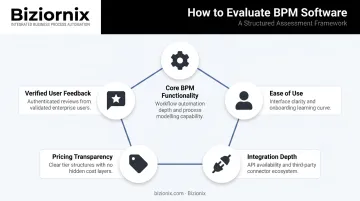
Each tool in this guide was assessed across five dimensions:
- Core BPM functionality — process modelling, automation, and monitoring capabilities
- Ease of use — accessibility for business users, not just developers
- Integration depth — breadth of native connectors and API support
- Pricing transparency — clarity of pricing structure, not just listed tiers
- Verified user feedback — ratings and review themes from Capterra
Key Evaluation Tradeoffs
| Tool | Strength | Tradeoff |
|---|---|---|
| Appian | Deep functionality, analyst-recognised | Higher cost, steeper learning curve |
| Bizagi | Advanced modelling and simulation | Mac OS limitations, complex versioning |
| Kissflow | Quick setup, citizen developer focus | Pricing ambiguity, limited customisation at scale |
| Pipefy | Templates and service portals | Per-user cost, occasional bugs |
| monday.com | Flexibility and ease of use | Not a pure BPM suite |
One common mistake businesses make: choosing tools based on feature lists alone without testing adoption fit or checking whether the platform covers real workflows. A tool with 200 features your team ignores is still a cost centre — just a more expensive one.
For businesses needing operational breadth beyond process mapping — think finance, compliance, and inventory — an integrated ERP platform deserves a place on the shortlist alongside standalone BPM tools, particularly when consolidating fragmented systems is a priority.
Conclusion
Choosing BPM software comes down to fit — your organisation's scale, technical capacity, process complexity, and budget matter more than feature counts or brand recognition. Trial 2–3 shortlisted tools before committing — most offer free tiers or trial periods specifically for this reason.
For growing Indian businesses that need more than a standalone BPM tool, Bizionix offers a cloud ERP built specifically for MSMEs. It combines GST-compliant accounting, multi-location inventory, procurement workflows, HRMS, and document approvals in one unified system — backed by over two decades of industry experience and a Hyderabad-based support team.
Contact the team for a demo: info@bizionix.com or +91 91779 99277.
Frequently Asked Questions
What is BPM software and how is it different from project management software?
BPM software designs, automates, and continuously optimises repeatable processes — like purchase approvals, employee onboarding, or invoice workflows. Project management software handles one-time initiatives with defined timelines. There's overlap, but BPM is process-centric; project management is initiative-centric.
What is the difference between BPM software and ERP software?
BPM tools specialise in workflow design and process automation. ERP systems integrate multiple business functions — finance, inventory, HR, compliance — into one platform. Modern ERP platforms like Bizionix include built-in workflow automation, which can reduce or eliminate the need for a separate BPM tool.
Which BPM software is best for small and mid-sized businesses?
SMBs typically benefit most from no-code/low-code platforms with transparent pricing and quick setup. Kissflow, Pipefy, and monday.com are commonly recommended for SMB suitability. Growing businesses in India with broader operational needs may find an integrated ERP more cost-effective than stitching together separate BPM, accounting, and compliance tools.
What features should I prioritise when evaluating BPM software?
Key features to evaluate:
- Visual workflow builder and automation rules
- Integration with your existing tools
- Role-based access controls and real-time dashboards
- Scalability as your processes grow
Weight ease of adoption heavily — a tool teams resist using delivers no value regardless of its feature set.
How long does it typically take to implement BPM software?
Simple no-code tools can be configured and running within days; enterprise platforms with complex integrations often require weeks to months. Training and change management typically take longer than the technical setup itself.
Is BPM software worth the investment for a growing business?
Generally, yes. BPM tools deliver ROI by cutting manual errors, removing bottlenecks, and giving teams real-time visibility into operations. The key is choosing a tool proportionate to your actual business complexity — not simply the most feature-rich option available.