This is the daily reality for a significant share of Indian businesses. The India SME Forum's 2025 study of 7,835 MSMEs found that 95.4% of digitised MSMEs still rely on email for coordination, while WhatsApp serves as the de facto approval system for thousands more. Email and chat are communication tools — not workflow systems. They don't enforce dependencies, log decisions, or escalate stalled approvals automatically.
Workflow management system software fixes exactly that. It turns informal coordination into structured, trackable, and often automated sequences — so work moves reliably from one step to the next, with full visibility at every stage.
This guide covers what workflow management software actually is, compares five leading tools (monday.com, ClickUp, Smartsheet, Wrike, and Bizionix), and gives Indian MSMEs a practical framework for choosing the right fit.
Key Takeaways
- Workflow management software automates and tracks business processes, replacing manual follow-ups with rule-based flows
- The best tools differ by use case: some excel at visual task tracking, others at deep integrations, and others are purpose-built for compliance-heavy operations
- Indian MSMEs should prioritise tools with GST compliance, local support, and unified operations
- Key selection criteria: ease of use, automation depth, integration capabilities, scalability, and TCO
- Tools compared: monday.com, ClickUp, Smartsheet, Wrike, and Bizionix
What Is a Workflow Management System?
NIST defines a workflow management system as a computerised system that schedules and synchronises tasks within a workflow according to specified task dependencies. That definition draws a clear line between a shared to-do list and an actual workflow system: the core capability is rule-based movement of work across steps, owners, and dependencies — not just tracking what needs to be done.
Two Types of Workflows Most Businesses Need
Modern workflow tools handle two distinct workflow categories:
- Human task-centric workflows — approvals, reviews, escalations, sign-offs that require a person to act at each stage
- Automated workflows — data routing, triggered notifications, system integrations that execute without manual intervention
Most growing businesses need both. A purchase approval requires a human decision; routing that approved PO to accounting and generating a compliant invoice can be fully automated.
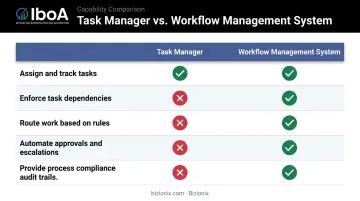
Workflow Management vs. Task Management
The distinction matters when you're buying software:
| Capability | Task Manager | Workflow Management System |
|---|---|---|
| Assign and track tasks | ✅ | ✅ |
| Enforce task dependencies | ❌ | ✅ |
| Route work based on rules | ❌ | ✅ |
| Automate approvals and escalations | ❌ | ✅ |
| Provide process compliance audit trails | ❌ | ✅ |
Workflow management software is also increasingly embedded inside broader platforms — including ERP suites, project management tools, and work management platforms. When evaluating options, focus on automation depth: how far can the system carry a task (a vendor invoice, a leave request, a sales order) from trigger to completion without manual hand-holding?
Top Workflow Management System Software: Best Tools Compared
These five tools were selected based on feature depth, automation capabilities, usability for non-technical teams, integration breadth, pricing transparency, and fit across different business sizes and industries. Each entry below covers what the tool does well, where it falls short, and who it's built for.
monday.com
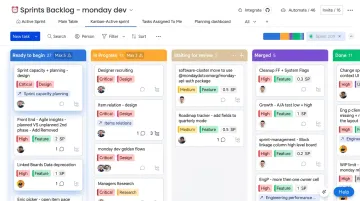
monday.com is a US-based Work OS platform used across industries globally, built around a visual, board-based interface. Its workflow management capability comes through customisable boards, automation recipes, and cross-department dashboards.
The standout feature for non-technical teams is its no-code automation recipes — point-and-click triggers, conditions, and actions that handle status updates, task assignments, and approval notifications without any coding. With 850+ integrations and apps, it connects to most tools already in use.
| Key Features | Visual boards (Kanban, Gantt, calendar), automation recipes, dashboard reporting, time tracking, 200+ app integrations |
| Best For | Mid to large teams managing multi-department workflows and deadlines |
| Automation Limits | 250 actions/month on Standard; 25,000/month on Pro; up to 250,000/month on Enterprise |
| Pricing | Free plan available; Basic $9/seat/month; Standard $12/seat/month; Pro $19/seat/month (billed annually); Enterprise custom |
| Capterra Rating | 4.6/5 from 6,035 reviews |
Worth noting: Automation depth increases meaningfully at Standard and above. Buyers should model their automation usage against the action quotas before committing to a plan.
ClickUp
ClickUp consolidates tasks, documents, whiteboards, goals, and workflow automation into a single workspace — designed for teams that want to reduce the number of tools they manage.
Its hierarchical workspace structure (Workspaces → Spaces → Folders → Lists → Tasks) lets businesses mirror their actual org structure within the platform. The built-in ClickUp Brain AI assistant adds automated task generation, workload summaries, and natural language search across the workspace.
| Key Features | Task management, collaborative docs, whiteboards, sprint management, AI assistant (Brain), custom workflow automation, built-in screen recording |
| Best For | Teams wanting to consolidate project management, documentation, and workflow automation into one platform |
| Pricing | Free Forever; Unlimited $7/user/month; Business $12/user/month (billed annually); Enterprise custom |
| AI Add-on | ClickUp Brain available on all paid plans at $9/Workspace member/month |
| Capterra Rating | 4.6/5 from 4,581 reviews |
Worth noting: The low entry price is attractive, but feature breadth can increase setup complexity. Brain AI is an additional charge on top of the base plan.
Smartsheet
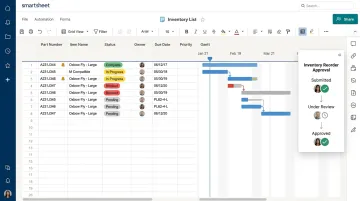
Smartsheet takes a spreadsheet-first approach — the interface looks and feels like Excel or Google Sheets, but adds conditional logic, approval routing, automated notifications, and real-time reporting underneath.
Its particular strength is cross-sheet automation: automatically sending approval requests, logging status changes, and generating PDF summaries when a row or task reaches a defined state — all without code. The WorkApps builder lets enterprise teams create no-code web and mobile apps from their sheets.
| Key Features | Grid/spreadsheet view, conditional logic automations, approval request routing, Gantt and calendar views, cross-sheet reporting, WorkApps builder |
| Best For | Operations and project teams that want spreadsheet-style familiarity with enterprise-grade workflow automation |
| Pricing | Pro $9/member/month; Business $19/member/month (billed annually); Enterprise and Advanced Work Management custom |
| Free Plan | No longer available to new signups as of August 28, 2024 |
| Capterra Rating | 4.5/5 from 3,505 reviews |
Worth noting: WorkApps and advanced workflow features are reserved for Enterprise and higher tiers. Teams that need these capabilities from the start should budget accordingly.
Wrike
Wrike is a cloud-based workflow platform built for enterprise and mid-market teams managing complex, multi-layered operations across departments.
Two features set it apart for high-volume teams. Blueprints are reusable workflow templates for recurring processes — create the template once, deploy it repeatedly without rebuilding from scratch. Dynamic request forms adapt their questions based on submitted answers, then auto-populate and route tasks to the right owners, reducing intake time at scale.
| Key Features | Custom workflow statuses, Blueprints (reusable templates), AI-powered task summaries, Gantt charts, resource planning, dynamic request forms, real-time Stream view |
| Best For | Enterprise and large teams managing complex, multi-layered workflows across siloed departments |
| Pricing | Free $0; Team $10/user/month; Business $25/user/month; Pinnacle and Apex custom (from January 2026) |
| Key Features Locked | Blueprints and dynamic request forms require Business plan or above |
| Capterra Rating | 4.4/5 from 2,988 reviews |
Worth noting: The most powerful workflow features — Blueprints and dynamic forms — only unlock at Business ($25/user/month). Teams on Team plans will find workflow automation limited.
Bizionix
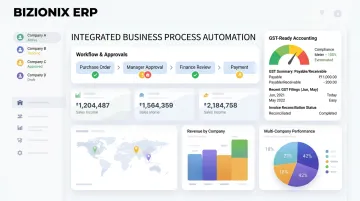
Bizionix, developed by IIS-LLP (a subsidiary of Protocol India Private Limited with over two decades of industry experience), is a 100% cloud-based ERP built specifically for Indian MSMEs. Where the tools above are standalone workflow platforms, Bizionix embeds workflow management inside a unified business system covering accounting, inventory, GST compliance, HR, and operations — all accessible through a single secure login.
The real differentiator for Indian businesses is compliance-integrated workflows. Approval workflows, purchase orders, and invoicing flows are natively linked to GST-ready accounting, with direct API integration to the Invoice Registration Portal for instant IRN generation. Businesses don't need to stitch together a separate workflow tool with accounting software and then manage GST compliance on top — everything runs from one system.
Additional capabilities include:
- Full traceability across every workflow step — who acted, when, and why — through built-in accountability logs
- Manages multiple companies from a single login, with independent books and entity-level permissions
- Configurable role-based access at department and entity level (view, edit, or admin)
- GSTR-1 auto-population with pre-validated invoice formats to prevent rejection errors
| Key Features | Unified workflow management across departments, GST-ready accounting with automated e-invoicing, multi-company management from a single login, real-time operational visibility, configurable approval workflows, activity tracking and accountability logs |
| Best For | Indian MSMEs, manufacturing units, distribution businesses, and multi-location enterprises needing integrated workflow management with built-in compliance |
| Pricing | NEO plan at ₹999/year (14-day free trial included); Enterprise plan — contact Bizionix directly for pricing tailored to your business size and module requirements |
Worth noting: For Indian MSMEs whose businesses touch GST e-invoicing thresholds (aggregate turnover between ₹5 crore and ₹10 crore must comply with e-invoicing requirements under Notification 10/2023 - Central Tax), a workflow tool that doesn't connect to accounting and compliance creates ongoing manual overhead.
How to Choose the Right Workflow Management Software
Feature lists rarely determine whether a tool succeeds in practice. The criteria below focus on what actually drives adoption, performance, and long-term fit.
What the Evaluation Covered
- Core functionality — task tracking, automation depth, approval routing, and collaboration
- Usability for non-technical users — whether a business owner or operations manager can configure workflows without IT
- Integration ecosystem — how well the tool connects to software already in use
- Pricing transparency — what's actually included at each tier vs. locked behind add-ons
- Scalability — whether the tool grows with the business without dramatic cost jumps
- Local compliance fit — critical for Indian businesses where GST workflows affect daily operations
Three Mistakes Buyers Commonly Make
- Choosing on brand recognition — a globally popular tool may not account for India-specific compliance needs or local support availability
- Underestimating total cost — per-user pricing, automation quotas, AI add-ons, and premium modules stack up quickly; model a 12–24 month cost, not just the entry price
- Skipping process mapping — buying software before documenting which recurring workflows are causing the most delay leads to mismatched purchases
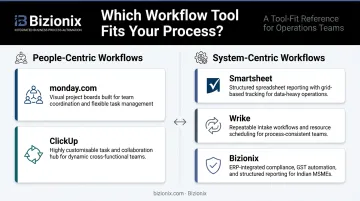
Match the Tool to Your Workflow Type
Before evaluating any software, identify whether your primary need is:
- People-centric workflows — approvals, task routing, team coordination, escalations
- System-centric workflows — integrating data across multiple platforms, automated triggers, compliance-linked processes
Each tool has a natural home:
- monday.com / ClickUp — people-centric coordination at scale
- Smartsheet — operations teams comfortable with spreadsheet-style reporting
- Wrike — structured, repeatable intake processes
- Bizionix — when workflow management needs to work within GST compliance, accounting, and inventory rather than alongside them
Conclusion
Workflow management software has moved from "nice to have" to operational necessity for growing businesses. The right tool keeps tasks moving, maintains accountability, and supports better decisions — provided it actually fits your team's size, process complexity, and compliance requirements.
For Indian MSMEs evaluating options, the key questions are: Does this tool handle the workflows that are actually causing delays? Does the pricing stay manageable as the team grows? And critically — does it account for GST compliance, or does that remain a separate problem?
If those questions are pointing you toward a single integrated platform — one that connects approvals, invoicing, and compliance in one place — explore Bizionix and see how a unified ERP approach can replace the disconnected tools your team may currently be juggling.
Frequently Asked Questions
What is workflow management system software?
Workflow management system software automates, tracks, and manages predefined sequences of business tasks by replacing manual handoffs with structured, rule-based flows. It routes work between people or systems based on defined conditions, enforces process compliance, and flags anything that stalls between steps.
Can ChatGPT create workflows for a workflow management system?
ChatGPT can help draft workflow logic, suggest process steps, or describe automation rules in plain language. It cannot directly build or deploy workflows inside a workflow management system — that still requires configuring the actual software. Some platforms now use built-in AI assistants to turn text prompts into functional workflow templates.
What is the difference between workflow management software and project management software?
Project management software focuses on planning, scheduling, and tracking one-time or time-bound projects. Workflow management software is designed for repeatable, process-driven operations — like approval chains, invoice routing, or onboarding flows — that run continuously and require structured automation rather than one-off planning.
How much does workflow management system software cost?
Public paid plans start at $7/user/month (ClickUp), $9/seat/month (monday.com), $9/member/month (Smartsheet), and $10/user/month (Wrike) — these are USD prices billed by international vendors. ERP-integrated solutions like Bizionix use flat-fee annual pricing starting at ₹999/year. Indian MSMEs should also factor in implementation, training, and compliance-related costs when comparing options.
What features should I look for in workflow management software for a small business?
The most important features for small businesses:
- No-code automation for common recurring tasks
- Easy setup without heavy IT involvement
- Integration with existing tools (email, accounting software)
- Role-based access control for team permissions
- Pricing that stays predictable as headcount grows
Is cloud-based workflow management software safe for business data?
Established cloud platforms use encryption, role-based access controls, and audit logs to protect business data. When evaluating vendors, ask for ISO 27001 or SOC 2 compliance documentation. For Indian businesses specifically, check whether the vendor offers local support and whether their data practices align with India's Digital Personal Data Protection (DPDP) Act requirements.