Free workflow software solves this without budget pressure. The catch? "Free" means very different things across tools — some cap users at 2, others at 10, and some have no cap at all. This guide covers 7 genuinely free options, with accurate plan limits so you can choose without surprises.
Key Takeaways
- Free workflow software handles task assignment, progress tracking, and team collaboration at zero cost
- The 7 tools covered: Trello, Asana, ClickUp, Notion, Monday.com, Jira, and Zoho Projects
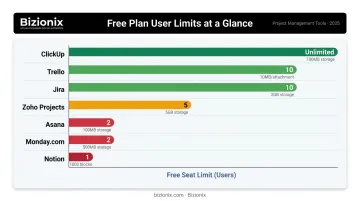
- ClickUp and Jira offer the most generous free plans — unlimited members and 10 users respectively
- Check user caps before onboarding — Asana and Monday.com both limit free plans to just 2 members
- Teams managing tasks plus billing, inventory, and GST compliance will eventually need more than any standalone tool
What Is Free Workflow Management Software?
Workflow management software maps repeatable processes, assigns ownership to each step, tracks progress in real time, and moves work forward without constant manual nudging. As IBM defines it, a workflow is a sequence of tasks or activities that moves work from initiation to completion — and the software coordinates that movement across people and systems.
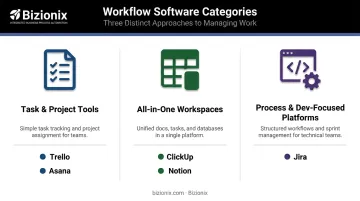
These tools generally fall into three categories:
- Task/project tools — Trello, Asana (manage individual tasks and projects)
- All-in-one workspaces — ClickUp, Notion (combine docs, tasks, and databases)
- Process/dev-focused platforms — Jira (structured workflows for technical teams)
Worth clarifying upfront: a perpetual free plan is not the same as a free trial. Asana calls its free tier "Free forever," ClickUp calls theirs "Free Forever," and Jira lists "Free forever for 10 users." Zoho Projects, by contrast, separately advertises paid-plan trials. Verify which type you're getting before committing your team.
7 Best Free Workflow Software Tools for Teams in 2025
These tools were selected based on free plan generosity, real collaboration capabilities, ease of setup, and practical usability for small to mid-sized teams.
Trello
Trello's Kanban board system is one of the most immediately usable workflow formats available — boards, lists, and cards give any team a visual overview of work in minutes, with no training needed.
| Detail | Info |
|---|---|
| Best For | Small teams, marketing, content pipelines, visual task tracking |
| Free Plan Limits | Up to 10 collaborators per Workspace, 10 boards, 10 MB/file |
| Key Features | Kanban boards, 250 automation runs/month, unlimited Power-Ups, iOS/Android apps |
The free plan includes automation (Butler) with 250 Workspace command runs per month — enough for basic repetitive actions like moving cards, assigning labels, and triggering due date reminders. Unlimited Power-Ups connect Trello to Slack, Google Drive, and 200+ other apps.
The main constraint: the 10-collaborator cap per Workspace. Any team beyond that headcount hits a hard wall at the free tier.
Asana
Asana brings more structure than Trello — think task hierarchies, assignees, due dates, and project templates. It's well-suited for operations, HR, and marketing teams that need clear ownership and sequencing.
| Detail | Info |
|---|---|
| Best For | Operations, HR, marketing teams needing structured task management |
| Free Plan Limits | Up to 2 users, unlimited tasks and projects, 100 MB/file |
| Key Features | List, board, and calendar views, 100+ integrations, unlimited storage |
Critical note: Asana's Personal plan currently supports only 2 users — not 10 as older sources suggest. Task dependencies and timeline/Gantt views require a paid upgrade. For solo operators or two-person teams, it's a clean, polished option. Anything larger runs straight into the seat cap.
ClickUp
ClickUp's free plan is the most generous among the tools on this list for team size — unlimited members, unlimited tasks, and multiple views including Kanban, Calendar, and Sprint boards, all at no cost.
| Detail | Info |
|---|---|
| Best For | Cross-functional teams, startups, teams managing multiple workstreams |
| Free Plan Limits | Unlimited users and tasks, 60 MB storage, limited advanced reporting |
| Key Features | Custom statuses, multiple views, recurring tasks, ClickUp Docs, time tracking (100 uses) |
Recurring tasks work on all plans, which matters for teams with weekly or monthly routine work. Threaded comments keep feedback attached to tasks rather than buried in email. The storage cap (60 MB) is tight — teams sharing files regularly will hit it quickly and should use external file storage like Google Drive alongside ClickUp.
Teams that primarily manage tasks and communication (rather than heavy file sharing) will get the most out of the free tier.
Notion
Notion blends documentation and workflow tracking into a single workspace. One page can contain a task database, a Kanban board, a project calendar, and meeting notes, all linked together.
| Detail | Info |
|---|---|
| Best For | Creative teams, knowledge workers, teams needing docs + workflows in one place |
| Free Plan Limits | Unlimited pages/blocks for individuals; block-limited for 2+ member workspaces; 5 MB/file |
| Key Features | Pages and databases, Kanban/table/calendar/timeline views, real-time collaboration, templates |
The block limitation for multi-member workspaces is the key caveat. Notion Free works well for solo users or very small teams building lightweight wikis and content trackers. As a full team workflow system, the block cap becomes restrictive faster than expected — especially for teams adding meeting notes, SOPs, and task databases in the same workspace.
Notion AI is available as a limited trial on the free plan. Advanced features require Business or Enterprise tier.
Monday.com
Monday.com's free plan is best understood as a hands-on preview of a premium product, not a fully functional team workspace. The interface is polished, the template library covers 200+ use cases, and the column-based board system is easy to navigate from day one.
| Detail | Info |
|---|---|
| Best For | Teams evaluating enterprise-grade workflow tools before committing to a paid plan |
| Free Plan Limits | 2 seats only, 3 boards, 200 items, 500 MB storage |
| Key Features | Visual boards, multiple column types, 200+ templates, mobile app |
No automations. No integrations. These are locked behind paid tiers, which significantly limits Monday.com Free for any team trying to run actual recurring workflows. The 2-seat cap makes it suitable for founders or two-person teams — and a reasonable starting point if the goal is evaluating the platform before committing to a paid plan.
Jira
Jira started as a developer issue tracker and has evolved into a structured workflow platform used by software, IT, product, and operations teams. Its free plan is one of the strongest on this list for technical teams.
| Detail | Info |
|---|---|
| Best For | Software, IT, and product teams using Agile or Scrum frameworks |
| Free Plan Limits | Up to 10 users, 2 GB storage, 100 automation rule runs/month |
| Key Features | Custom workflows, Scrum/Kanban boards, backlog management, board/timeline/calendar views, dashboards |
The 100 automation rule runs per month is meaningful — enough for small sprint-based teams to automate status transitions and assignment routing without paying. Unlimited goals, projects, tasks, and forms are all included.
One real limitation: on the free plan, everyone with Jira access is effectively a site admin, and external collaboration is restricted. Teams that need permission controls or guest access will need to upgrade. For Indian software teams and IT service firms already working in Agile cycles, Jira Free covers the fundamentals without cost.
Zoho Projects
Zoho Projects is the most relevant free option for Indian MSMEs already using Zoho's product suite. Its free plan supports 5 users and 3 projects — a meaningful jump from older plan limits that circulate online.
| Detail | Info |
|---|---|
| Best For | Indian MSMEs, Zoho ecosystem users, small businesses managing simple workflows |
| Free Plan Limits | Up to 5 users, 3 projects, 5 GB storage |
| Key Features | Task management, milestones, Gantt charts, file sharing, task dependencies, Zoho CRM integration |
The native connection to Zoho CRM, Zoho Books, and Zoho People makes this practical for businesses already operating within the Zoho ecosystem. Rather than switching vendors, teams can add project tracking to an environment they already know. Gantt charts and task dependencies are available on the free tier — features that competitors typically lock behind paid plans.
For businesses not already using Zoho, the 3-project cap limits its usefulness for teams juggling multiple ongoing workstreams.
How to Choose the Right Tool (and When Free Isn't Enough)
Selecting Based on What Actually Matters
Most teams pick workflow tools based on brand recognition rather than whether the free plan covers their actual needs. That's where problems start — a team of 8 people choosing Asana discovers a 2-user cap only after onboarding.
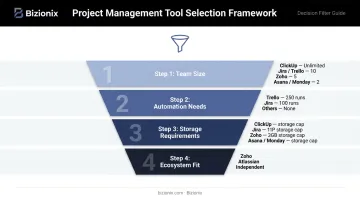
Use this framework to choose:
- Team size first — ClickUp (unlimited), Jira and Trello (10 users), Zoho Projects (5 users), Asana and Monday.com (2 users)
- Automation needs second — Trello (250 runs), Jira (100 runs/month), Monday.com and Asana (none on free tier)
- Storage requirements third — ClickUp (60 MB), Notion (5 MB/file), Monday.com (500 MB), Jira (2 GB), Zoho (5 GB)
- Ecosystem fit fourth — Zoho Projects for Zoho users; Jira for Atlassian shops; ClickUp or Notion for independent setups
According to Capterra's 2025 Project Management Software Trends Survey of 2,545 global respondents, security was the top priority for 71% of buyers and AI functionality triggered new software purchases for 55%. Free tiers rarely address either well — AI features are consistently locked behind paywalls, and permission controls are typically restricted on free plans.
When Standalone Workflow Tools Stop Being Enough
That framework helps you pick the right free tool — but it assumes tasks are the whole problem. For many growing teams, they're not.
Free workflow tools manage tasks well. Connecting those tasks to the rest of the business is a different challenge entirely.
A purchase approval workflow in Trello doesn't know whether inventory is low. A project tracker in Notion doesn't update your GST records when an invoice is raised. When an operations team closes a sales order, someone still has to manually update the accounts.
As teams grow, the manual handoffs multiply. A RIS report on MSME digitalisation found that while over 95% of surveyed Indian MSMEs use at least one digital product, only 14% use cloud computing and just 12% use ERP. Most businesses are running on disconnected tools — and the friction compounds with every new hire and every new process.
For Indian MSMEs juggling billing, inventory, GST compliance, and multi-department coordination on top of task management, Bizionix addresses this directly. It connects workflow approval chains, GST e-invoicing, inventory tracking, and financial reporting in one platform: a sales order automatically updates stock levels, triggers an invoice, and populates GSTR-1 without manual handoffs.
The entry-level NEO plan starts at ₹999/year, with a 14-day free trial available before committing.
Conclusion
The right free workflow tool depends on your team size and what you actually need to manage:
- Trello — visual simplicity, 10 users, great for task boards
- Asana — structured task logic, 2 users only on free
- ClickUp — most generous free plan, unlimited members
- Notion — documentation + lightweight workflows, individual-focused
- Monday.com — best interface preview, 2 seats, no automations free
- Jira — strongest free option for agile/dev teams, 10 users
- Zoho Projects — best fit for Indian MSMEs in the Zoho ecosystem, 5 users
Start with the tool that matches your team size and primary need. Most have no setup cost and take under an hour to configure, so running two tools in parallel for a week is a practical way to find what sticks before committing.
For teams that find themselves managing invoices, inventory approvals, and compliance alongside task tracking — where no single free tool covers the full picture — take a look at Bizionix, a GST-compliant cloud ERP built for Indian MSMEs that brings finance, inventory, HR, and operations into a single system.
Frequently Asked Questions
What is the best free workflow management software?
It depends on team size. ClickUp offers the most generous free plan for teams with unlimited members. Trello works best for small visual task tracking. Jira is the strongest option for technical and agile teams. Zoho Projects is the most practical choice for Indian businesses already using Zoho tools.
What features should I look for in free workflow software?
Prioritise task assignment, due dates, real-time collaboration, and at least one automation option. Free plans most commonly restrict user seats and automation runs — check both limits before onboarding your team.
Can free workflow software handle team collaboration effectively?
Most free tools support comments, file sharing, and real-time updates — making them effective for small teams. Teams of 10+ users will often hit seat limits; ClickUp and Jira are the only free options that realistically support larger groups.
What is the difference between workflow software and project management software?
Project management tools focus on one-time projects with defined start and end dates. Workflow software manages repeatable, ongoing processes. Most modern tools blend both — the distinction is less about the tool and more about how you configure it.
How many users can typically use free workflow software?
ClickUp supports unlimited users, Jira and Trello support up to 10, Zoho Projects supports 5, while Asana and Monday.com cap free users at 2. Start with user count — it eliminates most options immediately.
When should a team upgrade from free to paid workflow software?
Upgrade when automation limits slow repetitive work, when you've outgrown user seats, or when your workflows need to connect with systems like accounting, inventory, or GST compliance — at that point, a standalone free tool is no longer enough.