The root cause isn't talent — it's documentation. When processes live in people's heads, scattered spreadsheets, and WhatsApp threads, every departure becomes a knowledge leak. Every new hire starts from scratch. Every department runs slightly differently.
Business process documentation software fixes this by converting how your business actually operates into structured, searchable, repeatable workflows. For Indian MSMEs scaling across departments, this matters even more. A June 2025 Economic Times survey found that 73% of semi-urban and rural MSMEs reported higher income or improved efficiency through digital adoption — yet accounting software penetration sat at just 30%, and CRM adoption at 13%. Process documentation is the next step in that journey.
This guide reviews the top tools available in 2025 and helps you choose the right one.
Key Takeaways
- Process documentation software turns in-house knowledge into structured, searchable workflows teams can follow consistently
- Faster onboarding, fewer errors, better compliance, and less dependency on any single person are the core payoffs
- Tool choice depends on team size, workflow complexity, and whether you need documentation, execution, or both
- Top tools in 2025 include Scribe, Confluence, Process Street, Tango, and Notion — each suited to different use cases
- Indian MSMEs needing execution (not just documentation) can find it built into Bizionix's unified ERP across accounting, inventory, sales, and compliance
What Is Business Process Documentation Software?
Business process documentation software is a platform that helps organisations capture, store, organise, and share the exact steps, roles, inputs, and outputs involved in completing any repeatable business task. In short, it takes the "how we do things here" that lives in people's heads and turns it into something structured, searchable, and repeatable.
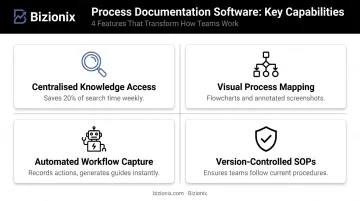
What separates these tools from a shared Google Drive folder comes down to four capabilities:
- Centralised knowledge access — all procedures live in one searchable location, eliminating the 20% of the workweek McKinsey found knowledge workers spend searching for information
- Visual process mapping — flowcharts, decision trees, and annotated screenshots make complex workflows understandable at a glance
- Automated workflow capture — tools like Scribe and Tango record your actions as you work, generating documentation without manual writing
- Version-controlled SOPs with approvals — when a process changes, version control ensures no one is following an outdated procedure
APQC benchmarks show the median new hire reaches full productivity in 35 days. The fastest organisations cut that to 25 days or fewer — largely because their onboarding runs on documented, structured processes rather than ad hoc training.
The rest of this guide breaks down which tools deliver these capabilities best — and how to match them to your team's specific needs.
Top Business Process Documentation Software & Tools in 2025
These tools were shortlisted based on ease of adoption, documentation depth, collaboration features, integration capabilities, and value for growing businesses. Each entry covers key features, ideal use cases, G2 ratings, and current pricing to help you compare quickly.
Scribe
Scribe is an AI-powered documentation tool that automatically generates step-by-step visual guides with annotated screenshots as you perform a process — no writing from scratch required. Its browser extension captures every click and keystroke silently in the background, producing a formatted guide in minutes. Operations, HR, IT, and sales teams use it to document repetitive workflows like software walkthroughs and employee onboarding without needing a dedicated technical writer.
A notable security feature: Smart Blur automatically redacts sensitive information before screenshots are uploaded to Scribe's servers, making it suitable for teams handling confidential data.
| Feature | Details |
|---|---|
| Key Features | Auto-capture with annotated screenshots, AI-generated step descriptions, sensitive data redaction (Smart Blur), viewer analytics, embeddable guides |
| Best For | Operations and enablement teams that need to document and share processes quickly without writing from scratch |
| G2 Rating | 4.8/5 (826 reviews) |
| Pricing | Free (Basic); Pro Personal $25/seat/month annually; Pro Team $13/seat/month annually (5-seat minimum); Enterprise — custom |
Confluence
Confluence, by Atlassian, is an enterprise-grade collaborative wiki used across tech, marketing, finance, and operations teams. Its hierarchical page structure and department-organised "spaces" make it well-suited for large cross-functional knowledge bases. Real-time co-editing via Live Docs allows multiple stakeholders to contribute simultaneously, and its Jira integration lets teams convert Confluence content directly into tracked tasks — Atlassian reports that 76% of customers ship projects faster when using both tools together.
| Feature | Details |
|---|---|
| Key Features | Page templates, version history, departmental spaces, macros for dynamic content, inline commenting, Jira integration |
| Best For | Mid-size to enterprise teams needing a centralised knowledge base with strong collaboration and Atlassian ecosystem integration |
| G2 Rating | 4.1/5 (4,346 reviews) |
| Pricing | Free (up to 10 users); Standard $5.42/user/month; Premium $10.44/user/month; Enterprise — custom |
Process Street
Process Street bridges documentation and execution. Instead of storing SOPs as static documents, it converts them into live, trackable checklists. Every time a recurring process runs — an employee onboarding, a finance approval, a compliance audit — a new workflow instance is created with task assignments, conditional logic, and an automatic audit trail. Accountability is built directly into the process, not enforced after the fact.
| Feature | Details |
|---|---|
| Key Features | Checklist-driven workflows, conditional logic, role assignments, form fields, audit trail, scheduled workflow triggers |
| Best For | Operations and compliance teams in MSMEs running repeatable, structured processes like HR onboarding or finance approvals |
| G2 Rating | 4.6/5 (463 reviews) |
| Pricing | Startup plan (under 15 employees, under $2M revenue): 5 users included; Pro and Enterprise — pricing on request; 14-day free trial available |
Tango
Tango captures workflows as you work and converts them into screenshot-annotated guides — similar to Scribe, but with one key differentiator: its Guide Me feature delivers those guides as interactive on-screen walkthroughs inside the tools employees actually use. Users see step-by-step guidance overlaid directly within the application, with no context-switching to a separate document.
Tango also includes step-level analytics, showing not just whether a guide was viewed, but precisely where users drop off — feeding that data back to improve documentation quality over time.
| Feature | Details |
|---|---|
| Key Features | Auto workflow capture, branching logic for non-linear processes, interactive on-screen walkthroughs (Guide Me), step-level viewer analytics, export to PDF/HTML/Markdown |
| Best For | Enablement and operations teams at mid-sized companies that want to track process adoption, not just publish documentation |
| G2 Rating | 4.7/5 (499 reviews) |
| Pricing | Free (5 shared workflows, up to 10 users); Pro Personal $22/user/month annually; Pro Team $15/user/month annually; Enterprise — custom |
Notion
Notion is a flexible all-in-one workspace combining notes, databases, wikis, and task management — and its block-based editor with customisable database structure makes it highly effective for teams that want process documentation within a broader operational workspace. SOPs can embed videos, checklists, and flowcharts; related processes can be cross-linked; and databases with filters and tags keep everything organised and searchable.
With over 100 million users and 30,000+ templates in its marketplace, Notion has become the go-to for startups and growing MSMEs that want one affordable tool instead of four separate ones.
| Feature | Details |
|---|---|
| Key Features | Block-based editor with multimedia support, database functionality with filters/tags, 30,000+ templates, real-time collaboration, cross-linking between related pages |
| Best For | Startups and growing MSMEs wanting a flexible, affordable workspace combining process documentation with project and knowledge management |
| G2 Rating | 4.6/5 (11,822 reviews) |
| Pricing | Free (individuals); Plus $10/member/month; Business $20/member/month; Enterprise — custom |
Types of Business Process Documentation Tools
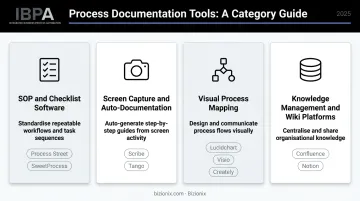
Not all process documentation tools serve the same purpose. They fall into four broad categories:
| Category | Primary Function | Examples |
|---|---|---|
| SOP & Checklist Software | Structured, recurring task execution with accountability | Process Street, SweetProcess |
| Screen Capture & Auto-Documentation | Converting workflow actions into visual guides automatically | Scribe, Tango |
| Visual Process Mapping | Flowcharts, BPMN diagrams, and process maps | Lucidchart, Creately, Visio |
| Knowledge Management & Wiki Platforms | Centralising and sharing documentation across teams | Confluence, Notion, Tettra |
Matching Tool Type to Business Need
The right category depends on your specific problem:
- A compliance-driven business needs SOP software with version control and approval workflows — Process Street fits this well
- A fast-scaling startup with no technical writers benefits most from auto-capture tools like Scribe that cut documentation time by a significant margin
- A cross-functional enterprise team sharing knowledge across departments will find wiki platforms like Confluence more manageable
- A team building process maps for new workflows needs a visual mapping tool, not a wiki
Many modern tools blend categories. Tango, for example, combines auto-capture with interactive walkthroughs and analytics. Notion covers documentation, project management, and databases in one workspace.
Some businesses outgrow standalone documentation tools entirely. When processes span finance, inventory, sales, and compliance simultaneously, maintaining documentation as a separate system creates gaps between what's written and what actually happens.
For Indian MSMEs at that stage, Bizionix takes a different approach: rather than documenting processes in a separate tool, it enforces them directly within the ERP through digital approval chains, role-based access controls, and structured workflows across every module.
How We Chose the Best Business Process Documentation Tools
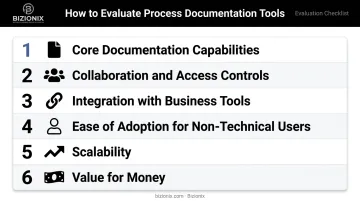
Each tool in this guide was evaluated across six criteria:
- Core documentation capabilities — can it capture, organise, share, and version-control processes effectively?
- Collaboration and access controls — does it support multiple contributors with appropriate permission levels?
- Integration with common business tools — does it connect with CRMs, HRMS, ERPs, Slack, or Google Workspace?
- Ease of adoption for non-technical users — will your team actually use it after the first week?
- Scalability — does it grow with your team without a dramatic pricing jump?
- Value for money — are pricing tiers transparent and predictable?
The Adoption Problem
The most common mistake businesses make is choosing a tool based on feature lists alone. Gartner predicts that 60% of supply-chain digital adoption efforts will fail to deliver promised value by 2028 due to insufficient learning and development investment. Documentation tools face the same risk: consistent daily use matters more than a long feature list gathering neglect.
Before committing, ask:
- Will non-technical staff find this usable without training?
- Is search functionality strong enough to retrieve a procedure quickly?
- Do pricing tiers scale without hidden costs as headcount grows?
- Does the tool require a dedicated admin to maintain it?
Pilot with one high-frequency process before rolling out organisation-wide. Real usage data from a two-week trial will tell you more than any vendor demo.
Conclusion
Choosing the right business process documentation software is an operational decision, not just a technology purchase. It determines how consistently your team executes, how quickly new hires become productive, and whether your business can scale without losing the knowledge it has accumulated.
Start with the process your team repeats most often: onboarding, a compliance workflow, or a sales handoff. Document it in whichever tool fits your size and use case, run a pilot, and measure whether execution actually improves before expanding further.
For Indian MSMEs ready to move beyond standalone documentation, Bizionix offers a unified cloud ERP built specifically for growing businesses in India. Rather than treating process documentation as a separate system, Bizionix embeds workflow discipline directly into daily operations:
- Digital approval chains and role-based access controls
- GST compliance automation and e-invoicing
- Real-time visibility across accounting, inventory, sales, and HR
Starting at ₹999/year with a 14-day free trial, it's built for MSMEs that want process standardisation and operational execution under one roof — without the complexity or cost of enterprise-grade systems.
Frequently Asked Questions
What is the best software for documenting processes?
The right tool depends on your use case. Scribe and Tango are best for auto-capturing workflows as visual guides. Process Street excels at checklist-driven SOPs with accountability tracking. Confluence suits large cross-functional knowledge bases, while Notion works well for flexible, affordable documentation in smaller teams.
What should business process documentation include?
Strong documentation should include:
- Process title, scope, and defined start/end points
- Step-by-step instructions with role assignments
- Required inputs, tools, and decision points
- Version history and approval records
Without these elements, documentation tends to go stale and gets followed inconsistently.
What are the different types of business process documentation tools?
There are four main categories:
- SOP and checklist software
- Screen capture and auto-documentation tools
- Visual process mapping tools (flowcharts, BPMN diagrams)
- Knowledge management and wiki platforms
Many modern tools blend categories — Tango, for example, combines auto-capture with interactive on-screen walkthroughs.
How does process documentation software improve team efficiency?
By converting institutional knowledge into structured, searchable guides, these tools reduce time spent on repetitive questions, shorten onboarding timelines, and free senior team members from re-explaining workflows. McKinsey found searchable knowledge records can reduce information search time by up to 35%.
What are the risks of not documenting business processes?
The main risks are:
- Knowledge loss when employees exit
- Inconsistent output quality across teams
- Compliance gaps in regulated industries
- Longer onboarding timelines
- Operational bottlenecks that are hard to diagnose without process visibility
Can process documentation software integrate with ERP or other business systems?
Most modern tools offer native integrations or API access to connect with ERPs, CRMs, and productivity suites. For businesses that want documented processes to connect directly to execution — where the same system handles accounting, inventory, and compliance — a unified ERP platform like Bizionix can eliminate the gap between documented workflows and day-to-day operations entirely, since process execution, compliance tracking, and reporting all run within a single system.