Introduction
Selecting an ERP system is expensive enough. But the decision that follows — do you adjust the system to fit your existing processes, or adapt your processes to the system? — is where Indian MSMEs quietly drain budgets and delay go-lives. That's the configuration vs. customization debate, and it's where projects most often go sideways.
The wrong choice locks your team into expensive upgrade cycles, spiraling IT costs, and a system that resists change as your business grows. The right choice gives you a platform that stays current with vendor updates and costs far less to maintain long-term.
Panorama's 2026 ERP Report found that more than a quarter of enterprise software projects run over budget, and nearly a quarter exceed their planned timelines — factors that customization consistently amplifies.
This guide breaks down both approaches with clear definitions, a direct comparison of trade-offs, and a practical decision framework built for Indian MSMEs navigating this choice.
Key Takeaways
- Configuration adjusts built-in settings, workflows, and roles — no source code required
- Customisation adds or modifies code to build functionality the system doesn't natively support
- Configuration is faster, cheaper, and easier to maintain — and won't break when you upgrade
- Customisation introduces real risks: IT dependency, upgrade breakage, and costs that routinely overrun
- For most MSMEs, configuration alone covers 80–90% of operational needs — with far less complexity to manage
ERP Configuration vs. Customisation: At a Glance
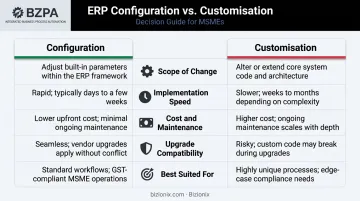
Here's how configuration and customisation compare across the five dimensions that matter most:
| Dimension | Configuration | Customisation |
|---|---|---|
| Scope of Change | Adjusts existing parameters, settings, and workflows within built-in ERP framework | Modifies or extends source code, database schemas, or system architecture |
| Implementation Speed | Weeks to a few months for most deployments | Months to years depending on complexity |
| Cost & Maintenance | Lower upfront and ongoing cost; minimal IT dependency | Higher initial cost; ongoing developer support required |
| Upgrade Compatibility | Settings typically survive vendor updates without rework | Custom code often breaks during upgrades; requires retesting |
| Best Suited For | Standard processes, growing businesses, MSMEs scaling operations | Truly unique workflows, proprietary algorithms, unmet regulatory requirements |
What Is ERP Configuration?
ERP configuration is the process of tailoring a system to your business's operational needs by adjusting pre-built parameters — without touching the underlying source code. You're working within the system's existing capabilities, not extending them.
What Can Be Configured?
Most modern ERP platforms let business users adjust a wide range of settings independently:
- User roles and access permissions — who can view, edit, or approve what
- Approval hierarchies — multi-level sign-off chains for purchase orders or invoices
- Tax codes — setting up GST rates, HSN/SAC codes, and tax rules for Indian compliance
- Financial calendars — defining fiscal periods, closing schedules, and reporting cycles
- Workflow routing — procurement flows, onboarding sequences, document approval chains
- Warehouse locations — mapping physical storage sites, stock zones, and transfer rules
- Reporting templates — creating or adjusting output formats without custom development
For Indian MSMEs, common examples include:
- Assigning GST tax codes to product categories
- Setting up two- or three-level invoice approval workflows
- Defining separate warehouse locations for multiple branches
- Configuring multi-company dashboards for group-level visibility
Why Configuration Works
- Faster deployment — configured systems go live in weeks, not months
- Lower total cost — no custom development, no specialist retainer fees
- Upgrade stability — settings persist through vendor updates without rework
- Vendor support intact — you remain within the system's supported boundary
- Non-technical control — department heads adjust workflows without raising IT tickets
When a finance manager can modify an invoice template or add a new approval step without waiting for a developer, the ERP becomes a tool the business actually controls.
When Does Configuration Work Best?
Configuration is the right call when:
- Standardising operations across multiple branches or GST entities
- Setting up GST-compliant accounting workflows from scratch
- Onboarding new user roles as the team expands
- Adapting the ERP to accommodate a new product line or business unit
- Enabling real-time visibility across locations without building new modules
Bizionix handles GST-ready accounting, multi-company management, and department-level workflows through configuration — no developer involvement or vendor-specific customisation projects required. The e-invoicing setup connects directly with India's IRP via API and takes minutes to activate using just an API key and GST credentials.
What Is ERP Customisation?
ERP customisation involves writing new code, modifying existing source code, or developing new modules and integrations to create functionality the system doesn't natively support. It goes beyond the built-in framework entirely.
What Customisation Looks Like in Practice
Common customisation scenarios include:
- Building a proprietary production scheduling algorithm for a manufacturer
- Creating custom regulatory reports for niche compliance requirements
- Developing a bespoke integration between the ERP and an external logistics platform
- Adding a unique commission-calculation engine for a sales team's complex incentive structure
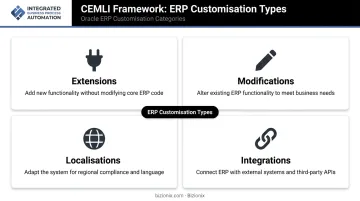
Oracle's CEMLI framework offers a useful taxonomy for understanding customisation types. If configuration is treated separately, the four main customisation categories are:
- Extensions — adding new functionality on top of the standard system
- Modifications — altering existing core application behaviour
- Localisations — country-specific compliance code not covered by standard features
- Integrations — custom connections between the ERP and external systems via code or APIs
The Real Risks of Customisation
Understanding these categories helps clarify where the costs accumulate. According to Panorama's analysis of ERP fit decisions, custom code is expensive to develop and maintain — it causes implementation budgets to balloon, timelines to slip, and creates upgrade complexity when vendor updates break custom code.
SAP's clean-core principles frame this well. Their guidance calls for avoiding unnecessary extensions, managing technical debt proactively, and adopting a zero-modification policy for cloud readiness. System modifications, direct write access to core tables, and implicit enhancements are classified as Level D — not recommended.
The upgrade burden alone is significant. Every vendor release potentially requires retesting, reworking, or rewriting custom code. For growing businesses with lean IT teams, that ongoing maintenance cost adds up fast.
When Customisation Delivers Genuine Value
Customisation is justified when:
- A unique business process provides measurable competitive advantage that configuration and integrations genuinely cannot replicate
- A specific regulatory requirement falls completely outside the standard system's scope
- Proprietary business logic is so central to operations that no off-the-shelf alternative exists
If competitors run effectively on standard ERP configurations, that's a strong signal that customisation isn't necessary — only that the process needs to adapt.
Which One Does Your Business Actually Need?
Most MSME customisation requests aren't driven by genuine system gaps — they're driven by unfamiliarity with what the ERP can already do through configuration. The first step is always exploring built-in capabilities thoroughly before commissioning custom development.
A Three-Question Decision Framework
Before choosing customisation, ask:
- Can this be met through configuration or a third-party integration? If yes, stop here.
- Does this functionality provide measurable value that competitors can't easily replicate? If no, it's probably not worth building.
- Does the organisation have resources to maintain this customisation long-term? Upgrades, retesting, and developer dependency have ongoing costs.
If the answer to any of these is no, configuration — or a purpose-built integration — is the right path.
Situational Guidance
| Choose Configuration When... | Choose Customisation When... |
|---|---|
| Scaling quickly across branches | The requirement is genuinely unique |
| Upgrade compatibility is a priority | Strategic differentiation depends on it |
| IT team is small or non-existent | Long-term maintenance plan is in place |
| Standard processes need digital structure | Regulatory gap exists that no standard feature addresses |
| GST compliance is the primary driver | Proprietary algorithm is core to operations |
The Hybrid Approach That Works
The most effective ERP implementations follow a layered model:
- Configure the core — finance, inventory, payroll, GST compliance through built-in settings
- Integrate for specialised needs — connect third-party tools via supported APIs
- Customise sparingly — reserve custom code strictly for the 5–10% of processes that constitute genuine competitive differentiation
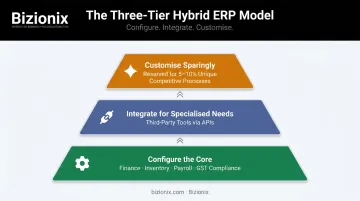
This approach preserves upgrade stability, controls long-term costs, and still accommodates genuine business-specific requirements.
For Indian MSMEs, the practical implication is straightforward: most operational needs — GST compliance, multi-company management, department-level workflows — can be met through smart configuration alone. Platforms like Bizionix are built specifically with this layered model in mind, letting businesses scale without accumulating custom code debt.
Conclusion
Configuration and customization serve different purposes, carry different cost profiles, and suit different situations. For most growing businesses — especially Indian MSMEs — a well-configured ERP handles the vast majority of operational needs without the cost, complexity, or upgrade risk that custom code introduces.
The businesses that extract the most value from their ERP investments share a common pattern: they start with configuration, maintain strict governance over what actually gets customized, and treat their ERP as a living system that evolves through settings and integrations — not through layers of bespoke code.
The foundation is choosing an ERP that's built to be configurable — one where standard operational requirements don't become justifications for expensive custom development. Bizionix is designed with exactly that in mind: a platform Indian MSMEs can configure to fit their processes today and scale without rewriting code tomorrow.
Frequently Asked Questions
What is the difference between ERP customisation and configuration?
Configuration adjusts built-in settings, roles, and workflows without touching source code — it works within the system's existing framework. Customisation writes new code or modifies existing code to create functionality the system doesn't natively offer. For most business needs, configuration is the preferred and more cost-effective approach.
What is ERP system configuration?
ERP system configuration aligns a standard ERP's existing features to a business's specific workflows, rules, and structure — such as defining GST tax codes, user roles, approval flows, and reporting formats — without any development work involved.
What is an ERP configurator?
An ERP configurator is a built-in tool within the system that lets administrators and sometimes business users set up and adjust system behaviour — such as workflows, approval logic, and product rules — through a guided interface rather than writing code.
What are the 4 types of ERP customisation?
Using Oracle's CEMLI framework as a reference, the four types are:
- Extensions — adding new functionality the system doesn't natively support
- Modifications — altering existing core behaviour or logic
- Localisations — country-specific compliance code (such as GST rules)
- Integrations — custom connections to external systems or third-party tools
Configuration sits separately as a non-code approach.
Can ERP configuration replace the need for customisation entirely?
For most MSMEs, yes — configuration handles the vast majority of real-world requirements, including GST compliance, multi-location workflows, and approval hierarchies. Customisation becomes necessary only when a business process is genuinely unique and cannot be replicated through any built-in setting or workflow.
When should an MSME choose configuration over customisation?
MSMEs should default to configuration — it covers most standard processes like invoicing, inventory, and GST compliance without added cost or risk. Customisation should only be considered when a genuinely unique process cannot be replicated any other way, given its higher cost and ongoing maintenance burden.