Sound familiar? This scenario plays out regularly for Indian MSMEs. The choice then becomes uncomfortable: do you reshape your business processes to fit the software, or modify the software to fit your processes?
This guide covers what ERP customisation actually means, how it differs from configuration, what it genuinely costs you, when it makes sense, and how to avoid the most expensive mistakes.
Key Takeaways
- Customisation means modifying ERP source code to build new functionality; configuration means adjusting built-in settings without touching code
- Customisation improves process alignment and compliance fit, but it adds cost, extends timelines, and complicates every future upgrade
- MSMEs should customise only when a critical, stable business process genuinely cannot be handled through configuration
- The smarter default is choosing a configurable ERP built for Indian workflows — with GST readiness, flexible approvals, and multi-entity management — before touching code
ERP Customisation vs. Configuration: What's the Difference?
These two terms are often used interchangeably, but they describe different interventions with real consequences for how your system behaves long-term.
Customisation: Changing the Code
ERP customisation means altering the system's source code, database structure, or core functionality to create features that don't exist in the standard product. Examples include building a custom approval workflow from scratch, or writing a new module for a billing structure the ERP never supported natively.
As Panorama Consulting describes it, customisation requires design, development, deployment, and testing — and can put your upgrade path at risk. Every change you make to the core is a change you'll likely need to retest or rewrite when the vendor releases an update.
Configuration: Working Within the System
Configuration adjusts built-in settings, parameters, roles, and rules to align the ERP with your business — without touching the underlying code. It works entirely within what the software was already designed to do.
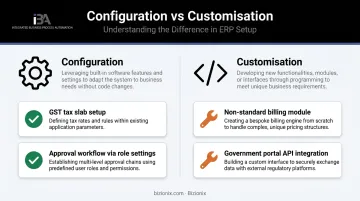
A concrete Indian MSME example makes the difference clear:
| Scenario | Type |
|---|---|
| Setting up GST tax slabs and e-invoicing rules in the existing compliance module | Configuration |
| Building a new module for a non-standard billing structure that the ERP doesn't support | Customisation |
| Linking approval workflows to department heads in existing role settings | Configuration |
| Writing code to force a government portal integration the ERP has no API for | Customisation |
Personalisation: The Third Option
Personalisation sits between these two — user-level changes that improve daily experience without touching enterprise process logic. Microsoft describes personalisation as options like:
- Role-based dashboards and default record views
- Language, time zone, and calendar preferences
- Custom report layouts and notification settings
- Display settings per user or team
No code changes required, and no upgrade risk. It's often the fastest way to improve how your team actually works in the system.
Configurations survive vendor upgrades cleanly. Customisations often don't: they create what SAP calls technical debt, the accumulated cost of rework that compounds every time a new release forces you to revisit old changes.
Key Benefits of ERP Customisation
Customisation has a legitimate place — but only when the business situation genuinely calls for it.
Process Alignment for Non-Standard Workflows
Standard ERP functionality is built around industry conventions — which work for most businesses but not all. A manufacturer with a non-standard production scheduling process, or a distributor with complex multi-tier pricing, may find that standard modules require workarounds that slow down operations daily.
Customisation lets the ERP conform to how the business actually operates, rather than forcing teams to work around software that wasn't designed for their processes.
Regulatory and Government Portal Compliance
This is the strongest legitimate customisation driver for Indian MSMEs. The GST ecosystem — e-invoicing mandatory for businesses above ₹5 crore turnover, e-way bill generation, GSTR filings — requires specific integrations with government portals.
The NIC e-Invoice API Sandbox and e-Way Bill API Developer Portal provide developer resources for these integrations. When an ERP doesn't support these natively, businesses face a genuine choice: customise or comply manually.
Platforms like Bizionix handle this through direct API integration with the GST e-Invoice system — instant IRN generation, real-time invoice validation, automatic QR code creation — without requiring any custom code. But where a standard ERP lacks this, building the integration is a legitimate customisation need.
Competitive Differentiation
Certain customisations can move an ERP from operational tool to competitive asset. Examples that often justify the investment:
- A customer portal showing personalised pricing tiers
- A real-time shipment tracking module visible to clients
- A franchise performance dashboard that competitors haven't built
The real test is whether the capability genuinely differentiates the business — not just whether it feels useful.
Scalability Through Complexity
A well-scoped customisation can be designed to grow with the business — from a 50-person operation to a multi-location enterprise — without requiring a system replacement. Scope discipline matters here. An overly broad customisation is often what forces businesses into a full ERP replacement down the line.
Major Drawbacks of ERP Customisation
Customisation costs rarely end at go-live. They resurface at every upgrade, every developer handover, and every process change — and they grow heavier over time.
Higher Cost and Extended Timelines
Every customisation adds to the project's weight before a single user logs in. A 2021 study citing prior literature found that 70% to 85% of ERP projects fail through cost, schedule, or benefit shortfalls — and heavy customisation is a leading contributor. Each layer adds:
- Developer hours for building and testing
- Documentation that needs updating with every change
- Additional QA cycles that delay go-live
- Scope creep as one custom feature exposes the need for another
That doesn't mean every customisation fails. It means the margin for error is narrower than most MSMEs expect going in.
The Upgrade Trap
Every time the ERP vendor releases an update, custom code needs to be reviewed, retested, and often rewritten. In cloud ERP systems, updates can overwrite or conflict with custom code entirely. The result: you either skip vendor updates (and fall behind on features and security), or pay repeatedly to bring your customisation forward.
This is a cost that doesn't appear in the original project budget but accumulates indefinitely.
Developer Dependency
Custom code requires specific knowledge to maintain. If the developer who built it leaves, or the vendor relationship ends, the organisation may be unable to troubleshoot or modify the customisation without starting over.
For MSMEs who built something on a project basis, this scenario is common: the work gets done, the developer moves on, and months later nobody on the team can explain how it functions.
The Accumulation Problem
The most dangerous pattern isn't one large customisation — it's the slow accumulation of many small ones. Each seems reasonable in isolation. Collectively, they make the system so rigid that adopting newer ERP features becomes almost impossible, and any process change requires a development cycle.
Ask this question before every customisation request: is this a must-have that solves a genuine capability gap, or a nice-to-have that preserves a legacy habit?
When Should Your Business Consider ERP Customisation?
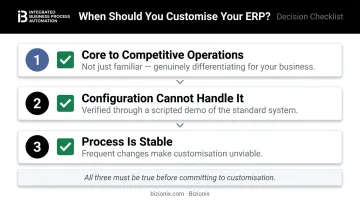
Three conditions should all be true before committing to customisation:
- The process is core to competitive operations — not just familiar, but genuinely differentiating
- Configuration and available modules cannot handle it — verified through a scripted demo, not assumed
- The process is stable enough to justify the investment — frequent changes to a customised workflow are expensive
Legitimate Customisation Scenarios for Indian MSMEs
- Industry-specific compliance that requires linking to a non-standard government portal with no available API support
- Integration with a legacy or proprietary in-house system that cannot be replaced and has no standard connector
- Multi-entity or franchise structures that standard modules handle poorly — unusual ownership hierarchies, non-standard intercompany transactions
- Regulated industry audit trails that require data structures the standard ERP doesn't capture
The "Customise vs. Adapt" Question
Before choosing customisation, answer this honestly: could the business adapt its internal process to match the ERP's standard workflow? Often the answer is yes — and that path is faster, cheaper, and tends to drive process standardisation the business genuinely needed. The resistance to adapting is usually cultural, not operational.
ERP Customisation Best Practices for MSMEs
Configuration First, Customisation Last
Follow this decision hierarchy:
- Test the requirement against standard out-of-box features
- Exhaust all configuration options and available add-on modules
- If still unresolved, evaluate whether the process could be adapted instead
- Only then consider custom development — and require senior stakeholder sign-off
Make it a rule: every customisation request must document the specific business need it solves and confirm that configuration cannot address it.
Minimise Scope and Document Everything
- Keep customisation scope narrow and specific
- Never bundle multiple requests into one project — each should be evaluated independently
- Require complete documentation of all custom code: what it does, why it was built, and what it connects to
- Treat every customisation as a future maintenance liability from day one
Choose an ERP Built for Configuration, Not Code
The most effective way to avoid customisation pain is selecting an ERP that adapts through configuration — not code — before the first line of custom development is ever considered.
For Indian MSMEs specifically, this means choosing a platform built with:
- GST-ready compliance out of the box — e-invoicing via direct IRP API, automated GSTR filings, e-way bill support
- Configurable approval workflows that match your procurement or dispatch SOPs without development work
- Multi-entity management for businesses with subsidiaries, branches, or franchise networks
- Role-based dashboards and access controls configurable through settings, not code
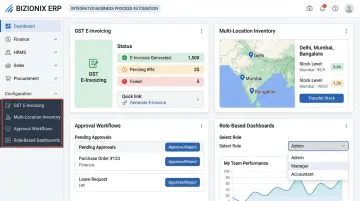
Bizionix is designed around this approach — GST compliance, multi-location inventory, multi-company management, and approval workflows are all handled through built-in settings. Because the configuration layer covers most Indian MSME workflow variations, businesses typically resolve process gaps without writing a single line of custom code.
For businesses already struggling with an ill-fitting ERP, the first question worth asking is whether customisation is the real solution, or whether a better-matched platform would eliminate the problem entirely.
Frequently Asked Questions
What is customisation in ERP?
ERP customisation refers to modifying an ERP system's underlying code or database structure to create functionality that doesn't exist in the standard product. It tailors the system to specific workflows, compliance requirements, or operational needs that configuration alone cannot address.
What is the difference between ERP customisation and ERP configuration?
Configuration adjusts built-in settings and parameters without altering the core code — it's stable across vendor upgrades and preserves support. Customisation involves actual code changes to build new or modified features, which adds maintenance burden and can break during software updates.
When should an MSME consider customising its ERP system?
Only when a core business process cannot be supported by standard features or configuration, and when that process is stable enough to justify the development investment. For Indian MSMEs, this threshold is higher than it might seem — most GST compliance, invoicing, and inventory workflows are already covered by well-configured standard ERP modules. If the process changes frequently, customisation costs will outweigh any benefit.
What are the risks of over-customising an ERP system?
The main risks: system complexity that blocks upgrades, recurring maintenance costs every time the vendor updates the platform, dependency on specialist developers, and potential loss of vendor support. Over time, a heavily customised ERP can become more of a liability than an asset.
What does ERP mean?
Enterprise Resource Planning is an integrated software system that consolidates core business functions — finance, inventory, procurement, HR, and sales — into one platform. For Indian MSMEs, a well-implemented ERP replaces fragmented spreadsheets and disconnected tools with real-time visibility and coordinated operations across the organisation.