Introduction
Running a growing business in India today means juggling GST filings, multi-location inventory, vendor payments, and billing — often across spreadsheets, WhatsApp threads, and disconnected software. The result is predictable: data mismatches, compliance delays, and money slipping through the cracks.
According to a survey of 7,835 MSMEs by the India SME Forum, 46.2% of Indian MSMEs still operate fully offline, and a separate RIS report found only 12% use ERP systems. That gap between operational complexity and digital readiness is exactly where cloud ERP fits.
This guide covers what cloud ERP is, how it compares to on-premises systems, the real benefits for Indian businesses, which modules matter most, and a practical five-step implementation plan — written for MSMEs, not Fortune 500 companies.
Key Takeaways
- Cloud ERP unifies finance, inventory, sales, HR, and GST compliance into one system accessible from any device
- ERP automation cuts the compliance burden Indian MSMEs carry, from GST filings to payroll processing
- Real-time visibility, lower operating costs, built-in GST compliance, and easy scalability — without SAP-level complexity
- Implementation works best in phases — start with one department, then expand
- Bizionix offers a purpose-built cloud ERP for Indian MSMEs starting at ₹999/year
What Is Cloud ERP and How Does It Work?
Cloud ERP (Enterprise Resource Planning) is business management software hosted on a vendor's servers and accessed through a browser or app. Gartner defines ERP as an integrated suite that shares a common process and data model covering broad operational end-to-end processes — think finance, inventory, purchasing, HR, and sales, all in one unified system.
The Technical Reality, Simplified
When a team member logs into a cloud ERP, they're connecting to software running on the vendor's infrastructure. Every department sees the same data, updated in real time. A confirmed sales order immediately updates inventory levels, triggers purchase workflows, and posts the relevant accounting entry — without anyone manually transferring that information between systems.
The vendor manages everything underneath:
- No local servers to maintain
- No IT team needed for updates or patches
- Automatic backups and uptime handled by the provider
Subscription Model (SaaS)
Most cloud ERP systems follow a Software-as-a-Service model — businesses pay monthly or annually rather than buying software licenses upfront. Bizionix, for example, offers an entry-level plan at ₹999/year and an Enterprise tier with custom pricing for more complex operations.
Deployment Types
| Type | What It Means | Best For |
|---|---|---|
| Multi-tenant SaaS | Shared infrastructure, lower cost | Most MSMEs |
| Single-tenant SaaS | Dedicated instance, more control | Data-sensitive businesses |
| Hybrid ERP | Mix of cloud and on-premises | Specific compliance scenarios |
For most Indian MSMEs, multi-tenant SaaS hits the right balance of cost, speed, and capability — without the overhead of managing dedicated infrastructure.
That said, it helps to be clear about what cloud ERP actually is (and isn't).
What Cloud ERP Is NOT
- Not just accounting software
- Not a desktop tool hosted on a remote server
- Not only for large enterprises — modern platforms like Bizionix are built specifically for MSMEs
Cloud ERP vs. On-Premises ERP: Key Differences
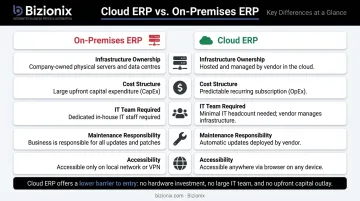
The choice between cloud and on-premises ERP is fundamentally a question of cost structure, control, and operational capacity.
Side-by-Side Comparison
| Dimension | On-Premises ERP | Cloud ERP |
|---|---|---|
| Infrastructure | Company owns and manages servers | Vendor manages all infrastructure |
| Cost structure | High upfront CapEx (hardware + licenses) | Predictable subscription (OpEx) |
| Scalability | Add hardware, plan IT projects | Upgrade plan, add users instantly |
| Maintenance | Internal IT team required | Vendor handles updates and patches |
| Accessibility | Office network only | Any device, any location |
Total Cost of Ownership
On-premises ERP carries costs most businesses underestimate. These include:
- Server hardware procurement and refresh cycles
- Software licenses and upgrade fees
- Internal IT staff salaries dedicated to maintenance
- Ongoing support contracts and security patching
Cloud ERP rolls most of this into one subscription fee.
IDC's research notes that 87% of medium-sized businesses with a full-time IT employee have four or fewer IT staff — meaning on-premises maintenance competes directly with every other technical priority. For an MSME without a dedicated IT team, that trade-off rarely makes sense.
When On-Premises Still Makes Sense
That said, on-premises deployments aren't obsolete. Strict data localisation mandates — such as those governing certain financial institutions or government-affiliated entities — or highly customised legacy environments may justify the overhead. For most Indian MSMEs without those constraints, cloud ERP offers a lower barrier to entry, faster deployment, and the flexibility to scale without capital expenditure.
Top Benefits of Cloud ERP for Growing Businesses
Real-Time Visibility Across the Entire Business
When every department works in the same system, owners stop waiting for end-of-day reports. Cash position, pending orders, stock levels, and outstanding invoices are visible right now — not after someone compiles a spreadsheet.
Bizionix provides a unified dashboard where sales, finance, and operations work from the same real-time numbers. Business owners get early visibility into issues rather than month-end surprises.
Lower Operating Costs and Faster ROI
Real-time visibility directly reduces the cost of running the business. A Forrester Total Economic Impact study for a cloud ERP deployment found:
- 209% ROI with payback in under six months
- Finance team productivity improved by up to 50% through AP, AR, and billing automation
- Monthly close time reduced by up to 30% by Year 3
These figures come from a Microsoft-commissioned midmarket composite case, not an Indian MSME benchmark. The core efficiency gains — fewer manual processes, faster billing cycles, less reconciliation — apply directly to any Indian MSME running these workflows manually today.
Built-In GST Compliance
For Indian businesses, GST compliance is non-negotiable — and manual handling creates real risk. Bizionix includes:
- Direct API integration with the government's Invoice Registration Portal (IRP) for instant IRN generation
- Pre-validation of invoice data before submission — catching format and data errors before they cause rejections
- Automatic QR code generation on every invoice
- GSTR-1 auto-population keeping sales, GST returns, and accounting records aligned
For businesses with annual aggregate turnover exceeding ₹5 crore (mandatory e-invoicing threshold), this automation eliminates hours of manual work every billing cycle.
Scalability Without Disruption
Compliance gets simpler as the business scales — and so does everything else. Adding a new warehouse location, product line, or team member doesn't require a hardware purchase or an IT project. On a cloud ERP, it means adjusting the subscription and configuring access.
Bizionix's multi-company management lets businesses manage multiple entities, branches, or GST registrations under a single login — with independent books per entity and centralised oversight through group-level dashboards.
Remote Access and Operational Continuity
Field teams, warehouse staff, and remote employees all see the same data as the finance team at headquarters. This removes the friction that slows distributed teams down:
- Eliminates follow-up calls caused by outdated or missing information
- Breaks down information silos across departments and locations
- Removes version-control problems from shared spreadsheets entirely
Core Modules Every Cloud ERP Solution Should Include
A well-built cloud ERP runs on a single shared database, connecting every department through one unified platform rather than a patchwork of disconnected tools.
Essential Module Checklist
- Financial Management & Accounting — invoicing, payables, receivables, bank reconciliation, balance sheet, P&L
- Inventory & Warehouse Management — multi-location stock tracking, material issue, ground stock visibility
- Order & Purchase Management — purchase orders, vendor management, GRN, consumption analytics
- GST & Compliance — e-invoicing with IRN generation, GSTR-1 auto-population, audit-ready records
- CRM & Sales Pipeline — leads, quotations, sales orders, customer lifecycle management
- HRMS & Payroll — attendance, leave management, salary processing, statutory compliance
- Production Planning — work orders, bill of materials, shop floor tracking, and procurement linkage for manufacturing businesses
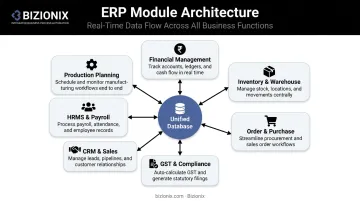
Bizionix integrates all of these as core modules within a unified architecture — data entered in sales flows automatically to inventory, accounting, and compliance without manual intervention.
Why Unified Architecture Matters
When modules share a single database, a confirmed sales order automatically updates stock levels, triggers purchase requests if needed, and posts the accounting entries — all without manual intervention. There's no duplicate data entry, no reconciliation across systems, and no data discrepancies between teams.
Industry Fit Matters Too
- Manufacturing businesses need production planning linked to inventory and procurement
- Distribution operations need multi-warehouse tracking with consumption analytics
- CA firms and holding companies need multi-entity management with separate books per client or subsidiary
When shortlisting a platform, check that it covers your specific workflows — not just a generic feature list that looks complete on paper.
How to Implement a Cloud ERP: Step-by-Step Guide
Panorama Consulting's 2024 ERP Report found that resource constraints are the most common cause of implementation timeline overruns, and unexpected technology needs are the top reason budgets get exceeded. Planning upfront prevents both.
Step 1 — Assess your current state
Document every tool, manual process, and data source across each department. Identify your biggest pain points — billing errors, GST reconciliation gaps, poor stock visibility. The answers shape your vendor shortlist and keep the project grounded in real business needs.
Step 2 — Define goals and select the right solution
Set measurable objectives and use them to evaluate vendors. Key criteria to check:
- GST readiness and e-invoicing compliance
- Module coverage across finance, inventory, and HR
- Local support availability and onboarding process
- Scalability as your business grows
Price matters, but it should not be your only filter.
Step 3 — Plan data migration and configure the system
Cleanse and standardise existing data before migration — incomplete or duplicate records in the old system will produce unreliable outputs in the new one. Work with the vendor to configure workflows, user roles, approval hierarchies, and dashboards to match how your business actually operates.
Step 4 — Train your team and run parallel testing
Conduct role-specific training before go-live. Run the new system alongside existing processes for a defined period — two to four weeks — to catch errors and confirm data accuracy. This parallel phase builds team confidence before full cutover.
Step 5 — Go live and optimise continuously
Launch with a phased approach where possible. Start with one department or location, stabilise it, then expand. Establish a feedback loop with the vendor's support team to refine configurations as the business grows.
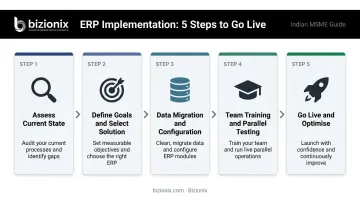
This phased approach aligns with how most businesses actually deploy ERP — Panorama's data shows fewer than 25% of organisations use a big-bang rollout. For multi-location or operationally complex businesses, a phased or hybrid rollout significantly reduces risk.
5 Signs Your Business Needs a Cloud ERP Right Now
1. Your teams use different tools for different tasks When sales works in one system, accounts in another, and inventory lives in spreadsheets, data mismatches are inevitable. A cloud ERP replaces this patchwork with one source of truth.
2. GST filing consumes too much time If your team spends hours before every deadline reconciling invoices, correcting GSTR errors, or manually generating e-invoices, that's a process problem, not a staffing one. Automated, integrated compliance tools solve it.
3. You can't see what's happening in real time If getting a clear picture of cash position, pending orders, or stock levels requires pulling reports from multiple people, you're operating with a blind spot. A cloud ERP gives owners real-time visibility across cash, inventory, and receivables — without chasing anyone for updates.
4. Your IT capacity is limited Most growing businesses run lean IT teams. Cloud ERP removes the infrastructure maintenance burden entirely — updates, security patches, and backups are the vendor's responsibility.
5. You're growing but your systems aren't keeping up New locations, new team members, new product lines — these are good problems. But if your current tools can't scale with them, operational chaos follows. A cloud ERP scales by adjusting the subscription, not by calling an IT contractor.
An Honest Note on Implementation Challenges
No implementation is without friction. The most common obstacles:
- Staff resistance to change — address this with early involvement and role-specific training
- Unclean data — audit and standardise data before migration, not during
- Internet dependency — cloud ERP requires reliable connectivity; plan for this operationally
Choosing a vendor with strong onboarding support and hands-on deployment assistance significantly reduces these risks. Bizionix includes dedicated implementation support as part of its onboarding process.
Frequently Asked Questions
What are cloud ERP solutions?
Cloud ERP solutions are enterprise resource planning systems hosted on a vendor's servers and accessed over the internet, integrating business functions like finance, inventory, GST compliance, and HR into one platform. They require no on-site hardware or dedicated IT team, making them practical for businesses of all sizes.
What is the difference between cloud ERP and on-premises ERP?
On-premises ERP is installed on a company's own servers and managed by internal IT. Cloud ERP is hosted by the vendor and accessed via browser, with the vendor handling updates, maintenance, and security. Cloud ERP offers lower upfront costs, automatic updates, and access from any location.
How long does it take to implement a cloud ERP system?
Timelines vary by business complexity, number of modules, and data volume. Panorama Consulting's 2024 benchmark reports a median of 15.5 months for midmarket deployments. Smaller MSME rollouts with limited scope and phased implementation can be significantly faster, so realistic scoping upfront makes the biggest difference.
Is cloud ERP suitable for small and medium businesses in India?
Modern cloud ERP platforms are specifically built for MSMEs — with affordable subscription pricing, GST compliance features, and modular scalability. Bizionix, for example, starts at ₹999/year and includes GST-ready accounting, e-invoicing with IRN generation, and multi-location inventory management.
How does cloud ERP help with GST compliance?
A GST-ready cloud ERP automates invoice generation, validates data before submission to prevent rejections, and integrates directly with the government's e-Invoice system for instant IRN generation. It also auto-populates GSTR-1 from sales data, keeping audit-ready records at every stage.
What should I look for when choosing a cloud ERP vendor?
Prioritise: module coverage relevant to your industry, built-in GST and e-invoicing compliance, local customer support, transparent pricing, ease of configuration, and a track record with businesses similar to yours. For Indian MSMEs, India-specific compliance capabilities should be non-negotiable.