Introduction
Picture a typical Tuesday at a growing manufacturing business in Pune: the accounts team is wrestling with a GST filing in Excel, the warehouse manager has no idea what the sales team just committed to a client, and the HR executive is manually calculating attendance for payroll. By the time the owner gets a financial picture, it's already two weeks old.
This fragmentation is not just frustrating — it's expensive. Gartner estimates poor data quality costs organisations an average of US$12.9 million per year globally, much of it driven by the kind of disconnected, manual processes that many Indian MSMEs still rely on daily.
This guide breaks down what business software is, why it matters, and how understanding the different types helps you choose the right solution for your business — instead of adding yet another disconnected tool to the mix.
Key Takeaways
- Business software covers any application designed to help organisations manage, automate, or improve their operations.
- Key categories include accounting, ERP, CRM, inventory management, HR/payroll, project management, and BI tools.
- Disconnected tools create data silos, duplicate work, and compliance gaps, including around GST e-invoicing requirements.
- Integrated platforms eliminate these problems by sharing one data layer across all departments.
- The right choice depends on your business size, industry, compliance obligations, and growth trajectory.
What Is Business Software?
Business software refers to any computer program or digital application used by an organisation to perform, automate, or manage its day-to-day operations. It differs from consumer software — social media platforms, mobile games, personal productivity apps — in that it is built specifically around organisational workflows, compliance requirements, and multi-user environments.
Understanding what business software does is one thing; understanding how it reaches your business is another.
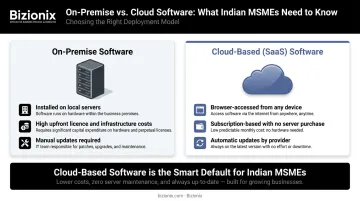
Deployment Models: Cloud vs. On-Premise
Business software is delivered in two primary ways:
- On-premise software is installed on local servers or computers within your office. You own the licence, manage the infrastructure, and handle updates yourself. Setup costs are high; flexibility is limited.
- Cloud-based (SaaS) software is hosted remotely and accessed through a browser or app. You pay a subscription, the provider manages servers and updates, and you can access the system from anywhere.
For Indian MSMEs, cloud-based tools have become the default choice — and for good reason. There is no server to purchase, no dedicated IT team required, and the system is accessible from any device. As India's MSME sector accelerates its digital adoption, SaaS platforms have emerged as the most practical entry point into structured business management.
Who Uses Business Software?
The scale of adoption varies considerably:
| Business Stage | Typical Approach |
|---|---|
| Small/early-stage | Standalone tools: basic invoicing, accounting apps |
| Growing mid-sized | Separate software per department (CRM, inventory, payroll) |
| Scaling enterprise | Integrated ERP suite unifying all functions |
Most MSMEs find themselves at the middle stage: running separate tools per department, each generating its own data in its own format. That fragmentation — not the lack of software — is where operational problems compound.
Why Businesses Need Software: The Cost of Operating Without It
Picture a typical day in a business still running on spreadsheets and WhatsApp approvals:
- A sales order is confirmed verbally, but inventory is never updated — leading to a stockout on dispatch day.
- An invoice goes out with the wrong GST rate because it was built manually from a template.
- A payroll run is delayed because attendance data lives in three different files.
- A supplier payment is missed because the payables ledger was last updated a week ago.
Indian Businesses Face Real Compliance Exposure
GST e-invoicing is mandatory for businesses with an Annual Aggregate Turnover (AATO) above ₹5 crore as of 1 August 2023. The GSTN requires invoices to be generated within the taxpayer's own accounting or ERP system, then reported to an Invoice Registration Portal (IRP) to obtain a unique Invoice Reference Number (IRN).
Without compliant software, businesses either upload JSON files manually — a slow process prone to keying mistakes — or risk non-compliant invoices that delay payments and attract GST scrutiny.
What the Productivity Data Actually Shows
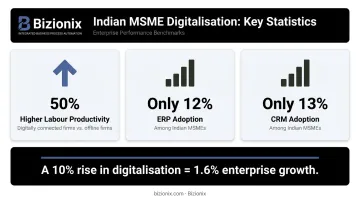
RIS research on Indian MSME digitalisation found that digitally connected firms show labour productivity approximately 50% higher than offline firms. A 10% increase in digitalisation levels links to a 1.6% increase in enterprise growth.
Yet ERP adoption among Indian MSMEs sits at just 12%, and CRM at 13%. For a growing business, that gap translates directly into slower billing cycles, weaker cash visibility, and decisions made on stale data.
Key Types of Business Software
Business software spans several distinct categories — each solving a different operational problem. Understanding what each type does helps you spot the gaps in your current setup.
Accounting and Financial Management Software
This covers invoicing, expense tracking, bank reconciliation, and financial reporting. For Indian businesses, the critical addition is GST compliance and e-invoicing — generating IRN-linked invoices, populating GSTR-1 automatically, and maintaining audit-ready records.
Businesses running on spreadsheets or manual ledgers routinely misfile returns, lose track of receivables, and make decisions on financial data that is days or weeks out of date.
ERP (Enterprise Resource Planning) Software
Gartner defines ERP as an integrated suite of business applications sharing a common process and data model across finance, HR, distribution, manufacturing, and supply chain. The defining feature of ERP is integration: a sale updates inventory automatically, triggers invoicing, and feeds into financial reports — no manual reconciliation required.
ERP is the most comprehensive category of business software. The global ERP market reached US$66 billion in 2024, growing at 11.3% year-on-year. For Indian MSMEs specifically, ERP adoption is accelerating — driven largely by GST compliance demands and the push to replace fragmented, department-level tools with a single connected system.
CRM (Customer Relationship Management) Software
CRM software centralises customer interactions, tracks leads through the sales pipeline, manages follow-ups, and provides visibility into sales performance. Teams relying on scattered inboxes and personal notebooks inevitably miss follow-ups, forget leads, and have no reliable view of what is actually in the pipeline.
Inventory and Warehouse Management Software
This category handles stock tracking across locations, purchase orders, GRN processing, and consumption analytics. It is particularly valuable for:
- Manufacturing businesses managing raw materials and finished goods
- Distributors with multiple warehouses
- Multi-location retailers needing real-time stock visibility
HR and Payroll Software
HR software manages employee records, attendance, leave, and salary processing — including statutory deductions. When attendance data is unreliable, manual payroll creates two compounding problems: incorrect salary calculations and exposure to TDS and statutory compliance errors.
Project Management Software
Project management tools help teams plan tasks, assign responsibilities, track deadlines, and collaborate — especially valuable for service businesses and distributed teams. Teams without this visibility routinely overrun timelines and budgets, often discovering the problem only after the damage is done.
Business Intelligence and Reporting Software
BI tools aggregate data from across the business and present it as dashboards, charts, and reports. The goal is evidence-based decision-making:
- Spot trends in sales before they reverse
- Identify which product lines are actually profitable
- Catch a cash-flow problem before it becomes critical
Standalone Tools vs. Integrated Business Platforms
The Fragmentation Trap
Most businesses don't start with a disconnected mess — they build it gradually. First comes an accounting app. Then a CRM trial. Then an inventory tool when the warehouse gets chaotic. Before long, the business is running on five or six separate systems that operate in isolation.
Okta's SMBs at Work 2024 report found that small businesses with 50 or fewer employees deploy 36 apps on average. Each app is a potential data silo. Each handoff between systems is a potential error.
The practical costs of this approach include:
- Duplicate data entry: the same customer or product appears in three systems with slightly different details
- Manual reconciliation: finance cross-checks CRM sales data against inventory records from a separate tool — every month
- Integrated reports become impossible when data lives in disconnected places
- Connecting standalone tools via third-party integrations adds technical work and ongoing subscription fees
What an Integrated Platform Changes
An integrated platform — typically an ERP or all-in-one business suite — runs all functions on a single shared database. When a sale is recorded:
- Inventory updates automatically
- An IRN-linked invoice is generated via the GST portal
- The receivable appears in the accounting ledger
- Financial reports reflect the transaction in real time
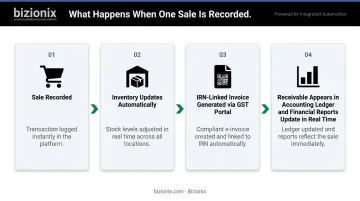
No exports. No reconciliation. No chasing the accounts team for updated numbers.
How Bizionix Handles This for Indian MSMEs
Bizionix, developed by IIS-LLP (Integrated Information Solutions LLP) for Indian MSMEs, is built on this architecture. The platform integrates Finance & Accounting, CRM, Inventory, Warehouse Management, Purchase Management, HRMS & Payroll, and Reporting into a single cloud-based system accessible from one secure login.
For GST compliance specifically, Bizionix connects directly via API to the government's Invoice Registration Portal — generating IRNs and QR codes instantly, auto-populating GSTR-1, and maintaining audit-ready records without manual JSON uploads. For businesses above the ₹5 crore AATO threshold, this eliminates one of the most error-prone parts of the monthly operating routine.
The entry-level NEO plan starts at ₹999 per year — built for MSMEs that need full-featured ERP capability without SAP-level cost or complexity.
How to Choose the Right Business Software for Your Business
Start With an Honest Audit
Before evaluating any software, identify where your actual problems sit:
- Where do errors happen most often?
- Which processes consume the most manual effort?
- Are compliance obligations — like GST e-invoicing — being met reliably?
- Which departments work in silos because their data doesn't connect?
Buying software to solve vague inefficiency rarely works. Buying it to fix a specific, documented problem usually does.
Three Practical Evaluation Criteria
Once you know what you're solving for, evaluate each option against three criteria:
Scalability: Can it grow with your business, or will you face a painful migration in two years? A platform handling 10 users and 500 invoices today should scale to 50 users and 10,000 invoices without a fresh implementation.
Integration: Does it work alongside your existing tools, or replace them entirely? Replacement is preferable — fewer subscriptions, fewer data handoffs, and a cleaner audit trail.
Local compliance readiness: For Indian MSMEs, this is non-negotiable. Software built for the US or European market won't handle GST returns, IRN generation, or e-way bills natively. Retrofitting foreign software for Indian compliance typically costs more than choosing an India-built solution from the start.
Trial Before You Commit
Knowing your criteria narrows the shortlist — but only hands-on testing confirms fit. Gartner predicts that by 2027, more than 70% of recently implemented ERP initiatives will fail to fully meet original business goals. The most common reason is poor user adoption: the software was chosen from a feature list, not from actual workflow experience.
Use demo sessions and free trials to validate:
- Does the interface suit your team's technical comfort level?
- Do the features map to your actual process, not a theoretical one?
- Is vendor support accessible and responsive when something goes wrong?
Bizionix offers a 14-day free trial on its Basic plan and demo sessions available through direct contact — a straightforward way to test the platform against your real workflows before committing.
Frequently Asked Questions
What is business software?
Business software is any application or program designed to help organisations manage, automate, or improve their operations — covering functions like accounting, HR, inventory, sales, and more. It is distinct from consumer software in that it is built for multi-user, organisational use rather than personal tasks.
Which is the best business software?
There is no universal answer. The right software depends on your business size, industry, and specific operational needs. Generally, integrated platforms deliver better long-term value than managing five or six disconnected tools, since shared data removes the reconciliation work that standalone tools create.
What are the main types of business software?
The primary categories are:
- Accounting and financial management software
- ERP (Enterprise Resource Planning)
- CRM (Customer Relationship Management)
- Inventory and warehouse management
- HR and payroll
- Project management
- Business intelligence tools
What is the difference between ERP and other business software?
ERP integrates multiple business functions — finance, inventory, HR, sales, and more — into one unified system with a shared data model. Most other software categories are standalone tools focused on a single function.
Do small businesses really need business software?
Yes — particularly for avoiding errors in accounting, managing GST compliance, and tracking inventory. Cloud-based options have made enterprise-grade software genuinely affordable for small businesses, with plans suited to micro-business budgets.
How does cloud-based business software benefit MSMEs?
Cloud software eliminates the need for on-premise servers, enables access from any device, scales without infrastructure investment, and updates automatically — removing operational burden for lean MSME teams without dedicated IT staff.