Introduction
Most growing businesses don't fail because of bad strategy. They fail because their operations can't keep up with their ambition.
Finance works from one spreadsheet. Operations tracks inventory in another, and sales follows up manually via WhatsApp. When leadership needs a clear picture of where the business stands, they're pulling numbers from three different sources — and none of them agree.
This isn't a people problem. It's a structural one. That's what enterprise software is built to solve.
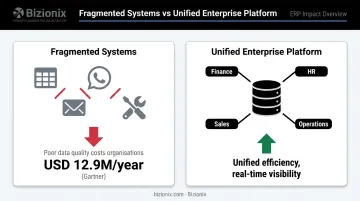
According to Gartner's data quality research, poor data quality costs organisations at least USD 12.9 million per year on average globally — a direct consequence of fragmented systems and inconsistent data.
This article covers what enterprise software is, its defining features, the main types, and the benefits it delivers — with practical context for Indian MSMEs weighing whether a unified platform fits their operations.
Key Takeaways
- Enterprise software integrates and automates multi-departmental business functions — finance, HR, sales, operations — into one unified system
- Unlike standalone tools, it's built for scalability, security, cross-departmental data flow, and multi-user governance
- Core types include ERP, CRM, SCM, HRM, and BI platforms
- Key benefits include improved efficiency, real-time data visibility, fewer errors, and lower operational costs
- Cloud-based platforms have made enterprise software accessible to Indian MSMEs and mid-sized businesses, not just large corporations
What is Enterprise Software?
Enterprise software is computer software designed to serve organisational needs rather than individual users. It supports complex, multi-departmental business processes at scale — integrating functions like finance, HR, procurement, inventory, and sales into a single system.
The distinction from consumer apps is fundamental. Consumer software optimises for simplicity for one user. Enterprise software optimises for integration, governance, scalability, and data consistency across an entire organisation.
Enterprise Software vs. Enterprise Application Software
The broader term "enterprise software" describes the category. "Enterprise application software" (EAS) refers to the specific tools that execute business functions within that category.
Software architect Martin Fowler offered a widely cited framing: enterprise applications are about "the display, manipulation, and storage of large amounts of often complex data; together with the support or automation of business processes with that data." This definition separates ERP, CRM, and HRM platforms from lightweight standalone tools — the former manages complex process data across the organisation, the latter handles a narrow function in isolation.
From Mainframes to Cloud
Enterprise software has gone through three distinct phases:
- 1970s–80s: Rigid on-premise mainframe systems, exclusive to large corporations
- 1990s–2000s: Client-server ERP systems, still complex and expensive
- 2010s onward: Cloud-based platforms that reduced upfront infrastructure costs
- Today: AI-enabled, modular platforms accessible to mid-sized businesses and MSMEs
The OECD notes that cloud computing lets SMEs access processing and storage at scale, reducing the investment barriers that once made enterprise software prohibitive for smaller organisations. For Indian MSMEs in particular, this shift has been significant — cloud ERP platforms now deliver enterprise-grade capabilities without the infrastructure costs or implementation complexity that once made them inaccessible.
The Defining Characteristic
Enterprise software creates a single source of truth. When finance, operations, HR, and sales all draw from the same centralised data repository, the inconsistencies that arise from running separate tools per department disappear. Decisions get made on current data — not last month's export from a spreadsheet someone emailed around.
Enterprise Software vs. Regular Business Software
The distinction isn't about company size. It's about scope and integration.
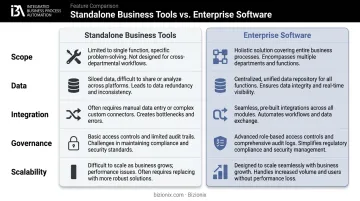
| Dimension | Standalone Business Tools | Enterprise Software |
|---|---|---|
| Scope | Single function (invoicing, payroll) | Organisation-wide process coverage |
| Data | Siloed per tool | Unified across departments |
| Integration | Manual exports or no connection | Automatic data flow between modules |
| Governance | Limited access control | Role-based permissions, audit trails |
| Scalability | Breaks as transaction volume grows | Architected to scale with the business |
Forrester research found that 77% of technology decision-makers reported moderate to extensive tech sprawl in 2024, creating unsustainable costs, slower IT delivery, and security risks. Forrester research found that 77% of technology decision-makers reported moderate to extensive tech sprawl in 2024, creating unsustainable costs, slower IT delivery, and security risks. Running five disconnected tools produces exactly this outcome at scale.
The practical signal: enterprise software makes sense when cross-departmental coordination is critical and data consistency is non-negotiable. If the combined cost of manual effort, errors, and lost visibility across fragmented tools outweighs a unified platform investment — that's the tipping point.
Key Features of Enterprise Software
Scalability
Enterprise software is built to handle growing transaction volumes, larger user bases, and more complex data — without slowing down or breaking under pressure.
Consider the concrete limit of spreadsheet-led operations: Microsoft documents Excel's maximum worksheet size at 1,048,576 rows by 16,384 columns. For a growing distribution business tracking thousands of daily transactions across multiple locations, that ceiling arrives faster than expected — and when it does, the system doesn't just slow down. It fails silently.
Enterprise software removes that ceiling by design.
Integration and APIs
Connected modules share data automatically through APIs. A sales order updates inventory, triggers a purchase requisition if stock is low, adjusts financial forecasts, and generates a GST-compliant invoice — all without manual re-entry at each step.
This eliminates the lag and compounding errors that siloed systems create. In Bizionix, for example, when a sales invoice is created, the system automatically validates it against GST rules, generates the IRN via direct API connection to the Invoice Registration Portal, and auto-populates GSTR-1 — all within the same workflow.
Security and Access Controls
Multi-user environments require structured access governance. Enterprise software provides:
- Role-based access controls (RBAC) — users see only what their role permits
- Audit trails — complete logs of who did what and when
- Data encryption — protection for sensitive financial and operational data
- Entity-level permissions — critical for organisations managing multiple business units
NIST recognises RBAC as a foundational security model, standardised as ANSI/INCITS 359-2004, specifically designed to restrict system access to authorised users based on defined roles.
Real-Time Reporting and Analytics
Reporting drawn from a unified data repository means leadership sees current reality — not end-of-month reconciliations.
MIT research found that data-driven decision-making is associated with a statistically significant 3% or more productivity increase on average. For an MSME managing inventory across locations, that difference shows up in fewer stockouts, faster billing cycles, and tighter cash flow control.
Customisation and Configurability
Modern enterprise platforms are configurable — meaning they adapt to a business's existing workflows through built-in settings and configuration options, not code-level changes. This cuts implementation time and cost significantly compared to older on-premise systems that demanded extensive custom development work.
Types of Enterprise Software
Enterprise Resource Planning (ERP)
ERP is the most comprehensive category — the operational backbone that integrates finance, procurement, inventory, HR, manufacturing, and sales into one platform. A single data entry ripples through connected modules automatically.
The worldwide ERP software market grew 11.3% to USD 66 billion in 2024, driven by cloud adoption and AI integration. It's an active, evolving category — not the legacy back-office software it's often mistaken for.
For Indian MSMEs, GST compliance is a non-negotiable ERP requirement. Under CBIC Notification No. 10/2023-Central Tax, businesses with aggregate turnover above ₹5 crore are mandatorily required to generate e-invoices via the Invoice Registration Portal. An ERP without direct IRP integration creates a manual compliance burden — Bizionix addresses this directly through API-based IRN generation.
Customer Relationship Management (CRM)
CRM software manages the complete customer lifecycle — from lead capture and pipeline management to post-sale engagement. It unifies customer data across touchpoints, enabling consistent follow-up and accurate forecasting.
The global CRM market grew 13.4% to USD 128 billion in 2024, reflecting how central customer data management has become to business operations. Common standalone examples include Salesforce and HubSpot; integrated CRM within an ERP platform like Bizionix connects customer data directly to inventory, invoicing, and finance.
Supply Chain Management (SCM) and Procurement
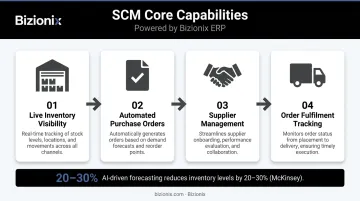
SCM coordinates the flow of goods, information, and finances from supplier to customer — covering procurement, inventory, logistics, and order fulfilment. Core capabilities include:
- Live inventory visibility across locations
- Automated purchase orders triggered by reorder thresholds
- Supplier management to track lead times and pricing
- Order fulfilment tracking from dispatch to delivery
Together, these reduce both stockouts and excess carrying costs.
McKinsey research found that AI-driven demand forecasting reduces inventory levels by 20–30% in distribution operations — a meaningful gain for businesses managing multi-location stock.
HRM and Business Intelligence
HRM software automates recruitment, attendance, leave management, payroll, and statutory compliance. In a unified ERP, payroll data flows directly into financial accounts — eliminating manual reconciliation between HR and finance.
Business Intelligence (BI) turns raw data from all enterprise systems into dashboards and predictive reports. Modern ERP platforms embed BI rather than treating it as a separate tool, giving leadership one interface for both operational and financial performance.
Key Benefits of Enterprise Software
Operational Efficiency and Cost Reduction
Automating repetitive tasks — invoice generation, approval workflows, GST return preparation, stock reconciliation — frees employees to focus on decisions that actually require human judgement.
The real cost comparison isn't enterprise software versus doing nothing. It's one unified platform versus five disconnected tools — plus the manual effort to keep them in sync. Bizionix replaces separate accounting software, invoicing apps, HR tools, and a CRM with one integrated system, typically at a fraction of the combined cost.
Key efficiency gains from a unified platform:
- Eliminates manual data re-entry between departments
- Automates compliance workflows (GST filing, e-invoicing, TDS)
- Reduces billing cycle time through real-time invoice generation
- Replaces WhatsApp approvals and email follow-ups with structured digital workflows
Data Accuracy and Better Decision-Making
When all departments draw from the same data source, reporting becomes reliable. Finance and operations stop working from different versions of the same numbers.
Gartner's finding — that poor data quality costs organisations at least USD 12.9 million (approximately ₹107 crore) per year — illustrates the operational and financial cost of letting data inconsistency persist. Centralising data in a single system isn't just an efficiency measure; it's a risk control.
Leaders with accurate, real-time data can:
- Budget and forecast with confidence rather than guesswork
- Spot cash flow problems before they become crises
- Make expansion decisions based on actual operational capacity
Scalability Without System Replacement
Enterprise software grows with the business — no painful migrations, no replacing the system when headcount doubles. This matters most for businesses moving from early-stage operations into mid-scale complexity.
A scalable platform handles:
- New users and additional locations without re-implementation
- Multiple business entities under one system
- Higher transaction volumes without performance degradation
Is Enterprise Software Right for Your Business?
Signs You've Outgrown Basic Tools
These aren't signs of poor management — they're symptoms of missing infrastructure:
- Finance and operations working from different versions of the same data
- Reports taking hours or days to compile from multiple sources
- Billing cycles delayed because invoicing isn't connected to operations
- GST compliance managed manually, creating error and penalty risk
- Inventory tracked in spreadsheets that don't reflect real-time stock
- Management unable to see cross-department performance without chasing updates
- Multiple locations or business entities running on completely separate systems
Addressing the Cost and Complexity Objection
The most common MSME hesitation is that enterprise software is built for large corporations — too expensive, too complex, too slow to implement.
That was true of legacy systems. Cloud-based platforms are now modular, faster to deploy, and priced for smaller organisations. Bizionix's entry-level plan starts at ₹999 per year with a 14-day free trial — a very different calculation than an SAP implementation.
The real comparison isn't enterprise ERP vs. nothing. It's a unified platform vs. the total cost of multiple disconnected tools plus the manual effort to keep them aligned.
Where Bizionix Fits
Bizionix is an enterprise-grade cloud ERP built specifically for Indian MSMEs, manufacturing companies, distribution businesses, and multi-location enterprises. It offers:
- Automated GST compliance, e-invoicing, and direct IRN generation via IRP API
- Multi-entity management: multiple companies, GST registrations, and branches under one login
- Integrated modules across Finance, Sales & CRM, Purchase, Inventory, Warehouse, HRMS & Payroll, and Production Planning
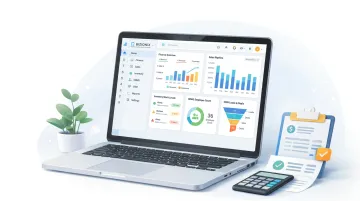
- Real-time dashboards giving leadership a unified view across all functions
Backed by over two decades of industry experience through its parent company Protocol India Private Limited, IIS-LLP built Bizionix around how Indian businesses actually operate — not around theoretical enterprise requirements. The result is enterprise capability without SAP-level complexity or cost.
Frequently Asked Questions
What is enterprise software?
Enterprise software is organisation-wide software designed to integrate and automate multi-departmental business processes — finance, HR, sales, operations — into a single system. Unlike consumer or single-function apps, it prioritises cross-departmental data flow, scalability, and governance, and includes systems like ERP, CRM, and HRM.
What are the types of enterprise software?
The primary types are ERP, CRM, SCM, HRM, and BI (Business Intelligence) platforms. ERP is the most comprehensive — it integrates the widest range of business functions, from finance and inventory to HR and sales, into one system.
What are examples of enterprise software?
SAP, Oracle, and Microsoft Dynamics are well-known ERP platforms. Salesforce is the dominant standalone CRM; Workday is widely used for HRM. Bizionix is built specifically for Indian MSMEs — an integrated ERP platform with GST compliance, HRMS, and CRM built in, without the cost or complexity of large-scale enterprise systems.
What is an enterprise software company?
An enterprise software company designs, develops, and maintains software platforms built for organisational use rather than individual consumers. These range from global vendors like SAP and Oracle to specialised regional providers built for specific markets — such as Bizionix, which focuses on cloud-based ERP for growing Indian businesses.
What are the 5 stages of enterprise software development?
The five typical stages are:
- Requirements gathering and needs analysis
- System design and architecture
- Development and customisation
- Testing and quality assurance
- Deployment, training, and ongoing maintenance
Many businesses skip custom development entirely by choosing a configurable platform like Bizionix that can be set up without a lengthy build cycle.