Introduction
Picture this: a mid-sized trading business in Pune manages accounts in Excel, tracks inventory in a separate tool, chases payments over WhatsApp, and spends the last week of every quarter manually reconciling GST. The finance team finds a duplicate vendor payment. The warehouse ships against an invoice that was already cancelled. A ₹4 lakh receivable sits 90 days overdue because nobody followed up.
This isn't an unusual story. It's the default operating reality for thousands of growing Indian businesses.
The root cause isn't effort — it's fragmentation. When accounting, inventory, billing, and HR each live in separate tools, data gaps are inevitable. Decisions get made on incomplete information, compliance slips, and revenue leaks quietly.
Enterprise software for business operations solves this by replacing scattered point tools with a single integrated system. This guide covers what it is, why growing businesses need it, the core types available, must-have features, and how to choose one that actually fits.
Key Takeaways
- Enterprise software replaces disconnected spreadsheets and standalone tools with one system managing finance, inventory, sales, HR, and compliance.
- Without it, growing MSMEs face financial leakage, GST filing errors, poor visibility, and manual follow-ups that drain team capacity.
- Core types include ERP, CRM, inventory management, financial software, and HR systems — and they work best unified under one platform.
- Look for cloud access, GST-ready compliance, scalability, and straightforward onboarding, without the complexity or cost of enterprise systems built for much larger organizations.
What Is Enterprise Software for Managing Business Operations?
Enterprise software refers to digital systems that manage and automate core business processes — finance, operations, sales, HR, and compliance — across an organisation. The key distinction from basic tools is integration: rather than leaving each department running separate records, enterprise software connects all functions into a single source of truth.
The word "enterprise" misleads many business owners into assuming this software is only relevant once you hit a certain headcount or revenue threshold. That assumption is wrong. Growing MSMEs, multi-location businesses, manufacturing units, and distribution companies all face the same operational complexity that enterprise software addresses. The label refers to functional depth, not company size.
According to a RIS report on MSME digitalisation, only 12% of Indian MSMEs currently use ERP, and just 13% use CRM — despite most citing operational challenges that these systems directly address. The adoption gap is wide, and businesses that close it gain a real structural advantage.
That adoption gap is also why cloud-based deployment has become the practical entry point for most Indian MSMEs. Unlike on-premise installations — which require in-house servers, IT staff, and lengthy setup cycles — cloud enterprise software runs on the provider's infrastructure. Key advantages include:
- Accessible from any device, anywhere
- Automatic updates with no IT overhead
- Faster deployment, often weeks instead of months
- Lower upfront cost with predictable subscription pricing
Why Growing Businesses Struggle Without Enterprise Software
The Fragmentation Problem
Most MSMEs start with separate tools for each function — one for billing, another for inventory, a third for payroll. At early stages, this works well enough. As the business scales, these disconnected systems create data silos: the same customer, vendor, or stock item exists across three different records, requiring manual reconciliation every time something changes.
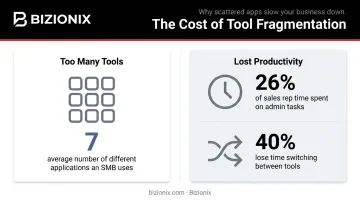
According to Salesforce's 2024 SMB Trends Report, the average small business uses 7 different applications to run operations. Meanwhile, HubSpot's 2025 State of Sales data shows sales reps spend 26% of their time on administrative tasks, with 40% reporting they lose too much time switching between tools. That's time spent on coordination, not output.
Financial Leakage and Missed Revenue
Fragmentation doesn't just slow things down — it creates specific, expensive failure points:
- Invoices sent late or not at all
- Duplicate payments made to vendors due to poor records
- Expenses logged inconsistently across departments
- Receivables left unchased because no system flags them
APQC benchmarks show duplicate or erroneous disbursements range from 0.1% for top-performing organisations to 1.0% for bottom performers — small percentages that compound into material losses at scale.
The GST Compliance Risk
For Indian businesses, the financial leakage problem has a sharper edge: compliance failure. GST filing, e-invoicing mandates, and TDS compliance all require accurate, real-time financial data. When accounting is siloed or manual, filing errors follow — and errors attract notices.
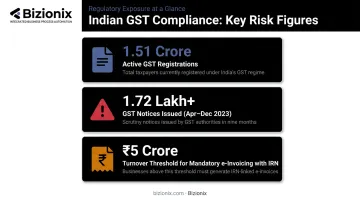
The numbers make the risk concrete. The GSTN reported over 1.51 crore active GST registrations as of April 2025, with over 1.72 lakh GST notices reportedly issued in April–December 2023 alone. Businesses with annual aggregate turnover above ₹5 crore are now required to generate e-invoices with IRN — a compliance requirement that cannot be met reliably with manual or disconnected systems.
The Visibility Gap
Without a unified system, business owners operate on incomplete information. Fragmented tools can't answer these questions in real time:
- Which location is profitable this month?
- Which products are stalling in the warehouse?
- Which customer accounts are 60+ days overdue?
The result: decisions get made on last month's reports, or on instinct — neither of which is a reliable basis for growth.
The Hidden Cost of Multiple Subscriptions
Running five separate tools — billing, inventory, payroll, CRM, reporting — doesn't just fragment data. It inflates costs and creates maintenance overhead. Each tool needs separate training, support, and vendor management. A unified platform eliminates all of it at once.
Core Types of Enterprise Software for Business Operations
These functional categories represent the building blocks of business operations management. The most effective approach is to adopt a platform where these modules are integrated natively, not bolted together from different vendors after the fact.
Accounting and Financial Management
Accounting software handles the full financial stack. For Indian businesses, GST compliance is non-negotiable. Core capabilities to look for include:
- Invoicing, expense tracking, and ledger management
- Bank reconciliation and financial reporting
- Automated GST calculation and GSTR-1 auto-population
- Direct API integration with the Invoice Registration Portal (IRP) for instant IRN generation
Bizionix, for example, includes a native Accounts & Finance module covering general ledger, reconciliation, receivables, payables, TDS processing, and real-time financial reporting — all integrated with its e-invoicing workflow. Invoice data is validated against GST rules before submission, with IRN and QR codes generated within seconds, eliminating rejections from format errors.
Inventory and Warehouse Management
Inventory software tracks stock levels across locations, manages purchase orders, handles GRNs (Goods Receipt Notes), and alerts teams to low stock. For manufacturers and distributors, this prevents both stockouts and overstocking: two sides of the same working-capital problem.
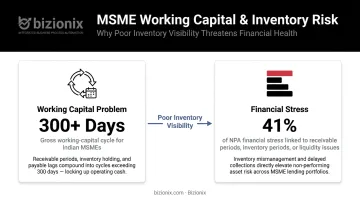
The RBI's MSME Expert Committee found that gross working-capital cycles for Indian MSMEs often exceed 300 days, with 41% of financial stress in NPA cases tied to receivable periods, inventory periods, or liquidity issues. Poor inventory visibility is a direct contributor.
CRM and Sales Management
CRM software manages leads, customer interactions, follow-up schedules, and pipeline visibility. Sales teams stop relying on memory or personal WhatsApp messages and instead work from a structured system that surfaces which leads need action and which accounts are at risk.
A well-implemented CRM creates ownership at every stage of the sales process and ensures at-risk accounts don't slip through because one person is on leave.
HR and Payroll Management
HR software handles employee records, attendance, leave, and payroll processing. For growing businesses, the payroll module handles salary calculations and TDS deductions automatically, keeping the business compliant with Indian labour regulations. An employee self-service portal cuts down routine HR queries without adding headcount.
Unified ERP Platform
While individual point solutions address specific functions, a unified ERP integrates all of the above under a single login — so a sales invoice automatically updates inventory, triggers accounting entries, and reflects in the financial dashboard in real time.
Bizionix is built specifically for this use case: a cloud ERP for Indian MSMEs with 12+ integrated modules on a single database. Businesses managing multiple entities (subsidiaries, branches, franchise networks) can do so under one secure login, with separate books of accounts per entity and consolidated group-level dashboards.
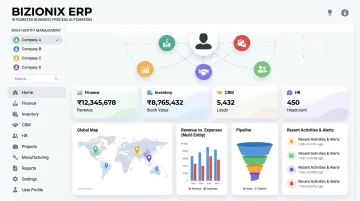
The NEO plan starts at ₹999 per year, with a 14-day free trial available.
Must-Have Features in Enterprise Business Management Software
Real-Time Dashboards and Visibility
The software should show live data — sales performance, inventory status, outstanding receivables, and cash position — without requiring anyone to manually pull a report. For MSMEs where decisions move fast, waiting 24 hours for a report is too long.
GST Compliance and Automated E-Invoicing
For Indian businesses, non-negotiable. Look for:
- GST-ready accounting with automated GSTR-1 population
- Direct IRP integration for IRN generation without third-party tools
- Pre-validation that catches format and data errors before submission
- Automatic QR code generation on every invoice
- Regular compliance updates as regulations change
Multi-Location and Multi-Entity Management
Growing businesses with multiple branches, warehouses, or legal entities need:
- Consolidated group-level dashboards
- Independent books of accounts per entity
- Location-level access controls
- Single login across all entities
Managing this through separate spreadsheets per location creates reconciliation problems that compound every month.
Scalability and Configurability
The software should grow with the business without requiring a system replacement. Key capabilities to look for:
- Add users, modules, or locations as the business expands
- Configurable workflows that adapt to your existing processes
- No forced rebuilding of operations around software limitations
Cloud Access with Activity Tracking
A fully cloud-based system means the team operates from any device, at any location, without infrastructure dependencies. Activity tracking logs every transaction, approval, and update — creating audit-ready records that reduce both fraud risk and compliance exposure.
How to Choose the Right Enterprise Software for Your Business
Start With Your Biggest Pain Point
Before evaluating features, identify your single most costly bottleneck:
- GST filing errors and compliance risk?
- Poor inventory visibility leading to stockouts or overstock?
- Delayed billing and unchased receivables?
- No real-time view across multiple locations?
This diagnosis should drive your evaluation criteria. Buying software based on brand name or the cheapest price tag consistently leads to low adoption and wasted investment.
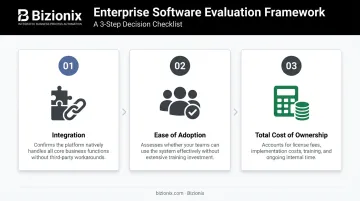
Evaluate Three Things Before Signing
- Integration — Confirm whether the platform handles all your core functions natively, or whether you'll still need a patchwork of separate tools running alongside it.
- Ease of adoption — Can your operations team use it without months of training? Industry research consistently shows that poor fit and low adoption — not technology failure — are the leading reasons ERP implementations fall short of their original goals.
- Total cost of ownership — The license fee is just one component. Factor in implementation, training, support, and the internal time your team will spend managing the system.
Run a Structured Pilot
Test the software against your real workflows — not a polished vendor demo. Involve the people who will use it daily. Define pass/fail criteria before you start: verify that GST filing works for your business structure, that the inventory module handles your locations, and that support is genuinely responsive when something breaks.
Bizionix offers a 14-day trial designed for exactly this — enough time to run real transactions, stress-test the GST and inventory modules, and find friction points without the commitment of a six-month deployment timeline.
Frequently Asked Questions
What are enterprise business operations?
Enterprise business operations are the core processes an organisation runs to deliver products or services — including finance, procurement, sales, inventory, HR, and compliance. Enterprise software manages these processes in a coordinated way, replacing manual coordination with structured, automated workflows.
What is the difference between ERP and business management software?
ERP traditionally covers back-office functions like finance, supply chain, and inventory. Business management software is broader, encompassing CRM, HR, project management, and customer service. Modern ERP platforms increasingly cover all of these, so the distinction is now more about terminology than actual function.
What features should enterprise software for managing business operations include?
At minimum, look for:
- Real-time dashboards and reporting
- GST-ready accounting with e-invoicing
- Inventory and warehouse management
- CRM, HR, and payroll modules
- Multi-location support and cloud access
All ideally delivered under one unified platform, not stitched together from separate tools.
How does enterprise software help reduce operational costs?
Enterprise software reduces costs in four direct ways: fewer labour hours through automation, recovered revenue from error-free billing, lower tool spend by consolidating subscriptions, and reduced compliance penalties through automated GST filing and pre-validated e-invoicing.
Is cloud-based enterprise software better than on-premise for growing businesses?
For most Indian MSMEs, yes. Cloud-based software requires no in-house servers or dedicated IT team, is accessible from any device, receives automatic compliance updates, and deploys far faster. Businesses without dedicated IT infrastructure benefit most from this model.
What should Indian MSMEs specifically look for in enterprise software?
Prioritise built-in GST compliance with IRP integration, multi-entity management under a single login, INR-based pricing, and a system that doesn't require an IT department to run. Note that the e-invoicing mandate now applies to all businesses above ₹5 crore turnover, making GST readiness a non-negotiable requirement.