Introduction
Managing a warehouse without the right software is like running a business without a bank account: possible, but the cracks show fast. Stockouts frustrate customers. Overstocking ties up capital. Manual reconciliation eats hours. Picking errors trigger returns. And as order volumes grow, these problems compound faster than any spreadsheet can keep up with.
Global retail inventory distortion was projected at USD 1.7 trillion in 2024, according to IHL Group — a figure that reflects the combined cost of out-of-stocks and overstocking across retail supply chains. Behind much of that distortion is the absence of real-time inventory visibility. For Indian MSMEs managing distribution, manufacturing, or multi-location stock, this gap is especially costly — and increasingly avoidable.
Warehouse Management Software (WMS) addresses this directly. WMS is not a single product, though. It exists in four distinct types, each designed for a different operational context, budget, and scale.
This article breaks down all four types, explains who each suits best, and gives you a practical framework for choosing the right one for your business.
Key Takeaways
- WMS manages all warehouse activities — receiving, storage, picking, packing, and shipping — from one platform
- The four types are: Standalone WMS, Cloud-Based WMS, ERP-Integrated WMS, and Supply Chain Suite WMS
- No single type is universally best — the right fit depends on your size, budget, integration needs, and IT capability
- For Indian MSMEs, cloud-based and ERP-integrated options tend to offer the best balance of affordability, ease of access, and room to grow
What Is Warehouse Management Software?
A WMS is a software platform that manages and monitors all activities within a warehouse — from receiving goods and putting them away, to picking, packing, and dispatching orders — while maintaining a real-time view of inventory at all times.
Gartner defines WMS as a software application that helps manage and intelligently execute the operations of a warehouse, distribution centre, or fulfilment centre. ASCM's definition focuses more narrowly on workflow optimisation and goods storage — both point to the same operational need: a single system that keeps stock moving accurately.
Where WMS fits in your business:
- Operationally: It acts as the real-time control centre for physical stock movement
- Systemically: It connects warehouse activity to procurement, billing, sales, and logistics
- Strategically: It gives management the visibility needed to make smarter purchasing and stocking decisions
The WMS market reflects how central this software has become. MarketsandMarkets projects the global WMS market to reach USD 10.04 billion by 2030, up from USD 4.57 billion in 2025 — a 17.1% CAGR. Growth is driven by e-commerce expansion, 3PL adoption, and rapidly increasing uptake across Asia Pacific, with India emerging as one of the key growth markets in the region.
The 4 Types of Warehouse Management Software
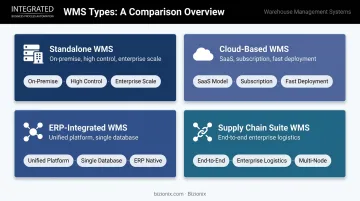
WMS is not a one-size-fits-all category. The four types differ by deployment model, integration depth, and the business environment they are designed for. Understanding these differences is the first step to choosing correctly.
Standalone WMS
A standalone WMS is a purpose-built warehouse application installed on a company's own servers (on-premise). It functions independently of other business software and is designed exclusively for warehouse operations — receiving, put-away, picking, packing, and shipping — with deep, warehouse-specific functionality.
Who it suits: Large or established businesses with dedicated IT teams, complex warehouse requirements (multiple zones, large SKU counts, specialised workflows like cold storage or 3PL), and the capital for on-premise infrastructure.
Key strengths:
- Deep customisation of warehouse workflows
- Full data control on company-owned infrastructure
- No reliance on internet connectivity for operations
- Highly configurable for industry-specific needs
Limitations:
- High upfront cost — perpetual licences range from roughly ₹2 lakh to ₹1.65 crore per facility (USD 2,500–200,000), with implementation adding ₹8 lakh to ₹1.25 crore (USD 10,000–150,000)
- Annual maintenance typically runs 10–25% of the initial licence price
- Slow and expensive to upgrade
- Difficult to integrate with modern cloud tools
- Demands a capable in-house IT team to maintain
For Indian MSMEs, these costs typically exceed what the operational complexity justifies — cloud-based or ERP-integrated options deliver more value at a fraction of the investment.
Cloud-Based WMS
A cloud-based WMS is delivered as a Software-as-a-Service (SaaS) product hosted on remote servers and accessed via a browser or mobile app. The software provider manages infrastructure, updates, and security. The business pays a subscription fee.
Who it suits: Growing businesses, e-commerce operations, multi-location warehouses, and businesses that need fast deployment without heavy upfront investment. Particularly relevant for Indian MSMEs that need scalable, mobile-accessible warehouse management without enterprise-level IT infrastructure.
Cloud WMS now dominates the market — cloud-based platforms accounted for 55.21% of WMS revenue share in 2025 and are projected to grow at a 22.6% CAGR through 2033, according to Mordor Intelligence and Grand View Research respectively.
Key strengths:
- Low upfront cost with predictable monthly pricing (typically ₹16,500–₹8.3 lakh/month, or USD 200–10,000, depending on scale)
- Fast implementation — often weeks to a few months vs. 4–6 months for on-premise systems
- Automatic updates with no IT effort required
- Accessible from any device, anywhere
- Scales easily as order volumes or locations grow
Limitations:
- Subscription costs accumulate over time
- Full functionality depends on reliable internet connectivity
- Deep customisation may be more limited than standalone systems
- Data hosted off-site, which raises data sovereignty concerns for regulated industries
ERP-Integrated WMS
An ERP-integrated WMS is a warehouse management module built into — or tightly coupled with — a broader Enterprise Resource Planning system. Rather than being a separate warehouse tool, it is part of a unified platform that also manages finance, procurement, sales, HR, and other business functions.
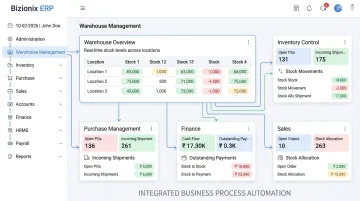
The critical difference from other WMS types: it shares a single database with all other business functions. Inventory data automatically flows into purchase orders, invoices, financial reports, and sales — without manual transfers or separate integrations.
Who it suits: Mid-sized businesses managing warehouse operations alongside sales, procurement, and accounting — and wanting all data centralised in one system. Particularly well-suited for manufacturers, distributors, and businesses running multiple entities or locations.
For Indian MSMEs, Bizionix makes this approach accessible without SAP-level cost or complexity. Its Warehouse Management and Inventory Control modules connect directly with Purchase Management (GRN, vendor management, purchase orders), Sales & CRM, Finance & Accounting, and Production Planning.
Multi-location stock tracking, real-time inventory visibility, and GST-compliant invoicing all run from the same platform — no duplicate entry, no reconciliation between separate tools.
Key strengths:
- All departments — warehouse, finance, sales — work from the same live data
- Eliminates errors from manual re-entry between separate systems
- Stock movements update purchase orders, invoices, and financial reports automatically
- GST-ready reporting built in — relevant for Indian compliance requirements
- Lower total cost of ownership by consolidating multiple tools
Limitations:
- Warehouse functionality may not be as deep as a purpose-built standalone WMS
- If the ERP is not modern or cloud-native, the warehouse module may lack real-time capabilities
- Choosing a poor-fit ERP purely for its WMS module can create broader operational problems
Supply Chain Suite WMS
A Supply Chain Suite WMS is a warehouse management system embedded within an enterprise-grade, end-to-end supply chain management platform. These suites include transportation management, demand planning, order management, procurement, and distribution alongside WMS — all unified under one platform.
Examples include SAP Extended Warehouse Management, Oracle Fusion Cloud Logistics, Blue Yonder, and Infor — each designed for high-volume, multi-node supply chain environments.
Who it suits: Large enterprises, 3PL providers, and businesses with complex, multi-node supply chains managing inbound raw materials, multiple distribution centres, last-mile logistics, and real-time demand signals. For most MSMEs, the implementation complexity and cost place this category well out of practical reach.
Key strengths:
- End-to-end supply chain visibility from supplier to customer
- Advanced automation — AI-driven demand forecasting, robotics integration, labour management
- Optimises across the full logistics network, not just one warehouse
Limitations:
- Highest implementation cost and complexity of all four types
- Requires significant IT expertise and formal change management
- Often overkill for businesses that simply need accurate warehouse inventory management
- Implementation timelines typically run 12–18 months for enterprise deployments, creating significant disruption before any value is realised
How to Choose the Right WMS Type
The right WMS is not the most advanced one — it is the one that fits your current operational reality and growth trajectory without adding unnecessary cost or complexity.
Business Size and Operational Complexity
Assess your daily order volume, number of SKUs, warehouse locations, and whether you need simple stock tracking or advanced features like wave picking, zone management, or labour analytics.
A practical starting point: businesses managing 20–30+ daily orders, 200+ SKUs, or 2–3+ warehouse staff, or those adding new sales channels, are typically at the threshold where a dedicated WMS adds measurable value over spreadsheets or basic inventory tools.
Treat this as a directional guide, not a hard rule. Gartner recommends quantifying warehouse complexity across multiple dimensions before defining WMS requirements.
Integration with Existing Systems
If you already use accounting software, a GST billing platform, or a procurement system, your WMS must connect to these tools directly. Fragmented systems create data errors and reporting gaps.
- ERP-integrated WMS connects natively — and for Indian businesses, this often means built-in GST compliance and e-invoicing support with no extra configuration
- Cloud WMS typically connects via APIs to other tools
- Standalone WMS may require custom integration work, adding cost and time
Budget and Total Cost of Ownership
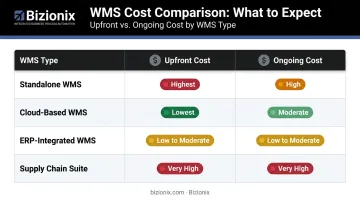
| WMS Type | Upfront Cost | Ongoing Cost |
|---|---|---|
| Standalone WMS | Highest (licence + hardware + implementation) | High (maintenance, upgrades, IT staff) |
| Cloud-Based WMS | Lowest | Moderate (subscription accumulates) |
| ERP-Integrated WMS | Low to moderate | Low to moderate (consolidated tools) |
| Supply Chain Suite | Very high | Very high |
One often-overlooked point: implementation and training services frequently represent 1–2x the annual software cost, regardless of WMS type. Always request a full total cost of ownership breakdown before committing.
IT Capability and Infrastructure
- Standalone WMS demands an in-house IT team to manage servers, maintenance, and upgrades
- Cloud and ERP-integrated WMS require reliable internet and a trusted software vendor — but no in-house infrastructure
- For Indian MSMEs without large IT departments, cloud-based and ERP-integrated systems are the most practical choice
Scalability as You Grow
Will the system support two warehouses when you need three? Will it handle double the order volume during peak season? Cloud-based and ERP-integrated platforms typically offer the easiest scaling path — additional locations or users can be added without hardware investment or expensive version upgrades.
What to Watch Out for Before Finalising Your WMS
Three common mistakes derail WMS decisions before implementation even begins:
Buying more complexity than you need. An MSME adopting a Supply Chain Suite WMS because it "sounds comprehensive" will pay for capabilities unused for years while struggling to implement what they actually need today. Match the WMS type to your current operational requirements — not your aspirational ones.
Choosing based on brand name rather than fit. The relevant question is not "is this a well-known system?" but "does this type of system match our warehouse processes, team skill level, and budget?" A poorly matched system will see low adoption and poor return on investment regardless of its reputation.
Underestimating hidden costs. Standalone WMS is particularly prone to this. Common costs that exceed the initial software price include:
- Customisation and configuration fees
- Data migration from existing systems
- Hardware (scanners, printers, servers)
- Version upgrades and annual maintenance
Always request a complete cost breakdown covering implementation, training, migration, and ongoing maintenance before signing anything.
Frequently Asked Questions
What is warehouse management software?
WMS is a software platform that helps businesses manage all warehouse activities — from receiving and storage to picking, packing, and shipping — with real-time visibility of inventory levels and locations. It replaces manual tracking with a centralised digital record of all stock movement.
What are the four types of warehouse management systems?
The four types are: Standalone WMS (on-premise, purpose-built), Cloud-Based WMS (SaaS, subscription-based), ERP-Integrated WMS (built into a broader business management platform), and Supply Chain Suite WMS (part of an enterprise-wide logistics platform). Each suits a different operational scale and budget.
Which is the best warehouse management software?
There is no single best WMS. The right choice depends on your business size, budget, integration needs, and IT capability. Growing businesses and Indian MSMEs typically benefit most from cloud-based or ERP-integrated options, which offer affordability and scalability without heavy upfront investment or IT overhead.
Is warehouse management software like SAP?
SAP Extended Warehouse Management is one example of a Supply Chain Suite WMS — designed for large enterprises with complex, multi-node logistics operations. Most small and mid-sized businesses do not need SAP's complexity or cost. Cloud-based and ERP-integrated alternatives exist specifically for their scale and budget.
What is the difference between a standalone WMS and a cloud-based WMS?
A standalone WMS is installed on company-owned servers with higher upfront costs and full data control on-site. A cloud-based WMS is hosted by the software provider and accessed via the internet, with lower setup costs, automatic updates, and easier scaling.
Can an ERP system replace a dedicated warehouse management system?
A modern, well-built ERP with a strong warehouse management module can effectively replace a standalone WMS for most SMEs — provided the warehouse functionality covers core needs. Businesses with highly complex operations (large distribution centres, automation, robotics) may still need a purpose-built WMS alongside their ERP.