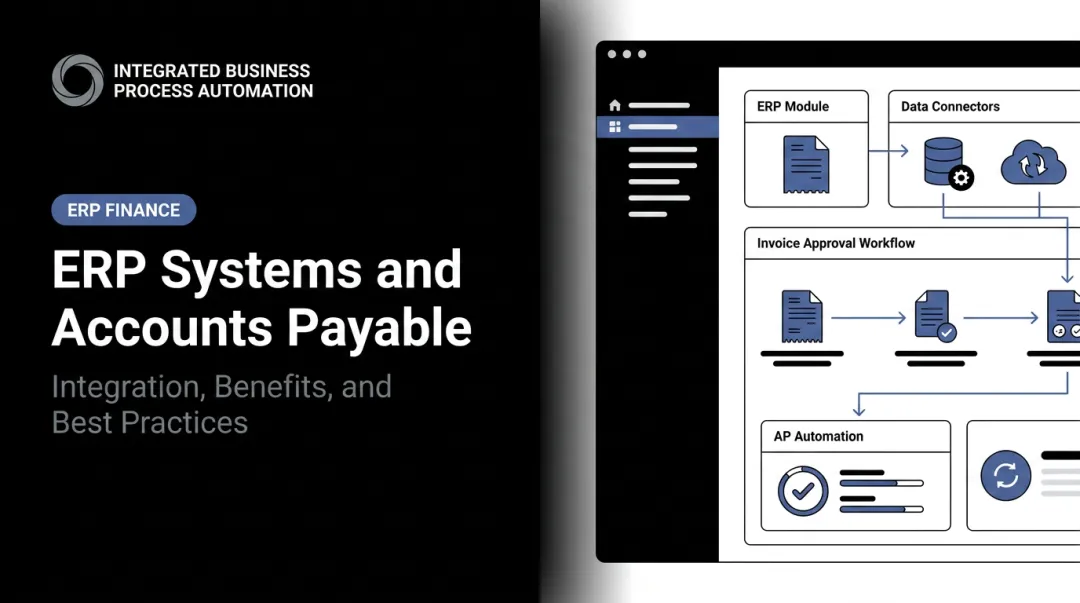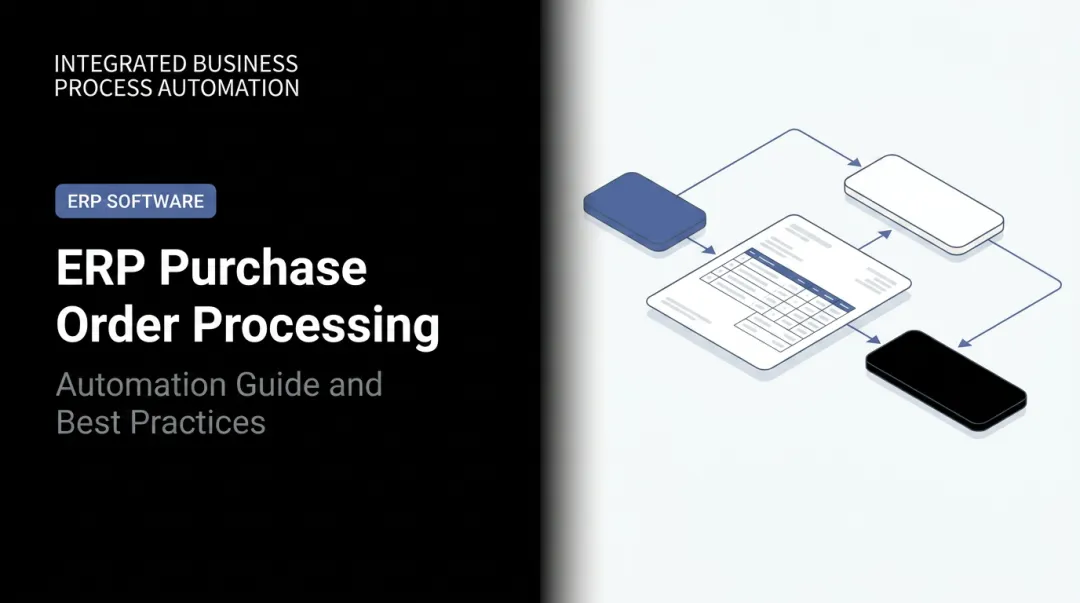
ERP invoice processing solves this by handling the entire invoice lifecycle — receipt, validation, GST compliance, approval, payment, and archiving — inside a single connected system. This guide explains exactly how that works, step by step, including where automation delivers real value and where it requires proper setup to function correctly.
Key Takeaways
- ERP invoice processing automates the full AP and AR lifecycle in one system, eliminating manual data entry and disconnected tools.
- The six core steps: invoice capture → data extraction and validation → GST/compliance verification → approval routing → payment processing → archiving.
- Ardent Partners' 2025 ePayables report finds top AP teams process invoices in 2.9 days vs. 13.5 days for others — automation explains most of that gap.
- For Indian MSMEs, automated GST compliance (IRN generation, GSTR-1 auto-population, GSTIN validation) eliminates the most error-prone task in accounts.
- Clean vendor master data and defined approval workflows are prerequisites — the system performs only as well as what's configured into it.
What Is ERP Invoice Processing?
ERP invoice processing is the systematic handling of all inbound vendor invoices (accounts payable) and outbound customer invoices (accounts receivable) through a connected ERP platform. Every invoice is validated against existing business records — purchase orders, goods receipt notes, contracts — before payment or collection is triggered.
This validation against live business records is what separates ERP-driven processing from standalone invoicing tools.
AP vs. AR: Two Sides of One Workflow
Most standalone accounting tools handle payables or receivables in isolation. ERP handles both within a single coordinated workflow, on a shared data foundation:
- Vendor invoices (AP) are received, validated against POs and GRNs, approved, and paid
- Customer invoices (AR) are generated from sales orders, issued, tracked, and collected
In Bizionix, both functions run within a unified Finance & Accounting module on a single centralized database, meaning that when a sales invoice is created, it simultaneously updates accounts receivable, GST records, and financial reports — no manual cross-posting required.
What ERP Adds Over Standalone Tools
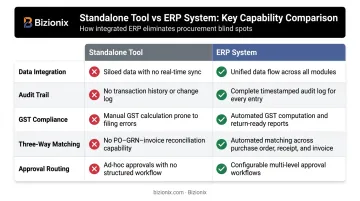
| Capability | Standalone Tool | ERP System |
|---|---|---|
| Data integration | Siloed per function | Connected across procurement, inventory, finance |
| Audit trail | Partial or manual | Complete, timestamped, system-generated |
| GST compliance | Manual or add-on | Automated — GSTIN validation, IRN, GSTR filing |
| Three-way matching | Not available | Automatic PO/GRN/invoice cross-check |
| Approval routing | Email or manual | Configurable digital workflows |
Why Growing Businesses Need ERP Invoice Processing
The core problem is volume. A business handling 20 invoices a month can manage with a spreadsheet and a vigilant accounts team. Add more vendors, more locations, and GST compliance obligations, and the same approach produces cascading failures.
The Cost of Manual Processing
According to Ardent Partners' 2025 State of ePayables report, the average cost to process a single AP invoice is ₹820 (~$9.84), while best-in-class teams bring that down to ₹221 (~$2.65) — nearly a four-fold gap. The same report puts the average invoice exception rate at 18.4%, meaning nearly one in five invoices requires manual intervention to resolve a discrepancy.
For a business processing 500 invoices a month, that's 90+ invoices going back for manual review every single month.
What Goes Wrong Without Structured ERP Workflows
- Duplicate payments — without system-level controls, the same invoice gets paid twice when received across channels
- Missed early-payment discounts — manual tracking cannot reliably flag discount windows before they lapse
- GST mismatches and ITC rejections — incorrect GSTINs, wrong tax components, or missing e-invoices create Input Tax Credit problems that GST authorities are scrutinising
- Approval delays — invoices sitting in email inboxes create vendor disputes and damage supplier relationships
- No audit trail — during tax assessments, reconstructing invoice history from spreadsheets is slow and incomplete
Each of these failures compounds the others. Structured ERP workflows exist specifically to break that cycle — and the businesses that adopt them stop firefighting and start managing.
How ERP Invoice Processing Works: Step-by-Step
Invoices enter the ERP from multiple sources, are validated against existing business records, routed through defined approval hierarchies, settled, and archived — with every action logged automatically. Here is how each stage works in practice.
Step 1: Invoice Capture
Invoices arrive through various channels — email, supplier portals, EDI feeds, scanned paper documents, or directly from the GST e-invoice system. The ERP captures these in a standardised format, using OCR and AI-based extraction to auto-populate key fields: vendor name, invoice number, line items, tax amounts, and due dates.
The accounts team receives a structured, pre-populated invoice record — no manual keying, no re-entry from a PDF.
Step 2: Data Extraction and Validation (Three-Way Matching)
Once captured, the ERP automatically cross-references the invoice against two existing records:
- Purchase Order (PO) — confirms the vendor, quantity, and rate match what was ordered.
- Goods Receipt Note (GRN) — confirms the goods or services were actually received.
This three-way match is the primary financial control against overpayments and fraud. APQC defines three-way matching as requiring an invoice to be matched to a purchase order and a receiving document before payment processing — it is the standard for structured AP operations.
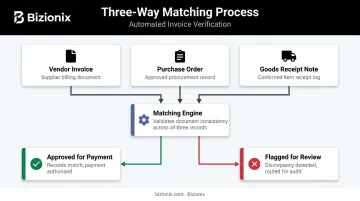
Any discrepancy in quantity, rate, or vendor details flags the invoice for review before it moves forward.
Step 3: GST and Compliance Verification
For Indian businesses, this step is non-negotiable. The ERP validates:
- Vendor GSTIN — confirmed as active and correctly recorded
- Tax component accuracy — CGST/SGST for intra-state, IGST for inter-state transactions
- E-invoicing obligation — for businesses with aggregate turnover above ₹5 crore (mandatory from 1 August 2023 per CBIC Notification No. 10/2023-Central Tax), the ERP generates the Invoice Reference Number (IRN) via direct API connection to the GSTN Invoice Registration Portal
Bizionix connects directly with the GST e-Invoice system via API — no manual JSON uploads, no third-party intermediary. IRN and QR code generation happens in seconds, and GSTR-1 is auto-populated from the same transaction data.
Step 4: Approval Workflow Routing
Validated invoices are routed to the appropriate approver based on pre-configured rules. The approval history is logged with timestamps — no email chains, no informal follow-ups.
Routing rules can be defined by:
- Invoice value threshold
- Department or cost centre
- Vendor category or payment type
- Geographic location or entity
The system sends notifications automatically and escalates overdue approvals on schedule, rather than waiting for manual intervention.
Step 5: Payment Scheduling and Processing
With approval confirmed, the ERP moves straight to payment execution. The system handles:
- Scheduling based on vendor payment terms and current cash position
- Early-payment discount alerts so favourable windows aren't missed
- Automatic reconciliation against the invoice once payment clears, updating accounts payable in real time
Step 6: Recording, Archiving, and Audit Trail
Every invoice and payment transaction is recorded in the general ledger with proper GL account coding. Invoice documents are archived with searchable metadata — vendor name, invoice number, date, GSTIN — so retrieval during a GST audit or statutory review takes seconds, not hours of manual searching.
The complete, timestamped audit trail covers every action from receipt through final payment, with no manual reconstruction needed.
Key Benefits of Automating Invoice Processing in an ERP
Time and Cost Efficiency
The numbers from Ardent Partners are unambiguous: best-in-class AP teams achieve 78% lower processing cost, 82% faster processing, and 59% lower exception rates than average teams. The Hackett Group adds that companies with 30% or higher touchless invoice processing have, on average, 3.5x higher AP productivity.
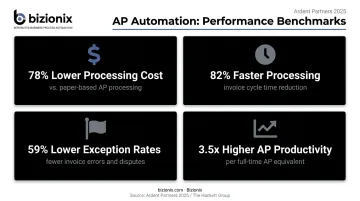
Practically, this means invoice approval cycles that took five to seven days compress to hours — sometimes minutes for routine, matched invoices.
Error Reduction and Financial Accuracy
Pre-validation rules and three-way matching catch discrepancies before payment, not after. This prevents:
- Duplicate payments
- Overpayments against incorrect rates
- Incorrect ITC claims from vendor GST errors
- Ledger entries that don't reconcile with inventory
The ERP produces records that are always in sync with procurement and inventory data — no manual reconciliation needed at month end.
Real-Time Cash Flow Visibility
Finance managers can see exactly which invoices are pending, in approval, overdue, or paid — at any moment. Bizionix's real-time dashboards give finance teams a live view of cash positions and receivables at any point in the month. That ongoing visibility makes cash flow forecasting practical and supports sharper working capital decisions — including when to accelerate collections or defer non-critical payments.
GST Compliance Without Manual Effort
For Indian MSMEs, this is where automation delivers its clearest return. An ERP with live IRP integration handles:
- GSTIN validation at the point of invoice entry
- Correct CGST/SGST/IGST application per transaction type
- IRN and QR code generation — automatically
- GSTR-1 auto-population from processed invoices
Bizionix's direct API integration with the GST e-Invoice system means that once a sales invoice is created, compliance is handled in the background. The accounts team does not manually touch GST filings for routine transactions.
Stronger Vendor Relationships and Faster Collections
On the AP side, vendors paid accurately and on time become more cooperative partners. That translates to better credit terms, fewer payment disputes, and stronger negotiation leverage. On the AR side, automated invoice generation and follow-up shortens the collection cycle and reduces days sales outstanding.
Common Issues, Misconceptions, and When Automation Isn't Enough
ERP invoice automation delivers results only when the underlying data and workflow rules are properly set up. Skip that foundation, and the system creates new problems instead of solving old ones.
The Master Data Problem
Businesses that go live without cleaning up their vendor master records, GL code mappings, and HSN/SAC codes often generate higher exception rates than they had manually — because the system now flags every inconsistency that previously went unnoticed. Poor data quality and fragmented systems consistently emerge as the primary reason AP automation underdelivers across implementations.
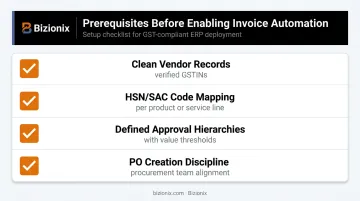
Before enabling automation, foundational data setup matters:
- Clean vendor records with verified GSTINs
- Correctly mapped HSN/SAC codes per product or service line
- Defined approval hierarchies with clear value thresholds
- PO creation discipline in the procurement team (no PO = no three-way match)
Common Failure Points in Practice
- Inconsistent PO creation — if procurement raises POs inconsistently, three-way matching cannot function and invoices default to manual review
- Over-rigid approval rules — workflows configured without exception-handling logic create bottlenecks when invoices fall outside standard parameters
- GSTIN mismatches in vendor profiles — incorrect GSTINs in the vendor master cause e-invoicing validation failures downstream
When ERP Automation May Not Deliver Full Value
- Businesses processing fewer than 20–30 invoices per month may not see immediate ROI from full automation; simpler digital tools are a more practical starting point
- Highly non-standard or negotiated invoice formats may require additional configuration before automated extraction works reliably
- Organizations without connected procurement and inventory data cannot benefit from three-way matching until those modules are operational
The E-Invoicing Compliance Misconception
Many businesses assume that having an ERP means they are automatically GST e-invoicing compliant. That holds true only if the ERP has a live, certified integration with the IRP and that integration is properly configured with the business's GST credentials.
In Bizionix, the e-invoicing integration requires a one-time setup step: connecting the business's GSTIN and API credentials. Once configured, IRN generation and GSTR-1 auto-population are fully automated. That initial configuration step is not optional, and assuming it is already active without verifying is a common compliance risk.
Frequently Asked Questions
What are the invoice processing steps in ERP?
The six core steps are: invoice capture, data extraction and validation (three-way matching), GST and compliance verification, approval workflow routing, payment scheduling and processing, and archiving with audit trail creation. In a well-configured ERP, most steps happen without manual intervention — exceptions escalate automatically for review.
What is an invoice in ERP?
In an ERP, an invoice is not just a PDF — it is a structured financial transaction linked to a vendor master, purchase order, GL account, and tax configuration. When processed, it triggers payment, updates inventory, and feeds GST filings. All of this flows into financial reports automatically.
What is the difference between I2C and O2C in ERP?
Order-to-Cash (O2C) covers the entire customer cycle from receiving an order to final payment collection. Invoice-to-Cash (I2C) is a subset focused specifically on generating the customer invoice and collecting payment. In practice, I2C is the financial close-out phase — the point where operational delivery hands off to accounts receivable.
What is three-way matching in ERP invoice processing?
Three-way matching is the automatic cross-check of a vendor invoice against the corresponding purchase order and goods receipt note — verifying that quantity, price, and vendor details match before approving payment. It is the primary AP control against overpayments and duplicate payments.
How does ERP invoice processing support GST compliance for Indian businesses?
A GST-ready ERP validates vendor GSTINs, applies the correct CGST/SGST/IGST components per transaction type, and generates e-invoices with IRNs via direct IRP API integration. It also auto-populates GSTR return data, removing manual reconciliation and reducing ITC mismatch risk.