The problem isn't effort. It's structure. According to a Research and Information System (RIS) survey of 2,882 Indian MSMEs across 14 states, only 12% use ERP systems — even though 95% use at least one digital product and 87% use digital payments. The gap between basic digitisation and integrated financial management is where most AP problems hide.
This article covers how ERP systems integrate with accounts payable, what that integration actually delivers, and the best practices that make implementation work — with a specific focus on Indian MSMEs.
Key Takeaways
- ERP systems centralise vendor data, outstanding liabilities, and payment status into one real-time platform — replacing fragmented spreadsheets and disconnected tools
- AP integration automates invoice capture, approval routing, three-way matching, and payment scheduling — reducing manual effort and errors
- Key benefits: faster invoice cycles, GST-ready invoicing and e-invoice compliance, stronger vendor relationships, and lower operating costs
- Successful rollout requires mapping existing workflows, choosing a GST-compliant ERP, and taking a phased implementation approach
What Is an ERP System and Its Role in Accounts Payable
Enterprise Resource Planning (ERP) is a unified software platform that connects core business functions — finance, procurement, inventory, and operations — through a single shared database. Every department works from the same data, in real time, rather than maintaining separate records that inevitably diverge.
Gartner defines Cloud ERP Finance as the system of record for finance, generating and storing accounting entries in accordance with accounting standards — covering accounts payable, accounts receivable, and the general ledger.
ERP's Specific Role in Accounts Payable
In AP, ERP acts as the financial backbone. It:
- Stores and manages the vendor master database
- Tracks all outstanding liabilities and payment due dates
- Validates invoices against purchase orders
- Schedules and records payments
- Generates audit-ready reports and compliance documents
Why ERP Alone Isn't Always Enough
ERP is the system of record. AP-specific outcomes — touchless invoice processing, exception handling, approval routing — depend on how well the AP workflow is configured or integrated within that ERP.
Ardent Partners' 2024 ePayables study found that only 32.6% of B2B invoices are handled through straight-through processing (fully automated, no manual intervention) globally. For Indian MSMEs, where manual invoice handling is still common, the gap is often wider. Having an ERP is the starting point — but how that AP workflow is configured inside it determines actual results.
How ERP and AP Integration Works: The Full Workflow
A well-integrated ERP doesn't just store AP data — it moves it through the entire invoice-to-payment cycle automatically. Here's how the workflow operates end to end.
Step 1: Invoice Capture
Invoices arrive by email, PDF, or supplier portal. An ERP with AP integration extracts header and line-item data automatically and logs each invoice against the relevant vendor record. No manual data entry, no re-keying — and no attachments buried in someone's inbox.
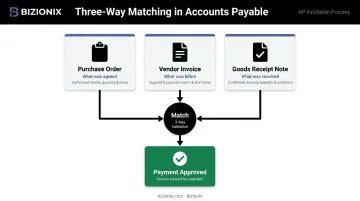
Step 2: Three-Way Matching
The system cross-checks the incoming invoice against two other documents:
- The Purchase Order (PO) — what was agreed to be purchased and at what price
- The Goods Receipt Note (GRN) — confirmation that goods or services were actually received
Payment cannot proceed until all three documents align. This single control prevents duplicate payments, catches pricing discrepancies, and enforces procurement discipline without anyone manually pulling records to compare them.
Step 3: Approval Routing
Once an invoice passes matching, the ERP routes it to the right approver based on predefined rules — amount thresholds, cost centres, or departments. Approvals happen digitally, eliminating the delays caused by physical sign-off chains or email threads that go unanswered for days.
Step 4: Payment Scheduling
Approved invoices queue for payment based on due dates and cash flow priorities. When payment executes, the general ledger updates automatically — no separate journal entries required.
Step 5: Reconciliation and GST Compliance
Post-payment, the system reconciles transactions against bank statements and flags discrepancies. For Indian businesses, there's an additional layer: GST reconciliation. Vendor invoices must match GSTR-2B filings to support Input Tax Credit (ITC) claims.
The GST portal's GSTR-2B advisory explicitly states that taxpayers must reconcile GSTR-2B with books of accounts to ensure credit is not claimed twice for the same document.
Bizionix handles this through direct API integration with the Invoice Registration Portal (IRP), auto-generating Invoice Reference Numbers (IRNs) instantly and keeping purchase-side GST records aligned with portal data — no manual uploads needed.
Key Benefits of ERP-AP Integration for Growing Businesses
Fewer Errors, Lower Costs
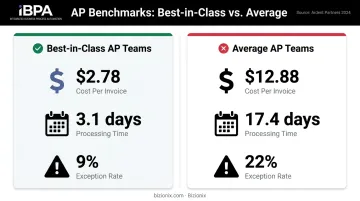
Manual AP is expensive and error-prone. APQC's 2024 benchmark across 4,821 companies puts the median cost to process one invoice at $6.00. Ardent Partners found that best-in-class AP teams — those with high automation — process invoices at $2.78 each in 3.1 days, while others average $12.88 and 17.4 days.
The exception rate gap tells a similar story: best-in-class teams handle 9% exception invoices, while others deal with 22%. Every exception is a delay, a manual intervention, and a cost.
Real-Time Cash Flow Visibility
With all vendor liabilities, due dates, and outstanding invoices in one system, finance teams can see upcoming cash commitments before they become surprises. This matters most for MSMEs managing tight working capital — payment prioritisation becomes a data-driven decision rather than a best guess.
GST and Audit Readiness
ERP-integrated AP maintains a complete, time-stamped record of every invoice action: who captured it, who approved it, when it was paid, and what the matching result was. For Indian MSMEs, this directly reduces the reconciliation burden between purchase records and GSTR-2B filings — and creates defensible audit trails if GST authorities raise queries.
Platforms like Bizionix handle this end-to-end — GST-ready accounting, TDS compliance, and bank reconciliation within the same system, covering both outbound and purchase-side compliance without additional tools.
Stronger Vendor Relationships
Timely payments build supplier trust — and supplier trust translates to better credit terms. Ardent Partners reports that best-in-class AP teams spend 50% less time responding to supplier payment inquiries than their peers, because vendors can get status updates without calling the AP team.
For MSMEs, the stakes are higher than a workflow convenience. A GAME and Dun & Bradstreet report estimates ₹10.7 lakh crore is locked annually in delayed MSME payments — with delayed invoice submission accounting for 14.1% of those delays. Improving AP processes directly reduces how much working capital stays trapped at each link in the chain.
Scalability Without Adding Headcount
Manual AP scales linearly: more invoices means more people. ERP-integrated AP breaks that pattern:
- Invoice volumes can double without a proportional increase in AP headcount
- Automated matching and approvals absorb volume spikes without bottlenecks
- Finance teams redirect time from data entry to exception handling and vendor strategy
This makes ERP-AP integration a practical requirement — not just a nice-to-have — for any MSME planning to grow without growing its overhead.
Common AP Challenges That ERP Integration Solves
Invoice Processing Delays
Paper-based and email-driven approval chains create predictable bottlenecks. Invoices sit in inboxes. Approvers travel or are unavailable. Payment deadlines pass. The result is late payment penalties and strained vendor relationships — both avoidable with automated routing and real-time status tracking.
Data Silos Across Teams
When procurement uses one system, finance uses another, and AP runs on spreadsheets, the same data gets entered multiple times. Each re-entry is an opportunity for error. ERP integration makes key records — purchase orders, GRNs, and invoices — visible to all relevant teams in one platform. Everyone works from the same data, not competing versions.
GST Compliance Risk in the Indian Context
Data silos compound a more pressing problem: GST exposure. For Indian MSMEs, manual AP creates significant compliance risk across every vendor payment cycle. Managing GST across dozens or hundreds of vendor invoices without an integrated system means:
- Reconciling GSTR-2B against purchase records manually, each month
- Risk of ITC mismatches triggering scrutiny or disallowed credits
- Potential TDS deduction errors on vendor payments
- GST cash flow pressure — MSMEs must pay GST by the 20th of the succeeding month regardless of whether buyers have paid them
An ERP that handles purchase-side GST natively closes these reconciliation gaps before they reach month-end — keeping ITC claims accurate and GSTR-2B filings clean.
Best Practices for a Successful ERP-AP Integration
Map Your Current Workflow Before Implementation
Before configuring anything, document your entire existing AP process — from invoice receipt to payment. This reveals where approvals stall, where exceptions pile up, and where the real bottlenecks live. The goal is to design those problems out of the new system, not replicate them in digital form.
Choose an ERP Built for Your Regulatory Context
Not all ERP platforms are designed for the same scale or compliance environment. For Indian MSMEs, the requirements are specific:
- Native GST compliance with GSTR return support
- Direct e-invoicing integration with IRN generation
- TDS handling within the AP workflow
- Implementation cost and complexity appropriate for MSME scale
Bizionix, built by IIS-LLP specifically for Indian MSMEs, covers all four. It provides unified payables management, GST-ready accounting, TDS compliance, and direct API connection to the GST e-Invoice portal for instant IRN generation. At ₹999 per year for its NEO package, it gives growing businesses full AP control without the overhead of large enterprise systems. A 14-day free trial is available.
That scale fit matters more than most teams expect. Gartner projects that by 2027, more than 70% of recently implemented ERP initiatives will fail to fully meet their original business-case goals, with up to 25% failing catastrophically. The most consistent factor behind those failures: choosing a system mismatched to the business's actual size and compliance requirements.
Roll Out in Phases, Starting With Core Workflows
Avoid automating every AP function simultaneously. A phased approach reduces risk and builds team confidence:
- Phase 1: Invoice capture and digital approval routing
- Phase 2: Three-way matching and exception handling
- Phase 3: Payment scheduling and GST reconciliation
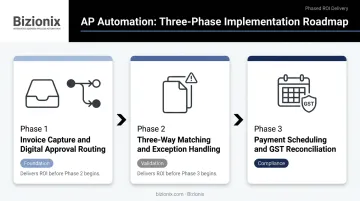
Each phase delivers visible ROI before the next begins and surfaces configuration issues while they're still easy to fix.
Once the core workflow is stable, ownership becomes the next variable to get right.
Define Clear Ownership and Train by Role
Technology adoption fails when teams aren't sure who does what in the new system. Before go-live:
- Assign clear roles: who captures invoices, who approves, who reconciles
- Conduct role-specific training (not generic platform walkthroughs)
- Identify an internal champion who monitors exceptions and escalates issues during the adjustment period
Without defined ownership, even well-configured systems drift back toward manual workarounds within weeks of launch.
Frequently Asked Questions
What is an ERP system in accounting?
An ERP (Enterprise Resource Planning) system in accounting is software that unifies financial functions — including accounts payable, accounts receivable, general ledger, and reporting — in a single platform. Finance teams get accurate, real-time data across the business rather than relying on separate, disconnected tools that produce conflicting numbers.
How does ERP improve accounts payable processes?
ERP automates the core AP workflow — invoice capture, approval routing, three-way matching, and payment scheduling — eliminating most manual effort. Finance teams gain real-time visibility into outstanding liabilities and prevent duplicate payments through built-in validation.
What are the key benefits of integrating ERP with accounts payable?
The main benefits include:
- Faster invoice processing with fewer errors
- Real-time cash flow visibility and audit trails
- Stronger vendor relationships and compliance readiness
For Indian businesses, GST reconciliation and ITC management become much less burdensome when AP data and tax records live in the same system.
What challenges come with ERP and AP integration?
Common challenges include data migration complexity, resistance to process change, and configuration mismatches with existing workflows. A phased rollout, clear role definitions, and proper training make these manageable — provided the implementation is treated as a process change, not just a software deployment.
How do I choose the right ERP for accounts payable management?
Evaluate ERP options against:
- Built-in AP capabilities and ease of configuration
- GST and TDS compliance for Indian regulatory requirements
- Implementation complexity, scalability, and total cost
Indian MSMEs should prioritise natively GST-compliant cloud platforms over enterprise systems that require extensive customisation.
Is cloud ERP suitable for small and mid-sized businesses managing AP?
Cloud ERP suits SMBs well — it removes infrastructure costs, enables real-time access from any location, and scales with growth. Only 14% of Indian MSMEs currently use cloud computing (per RIS survey data), but the economics have shifted enough to make it a practical option for businesses that previously ruled it out.