Introduction
Picture this: your accounts team spends the last week of every month manually entering invoice data, cross-checking GST rates, and chasing payment confirmations via WhatsApp — only to discover that cash flow is still unpredictable and two invoices went out with wrong tax calculations.
This isn't an edge case. It's the daily reality for thousands of Indian MSMEs.
According to a GAME and Dun & Bradstreet report, ₹10.7 lakh crore is locked annually in delayed MSME payments — and 14.1% of those delays trace directly to late invoice submission. Beyond the numbers, billing delays create revenue leakage and put real strain on customer relationships.
This article covers what automated billing software is, the measurable benefits it delivers for Indian MSMEs, a step-by-step setup guide, and the best practices that separate a smooth rollout from a failed one.
Key Takeaways
- ₹10.7 lakh crore is locked in delayed MSME payments annually — late invoicing is a direct contributor
- Automated billing eliminates manual data entry, catches GST errors before they leave your system, and sends invoices the moment an order is confirmed
- Businesses above ₹5 crore turnover must generate IRNs for e-invoicing compliance — billing software handles this without manual effort
- Setup follows a clear five-step process: from auditing your current workflow to training your team for full adoption
- Bizionix includes a built-in billing module with direct GST e-Invoice API integration — no standalone tool required
What Is Automated Billing Software?
Automated billing software replaces manual invoicing and payment collection tasks with rule-based, scheduled workflows. Rather than a staff member opening a spreadsheet and manually typing invoice details, the system pulls data from orders, customer records, and pre-configured pricing to generate, deliver, and track invoices automatically.
Billing Software vs. Invoicing Software
These terms get used interchangeably, but they cover different scopes:
- Invoicing software creates and sends payment requests — it handles the document itself
- Billing software manages the broader billing cycle — charge calculation, recurring billing, payment tracking, and collections
Most modern platforms, including ERP systems like Bizionix, combine both functions within a single integrated financial module.
For Indian MSMEs, this matters because the same system that raises an invoice should also handle GST returns, reconciliation, and audit trails — not require three separate tools patched together.
The Hidden Cost of Manual Billing
Operational Drag That Compounds Over Time
Every invoice raised manually represents staff time spent on data entry, GST rate cross-checking, and follow-up calls that could have been redirected to actual business work. At 50 invoices per month, this is manageable. At 500, it becomes a full-time bottleneck.
Ardent Partners' 2024 State of ePayables report found that average invoice processing takes 9.15 days, while best-in-class teams process invoices in 3.1 days. That gap isn't talent — it's process automation.
The Accuracy and Compliance Risk
Manual billing errors in an Indian GST context carry real consequences:
- Incorrect CGST/SGST/IGST splits trigger payment disputes
- Missing HSN/SAC codes cause invoice rejections
- Non-compliant invoices delay collections and expose businesses to penalties
- Under CBIC Section 122, invoice-related offences attract a penalty of ₹10,000 or tax evaded, whichever is higher — with certain failures extending to ₹25,000
A GAME/D&B study on MSME payment behaviour found that 3.6% of payment delays are attributed to incomplete GST compliance by the seller — meaning your billing errors become your buyer's excuse to pay late.
When Growth Breaks the Process
Compliance risk doesn't shrink as transaction volumes grow — it multiplies. Manual billing processes that work at low volumes break down at scale, and the numbers for Indian micro enterprises reflect this clearly:
- Delayed payments represent 65.73% of total sales
- Median debtor days run 195 days beyond the legal 45-day payment limit
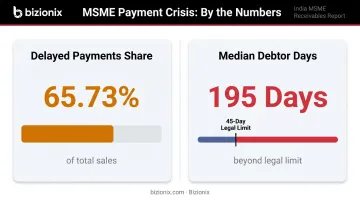
Adding invoice volume without automation widens both gaps. More invoices mean more entry errors, more missed follow-ups, and more disputed amounts sitting outside your cash flow.
Key Benefits of Automated Billing Software
Faster Billing Cycles and Improved Cash Flow
Automated systems generate invoices at the moment of order completion or on a configured schedule — not when someone gets around to it. This eliminates the lag between delivery and billing, which the GAME/D&B data identifies as a primary driver of collection delays.
For MSMEs already contending with ₹10.7 lakh crore locked in delayed payments industry-wide, removing even a few days from the invoice-to-cash cycle has a measurable impact on working capital.
Elimination of Billing Errors Through Pre-Validation
Before any invoice reaches a customer, automated systems apply pre-configured pricing rules, tax rates, and customer-specific terms. Discrepancies — wrong GST rate, missing fields, incorrect GSTIN — are caught internally, not discovered by the customer.
This is the structural difference between automated and manual billing. Manual entry relies on the person being correct every time. Automated validation relies on rules that apply consistently, regardless of volume or time pressure.
Cost Reduction Through Operational Efficiency
Billentis research puts paper invoice processing costs at EUR 11.10 per invoice for issuers, compared to EUR 4.50 for automated invoices — a 59% reduction. On the recipient side, the gap is even wider: EUR 17.60 vs EUR 6.40. These are European figures, but the cost ratio holds broadly: automation consistently cuts invoice processing costs by more than half, regardless of geography. Scaled across hundreds of invoices monthly, that reduction adds up fast.
Beyond direct costs, automation reduces the staff hours spent on:
- Manual data entry and formatting
- Error correction and re-issuing invoices
- Payment follow-ups and dunning calls
- Reconciliation at month-end
Compliance and Audit Readiness
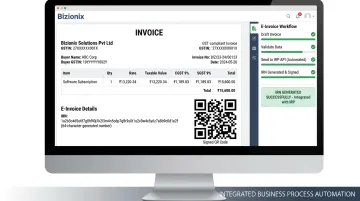
For Indian businesses crossing the ₹5 crore annual turnover threshold, e-invoicing is mandatory. Every B2B invoice must be submitted to the Invoice Registration Portal (IRP), receive an IRN (Invoice Reference Number), and include a digitally signed QR code — or it is not considered a valid GST invoice.
Automated billing software handles this without manual uploads or portal logins. Bizionix connects directly to the IRP via API: the invoice is created, validated against GST rules, and the IRN and QR code are generated instantly — all within the same workflow.
The system also maintains a complete, timestamped audit trail of every invoice and payment, making GSTR-1 filing, reconciliation, and financial audits significantly easier.
Scalability Without Adding Headcount
Manual billing scales linearly — more invoices means more staff time. Automated billing doesn't. The same configured rules that process 100 invoices per month handle 1,000 without additional complexity or headcount.
For MSMEs on a growth trajectory, this is the difference between a billing process that supports expansion and one that becomes the ceiling on it.
Must-Have Features in Automated Billing Software
When evaluating billing software for an Indian MSME context, these three feature areas are non-negotiable:
Automated Invoice Generation and e-Invoicing Compliance
The software must auto-create invoices from order or contract data and deliver them electronically. For businesses above the ₹5 crore turnover threshold, this includes:
- GST-compliant invoice formats (PDF and JSON)
- Automatic CGST/SGST/IGST breakdowns based on supply type
- HSN/SAC code inclusion
- Direct API connection to the IRP for instant IRN generation
- QR code creation on every invoice
Bizionix handles this in a single workflow: invoice creation triggers automatic validation, IRN generation, and QR code embedding with no manual steps between creation and compliance.
Integration with Accounting and ERP Systems
Standalone billing software that doesn't connect to your accounting system creates a new manual problem: reconciliation. Every invoice raised should automatically update:
- General ledger entries
- Accounts receivable balances
- GST return data (GSTR-1 auto-population)
- Financial reports
Bizionix operates on a single-database architecture, meaning a sales invoice raised in the billing module is instantly reflected across finance, accounting, and reporting — without imports, exports, or manual journal entries.
Configurable Billing Rules and Recurring Billing Support
The platform should allow businesses to define:
- Billing frequency and invoice generation triggers
- Payment terms per customer or customer group
- Late fee logic and partial payment handling
- Recurring billing for subscription or retainer arrangements
MSME billing is rarely uniform. Customer terms vary, billing cycles differ by service type, and growing businesses need to adjust these rules as they scale — without rebuilding their setup from scratch.
How to Set Up Automated Billing Software: Step-by-Step
Step 1: Audit Your Current Billing Process
Before selecting software, map your existing workflow end to end. Document:
- Monthly invoice volumes and billing frequency
- Customer segments and payment methods
- Common failure points (late invoicing, GST errors, disputed amounts)
- Priority requirements — e-invoicing compliance, recurring billing, or collections
This audit determines which features matter most and what data needs to be migrated.
Step 2: Select the Right Software
Key selection criteria for Indian MSMEs:
- GST compliance — non-negotiable for legal invoicing
- ERP integration — verify it connects to your existing accounting or inventory systems
- Pricing model support — project-based, recurring, milestone, or transaction-based
- Ease of use — non-technical staff must be able to operate it daily
- Scalability — will it handle 3x your current volume without re-implementation?
For MSMEs seeking a unified approach, an ERP platform with a built-in billing module — like Bizionix — eliminates the complexity and cost of integrating standalone billing software with separate accounting or inventory systems.
Step 3: Configure Customer Profiles and Pricing Rules
Start configuration with the foundational data your invoices depend on:
- Import customer master data (GSTIN, address, contact details)
- Define product and service catalogue with prices and applicable tax codes
- Set billing terms per customer or customer group
- Configure GST rates — CGST/SGST for intra-state, IGST for inter-state supply
Clean data here directly determines invoice accuracy. An incorrect GSTIN or missing tax code at this stage will cause e-invoice rejections downstream — fix it before it hits a real customer.
Step 4: Set Up Billing Workflows and Automation Rules
With your data in place, define the rules that drive the automation:
- Invoice triggers — order completion, subscription renewal date, project milestone
- Delivery schedules — immediate or batched at configured intervals
- Payment reminder sequences — pre-due and post-due follow-up timing
- Overdue escalation rules — who gets notified and when
Test every workflow with sample data before going live. Specifically verify: reminder dates align with actual due dates, invoice templates populate all required GST fields, and escalation notifications reach the right contacts.
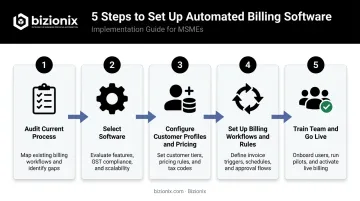
Step 5: Train the Team and Go Live
Role-based training matters here:
- Accounting teams — managing exceptions, reviewing failed deliveries, reconciliation
- Sales teams — understanding how billing connects to orders they raise
- Management — interpreting billing dashboards and outstanding balance reports
Run a parallel period where both manual and automated processes operate side by side before switching fully to the new system. This catches configuration gaps before they affect real invoices and gives the team confidence in the new system.
Best Practices for Getting the Most from Automated Billing
Standardise Invoice Templates and Communication
Consistent, professional invoice formats that clearly state payment terms, due dates, and payment methods reduce customer queries and disputes. Every invoice must include:
- GSTIN and HSN/SAC codes
- Itemised tax breakdowns
- Clear due dates and accepted payment methods
Getting these details right upfront cuts down on back-and-forth and prevents compliance-related payment delays.
Set Up Pre-Due Reminders, Not Just Overdue Notices
Configure reminder sequences before the due date — 7 days before and 1 day before — alongside post-due follow-ups. This nudges customers toward on-time payment without the awkwardness of a collections call, and reduces Days Sales Outstanding without straining relationships.
Review Billing Reports and Exception Queues Weekly
Automated billing is not a set-and-forget system. Finance teams should review:
- Failed invoice deliveries
- Payment mismatches or short payments
- Invoices stuck in IRN generation errors
- Recurring exception patterns that signal a configuration issue
These reviews catch problems before they compound and surface insights that improve billing rules over time.
Frequently Asked Questions
What is automated billing software and how does it work?
The software collects order and customer data, applies pre-configured pricing and tax rules, generates invoices on a trigger or schedule, delivers them electronically, and tracks payment status — replacing manual steps throughout the billing cycle. For Indian businesses, this includes automatic IRN generation for GST e-invoicing compliance.
What are the main benefits of automated billing software for small businesses?
Automated billing delivers faster invoicing, fewer errors, reduced admin time, improved cash flow, and easier GST compliance. These gains become critical as invoice volumes grow and teams take on more operational responsibility.
How long does it take to set up an automated billing system?
Simple setups with a clean customer database can go live within days. Businesses with complex pricing structures, legacy data migration, or multiple GST registrations typically take two to four weeks. Clean, well-organised data is the single biggest factor in accelerating the timeline.
Can automated billing software handle GST invoices and e-invoicing in India?
Yes. Modern billing software built for Indian businesses supports GST-compliant invoice formats, CGST/SGST/IGST breakdowns, HSN/SAC codes, and — for businesses above the ₹5 crore turnover threshold — automated IRN generation via direct IRP API integration.
What is the difference between billing software and invoicing software?
Invoicing software creates and sends payment requests. Billing software manages the broader cycle — charge calculation, recurring billing, payment tracking, and collections. Most modern platforms, including ERP systems like Bizionix, combine both within a single integrated module.
How does automated billing software improve cash flow?
Invoices go out immediately after delivery or on schedule, payment reminders fire automatically, and real-time dashboards show outstanding balances. This shortens the gap between delivery and payment, which is one of the most common causes of cash flow pressure for MSMEs.