Introduction: Why Manual Billing Is Costing Your Business More Than You Think
Picture this: An Indian MSME with ₹8 crore turnover sends an invoice with an incorrect HSN code. The buyer's system rejects it. The goods are already in transit. The e-way bill expires. The shipment gets detained. The customer withholds payment pending a corrected invoice. Meanwhile, the 30-day IRN reporting window is closing, and the finance team is scrambling to fix the error before the deadline passes, risking a ₹25,000 penalty per invoice.
Manual invoice processing costs Indian MSMEs ₹1,250–₹1,650 per invoice, with error rates between 5% and 10%. Fixing a single error costs up to ₹4,400.
When your billing runs on Excel spreadsheets, standalone invoicing apps, and WhatsApp follow-ups, you're not just losing time. You're leaking cash, risking compliance penalties, and creating information gaps that hide your real financial position until month-end surprises demand reactive fixes.
This guide walks you through what ERP billing software is, how it works, which features matter for Indian MSMEs in 2026, and how to choose the right solution for your business.
TLDR:
- Manual billing costs MSMEs ₹1,250+ per invoice with 5-10% error rates
- ERP billing integrates invoicing with inventory, accounting, and GST compliance in real-time
- Businesses above ₹10 crore turnover face strict 30-day IRN reporting deadlines from April 2025
- Cloud ERP billing delivers 372-384% ROI through automation and error elimination
- Choose platforms built for Indian MSMEs with native GST integration and fast deployment
What Is ERP Billing Software?
Enterprise Resource Planning (ERP) is a centralized platform that connects core business functions—finance, inventory, procurement, HR, and sales—into one unified system. Data flows automatically across every function, eliminating the fragmented tools that slow growing businesses down.
ERP billing specifically refers to the billing module within this integrated system. It handles invoice creation, accounts receivable, payment tracking, and tax compliance—but unlike standalone invoicing apps, it's directly connected to live data from sales orders, inventory records, and customer accounts.
How ERP Billing Differs from Standalone Tools
Standalone invoicing apps only generate invoices. You create an invoice, send it, and manually update your accounting software, inventory spreadsheet, and GST records separately. Each step introduces potential errors and delays.
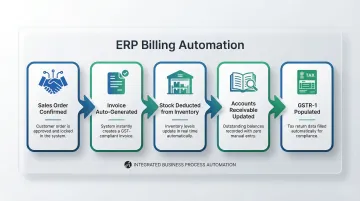
ERP billing embeds invoicing into your broader business workflow. When a sales order is confirmed, the system automatically triggers invoice generation, deducts stock from inventory, updates accounts receivable, and populates your GSTR-1 return—all simultaneously, without manual intervention.
Who Needs ERP Billing Software?
ERP billing becomes essential when businesses outgrow basic tools:
- Multiple customers or product lines requiring different pricing, terms, and tax treatments
- Recurring billing with subscription or contract-based revenue
- GST compliance automation for businesses above ₹5 crore turnover subject to e-invoicing mandates
- Multi-location or multi-entity operations needing consolidated financial oversight
- Growing transaction volumes where manual processes create bottlenecks and errors
Evolution: From Enterprise Giants to MSME Cloud Platforms
For most of the MSMEs listed above, traditional ERP was never a realistic option. Systems like SAP and Oracle were built for large enterprises—months-long implementations, dedicated IT teams, and budgets running into crores. That's changed. Cloud-based ERP platforms now bring the same integrated billing, GST compliance, and multi-entity management to MSMEs without the complexity or cost:
- Traditional ERP: On-premise, high cost, 6–12 month rollout, IT-team dependent
- Modern cloud ERP: Subscription-based, rapid setup, built-in GST compliance, no dedicated IT required
How ERP Billing Software Works: Core Capabilities
Automated Invoice Generation and Delivery
ERP billing auto-generates invoices from upstream data—confirmed sales orders, delivery confirmations, or service completion records. The system pulls customer details, pricing, product information, and tax settings automatically, eliminating manual re-entry and the errors that come with it.
The delivery workflow:
- Invoices are formatted according to GST requirements
- Invoice numbers are assigned sequentially per compliance rules
- Invoices are sent to customers via email or customer portals
- The system tracks delivery confirmation automatically
Bizionix, for instance, completes this entire cycle in seconds—from order confirmation to a delivered, compliant invoice.
Accounts Receivable and Payment Tracking
ERP billing maintains a live accounts receivable ledger. Every invoice issued is tracked against incoming payments in real-time. The system flags overdue accounts automatically and can trigger payment reminder sequences without manual intervention.
Dunning management (automated overdue payment follow-up) schedules escalating reminders—gentle nudges at 7 days overdue, firmer follow-ups at 15 days, final notices at 30 days—while logging every customer interaction for complete collections visibility.
GST Compliance and E-Invoicing Automation
Indian businesses carry significant compliance obligations. GST-registered businesses above ₹5 crore turnover must generate Invoice Reference Numbers (IRNs), maintain accurate GSTIN records, and file periodic returns—all of which become error-prone fast when handled manually.
How ERP billing handles this end-to-end:
- Validates invoice data against GST rules before generation
- Connects via API to the government's Invoice Registration Portal (IRP) for real-time IRN generation
- Auto-generates digitally signed QR codes embedded in invoices
- Auto-populates GSTR-1 filings from validated invoice data
- Tracks compliance deadlines, including the critical 30-day reporting limit for businesses above ₹10 crore (effective April 1, 2025)
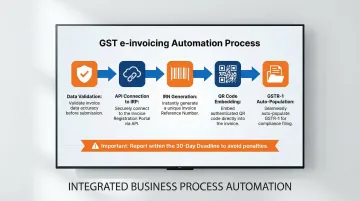
Direct API integration with the GST e-Invoice system—as offered in Bizionix—means IRNs are generated instantly, with no manual portal submissions required.
Multi-Entity and Multi-Location Billing
Growing businesses often operate multiple companies, branches, or franchise units. ERP billing supports this complexity by managing inter-company billing, consolidated accounts receivable, and entity-level financial reporting from a single login.
Key capabilities for multi-entity operations include:
- Independent books of accounts and GST compliance per entity
- Consolidated accounts receivable across all locations
- Entity-level P&L and financial reporting
- Single login access for management across the entire organization
Financial Reporting and Revenue Visibility
ERP billing feeds real-time data into financial reporting dashboards. AR aging reports, outstanding invoice summaries, revenue by customer or product line, and cash flow forecasts are always current and accessible to management—no waiting for month-end reconciliation.
Core Features to Look for in ERP Billing Software
Not every ERP billing module is built the same. The features below are what separate a system that actually fits your business from one that creates more work than it saves.
Customizable Invoice Templates and Workflows
Different business types need different invoice formats:
- Service businesses may bill by milestone or time and materials
- Manufacturers invoice by shipment or batch
- Distributors bill against purchase orders with multiple line items
The system should allow template customization, payment terms configuration, and workflow rules without requiring developer support. Look for drag-and-drop designers and conditional logic that adapts to your process.
GST-Ready Tax Engine
A proper tax engine automatically applies the correct GST slab (CGST/SGST/IGST) based on:
- Transaction type (B2B vs. B2C)
- Customer location (intra-state vs. inter-state)
- Product/service category and HSN code
The engine must stay updated as tax rules change. For businesses above ₹5 crore turnover, 6-digit HSN codes are mandatory — the system should enforce this automatically.
E-way bill requirement: For goods movement with consignment value exceeding ₹50,000, the system should generate e-way bills alongside invoices, auto-populating Part A of the form from invoice data.
Integration Across ERP Modules
The billing module should have native integration with:
- Inventory: Auto-deduct stock on invoice generation
- CRM: Pull customer pricing, contract terms, and payment history
- General Ledger: Auto-post revenue entries without manual journal entries
- Purchase Management: Track vendor invoices and reconcile inter-company transactions
When these connections are native — not bolted on — your billing cycle runs without the manual handoffs that cause errors and delays.
Payment Gateway and Collection Management
Look for:
- Support for multiple payment modes (bank transfer, UPI, credit/debit cards)
- Payment link generation embedded within invoices
- Automatic reconciliation of incoming payments against open invoices
- Integration with Indian payment gateways and banking systems
Reporting, Analytics, and Audit Trail
Real-time dashboards should surface what matters most to collections and oversight:
- Billing cycle performance
- Days Sales Outstanding (DSO)
- Top overdue accounts
- Revenue trends by customer, product, or region
Every invoice also needs a complete audit trail — who created it, when it was modified, when it was sent, and what changed. This is critical for internal controls and statutory compliance.
Benefits of ERP Billing Software for Growing Businesses
Faster Billing Cycles and Payment Collection
Automated invoice generation eliminates the lag between order fulfillment and invoice dispatch, shortening the cash conversion cycle. According to IDC research, AR automation delivers 384% ROI with a 9-month payback period.
Elimination of Billing Errors and Compliance Risk
Manual data entry across disconnected tools is the leading cause of invoice errors, GST mismatches, and late filing penalties. ERP billing pre-validates data before submission, reducing rejections and penalties.
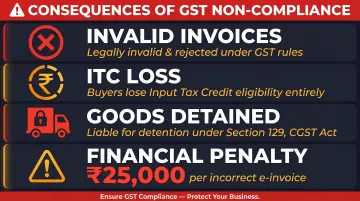
Non-compliance carries real consequences for Indian businesses:
- Invoices without valid IRNs are legally invalid under GST rules
- Buyers lose eligibility for Input Tax Credit on such invoices
- Goods can be detained under Section 129 of the CGST Act
- Incorrect e-invoices attract penalties of ₹25,000 per invoice
Unified Financial Visibility
With billing integrated into the broader ERP, management gets a real-time picture of revenue, receivables, and cash flow—not a snapshot from last month's export. That visibility also opens doors to working capital financing.
India's TReDS (Trade Receivables Discounting System) platform financed over 41.5 lakh invoices worth ₹1.38 lakh crore in 2023-24, with a 94.4% success rate. Clean, digitized invoice data from an ERP system makes accessing such financing much simpler.
Lower Operational Cost
Most finance teams manage billing across several disconnected tools:
- Standalone invoicing software
- Separate accounting packages
- Manual Excel trackers for reconciliation
Consolidating these into a single ERP billing system reduces per-transaction cost and frees your team from repetitive cross-system reconciliation work.
Standalone Billing Tools vs. ERP Billing Software: Which Do You Need?
The right choice depends on where your business is today — and where it's headed. Here's a practical framework to help you decide.
When Standalone Tools Are Sufficient
Freelancers, very early-stage startups, or businesses with a single revenue stream and minimal compliance requirements can manage with simpler, lower-cost invoicing apps. If you're raising one or two invoices a day and don't need GST filings, inventory tracking, or multi-branch reporting, a basic tool does the job without overcomplicating things.
When Standalone Tools Start Failing
Once a business handles multiple product lines, recurring billing, or GST compliance across states, the cracks show quickly. Data fragmentation forces manual workarounds — your billing tool doesn't talk to your inventory, your accounts team is working off exported spreadsheets, and reconciliation eats hours every week. That's the point where an ERP billing module pays for itself.
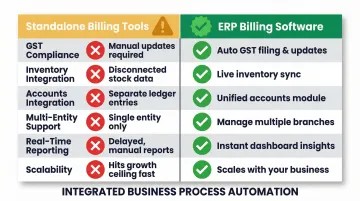
Comparison Framework
| Capability | Standalone Billing Tools | ERP Billing Software |
|---|---|---|
| GST Compliance | Manual JSON uploads or third-party connectors | Native API integration for real-time IRN and e-way bill generation |
| Inventory Integration | No connection; manual stock updates | Automatic stock deduction on invoice generation |
| Accounts Integration | Requires manual export/import | Auto-posts revenue entries to general ledger |
| Multi-Entity Support | Separate logins and databases per entity | Consolidated oversight with entity-level reporting from single login |
| Real-Time Reporting | Static reports; data must be exported | Live dashboards with current AR, DSO, and cash flow |
| Scalability | Breaks down as transaction volume grows | Designed to scale with business growth |
How to Choose the Right ERP Billing Software for Your Business
Assess Your Compliance and Integration Requirements
First, map your compliance obligations:
- GST registration status and turnover thresholds
- E-invoicing mandate applicability (₹5 crore+ turnover)
- E-way bill requirements for goods movement
- 30-day IRN reporting deadline (for ₹10 crore+ turnover from April 2025)
List the systems billing needs to connect with:
- Inventory management
- CRM or customer database
- Accounting and general ledger
- Purchase and procurement systems
These requirements form your non-negotiable baseline — the next step is finding a platform that can meet them without demanding enterprise-level budget or complexity.
Evaluate Scalability and Indian MSME Fit
Many ERP platforms are designed for large enterprises with complex, costly implementations. Growing Indian businesses should look for platforms built specifically for the MSME segment:
- Cloud-native architecture requiring no infrastructure investment
- Affordable subscription pricing (not lakhs in upfront licenses)
- Pre-configured GST compliance settings
- No requirement for dedicated IT teams
Bizionix, for instance, delivers GST-ready billing inside a complete cloud ERP — built specifically for Indian MSMEs, with subscription pricing that keeps enterprise-grade features accessible without enterprise-level costs.
Check for Ease of Use and Implementation Timeline
Evaluate:
- Onboarding process and setup time
- Data migration support from existing systems
- Training resources and documentation
- Realistic go-live timeline
A 12-month implementation drains resources a growing MSME simply cannot spare. Cloud-based ERP billing solutions with pre-configured GST settings and built-in data migration support can typically go live in weeks, not months.
Frequently Asked Questions
What is ERP in billing?
ERP billing refers to the billing and invoicing functionality embedded within an Enterprise Resource Planning system, where invoice creation, payment tracking, and tax compliance are directly connected to sales orders, inventory, and accounting data—unlike standalone invoicing tools that operate in isolation.
What are the four types of ERP?
The four main ERP deployment types are:
- On-premises ERP — installed and maintained on company servers
- Cloud-based ERP — hosted by the vendor and accessed via browser
- Hybrid ERP — combines cloud and on-premises components
- Industry-specific ERP — preconfigured for sectors like manufacturing, retail, or services
What is the difference between billing software and ERP billing software?
Standalone billing software handles only invoice generation and payment tracking, while ERP billing software integrates these functions with the rest of the business—inventory, procurement, accounting, and CRM—so financial data flows automatically across departments without manual entry.
Is ERP billing software suitable for small and mid-sized businesses?
Yes. Modern cloud-based ERP billing solutions are built for SMEs and MSMEs, delivering enterprise-grade features without SAP-level complexity or cost. Bizionix, for instance, is purpose-built for Indian MSMEs—making GST compliance, automated invoicing, and integrated accounting practical from day one.
How does ERP billing software handle GST compliance in India?
GST-ready ERP billing software automatically applies the correct tax slabs, validates invoice data against GST rules, generates IRNs via direct API integration with the government's e-Invoice portal, and supports e-way bill generation—cutting manual compliance work and filing errors.
How long does it take to implement ERP billing software?
Timelines depend on business size and system complexity. Cloud-based MSME-focused platforms typically go live within a few weeks, especially when the vendor offers data migration support and pre-configured GST settings out of the box.