Introduction
For growing businesses processing dozens or hundreds of purchase orders each month, procurement turns into a control problem fast. Missed approvals let purchases slip through without authorisation. Duplicate orders tie up working capital. Invoice mismatches go undetected until month-end reconciliation — by then, fixing them means manual journal entries, vendor disputes, and delayed closings.
ERP purchase order processing solves this by embedding the entire PO lifecycle — requisition, approval, dispatch, receipt, and payment — within a single connected system that links procurement with accounts payable, inventory, and vendor records in real time. No email chains to chase. No spreadsheet to reconcile at the end of the month.
This guide explains how ERP PO processing works, how to automate it, which PO types belong in your procurement toolkit, and the best practices Indian MSMEs should follow to keep procurement clean and controlled.
Key Takeaways
- ERP purchase order processing automates the full PO lifecycle—from requisition and approval through GRN, invoice matching, and payment—in one system
- Unlike spreadsheets or standalone tools, an ERP connects PO data to inventory, accounts payable, and the general ledger in real time
- APQC benchmarks put the median cost per purchase order at $55 (US benchmark)—manual processes drive this higher with errors and delays
- Automation enforces approval hierarchies, enables three-way matching, and maintains a full audit trail without manual coordination
- Key best practices include standardised approval workflows, clean vendor master data, blanket POs for recurring spend, and supplier performance tracking
What Is ERP Purchase Order Processing?
ERP purchase order processing is the structured, system-driven workflow through which a business creates, approves, sends, tracks, and closes purchase orders—entirely within an ERP platform that keeps procurement synchronised with financial, inventory, and vendor data at all times.
The goal is straightforward: every purchase should be authorised before it happens, correctly recorded in the books, matched against what was actually received, and paid on accurate terms. When procurement and finance operate in silos—one team on spreadsheets, another on email—those four requirements are nearly impossible to enforce consistently.
What Sets ERP PO Processing Apart from Standalone Tools
A standalone PO tool manages documents. An ERP-integrated PO module manages the transaction end-to-end:
- Auto-posts journal entries when invoices are approved, eliminating manual bookkeeping handoffs
- Updates stock levels when a Goods Receipt Note (GRN) is recorded, keeping inventory accurate in real time
- Flags discrepancies between PO, GRN, and invoice before any payment is released
- Enforces vendor controls by restricting purchases to approved suppliers with verified GST details
This integration boundary is what makes the difference. When an invoice is posted in a fully integrated ERP, the system simultaneously updates procurement records, financial accounts, and inventory—a level of cross-functional control that no standalone document tool can replicate.
How ERP Purchase Order Processing Works
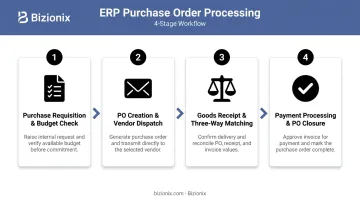
The process follows a defined sequence: a purchase need triggers a requisition, which moves through an approval chain, becomes a formal PO, is dispatched to the vendor, tracked through delivery, and closed once three-way matching confirms everything aligns.
What feeds into this flow matters as much as the steps themselves. The ERP pulls all of the following without manual re-entry:
- Vendor master records and approved supplier lists
- Item catalogues with agreed pricing
- Department budget data and cost centre mapping
- Approval authority thresholds
This eliminates redundant data entry and reduces errors at every stage.
Step 1: Purchase Requisition and Budget Check
A department user submits a purchase request through the ERP, specifying item, quantity, and estimated value. The system automatically checks available budget against the relevant cost centre and routes the requisition to the appropriate approver. No email, no paper form.
Step 2: PO Creation and Vendor Dispatch
Once approved, the ERP auto-generates a formal purchase order pulling vendor details, agreed pricing, delivery terms, and tax codes (including GST for Indian businesses) from the vendor master. The PO is dispatched electronically, timestamped, and assigned a unique PO number for end-to-end traceability.
Step 3: Goods Receipt and Three-Way Matching
When goods arrive, the receiving team records a GRN in the ERP. The system then performs three-way matching—comparing the PO, GRN, and vendor invoice for quantity, price, and terms. Discrepancies are automatically flagged before any payment is authorised. Top-quartile automated AP teams achieve a 90% PO first-pass match rate, compared to 70% for bottom-quartile teams.
Step 4: Payment Processing and PO Closure
After a successful match, the invoice routes to accounts payable for payment within agreed terms. The ERP auto-posts the accounting entry, closes the PO, and updates vendor payment history. The result is a complete, auditable record from requisition to payment.
Why Manual PO Management Fails Growing Businesses
APQC's Open Standards Benchmarking data, drawn from 4,625 companies, puts the median cost per purchase order at $55. Add uncontrolled maverick purchasing — where employees bypass approved vendors — and that cost climbs further. APQC found that organisations with 2% or more maverick buying face a $2.58 higher procurement cost per $1,000 in purchases than those below 1%, and need 16 additional hours at the median to issue a single PO.
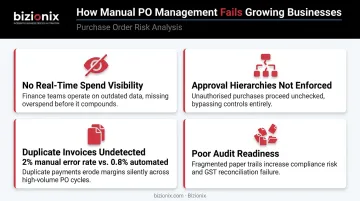
Manual PO workflows fail growing businesses in four specific ways:
- No real-time spend visibility — committed spend sits in email threads and spreadsheets, invisible to finance until month-end
- Approval hierarchies aren't enforced — anyone can make purchases above their authorised limit because there's no system-level control
- Duplicate invoices and pricing mismatches go undetected — without automated matching, duplicate or erroneous payments affect 2% of annual disbursements for bottom-performing organisations, compared to 0.8% for top performers
- Audit readiness is poor — documentation scattered across email, printed forms, and shared drives cannot reliably support an audit or a dispute
These failures cascade into accounts payable. When POs are created after a purchase has already been made — a common manual workaround — AP cannot perform three-way matching, vendors get paid late or incorrectly, and finance loses the data it needs for reliable cash flow forecasting.
The procurement gap becomes a finance problem fast.
How to Automate PO Processing in Your ERP
ERP automation doesn't just speed up existing steps — it shifts who coordinates them. The system enforces approval workflows automatically, so procurement stops chasing email threads and starts managing by exception.
Configure Approval Tiers That Match Your Authority Structure
Define approval thresholds by purchase value, department, and expense category. Set escalation rules for approvals that go unanswered beyond a set time. The ERP routes each requisition to the right approver and logs every decision with a timestamp — accountability without the administrative overhead.
APQC data shows that 80% of purchase orders are already approved electronically at the median across 4,472 organisations. For businesses still relying on email-based approvals, this is the highest-leverage automation to implement first.
Invest in Vendor Master Data Before Automating
Automation is only as accurate as the data behind it. A well-maintained vendor database allows the ERP to auto-populate POs accurately and enforce preferred supplier policies at the point of requisition.
At minimum, each vendor record should include:
- Verified GSTINs
- Correct bank account details
- Current payment terms
- Approved item catalogues
Poor vendor master quality is a leading cause of payment errors. The same APQC research that identified duplicate payment rates cited data-entry errors and poor-quality master vendor files as primary causes.
Let Automated Three-Way Matching Handle Routine Invoices
When an invoice arrives, the ERP compares it against the PO and GRN. Matched invoices move to payment without any manual review. Mismatches are held and flagged with a reason code for procurement or AP to resolve.
The productivity gap is measurable. According to APQC benchmarks, heavily automated AP teams process 22,756 invoices per FTE versus 8,600 for teams with limited automation — and labour cost per invoice drops from USD $7.90 to $3.40. Manual effort concentrates only on genuine exceptions, not routine processing.
Choosing the Right ERP for Indian MSME Procurement
For Indian MSMEs, the practical constraint is implementation complexity and cost — not ambition. Cloud ERP platforms built for the Indian market, such as Bizionix, connect procurement, GST-compliant invoicing, inventory, and accounts payable in a single module — with no separate IT setup or third-party integrations required. For MSMEs without dedicated procurement or IT teams, that unified architecture is what makes PO automation practical rather than theoretical.
Types of Purchase Orders in ERP
ERP systems manage four distinct PO types, each suited to different procurement scenarios:
| PO Type | Definition | Best For |
|---|---|---|
| Standard PO | One-time order for a specific quantity at a fixed price and delivery date | Ad hoc purchases with all details known upfront |
| Blanket PO | Standing agreement for recurring purchases over a period, with pre-agreed pricing but flexible delivery schedules | Regular consumables, maintenance supplies, recurring services |
| Planned PO | Forward-scheduled order based on production forecasts, with tentative delivery dates | Manufacturers with known production timelines |
| Contract PO | Long-term agreement establishing terms and conditions under which future standard POs will be raised | Strategic vendors with ongoing relationships |
For MSMEs, the most operationally valuable distinction is between Standard and Blanket POs. Blanket POs allow teams to issue release orders against a pre-approved total, so recurring purchases with a regular supplier don't require a full approval cycle each time.
The ERP tracks cumulative spend against the blanket PO ceiling and alerts procurement when it's approaching the limit — keeping spend visible without slowing down routine purchasing.
Best Practices for ERP Purchase Order Processing
Enforce Procurement Policy Inside the System, Not After the Fact
Define who can initiate a PO, spending thresholds that trigger additional approvals, and which vendors are pre-approved—then configure these rules directly in the ERP. Control at the point of requisition is categorically more effective than auditing for violations after the purchase is already made.
Keep Vendor Master Data Current
Outdated vendor records—wrong GSTINs, incorrect bank details, expired contracts—are among the most common causes of PO errors and payment delays. Establish a policy for onboarding new vendors with complete documentation before they can be selected in the ERP. Schedule periodic reviews to catch stale records before they cause problems.
For Indian businesses, verifying GSTIN validity and HSN/SAC codes at the vendor level is non-negotiable. Under CBIC Rule 46, tax invoices must include supplier and recipient GSTIN, HSN codes, tax rates, and place of supply—all of which should flow directly from the vendor master to every PO and matched invoice.
Use Blanket POs for Recurring Spend
For vendors supplying goods or services regularly, blanket POs eliminate repeated full approval cycles. They also create a natural audit point: when the ERP alerts procurement that spend is approaching the blanket PO ceiling, it's a prompt to review the vendor relationship and renegotiate terms before the agreement lapses.
Track Supplier Performance at PO Close
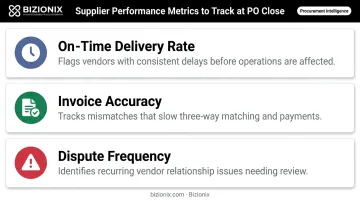
When marking a PO as closed, require the receiving team to log delivery accuracy and quality status. Over time, this data supports smarter vendor selection and stronger negotiation at contract renewal:
- On-time delivery rates — flag vendors with consistent delays before they affect operations
- Invoice accuracy — track mismatches that slow down 3-way matching and payments
- Dispute frequency — identify recurring issues that signal a vendor relationship needing review
As CIPS notes, structured supplier performance management helps reduce vendor numbers while maintaining supply quality—a measurable gain for MSMEs running lean procurement teams.
Frequently Asked Questions
What is ERP purchase order processing?
ERP purchase order processing is the automated management of the full PO lifecycle—from requisition and approval through goods receipt, invoice matching, and payment—within an integrated ERP system. Procurement data connects to inventory, accounting, and vendor records in real time, closing the gaps that siloed systems create.
What are the steps of ERP purchase order processing?
The key steps are: purchase requisition and budget check, approval routing, PO creation and vendor dispatch, goods receipt recording and three-way matching, payment processing, and PO closure with a complete audit record. Each step flows into the next within the same system.
What are the types of purchase orders in ERP?
The four main types are: Standard PO (one-time, fixed quantity and price), Blanket PO (recurring purchases against a standing agreement with pre-agreed pricing), Planned PO (forward-scheduled based on demand or production forecasts), and Contract PO (long-term terms governing future orders).
How does ERP PO processing differ from manual PO management?
ERP processing automates approval hierarchies, links procurement to accounting and inventory in real time, and handles three-way matching without manual document chasing. Manual processes depend on email approvals, spreadsheets, and after-the-fact reconciliation. Visibility gaps and error exposure compound quickly as order volume grows.
What is three-way matching in ERP purchase order processing?
Three-way matching is the ERP's automated comparison of the purchase order, goods receipt note, and vendor invoice to confirm that quantities, prices, and terms are consistent before approving payment. Any discrepancy is flagged for resolution before funds are released.
Can ERP purchase order processing support GST compliance for Indian businesses?
GST-compliant ERP systems maintain GSTIN, HSN/SAC codes, and applicable tax rates at the vendor master level, so every PO and invoice carries accurate tax information automatically. Businesses above the ₹5 crore turnover threshold must also meet e-invoicing requirements — a capability built into platforms like Bizionix.