Introduction
Most growing Indian businesses are running on a patchwork of tools — one software for invoicing, another for inventory, a spreadsheet for payroll, and constant WhatsApp messages to chase approvals. The result is predictable: data mismatches, financial leakage, and decisions made on outdated information.
The scale of the shift away from this model is significant. Gartner forecasts worldwide public cloud spending to reach $723.4 billion in 2025, up from $595.7 billion in 2024. Closer to home, IDC projects India's public cloud services market to grow from $10.9 billion in 2024 to $30.4 billion by 2029 — a 22.6% annual growth rate driven largely by business software adoption.
Despite this momentum, a Research and Information System report on MSME digitalisation found that only **12% of surveyed Indian MSMEs use ERP software** and just 14% use cloud computing. For most businesses in that 86%, the tools being used today are already costing money — in wasted hours, duplicate data entry, and decisions made without the full picture.
This guide covers what an enterprise cloud suite actually is, which features matter for Indian businesses, how to evaluate deployment options, and what to look for when choosing a platform.
Key Takeaways
- An enterprise cloud suite bundles finance, inventory, HR, procurement, and CRM into one integrated platform, replacing disconnected point solutions
- For Indian businesses, GST compliance (including e-invoicing and IRN generation) must be a core feature, not a paid add-on
- Cloud-based deployment means no on-premise servers or IT infrastructure — reducing setup costs and maintenance overhead
- Integrated systems eliminate data silos, reduce manual effort, and give management real-time visibility across all departments
- Choosing the right platform means matching it to your actual scale — not over-investing in SAP-level complexity your team won't use
What Is an Enterprise Cloud Suite?
An enterprise cloud suite is a unified, cloud-hosted platform that bundles multiple business management applications — finance, inventory, procurement, HR, CRM — into a single system accessible via the internet.
Gartner defines ERP as the ability to deliver "an integrated suite of business applications sharing a common process and data model covering broad operational end-to-end processes." That shared data model is the critical distinction.
How It Differs from Standalone Tools
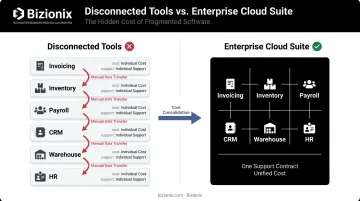
When you use separate apps for invoicing, inventory, and payroll, each system holds its own version of the truth. Someone has to manually reconcile them — and that reconciliation is always late, often wrong, and never fun.
A cloud suite eliminates that problem. When a sales order is created, inventory levels update automatically. When goods are dispatched, billing triggers without manual input. Finance sees the same numbers as the warehouse team, in real time.
Who Uses Enterprise Cloud Suites?
Modern cloud suites serve businesses of all sizes. Active users span:
- MSMEs and growing businesses scaling beyond spreadsheets
- Manufacturing companies needing real-time production and inventory data
- Multi-location operations and franchise networks managing several branches from one login
- CA firms handling multiple client entities simultaneously
- Business groups and holding companies that need consolidated reporting across subsidiaries
The Shift from On-Premise ERP
Traditional ERP came with significant overhead. Cloud suites changed the economics entirely:
- On-premise: Upfront server investment, dedicated IT staff, version upgrades that were multi-month projects
- Cloud suite: No hardware, automatic updates, access from any device
For businesses that previously couldn't justify the capital cost, this shift made enterprise-grade functionality genuinely accessible.
Core Features Every Enterprise Cloud Suite Should Have
Not all cloud suites are built equally. These are the capabilities that matter for Indian businesses specifically.
Financial Management and GST Compliance
A cloud suite's accounting module must go beyond basic ledgers. For Indian businesses, this means:
- Accounts payable and receivable with automated invoicing
- GST-compliant billing with e-invoicing capability
- Direct API integration with the government's Invoice Registration Portal (IRP) for automated IRN generation
- Auto-populated GSTR-1 returns from sales data
- TDS/TCS management within the accounting module
The GST e-invoicing threshold now applies to businesses with annual turnover exceeding ₹5 crore (per CBIC Notification No. 10/2023, effective 1 August 2023). For eligible businesses, the IRP workflow isn't optional — invoices without a valid IRN are not legally valid.
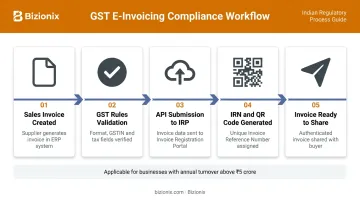
Bizionix handles this through direct API integration: when a sales invoice is created in the system, the system validates it against GST rules and generates the IRN plus QR code instantly, with no manual JSON uploads or third-party tools required. The invoice is ready to share within seconds.
Inventory and Supply Chain Visibility
Real-time inventory tracking within a unified system prevents the most common operational headaches:
- Stock levels visible across multiple warehouse locations
- Purchase orders tracked from creation through GRN (Goods Receipt Note)
- Warehouse movements recorded as they happen
- No end-of-day reconciliation between disconnected systems
This is particularly critical for manufacturing and distribution businesses where stockouts or overstocking directly affect cash flow and customer commitments.
Multi-Entity and Multi-Location Management
For business groups, franchise networks, or CA firms managing client portfolios, the ability to manage multiple entities from a single login is essential.
Bizionix's multi-company module supports this directly. Key capabilities include:
- Single login with a company selection dashboard — no separate credentials per entity
- Switch between entities without logging out, with access to both consolidated and individual financials
- Independent books, GST registrations, and compliance records per entity
- Shared platform architecture across the entire group
Real-Time Dashboards and Reporting
Unified data across departments means management doesn't have to chase updates. Live dashboards show:
- Cash flow and outstanding receivables
- Inventory positions and pending purchase orders
- Sales performance and customer activity
- P&L and balance sheet without waiting for month-end close
When financials update in real time rather than at month-end, management can spot a cash flow gap or an inventory shortfall before it becomes a problem — not after.
Role-Based Access and Security Controls
Payroll data, group-level financials, and entity-specific records all carry different sensitivity levels. A well-designed cloud suite allows granular permission settings:
- Role-based access (view/edit/admin) per user
- Department or branch restrictions
- Entity-level permissions for multi-company environments
- Full activity logs for audit readiness
Types of Cloud Deployment Models
The deployment model determines where your data lives, who manages the infrastructure, and what compliance obligations apply — a decision that looks different for an Indian MSME than for a multinational.
| Model | Description | Best For |
|---|---|---|
| Public Cloud | Hosted by a third-party provider on shared infrastructure | Most MSMEs; minimises upfront IT investment |
| Private Cloud | Dedicated infrastructure for a single organisation | Businesses with strict data security or regulatory requirements |
| Hybrid Cloud | Combination of public and private environments | Regulated industries; businesses transitioning from on-premise systems |
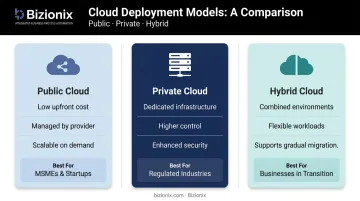
Most modern cloud suites for MSMEs (including Bizionix) operate on public cloud infrastructure, with enterprise-grade security controls applied at the application layer. For Indian businesses, the more relevant question is typically data compliance (GST, e-invoicing, KYC norms) rather than the underlying deployment architecture.
Key Business Benefits of an Enterprise Cloud Suite
Elimination of Operational Silos
When sales, finance, inventory, and operations all pull from the same data, manual hand-offs disappear. The RIS report found that a 10% increase in digitalisation levels correlates with a 1.6% increase in enterprise growth for Indian MSMEs — and that's across all digital tools, not just ERP specifically.
Poor data quality has its own cost. Gartner research indicates that poor data quality costs organisations at least $12.9 million per year on average (USD, global benchmark) — driven largely by the reconciliation overhead and decision errors that fragmented systems create.
Cost Reduction Through Consolidation
Cloud suites replace multiple software subscriptions with one platform. Bizionix, for example, consolidates finance, sales, CRM, inventory, warehouse, production planning, HRMS, and payroll — tools that would otherwise require five to six separate vendors, independent integrations, and separate support contracts.
Beyond subscription savings, the platform delivers direct operational savings:
- Faster billing cycles with fewer invoice errors
- Reduced manual effort for compliance tasks
- No server maintenance or IT infrastructure overhead
- Predictable operating costs instead of capital expenditure spikes
Scalability Without Disruption
Cloud suites grow with the business. New branches, new users, and new modules can be added without overhauling the system. For a business adding a regional warehouse or a franchise outlet, this means the platform adapts — not the other way around.
Better Decisions Through Clean Data
Without real-time dashboards, management relies on compiled spreadsheets that are already stale by the time they arrive. A unified cloud suite puts accurate data in front of decision-makers when it's needed — not three days after the fact.
Security and Business Continuity
Cloud suites with proper governance controls typically exceed what a small IT team managing on-premise infrastructure can deliver. That said, security is not automatic with cloud adoption. The controls that matter include:
- Encryption at rest and in transit
- Role-based access controls
- Automated backups and disaster recovery
- Audit logs for compliance tracking
IBM's 2024 Cost of a Data Breach report found that 40% of breaches involved data stored across multiple environments — including combinations of public cloud, private cloud, and on-premise systems — and these breaches cost over $5 million on average. The lesson isn't that cloud is risky; it's that fragmented, unmanaged data across multiple systems is risky. A well-governed unified platform reduces that exposure.
Common Challenges — and How to Address Them
Data Migration and Change Management
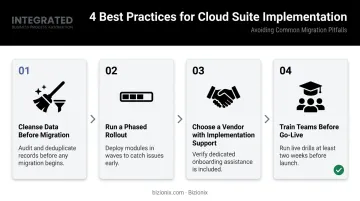
Moving from spreadsheets or legacy software to a cloud suite takes more than a new login — it takes deliberate planning. The most common failure point isn't the technology itself. Gartner predicts that by 2027, more than 70% of recently implemented ERP initiatives will fail to fully meet their original business goals, attributing this largely to technology-centric approaches that ignore stakeholder engagement.
Practical guidance:
- Cleanse data before migration — bring clean records across, not legacy mess
- Run a phased rollout — start with one module or one location before going wide
- **Choose a vendor with implementation support** — not just a product handover
- Train teams before go-live, not after
Internet Dependency
Cloud platforms require reliable connectivity. For multi-location businesses in India, this is a real consideration — TRAI data shows rural internet penetration at 47.63 per 100 population versus 116.09 in urban areas. Before committing to a platform, evaluate:
- The vendor's uptime SLA
- Offline capabilities (if any)
- Support response times for connectivity-related issues
- Branch-level connectivity at each operating location
Choosing the Wrong Platform
Businesses sometimes invest in systems built for organisations ten times their size, then struggle with adoption. A platform that requires a full IT team to manage is the wrong fit for most Indian MSMEs.
The right question isn't "what's the most powerful ERP available?" It's "what does our business actually need right now, and what can we realistically implement and use?" Bizionix addresses this directly: enterprise-grade functionality, built for growing businesses, without the complexity that makes large ERP systems impractical to deploy and maintain.
How to Choose the Right Enterprise Cloud Suite
Map Pain Points to Modules First
Before evaluating vendors, list the specific operational problems you're trying to solve:
- Manual GST invoicing causing delays and errors?
- Inventory mismatches between sales and warehouse?
- No consolidated view across multiple branches?
- Month-end closes taking too long?
This list becomes your evaluation checklist. If a platform doesn't directly address your top three pain points, it's not the right fit — no matter how compelling the demo looks.
Once you've defined your pain points, the next step is verifying that the platform is built for the regulatory and operational realities of Indian business — not retrofitted for them.
Evaluate for Indian Business Requirements
For businesses operating in India, these features must be included as standard — not chargeable add-ons:
- GST-compliant billing with e-invoicing and automated IRN generation
- GSTR-1 auto-population from sales transactions
- TDS/TCS management within the accounting module
- Multi-branch and multi-entity support
- Indian KYC and regulatory compliance where applicable
Platforms like Bizionix include GST compliance and multi-company management as core capabilities across all plans, which matters when you're comparing total costs across vendors.
Assess Total Cost of Ownership
Subscription pricing is only part of the picture. Evaluate:
- Implementation and data migration costs
- Training time and resources required
- Ongoing support quality and response times
- Whether the platform can scale without requiring a platform change later
Bizionix NEO starts at ₹999/year — a practical entry point for small businesses evaluating their first integrated platform — with enterprise pricing that scales for organisations managing complex multi-entity operations.
Frequently Asked Questions
What is a CloudSuite used for?
A CloudSuite consolidates core business functions (finance, inventory, procurement, HR, and compliance) within a single cloud-based platform. It replaces disconnected tools and gives management real-time visibility across the entire organisation from one login.
What are enterprise cloud services?
Enterprise cloud services are cloud-hosted software and infrastructure solutions built for organisations with complex operational needs. They deliver scalability, security, integration, and compliance capabilities that consumer-grade apps simply don't offer.
What is enterprise cloud storage?
Enterprise cloud storage is the secure, scalable remote storage of business data (documents, transactional records, reports) on cloud servers. It includes access controls, backup features, and audit trails accessible from any authorised device.
What is the difference between a cloud suite and standalone software?
Standalone software handles one function — invoicing only, for example — requiring separate tools for everything else and manual data transfers between them. A cloud suite integrates all functions in one platform with a shared data layer, eliminating duplication and the reconciliation burden.
Is an enterprise cloud suite suitable for small and medium businesses?
Modern cloud suites are increasingly designed for SMEs and MSMEs, with modular pricing, simpler interfaces, and industry-specific configurations. Platforms like Bizionix offer enterprise-grade capabilities at a fraction of the cost and complexity of traditional large-enterprise ERP systems.
How does an enterprise cloud suite support GST compliance for Indian businesses?
A GST-ready cloud suite automates invoice generation, IRN generation via direct IRP API integration, GSTR-1 auto-population, and reconciliation. This eliminates manual JSON uploads, prevents formatting-related rejections, and keeps compliance current automatically.