A database management system (DBMS) is the structured layer that changes this. It organises your data, controls who can access it, ensures consistency across departments, and makes information retrievable in seconds rather than hours. But with dozens of DBMS platforms available — ranging from open-source tools to enterprise giants — choosing the right one requires more than a quick Google search.
This guide covers the main DBMS types, the features that actually matter for business operations, a comparison of leading tools, and a practical five-step framework for making the right choice.
Key Takeaways
- Relational databases (RDBMS) — MySQL, PostgreSQL, Oracle, SQL Server — are the right default for structured business data like invoices, inventory, and payroll
- NoSQL suits unstructured, high-volume, or rapidly changing data; it's not a universal upgrade from SQL
- Poor data quality costs organizations over USD 5M annually — so security, backup, and data integrity are non-negotiable DBMS features
- MSMEs without a dedicated IT team are often better served by managed ERP platforms with built-in data management
- Total cost of ownership goes well beyond the licence fee — factor in hosting, maintenance, support, and staff skills
What Is a DBMS and Why Does It Matter for Growing Businesses?
A DBMS is software that sits between users (or applications) and stored data. It handles creating, reading, updating, and deleting records — while enforcing security, preventing conflicts, and maintaining consistency. The database itself is where records live; the DBMS is what controls access, transactions, performance, and recovery. They always work together, but they are not the same thing.
The Real Cost of Getting This Wrong
According to Forrester's 2024 research, more than 25% of data professionals said poor data quality cost their organisations more than USD 5M annually. Gartner puts the average annual cost of bad data at USD 12.9M per organisation. For MSMEs, the numbers are smaller — but the operational damage is just as real: delayed decisions, duplicate customer records, incorrect stock levels, and reconciliation exercises that consume entire weekends.
A properly implemented DBMS addresses this by:
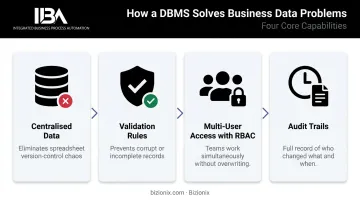
- Centralising all data in one place, eliminating the spreadsheet version-control problem
- Enforcing validation rules that prevent corrupt or incomplete records from entering the system
- Enabling multi-user access with role-based controls — so the accounts team and sales team can work simultaneously without overwriting each other
- Creating audit trails that show exactly who changed what and when
What This Means for MSMEs Without an IT Team
For many growing businesses, the practical challenge is not choosing a DBMS — it's getting organised data without a dedicated database administrator. Platforms like Bizionix ERP are built for exactly this situation: structured data management is embedded in the application layer, so business owners get real-time reporting, role-based access controls, and cross-department data consistency without ever touching a raw database. The technical heavy lifting happens behind the scenes; what reaches the business owner is clean data, reliable reports, and controls that actually work.
Types of Database Management Systems
DBMS types differ primarily in how they store and structure data. Understanding the differences helps match the right system to your workload.
Relational Database Management Systems (RDBMS)
RDBMS organises data into tables — rows and columns — with defined relationships between them. An order links to a customer; that customer links to invoices; invoices link to payments. SQL handles all queries. ACID compliance (Atomicity, Consistency, Isolation, Durability) guarantees that transactions either complete fully or not at all — critical for financial and operational data.
Examples: MySQL, PostgreSQL, Oracle Database, Microsoft SQL Server
Ideal for: Accounting, inventory, CRM, ERP, payroll — any structured, relational business data where consistency is non-negotiable.
As of May 2026, DB-Engines ranks Oracle, MySQL, Microsoft SQL Server, and PostgreSQL as the top four DBMS platforms globally — all relational. For most business transaction workloads, RDBMS is still the correct default.
NoSQL Database Management Systems
NoSQL databases store data without a fixed schema, using flexible formats:
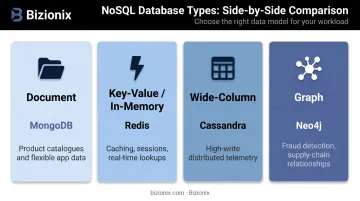
| NoSQL Type | Example | Best For |
|---|---|---|
| Document | MongoDB | Product catalogues, customer profiles, flexible app data |
| Key-value / in-memory | Redis | Caching, sessions, real-time lookups |
| Wide-column | Cassandra | High-write, distributed, telemetry workloads |
| Graph | Neo4j | Fraud detection, supply-chain relationships, recommendations |
Ideal for: Social media platforms, IoT data streams, content management, real-time analytics — situations where data structures change frequently or volumes are enormous.
The NoSQL market is projected to grow from US$19.39 billion in 2026 to US$69.09 billion by 2031 at a 28.95% CAGR. But growth does not mean universal suitability. Choose NoSQL when the data model or speed requirement clearly exceeds what a relational system can handle — not because it sounds more modern.
Other DBMS Types to Know
- Hierarchical DBMS — Data in a tree/parent-child structure. Suited for file systems or org charts. Rigid; not practical for most business applications
- Network DBMS — Extends hierarchical by allowing multiple parent relationships. Used in complex manufacturing or telecom data
- Object-Oriented DBMS (OODBMS) — Stores data as objects, mirroring object-oriented programming. Used in multimedia and engineering applications
- NewSQL — Combines SQL structure with distributed scale. Examples: CockroachDB, Google Cloud Spanner. Choose when you need relational consistency at very high distributed volume
- In-Memory DBMS — Stores data in RAM for ultra-low latency. Examples: SAP HANA, Redis. Relevant for performance-critical, real-time workloads
Most of these alternatives serve highly specific technical scenarios. For Indian MSMEs running ERP, accounting, and inventory operations: start with RDBMS. Consider the others only when a specific workload requirement makes a clear case.
Key Features to Look for in a DBMS
Not all DBMS platforms are equal, and the right features depend on your business size, data volume, and technical resources. Here are the capabilities that deserve careful evaluation.
Data Security and Access Control
A DBMS must enforce:
- User authentication — verified identity before any data access
- Role-based access control (RBAC) — staff get permissions through roles (accountant, warehouse user, sales rep), not blanket database access. NIST recognises RBAC as an ANSI/INCITS standard for formal access control
- Data encryption — at rest and in transit
- Audit trails — logs showing who accessed or modified what, and when
For Indian MSMEs, this last point carries regulatory weight. Under CGST Act Section 36, every registered person must retain accounts and records for 72 months from the annual-return due date. A DBMS without proper audit logging and retention controls creates compliance exposure.
Bizionix handles this at the application layer: entity-level permissions, role-based controls, department or branch restrictions, and full activity logs per company — all surfaced to administrators through real-time dashboards without requiring database-level configuration.
Scalability and Performance
A DBMS should handle growing data volumes without degrading query response times. Look for:
- Indexing support — PostgreSQL documentation confirms indexes allow the database server to find rows far faster than scanning without one. Used correctly, they're the simplest performance lever available
- Query optimisation engines — built-in query planners that automatically choose efficient execution paths
- Vertical scaling — moving to a more powerful server instance
- Horizontal scaling — distributing reads across replicas or adding nodes
Businesses with seasonal spikes (retail, manufacturing, hospitality) need a system that scales on demand rather than requiring manual infrastructure changes at peak periods.
Backup, Recovery, and Data Integrity
Databarracks' 2025 Data Health Check found that only 17% of organisations hit by ransomware paid the ransom — the rest recovered from backups. Backup processes that are tested regularly are what keep businesses running after an incident.
Evaluate vendors on:
- Backup frequency — how often snapshots are taken
- Point-in-time recovery (PITR) — ability to restore data to any moment before a failure or accidental deletion. PostgreSQL supports this natively through continuous archiving and write-ahead log replay
- Recovery time objective (RTO) and recovery point objective (RPO) — how long recovery takes and how much data could be lost
- Data validation rules — built-in constraints that reject corrupt or incomplete records before they enter the system
Concurrency Control and Integration
Concurrency control allows multiple users to read and write data simultaneously without conflicts. This matters in any business where departments share data — the sales team updating a customer record while accounts generates an invoice from the same record is a routine scenario that a DBMS must handle cleanly.
Integration and API support determine whether your DBMS connects smoothly with the rest of your software stack. A good DBMS should support open APIs, standard data export/import formats, and compatibility with the programming languages your developers use.
Bizionix is built on this principle: all modules — accounting, inventory, GST, CRM, HRMS — run on a single platform. When a sales invoice is created, it automatically populates GSTR-1, updates inventory, and reflects in the accounts ledger simultaneously, with IRN generated via direct IRP API connection — no separate integration layer needed.
Popular DBMS Tools and Who They're Best For
| Tool | Type | Best For |
|---|---|---|
| MySQL | Open-source RDBMS | SMBs and web applications; strong community support, easy to start |
| PostgreSQL | Open-source object-relational | Complex queries, extensibility, standards compliance |
| Microsoft SQL Server | Enterprise RDBMS | Microsoft-stack businesses; strong reporting and analytics integration |
| Oracle Database | Enterprise RDBMS | Large organisations with complex workloads and high-security needs |
| MongoDB | NoSQL document database | Flexible, large-scale, or unstructured application data |
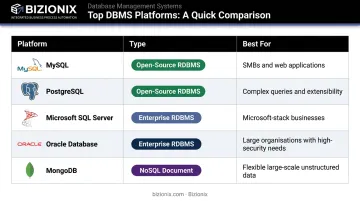
All five rank in DB-Engines' global top five as of May 2026, with Oracle, MySQL, SQL Server, and PostgreSQL occupying positions one through four.
Open-source options (MySQL, PostgreSQL, MongoDB) are the right starting point for cost-conscious MSMEs — they cut licensing costs and lower the barrier to entry. That said, open-source is not truly free:
- Installation, configuration, and security patching require hands-on expertise
- Backups and performance tuning demand ongoing attention
- Without in-house skills, the "free" database can quickly become the most expensive one
Enterprise platforms (Oracle, SQL Server) make sense for organisations with larger IT budgets, existing Microsoft or Oracle infrastructure, and compliance requirements that need vendor-backed support.
How to Choose the Right DBMS for Your Business
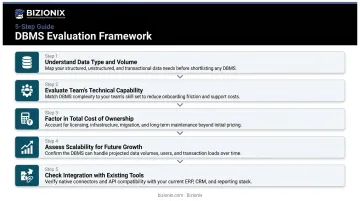
Choosing a DBMS is a business decision with technical consequences, not the other way around. Evaluate these five criteria before committing.
1. Understand your data type and volume Structured, relational data — financials, transactions, inventory, customer records — almost always belongs in an RDBMS. Unstructured, high-volume, or rapidly changing data (logs, media, IoT streams) may suit NoSQL better. When in doubt, start relational; migrating from SQL to NoSQL later is far harder than the reverse.
2. Evaluate your team's technical capability Open-source databases are cost-effective but require capable administrators. Running PostgreSQL without someone who understands query optimisation, index management, and backup validation is a liability, not a saving. If your business lacks a dedicated DBA or IT team, managed database solutions — or ERP platforms that handle data management at the application layer — are the more honest choice.
3. Factor in total cost of ownership Licence fees are one line item. The full TCO includes:
- Hosting or cloud infrastructure
- Ongoing maintenance and security patching
- Backup storage and monitoring
- Support contracts
- Staff skill requirements or hiring costs
- Migration costs if you switch later
Vendors will quote impressive cost-reduction figures, but those numbers reflect their own infrastructure and scale. Compare TCO at your specific data volume and team size, not based on headline marketing claims.
4. Assess scalability for future growth The DBMS you choose today should handle 3x–5x your current data volume without requiring a full platform migration. Ask vendors about their scaling model, whether cloud deployment is supported, and how performance behaves under realistic peak load — not just average load.
5. Check integration with your existing tools Your DBMS needs to connect with the software your business already runs: accounting platforms, invoicing tools, inventory systems, GST portals. Disconnected databases across departments create exactly the fragmentation problem you're trying to solve.
For Indian MSMEs, this integration challenge is especially practical. A platform like Bizionix addresses it through a unified data layer — accounting, inventory, billing, CRM, and GST compliance all operate from the same underlying database. That means no manual sync jobs between modules, no data discrepancies between departments, and no separate IT project to make your systems talk to each other.
Frequently Asked Questions
What are the 4 types of database management systems?
The four main types are Relational (RDBMS), NoSQL, Hierarchical, and Network DBMS. RDBMS is the most commonly used for business applications because its structured, table-based model handles transactional data — orders, invoices, inventory — with the consistency that operations require.
What are the 7 types of databases?
The seven categories are: relational, NoSQL, hierarchical, network, object-oriented, NewSQL, and in-memory databases. Each serves a different data model or performance requirement, with relational remaining dominant for general business use.
What are the 5 main functions of a database administrator (DBA)?
The five core DBA responsibilities are: database design and implementation, performance monitoring and tuning, security and access management, backup and recovery planning, and data integrity enforcement. Together, these functions cover the full lifecycle of keeping a database environment secure, stable, and performant.
What is the difference between a database and a DBMS?
A database is the structured collection of stored data — the records themselves. A DBMS is the software that manages, accesses, and controls that data. They always work together, but a database without a DBMS is just files; the DBMS is what makes the data usable, secure, and consistent.
Which DBMS is best for small and medium-sized businesses?
MySQL and PostgreSQL are strong open-source starting points for SMBs with some technical capability in-house. For Indian MSMEs without dedicated IT resources, managed ERP platforms like Bizionix offer a more practical path — delivering structured data management, role-based access, GST-compliant reporting, and real-time visibility without requiring anyone to administer a standalone database.
What are the main advantages and disadvantages of using a DBMS?
Advantages:
- Centralised data storage with reduced redundancy
- Multi-user access with role-based controls
- Faster reporting and stronger security
Disadvantages:
- Higher upfront setup costs compared to spreadsheets
- Ongoing administration requirements and migration complexity
- Potential vendor lock-in with proprietary commercial platforms