Introduction
ERP software has become the operational backbone of growing businesses across India: finance teams use it to track expenses, operations managers to monitor inventory, and HR teams to run payroll — all from a single system.
Yet many Indian MSMEs still run on disconnected spreadsheets and paper-based workflows, even as adoption among small businesses globally continues to climb.
The friction beginners face is real: ERP interfaces can look overwhelming at first, with multiple modules, dashboards, and data entry points that aren't immediately intuitive. Research shows that ERP transformation projects fail between 50% and 75% of the time, often due to inadequate training and poor understanding of how the system actually works.
This guide walks you through operating ERP software from day one: setup, navigation, daily workflows, and monitoring. No theory — just what you need to get moving.
Key Takeaways
- ERP connects finance, sales, inventory, and HR into one platform — understanding that logic is the first step to using it well
- Before you start, you need clean master data (customers, vendors, products) loaded into the system and user roles defined
- Work module-to-module: start with transactions (invoices, purchase orders), then track results through dashboards and reports
- Data quality is everything — according to Gartner, poor data quality costs organisations an average of $12.9M USD (~₹107 crore) per year
- Prioritise the 2–3 modules most critical to your role first — the learning curve is far more manageable that way
What Is ERP Software and Who Uses It?
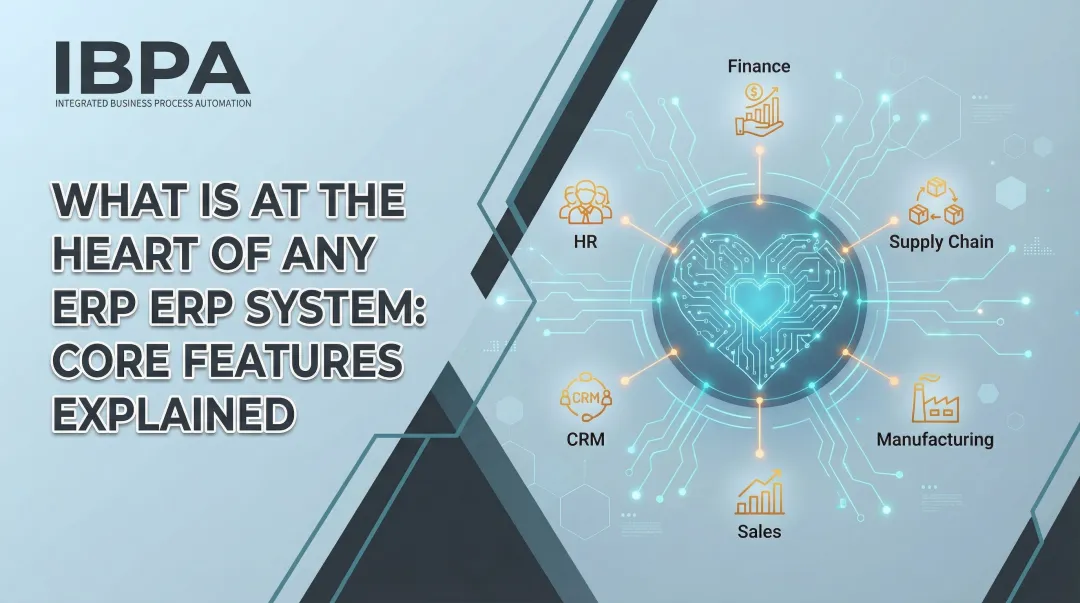
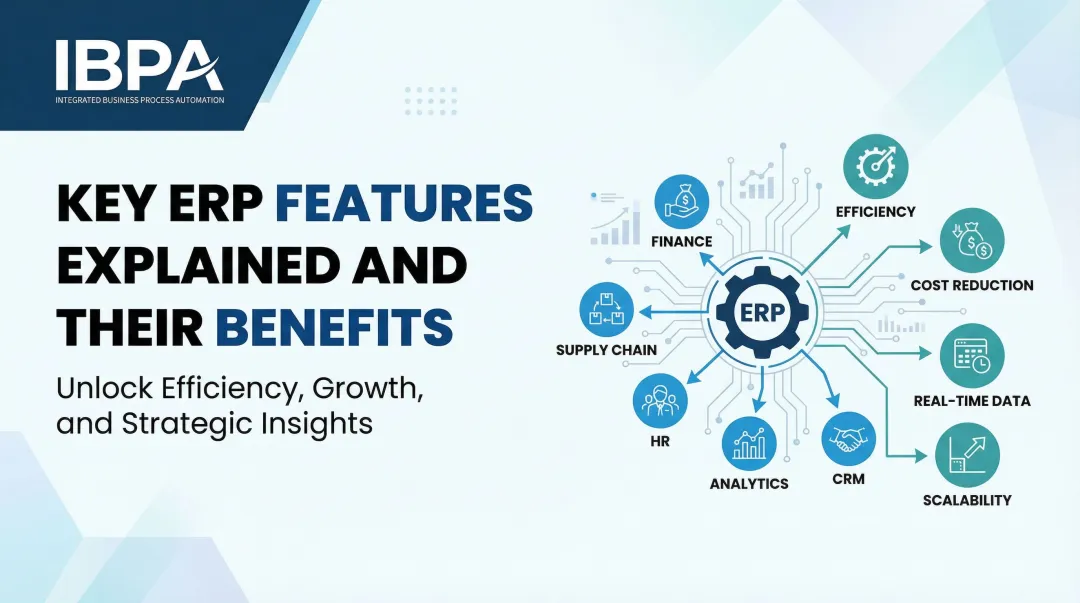
ERP (Enterprise Resource Planning) is software that integrates core business functions — accounting, inventory, sales, purchasing, HR — into a single system with a shared database, so all departments work from the same real-time information. Unlike standalone tools that operate in isolation, ERP systems are defined by their integrated nature and shared database.
Who Typically Uses ERP?
ERP serves multiple user types within an organisation:
- Business owners monitoring overall performance and making strategic decisions
- Finance managers processing invoices, reconciling accounts, and generating GST reports
- Operations teams tracking inventory, managing purchase orders, and monitoring stock levels
- HR departments managing attendance, processing payroll, and handling leave requests
- Sales teams tracking leads, creating quotations, and managing customer relationships
Each user accesses the same unified system through role-based logins, seeing only the modules relevant to their responsibilities.
Cloud-Based vs On-Premise ERP
There are two primary deployment models:
| On-Premise ERP | Cloud-Based ERP | |
|---|---|---|
| Hosting | Local servers | Vendor-managed, browser-based |
| Setup Cost | High upfront infrastructure investment | Lower initial cost |
| Maintenance | Internal IT team manages updates and security | Handled by vendor automatically |
| Access | On-site network required | Anywhere, 24/7 |
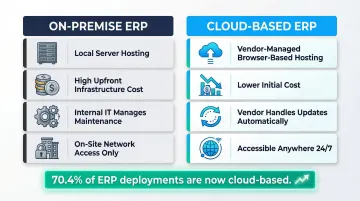
As of 2024, 70.4% of ERP deployments operate in the cloud, with 78.6% of new implementations choosing cloud solutions. For Indian MSMEs, cloud ERP removes the need for expensive IT infrastructure while delivering real-time access and built-in GST compliance — making it the practical default for growing businesses.
When Should Your Business Start Using ERP?
Businesses typically outgrow their current tools when manual effort overtakes analysis. When spreadsheets become the central source of truth, teams waste hours manually entering data across multiple documents, raising the risk of costly errors with every update.
Key Operational Triggers
Your business is ready for ERP when you experience:
- Separate files for inventory, sales, and accounting with no single source of truth
- Sales data that doesn't match inventory records, requiring hours of manual cross-checking
- Invoices that take days to generate due to approval bottlenecks and manual steps
- Outdated stock levels causing stockouts or overordering
- A month-end close that stretches into weeks instead of days
These are not isolated inefficiencies — they're compounding. Each one slows down the next process, and together they signal that your current tools have hit their ceiling.
When ERP Is NOT the Right Fit Yet
ERP adds most value when multiple people are involved in operations, when cross-departmental data sharing is needed, or when compliance requirements (like GST filing) are becoming a burden. Very early-stage solo businesses with minimal transactions may not benefit from ERP's complexity.
The Real Cost of Waiting
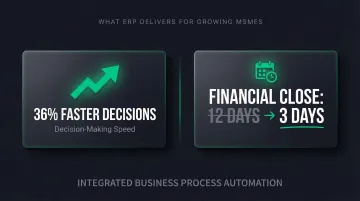
ERP becomes essential when the cost of disconnected information — missed orders, incorrect invoices, stock discrepancies — exceeds the investment required to unify operations on a single platform. For MSMEs, the impact is measurable: businesses that implement ERP report decisions made 36% faster, with monthly financial close times dropping from an average of 12 days to just 3. For growing Indian businesses managing GST compliance on top of daily operations, that time saving matters even more.
What You Need Before You Begin
Proper preparation determines ERP success. Here's what you must have ready before starting:
Master Data Readiness
Compile your customer list, vendor list, product/service catalogue, and chart of accounts before setup. ERP cannot function without this foundational data already structured and cleaned.
Why it matters: Poor data migration accounts for 38% of ERP implementation failures. What appears to be a clean database is often filled with duplicates and missing details, leaving your new ERP with corrupted records from day one.
What to prepare:
- Customer records with complete billing addresses and GSTIN details
- Vendor master data with payment terms and GST information
- Product/service catalogue with HSN codes and pricing
- Chart of accounts structure matching your business requirements
User Roles and Access Permissions
Decide in advance which employees will use which modules, and what approval levels each role requires. This prevents unauthorised data access and ensures workflow integrity from day one.
Role-based access controls ensure not every user sees everything — maintaining data security while giving each team member appropriate access for their responsibilities.
Basic System Access
For cloud-based ERP like Bizionix, you need only a browser and login credentials — no special hardware or IT infrastructure is required. This makes it practical even for lean MSME teams without a dedicated IT department. Once these three areas are in order, you're ready to move into the actual setup process.
How to Operate ERP Software: Step-by-Step
Correct ERP operation follows a logical sequence — the system is built around connected data flows, so entering information in the right module at the right step ensures accuracy across all downstream processes. Skipping steps or entering data out of sequence creates reconciliation problems later.
Step 1: Log In and Orient Yourself to the Dashboard
After logging in, the ERP dashboard is your central control panel. It typically shows pending tasks, key metrics (sales, receivables, inventory alerts), and quick-access links to modules. Spend time understanding what your specific dashboard is configured to show based on your role.
Beginner tip: Resist opening every module on day one. Instead, identify the 2-3 modules relevant to your daily work and focus navigation practice there first. For example, if you're in finance, concentrate on the Finance & Accounting and Sales modules before exploring Inventory or HR.
Step 2: Set Up and Verify Your Master Data
Master data is the foundation all transactions are built on. This includes:
- Customer records — name, billing address, GSTIN
- Vendor details — contact information, payment terms, GST registration
- Product/service items — descriptions, HSN codes, pricing, units of measure
- Tax configurations — GST rates, TDS settings
- General ledger accounts — chart of accounts structure
Verify this data is complete and correctly entered before processing any transaction.
Common beginner error: Starting to enter invoices or purchase orders before master data is complete leads to mismatched records, incorrect GST calculations, and reports that don't balance. Always validate master data first.
Step 3: Execute Daily Transactions Through the Right Modules
Understanding transaction flow is critical. Here's how common daily transactions work in ERP:
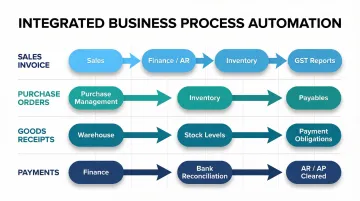
Sales Invoice Example:
- Create invoice in the Sales module using pre-loaded customer and product data
- System automatically updates accounts receivable in Finance module
- Stock levels reduce in Inventory module
- GST liability updates in compliance reports
This interconnected flow is why module selection matters. Each transaction in its correct module triggers automatic updates elsewhere, reducing manual reconciliation. Other common transaction types follow the same principle:
- Purchase orders — created in Purchase Management, update inventory expectations and payables
- Goods receipts — confirm inventory arrival, update stock levels, trigger payment obligations
- Expense entries — recorded in Finance, impact cash flow and profitability reports
- Payment processing — clears receivables/payables, updates bank reconciliation
Step 4: Monitor Performance Using Reports and Dashboards
ERP's real power is in reporting. Beginners should regularly check:
Operational reports:
- Outstanding invoices and receivables ageing
- Current stock levels and reorder alerts
- Pending purchase orders and delivery schedules
- Employee attendance and leave balances
Beyond day-to-day operations, financial summaries give you a broader picture of business health:
Financial summaries:
- Profit & loss statements
- Cash flow analysis
- GST liability and compliance status
- Balance sheet and trial balance
Pro tip: Dashboards provide real-time snapshots, while scheduled reports (daily, weekly, monthly) help track trends. Learn how to filter reports by date range, department, or location to get actionable data.
Step 5: Manage Approvals, Workflows, and User Actions
Modern ERP systems include approval workflows. For example, a purchase order above a certain value may require manager sign-off before it can be confirmed. Beginners should understand how to:
- Submit transactions requiring approval
- Review and approve items within their authority
- Escalate exceptions or urgent requests
- Track approval status and bottlenecks
Accountability feature: ERP logs every action with a timestamp and user ID, creating a full audit trail. Use this log to review your own entries before month-end closing — it's the fastest way to catch errors before they affect financial reports.
Best Practices for Using ERP Software Effectively
Prioritise Data Entry Discipline Above All Else
ERP's output quality is entirely dependent on input quality. Poor data quality costs organisations an average of $12.9 million annually, according to Gartner, with knowledge workers spending approximately 50% of their time dealing with data issues.
Establish these standards:
- Consistent naming conventions for customers, vendors, and products
- Mandatory field requirements before saving records
- Documented data entry guidelines accessible to all team members
- Regular data quality audits to identify and correct errors
Invest in Phased Training, Not One-Time Onboarding
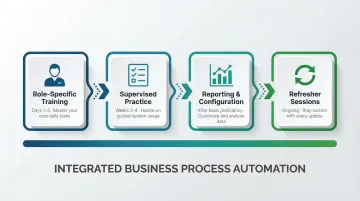
Organisations that tailor ERP training to specific departmental needs report a 30% boost in user proficiency. Train users on the modules they'll use daily first, then expand.
Recommended training approach:
- Start with role-specific training (1-3 days) focused on core daily tasks
- Follow with 2-4 weeks of supervised hands-on practice
- Introduce reporting and configuration features once basic proficiency is established
- Schedule refresher sessions whenever software updates or processes change
Customise the System to Match Your Business Processes
A good ERP should let you configure module fields, approval hierarchies, and report formats to match how your business actually works. Bizionix, for instance, is built to adapt to MSME workflows rather than locking teams into a fixed structure. Use this flexibility rather than building workarounds outside the system.
What you can typically customise:
- Custom fields in master data records
- Approval thresholds and workflow routing
- Report formats and dashboard layouts
- User roles and access permissions
Ensure Cross-Departmental Coordination from the Beginning
ERP works because departments share data — which means errors at one end ripple through the entire system. A common example:
- Sales logs an order incorrectly → inventory receives wrong stock signals
- Incorrect stock signals → finance records inaccurate revenue data
- Inaccurate revenue data → management makes decisions on bad numbers
Make sure every department understands how their inputs affect the teams downstream.
Build a Regular Review Rhythm
Schedule monthly system reviews to check for:
- Incomplete transactions requiring closure
- Unreconciled accounts needing attention
- Unused module features that could add value
- Process bottlenecks affecting efficiency
This keeps the ERP clean, accurate, and aligned with how the business is actually operating.
Conclusion
Operating ERP software correctly is less about mastering every feature immediately and more about following the right sequence — enter clean data, use the right modules for each transaction, and let the system's interconnected logic handle the rest.
Disciplined ERP usage is a long-term operational investment. Businesses that follow the system's processes gain cleaner data, faster decisions, and real visibility across departments — outcomes that compound over time as your team builds proficiency.
For Indian MSMEs, ERP adoption typically takes 3–9 months to move from initial setup to confident daily use. The practical path forward is straightforward:
- Start with core modules — finance, inventory, or GST compliance — before expanding
- Build team proficiency gradually through consistent, process-driven usage
- Expand into advanced features (HRMS, CRM, multi-location) as confidence grows
Frequently Asked Questions
What is ERP for beginners?
ERP is software that connects all core business functions — finance, inventory, sales, HR — into one system. Data entered in one area is automatically reflected across all others, eliminating the need for separate spreadsheets or tools for each department.
Is the ERP system easy to learn?
ERP systems have a learning curve, but most modern cloud-based ERP platforms are designed with role-based navigation so users only see the modules relevant to their work. Most employees become comfortable with their core workflows within 2-4 weeks of consistent use.
Is Excel an ERP system?
No, Excel is a spreadsheet tool that requires manual data entry and has no automatic integration between functions. ERP software automatically connects transactions across departments in real time.
How long does it take to learn ERP software?
Basic operational proficiency — enough to handle daily tasks in key modules — typically takes 2-4 weeks of hands-on use. Deeper understanding of reporting, configurations, and advanced features develops over 2-3 months of regular usage.
What are the basic modules every ERP beginner should know?
Most beginners will work across five core modules first:
- Finance and Accounting — financial management and GST compliance
- Sales and Invoicing — customer management and billing
- Purchase Management — vendor and procurement workflows
- Inventory — stock tracking and movement
- HR and Payroll — employee records and salary processing
Can small businesses use ERP software?
Yes — ERP is not just for large enterprises. Companies with ₹8–₹83 crore in annual revenue are prime candidates for cloud ERP, with first-year costs typically ranging from ₹2.5 lakh to ₹21 lakh. MSME-focused platforms offer the same core capabilities at a fraction of enterprise cost, with simpler setup.