Introduction
An overbooking during Diwali weekend. A guest waiting 20 minutes at the front desk because housekeeping hasn't updated the room status. A billing dispute because GST wasn't calculated correctly on the folio. For hotels running on disconnected systems or manual processes, these aren't rare incidents. They're routine.
For growing Indian hotels, these aren't just operational hiccups. They're revenue losses and reputation risks. A J.D. Power study found that missed arrival basics can drop guest satisfaction scores by up to 100 points on a 1,000-point scale. That translates directly to reviews, repeat bookings, and revenue.
This guide covers:
- What hotel front desk software is and how it works
- The features that matter most for Indian hotel operations
- A practical implementation process for hotel managers
Key Takeaways
- Hotel front desk software centralises reservations, check-in/check-out, room assignments, billing, and housekeeping coordination into one system
- It is typically a core module within a broader Property Management System (PMS), not a standalone product
- Successful implementation requires workflow mapping, data migration planning, and staff training — not just installation
- Top failure points — poor data migration, integration gaps, and low staff adoption — are all preventable
- Indian hotels must evaluate GST-compliant invoicing, UPI support, local payment gateways, and India-relevant OTA integrations
What is Hotel Front Desk Software?
Hotel front desk software is the operational core of daily guest management. It centralises reservations, check-in and check-out workflows, room status tracking, guest communication, and billing into a single interface — managing the full guest lifecycle from arrival to departure.
Unlike a basic booking tool that only captures reservations, front desk software manages everything surrounding them: room assignment, housekeeping coordination, folio generation, and guest history.
How It Fits Within a Hotel PMS
Front desk software is almost always a module or foundational layer within a broader Property Management System (PMS). As Oracle describes it, a hotel PMS is the critical business operations system managing front-office capabilities, guest experiences, reservations, room assignment, rates, and billing.
A full PMS typically includes:
- Front desk and reservations management
- Housekeeping coordination
- Channel and OTA management
- Billing, payments, and financial reporting
- Revenue management and analytics
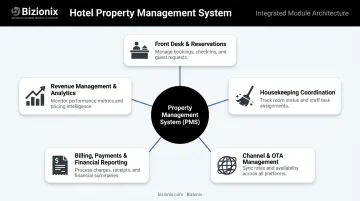
Some hotels deploy standalone front desk tools, but integrated PMS platforms offer a clear operational advantage: every department — front desk, housekeeping, F&B, accounts — works from the same live data.
Why This is No Longer Optional
The global hotel PMS market was valued at USD 3.6 billion in 2024, with cloud-based systems representing over 80% of that market. The shift from paper-based and spreadsheet-driven operations isn't a trend — it's already the baseline for competitive hospitality management.
Hotels still managing reservations across disconnected channels — or tracking room status on a whiteboard — face real disadvantages: slower check-ins, overbooking risks, and staff working from stale data. Understanding what modern front desk software actually does is the first step toward fixing that.
Key Features to Look For in Hotel Front Desk Software
Not all front desk software is built the same. These are the capabilities that separate genuinely useful systems from ones that just add a digital layer to existing manual processes.
Automated Check-In and Check-Out
Manual check-in creates lobby queues. Research from Cornell and J.D. Power shows that guest satisfaction drops by 50 points after just a five-minute wait at the front desk.
The software should support:
- Mobile check-in via a secure link sent to the guest's phone
- Self-service kiosk integration for contactless document upload and room assignment
- Digital key issuance via mobile or NFC immediately upon check-in
- Automatic handling of late check-outs and early arrivals without requiring staff intervention
Bizionix's hotel management module handles the full mobile check-in process — ID verification, room assignment, and digital key delivery — as a connected workflow with live sync to the PMS, keeping front desk records accurate without manual updates.
Reservation Management with Real-Time Synchronisation
Managing reservations from OTAs, direct bookings, and walk-ins in separate systems is a recipe for overbooking. The software must maintain a single source of truth at the front desk, with:
- Instant room availability updates across all connected booking channels
- Automatic conflict flagging when the same room is booked twice
- Waitlist management for high-demand periods
- Group booking handling with individual folio tracking
Housekeeping and Task Coordination
The front desk and housekeeping operate in a constant feedback loop. When a guest checks out, housekeeping needs that signal immediately. When a room is cleaned, the front desk needs to know it's ready — not after a 30-minute delay waiting for a phone call.
The right system handles this automatically:
- Room status updates push automatically upon check-out
- Cleaning task assignment happens within the same platform
- Real-time status feedback (clean, occupied, out-of-order, inspected) is visible to front desk staff
- Every action is logged with a timestamp for accountability
Billing, Payments, and GST Compliance
For Indian hotels, billing is not just about convenience — it is a compliance requirement. Integrated billing should consolidate room charges, F&B, spa, and incidentals into a single guest folio, with:
- Automated GST calculation aligned with the applicable rate (the GST Council confirmed accommodation at ₹7,500 or less per unit per day moves to 5% without ITC from September 22, 2025)
- GST-compliant invoice generation with correct HSN/SAC codes (Heading 9963 for accommodation services under CBIC classification)
- UPI and local payment gateway support — NPCI recorded over 22 billion UPI transactions in March 2026 alone; hotels that don't accept UPI are actively creating friction
- E-invoicing with IRN generation for eligible transactions
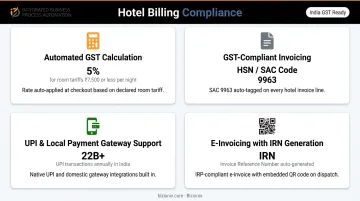
Bizionix connects directly with the GST e-Invoice system via API, enabling instant IRN generation and automatic QR code creation within the hotel billing module. This removes the need for a separate compliance tool entirely.
Reporting and Analytics
The front desk generates more operational data than most hotels actively use. A good system makes that data available without requiring manual extraction:
- Live occupancy, arrivals, and departures dashboard (updated in real time, not end-of-day)
- ADR (Average Daily Rate) and RevPAR (Revenue Per Available Room) tracking
- No-show pattern reporting for rate plan optimisation
- Audit trails for every transaction and action
According to the 2024 Lodging Technology Study by Hospitality Technology, 72% of hoteliers prioritise analytics for revenue optimisation and demand forecasting. The right platform turns that raw operational data into decisions — without requiring a separate BI tool or manual exports.
How to Implement Hotel Front Desk Software
Most hotel front desk software failures aren't caused by the software — they're caused by rushed implementation. Without proper preparation, even well-designed systems cause adoption problems and operational disruptions within the first 60 days.
Prerequisites Before You Begin
Get these right before touching the software:
Confirm infrastructure readiness — Cloud-based systems require stable internet connectivity. Verify hardware at the front desk (terminals, printers, card readers) and identify all required third-party integrations (OTAs, payment gateways, accounting systems) before configuration starts. If connectivity is inconsistent or integration APIs are unconfirmed, stop here.
Audit and clean your existing data — Dirty data migrated into a new system causes errors at go-live. Conduct a full audit of current guest records, room inventory configurations, rate plans, and booking data. Assign one person ownership of data cleanup before go-live.
Map your current workflows — Document how your team currently handles check-ins, room assignments, billing, housekeeping updates, and guest complaints. This becomes your configuration reference and training baseline.
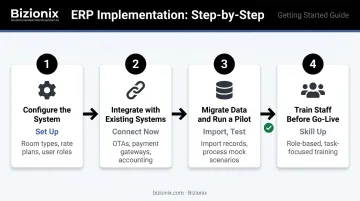
Step-by-Step Implementation Process
Step 1 — Configure the system to match your property
Set up room types, rate plans, cancellation and no-show policies, early check-in fees, and user roles. Do not use default configurations — misconfigured rate plans and access permissions create downstream problems that are difficult to trace.
Step 2 — Integrate with existing systems
Connect to your OTA channel manager, payment gateway, and accounting module. Test each integration individually — confirm that a booking created on MakeMyTrip or Booking.com appears correctly in the front desk system, and that payment transactions post accurately to the billing module before go-live.
Step 3 — Migrate data and run a pilot
Import historical guest profiles, existing reservations, and room inventory. Then run a controlled pilot — process mock check-ins, check-outs, and billing scenarios. Involve front desk staff in this phase. Their feedback here prevents training gaps later.
Step 4 — Train staff before go-live
Run role-based training: front desk agents need hands-on practice with check-in/check-out flows and billing; managers need to understand reporting dashboards and exception handling. Training must cover what to do when the system flags an error, not just normal operation.
Post-Go-Live Validation
In the first 30 days, actively monitor for:
- Reservation sync errors between OTAs and the front desk system
- Incorrect room status updates
- Billing mismatches or GST invoice errors
- Daily reports that don't align with actual occupancy figures
- Unresolved escalations — ensure a go-live support contact (internal or from your software provider) can respond to critical issues within hours
Common Implementation Problems and How to Fix Them
Data Migration Errors
Problem: Guest records, rate plans, or booking data migrate with gaps, duplicates, or formatting issues — causing check-in confusion or incorrect billing from day one.
Fix: Run a full data audit and standardization step before migration. Use the software provider's import templates and validate a sample batch before running the full migration. Industry surveys consistently show data migration complexity ranks among the top concerns hoteliers face when switching systems — it deserves dedicated time, not a rushed overnight run.
Integration Failures with OTAs or Payment Gateways
Problem: Reservations from OTAs don't appear in the front desk system, or payment transactions fail to post to the billing module.
Fix: Test every integration channel independently using real transactions in a staging environment before go-live. Confirm with your provider that the specific OTAs and payment gateways you rely on are fully supported and recently verified — not just listed as "compatible."
Low Staff Adoption
Problem: Front desk staff revert to spreadsheets and paper logs because the system feels unfamiliar or takes longer than the old method.
Fix: This usually traces back to training that was too brief, feature-focused rather than task-focused, or that skipped staff involvement in the pilot phase entirely. Redesign training around real scenarios — handling a walk-in, processing a group check-out, issuing a revised GST invoice. Assign one power user on the front desk team who can answer peer questions during the first month without escalating everything to IT or the vendor.
Pro Tips for a Successful Rollout
Choose go-live timing deliberately. Avoid launching during peak occupancy. A low-season window gives staff space to learn and allows issues to surface before a full house of guests arrives.
Run parallel systems for two weeks. Keep the previous system in read-only mode alongside the new one. This safety net allows cross-referencing and prevents data loss if a critical configuration issue surfaces post-launch.
Document configured workflows immediately after go-live. Once stable, write up each task: check-in SOP, billing SOP, housekeeping update SOP. This becomes your onboarding material for new hires and eliminates dependence on informal knowledge.
Frequently Asked Questions
Which software is used in hotel front office?
Hotels use Property Management Systems (PMS) with a front desk module as their primary operational software. These cloud-based platforms handle reservations, check-in/check-out, billing, and housekeeping coordination. The right choice depends on property size, budget, GST compliance requirements, and OTA integration needs.
What is PMS and POS?
A PMS (Property Management System) is the central hotel operations platform managing reservations, front desk, housekeeping, and reporting. A POS (Point of Sale) handles transactions at revenue outlets like restaurants, spas, or gift shops. Modern integrated platforms combine both, with F&B charges posting directly to the guest folio.
Is hotel front desk software the same as a hotel PMS?
Front desk software is typically a component within a broader PMS, not a separate product. A full PMS includes housekeeping management, revenue management, channel management, and financial reporting alongside front desk functionality. Buying standalone front desk software usually means managing integrations manually.
How long does it take to implement hotel front desk software?
Timelines range from two to eight weeks depending on property size, data migration complexity, and integrations. Smaller properties with clean data can go live in one to two weeks; multi-property or complex billing setups take longer.
What should hotels check after going live with front desk software?
In the first 30 days, monitor OTA reservation sync accuracy, GST invoice generation, housekeeping status updates, and alignment between daily reports and actual occupancy figures. Configuration issues caught early are minor fixes; left unaddressed, they compound quickly.
Can small and mid-sized Indian hotels implement front desk software cost-effectively?
Yes. Cloud-based platforms have removed the need for heavy hardware investment, making implementation accessible for smaller properties. The non-negotiables for Indian hotels are GST compliance with correct rate application, UPI and local payment gateway support, and integration with OTAs relevant to the Indian market — evaluate these before anything else.