Introduction
Picture this: it's Monday morning, and your HR manager has 23 unread messages before 10 AM. Twelve are payslip requests. Seven are leave balance queries. Four are address change forms that need to be manually updated across three different spreadsheets.
For HR teams across thousands of Indian MSMEs, this is a typical Monday morning. As businesses add headcount across departments and locations, manual HR administration creates compounding errors, compliance gaps, and a workforce that can't access basic information without filing a request and waiting days.
Research from RIS found that while 94% of surveyed MSMEs have internet connectivity, only 12% have adopted ERP systems — which means most growing businesses are still managing their workforce through disconnected tools and manual processes.
This article breaks down what Employee Self-Service (ESS) is within ERP systems, how it works, what features it includes, and why more Indian MSMEs are making it a core part of their HR and ERP strategy.
Key Takeaways
- ESS is a digital self-service interface within an ERP that lets employees manage leave, payslips, and personal data without involving HR each time
- ERP-native ESS shares one database with payroll, attendance, and finance — eliminating duplicate entries and data silos
- Employees get 24/7 access from any device, while managers approve requests and HR handles exceptions — all within the same system
- For Indian MSMEs scaling operations, ESS inside an integrated ERP cuts administrative overhead and gives HR real workforce visibility — fast
What Is Employee Self-Service (ESS) in ERP Systems?
Employee Self-Service is a digital interface embedded within an ERP's HR module that lets employees access, update, and manage their own employment-related data — without submitting a paper form or waiting for HR to handle a routine request.
The critical distinction: ESS is not a standalone portal bolted onto your existing systems. It sits inside the ERP architecture itself, sharing the same database as payroll, attendance, finance, and operations. When an employee updates their bank account through ESS, that change reflects immediately in payroll — no manual transfer, no reconciliation lag.
ESS vs. Manager Self-Service (MSS)
Most modern ERP platforms pair ESS with a Manager Self-Service (MSS) layer:
- ESS (employee-facing): Submit leave requests, view payslips, update personal details, access documents
- MSS (manager-facing): Approve leave requests, view team attendance, review workforce data — all within the same system
Together, ESS and MSS replace the email chains, paper forms, and informal WhatsApp approvals that define manual HR in most MSMEs.
Standalone HR Portal vs. ERP-Native ESS
| Feature | Standalone HR Portal | ERP-Native ESS |
|---|---|---|
| Data location | Separate system | Shared ERP database |
| Payroll sync | Manual export/import | Automatic, real-time |
| Finance integration | Requires reconciliation | Native connection |
| Compliance visibility | Fragmented | Unified |
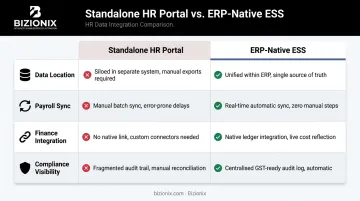
That comparison matters in practice. When employee data lives across separate tools — a spreadsheet for attendance, an HR portal for leave, a separate payroll application — errors compound. Compliance becomes harder to audit, and management visibility into workforce data breaks down at precisely the moments when clarity matters most.
How Does ESS Work Within an ERP System?
Role-Based Access and Secure Login
Every user in an ERP with ESS receives a login configured to their permission level:
- Employees see only their own data — payslips, leave balance, personal details
- Managers see their team's attendance, pending approvals, and workforce summaries
- HR administrators retain full visibility and configuration access
Bizionix, for example, features entity-level permissions and role-based controls (view/edit/admin) across its platform, with full activity logs ensuring accountability at every level. This permission structure is what makes ESS secure for sensitive payroll and personal data.
Cloud-Based, Device-Agnostic Access
Modern cloud ERP makes ESS available 24/7 from any device — desktop, tablet, or smartphone — without VPN or on-premise infrastructure. For businesses with:
- Field staff across multiple sites
- Factory workers on shift rotations
- Branch operations in multiple cities
- Hybrid or remote working arrangements
...accessibility isn't a convenience — it's a necessity. An employee in a warehouse shouldn't need to walk to an HR office or wait until Monday to check their leave balance. ...accessibility isn't a convenience — it's a necessity. An employee in a warehouse shouldn't need to walk to an HR office or wait until Monday to check their leave balance. The same applies to every action ESS enables — and that's where workflow automation comes in.
Workflow Automation and Approval Chains
Take a standard leave request. With ESS and workflow automation, the entire process runs without manual intervention:
- Employee applies for three days of leave via the ESS portal, selecting dates and reason
- Manager receives an automated notification in MSS with a one-click approve/reject option
- Manager views the team calendar to check for scheduling conflicts before approving
- Approval triggers automatic updates — leave balance decremented, attendance records updated, payroll module notified for that pay cycle
- Employee receives confirmation through the portal
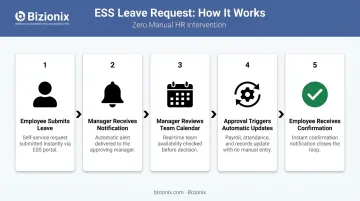
No email chains. No paper forms sitting in an inbox. No HR manually updating three separate spreadsheets.
Real-Time Data Synchronisation
Any update made through ESS — a bank account change, a tax declaration update, an address correction — immediately reflects across all connected ERP modules. Every connected team — HR, payroll, finance — always works from the same live data.
Key Features of an ESS Portal in an ERP System
Personal Information Management
Employees can independently update contact details, emergency contacts, bank account information, and residential address within their ESS profile. Changes sync automatically with HR records and payroll — removing HR as a middleman for routine data corrections.
Leave and Attendance Management
The leave workflow within a well-integrated ESS handles the full cycle:
- View real-time leave balances by leave type
- Apply for leave with dates, reason, and supporting notes
- Track application status (pending, approved, rejected) in real time
- Managers view team calendars before approving to avoid coverage gaps
- Approved leave automatically updates attendance records and the payroll calculation for that period
Payroll and Salary Access
Bloomberg Tax's payroll benchmarks survey found that 26.6% of organizations receive more than 1,000 payroll-related inquiries per year, with an average resolution time of 1.54 business days per inquiry. At scale, that's hundreds of staff-hours consumed by routine queries — hours ESS reclaims for HR and finance teams.
Through the payroll self-service interface, employees can:
- View and download payslips for any pay period
- Check year-to-date earnings and deductions
- Update income tax declarations
- Verify statutory deductions (PF, ESI, TDS)
Document and Compliance Access
ESS functions as a centralized document repository. Employees access employment records anytime without raising a request, including:
- Appointment letters and offer documents
- Company policies and HR handbooks
- Compliance forms and statutory declarations
- Benefits documents and entitlement summaries
This creates a single source of truth for employment records and keeps the organization audit-ready without HR fielding individual document requests.
Performance and Training (Extended Capabilities)
Advanced ERP-integrated ESS portals extend into performance management. Employees handle career development within the same system they use for daily HR tasks:
- Track goals and review progress on personal dashboards
- Submit and review performance appraisal forms
- Access assigned learning modules and training content
Keeping everything in one platform reduces the need to switch between separate tools — and keeps engagement with the system consistent across the employee lifecycle.
Benefits of ESS for Employees, HR Teams, and Business Owners
For employees — autonomy and transparency:
Deloitte's 2017 Human Capital Trends report found that nearly 80% of executives rated employee experience as important or very important — yet only 22% said their companies were excellent at building a differentiated employee experience. ESS directly closes that gap: employees can access their own employment data, on their own time, without filing a request.
For HR teams — reclaiming strategic capacity:
Deloitte estimates HR teams spend as much as 57% of their time on administrative tasks. In a growing MSME, that's mostly leave balance queries and payslip printing — not workforce planning, talent development, or policy work. ESS redirects all routine transactions to employees, freeing HR to focus on what actually drives the business.
For business owners — live workforce visibility:
Management gains access to real-time dashboards on:
- Attendance trends and absenteeism patterns
- Leave distribution across teams and locations
- Headcount summaries by department or branch
- Payroll cost summaries without waiting for month-end reports
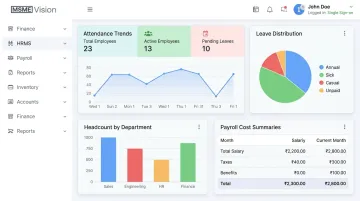
Staffing, cost planning, and operational decisions can be made from current data, not figures that are already several days old by the time they reach your desk.
How ESS Drives Digital Transformation in Growing Businesses
For most Indian MSMEs, ESS is often the first concrete step in a broader digital transformation journey. It replaces paper forms and informal processes with structured digital workflows — and in doing so, builds the organizational habit of operating through a system.
The RIS MSME Digitalisation study found that 46% of non-adopters perceived digital tools as irrelevant to their business, while 22% cited lack of technical expertise. ESS addresses both barriers directly: it solves a visible, daily problem (HR admin overload), and it's simple enough that employees engage with it quickly.
The real transformation happens when ESS is part of a unified ERP rather than a standalone tool:
- Digitizing HR automatically connects to payroll processing and financial reporting
- Attendance data feeds directly into cost calculations
- Leave patterns inform workforce planning dashboards
- Compliance data is always current, not manually compiled at audit time
Compare that to an MSME running on spreadsheets, WhatsApp approvals, and separate payroll software. Every data point lives in isolation. A unified platform connects HR, finance, operations, and compliance into one source of truth.
When employees use ESS daily for leave applications and payslip access, they become comfortable with the ERP interface. That familiarity accelerates adoption of other modules — inventory, CRM, procurement — across the business. Each area that goes digital pulls the next one along.
What to Look for in an ERP with ESS Capabilities
Not all ESS implementations are equal. Here's what separates a genuinely useful ESS from one that creates more work than it saves:
Ease of Use and Mobile Accessibility
Adoption drives value. Look for an interface intuitive enough to use without training, and fully functional on mobile for field staff, factory workers, and employees across multiple locations.
Depth of Native Integration
Ask directly: does ESS share the same database as payroll, attendance, and finance? Or does it sync periodically? True integration means a leave approval in ESS immediately updates attendance records and payroll — no reconciliation, no lag.
Scalability and Indian Compliance Fit
Beyond architecture, Indian MSMEs need a platform built for local statutory requirements. The ERP should handle:
- PF, ESI, TDS, and professional tax within the payroll module
- Payroll structures that reflect Indian compensation norms
- Multi-location and multi-entity support from a single instance as the business grows across cities or adds legal entities
Bizionix, developed specifically for Indian MSMEs and backed by over two decades of industry experience through IIS-LLP, offers a unified cloud ERP where HRMS and ESS capabilities connect natively with payroll, accounting, and operations. The platform supports multi-company management from a single login, giving growing businesses full workforce management capability without SAP-level complexity or cost.
Frequently Asked Questions
Frequently Asked Questions
What is an example of ERP employee self-service?
An employee logs into the ERP to apply for three days of annual leave. The system checks their available balance, routes the request to their manager for approval, and once approved, automatically updates attendance records and the payroll calculation for that month. HR involvement is not required at any step.
What is an ERP system for payroll?
An ERP payroll module automates salary calculation, statutory deductions (PF, ESI, TDS), and payslip generation. When integrated with ESS and attendance modules, payroll runs with minimal manual intervention and always reflects current employee data.
What are the main ERP modules?
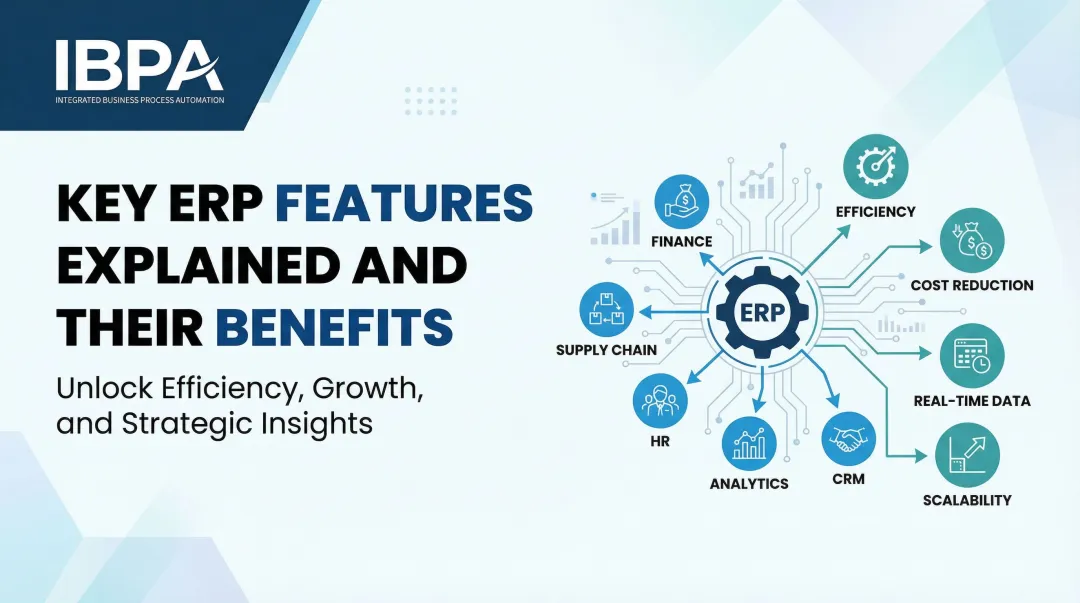
Core ERP modules typically include Finance and Accounting, Inventory and Warehouse Management, Sales and CRM, Purchase and Procurement, HR and Payroll (which includes ESS), and Manufacturing or Production — all operating on a single shared database.
What does ERP stand for?
ERP stands for Enterprise Resource Planning: integrated business software that consolidates core functions — finance, operations, HR, sales, inventory — into a single platform, replacing fragmented tools and manual processes with one shared source of truth.
How does ESS in an ERP differ from a standalone HR portal?
A standalone HR portal manages data in isolation and typically requires manual export to sync with payroll or finance. ESS within an ERP shares one database with all modules, so a leave approval or data update immediately reflects across HR, finance, and operations without additional steps.
What are the common challenges of implementing ESS in an ERP?
Common challenges include employee resistance to change, low digital literacy at rollout, ensuring role-based access is correctly configured, and choosing an ERP where ESS is genuinely integrated rather than a loosely connected add-on. Structured onboarding and training directly drive adoption rates.