Introduction
Many growing Indian businesses are running on a fragile stack: finance tracked in Excel, inventory managed across WhatsApp messages, and each department operating on its own disconnected tools. Month-end becomes a scramble — data doesn't match, reports take days to compile, and nobody has a clear picture of cash flow until it's too late to act.
The root issue is integration, not technology. A RIS survey of nearly 3,000 enterprises found that 95% of Indian MSMEs have adopted basic digital tools, but only 12% use ERP — the vast majority are digitised without being connected.
ERP automation closes that gap. This guide covers what ERP automation is, which processes it handles, the core benefits, and how to evaluate the right system for your stage of growth.
TL;DR
- ERP automation connects finance, inventory, HR, and sales into one system, eliminating manual data transfers between tools
- Indian MSMEs above ₹5 crore turnover are now legally required to generate IRNs for B2B invoices
- Cloud ERP is forecast to reach $110.26 billion by 2030, driven by SMB adoption
- Data quality and change management matter more to implementation success than software choice
- Platforms like Bizionix address Indian MSME compliance needs without SAP-level complexity or cost
What Is ERP Automation?
ERP automation uses technology — rules-based workflows, robotic process automation (RPA), and now AI — to execute routine business tasks inside a centralised system, without requiring manual input at each step.
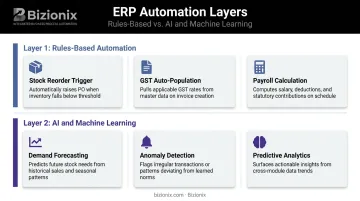
There are two distinct layers worth understanding:
Layer 1: Rules-Based Automation
The system follows predefined logic — no human decision required, just configured rules executing reliably. Common examples:
- Stock drops below threshold → reorder request triggers automatically
- Invoice created → GST fields auto-populate
- Payroll runs → attendance data feeds directly into salary calculations
Layer 2: AI and Machine Learning
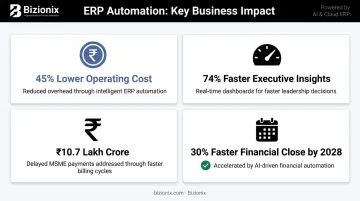
This is adaptive automation that learns from patterns — demand forecasting, anomaly detection in financial data, predictive analytics. Gartner predicts embedded AI in cloud ERP finance applications will drive a 30% faster financial close by 2028. For most Indian MSMEs, though, getting Layer 1 right is the immediate priority.
The practical outcome: departments stop duplicating data entry, errors stop compounding across systems. Leadership gets real-time visibility — without chasing down spreadsheets.
What Business Processes Can ERP Automate?
Finance and Accounting
Manual accounting creates two problems simultaneously: it's slow, and it's error-prone. ERP automation handles invoice creation, bank reconciliation, financial report generation, and GST filing preparation — tasks that typically consume disproportionate accountant hours.
For Indian businesses, the GST e-invoicing mandate adds urgency. Official GST notifications have extended e-invoicing requirements to businesses with aggregate turnover above ₹5 crore (from August 2023).
This means compliant e-invoicing — with Invoice Reference Number (IRN) generation through the government's Invoice Registration Portal — is now a legal requirement for a significant portion of MSMEs, not a nice-to-have.
Bizionix handles this through direct API integration with the IRP, validating invoice data against GST rules and generating IRNs within seconds. GSTR-1 auto-populates from sales data, keeping returns aligned with actual transactions.
Inventory and Purchase Management
Automated inventory monitoring tracks stock levels in real time across locations and triggers reorder requests when quantities fall below configured thresholds. This directly addresses the two most common warehouse management failures:
- Stock-outs — lost sales from depleted inventory that nobody caught in time
- Over-purchasing — capital tied up in excess stock that sat in a spreadsheet, unreviewed
HR and Payroll
ERP consolidates the administrative work that HR teams repeat every cycle:
- Attendance tracking and leave approval workflows
- Payroll calculation with statutory deduction handling
- Compliance reporting across PF, ESI, and TDS
For teams managing employees across multiple locations, this removes the manual reconciliation that causes most payroll errors.
Sales, CRM, and Reporting
ERP captures customer interactions, tracks lead status, and triggers follow-up tasks automatically — so deals don't stall because someone forgot to act. Reporting shifts from a weekly spreadsheet compilation exercise to a live dashboard pulling data from every department simultaneously.
Top Benefits of ERP Automation for Growing Businesses
Reduced Financial Leakage
Manual data entry across disconnected systems creates reconciliation gaps, duplicate payments, and invoices that vanish between tools. The problem compounds as transaction volumes grow.
Poor data quality costs organisations an average of $12.9 million per year, according to Gartner — and that's in environments with dedicated IT teams. For MSMEs managing data across Excel files and WhatsApp threads, the leakage is proportionally significant even if it's measured in lakhs rather than crores.
Automated ERP validates data at entry, cross-references records across modules, and flags discrepancies before they become costly corrections.
Lower Operating Costs as You Scale
A business processing 200 invoices per month can manage manually. At 2,000, the same team either burns out or makes mistakes. Automation lets transaction volume grow without proportional headcount growth — finance teams handle more with the same staff.
Hackett Group research shows that digitally mature finance teams operate at 45% lower cost as a percentage of revenue and deliver 74% faster executive insights compared to traditional teams.
Cost reduction is only part of the picture. Automation also changes how quickly leadership can act on information.
Real-Time Visibility for Decision-Making
Business owners and managers get live dashboards showing:
- Cash position and receivables
- Inventory levels across locations
- Sales performance by rep or region
- Pending approvals and open orders
This matters most for multi-location operations, where the alternative is waiting for each site to compile and send figures — by which point the data is already outdated.
Faster Billing and Improved Cash Flow
GAME and C2FO estimated delayed payments to Indian MSMEs at approximately ₹10.7 lakh crore — roughly 7.8% of GDP — with around 70% of debt requirements for micro and small enterprises linked to working capital pressure.
This makes delayed payments a genuine crisis — and automated invoicing directly shortens the gap between service delivery and cash receipt. When invoice data is pre-validated, IRNs are generated instantly, and invoices are dispatched automatically, the billing cycle compresses — and cash arrives sooner.
GST Compliance Without Manual Tracking
For businesses above the ₹5 crore threshold, e-invoicing compliance is mandatory, not optional. Automated ERP maintains timestamped audit trails, auto-populates GST returns, and generates compliance-ready records — removing the risk of penalties from missed filings or incorrectly structured invoices.
Traditional ERP vs. Automated ERP: What's the Difference?
| Dimension | Traditional ERP | Automated Cloud ERP |
|---|---|---|
| Human intervention | Required for most processes | Minimal — workflows execute automatically |
| Data storage | On-premise servers | Cloud-based, accessible from anywhere |
| Cost structure | High upfront licensing + implementation | Subscription-based SaaS model |
| System updates | Manual, IT-managed | Automatic, vendor-managed |
| GST compliance | Requires manual configuration | Built-in, updated for regulatory changes |
Many Indian MSMEs currently operate with a hybrid that functions like a fragmented traditional ERP: Tally for accounting, separate spreadsheets for inventory, WhatsApp for approvals. Data moves between these tools manually — and every transfer is an opportunity for error.
Automated ERP replaces this fragmentation with a unified database. Data entered once flows automatically to all relevant modules. That means:
- Sales records automatically update inventory levels
- Invoices feed directly into GST returns
- Payroll pulls from attendance without manual input
No duplicate entries, no end-of-month reconciliation headaches.
This accessibility has a price story behind it. The global cloud ERP market is projected to reach $110.26 billion by 2030, growing at 18% CAGR — driven largely by SMB adoption of subscription-based platforms that require no dedicated IT infrastructure. For Indian MSMEs, this means enterprise-grade automation is now within reach without SAP-level costs or complexity.
How to Implement ERP Automation: A Step-by-Step Guide
Step 1: Assessment and Process Mapping
Before selecting any platform, map your current workflows. Identify which processes are manual, repetitive, and error-prone. Document where data moves between tools, and where those transfers introduce errors or delays. This audit sets realistic scope and helps prioritise which automations will deliver the fastest return.
Step 2: System Selection and Gap Analysis
Evaluate platforms against your specific requirements:
- Industry fit and module coverage
- GST and e-invoicing compliance capabilities
- Integration with existing tools
- Scalability for future growth (additional entities, locations, users)
- Total cost of ownership across licensing, implementation, and ongoing support
Step 3: Configuration and Data Migration
This phase determines whether your automation works correctly from day one. Configure reorder triggers, approval workflows, invoice templates, and user roles before anything goes live.
Data migration deserves equal attention. Clean, validated historical data produces accurate automated outputs. Inconsistent or incomplete records, on the other hand, produce unreliable automation that teams quickly lose confidence in.
Step 4: Training and Change Management
Gartner predicts that more than 70% of recently implemented ERP initiatives will fail to fully meet their original business goals by 2027. The cause is rarely the software — it's adoption. Forrester describes change management as the "sweet spot" for ERP technology adoption.
Involve end users early. Appoint change champions within each department. Run hands-on training before go-live, not after. Teams who understand why the system works the way it does are far more likely to use it correctly.
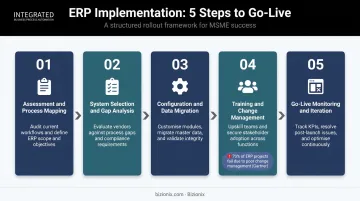
Step 5: Go-Live Monitoring and Iteration
Launch with a phased approach where possible — Panorama's 2024 research found fewer than 25% of organisations used a big-bang rollout, reflecting the risk concerns. Monitor automation performance, resolve edge cases, and refine workflows as operations evolve. For Indian MSMEs especially, regular reviews matter: GST rule changes, new compliance requirements, and business expansion into new locations all create moments where your automation logic needs revisiting.
What to Look for in an ERP Automation System
Core Capabilities Checklist
When evaluating platforms, look for:
- Unified modules covering finance, inventory, HR, and CRM in one system
- Cloud-based deployment with real-time access from any location
- Built-in GST and e-invoicing compliance for Indian regulatory requirements
- Multi-entity and multi-location management under a single login
- Role-based access controls for data security across departments and branches
Ease of Use and Implementation Speed
Growing businesses cannot afford multi-year ERP rollouts or systems that require a dedicated IT team to operate. The right platform should be configurable without heavy customisation, with structured onboarding support that gets core workflows running quickly.
Bizionix addresses this directly. It brings together finance, inventory, payroll, CRM, and compliance in one platform — without the complexity or cost associated with large-scale ERP deployments. Setup for core features like e-invoicing takes minutes via API key and GST credentials, and a 14-day free trial on the NEO plan lets businesses evaluate the fit before committing.
Total Cost of Ownership
Factor in more than the subscription price. Consider:
- Implementation and configuration costs
- Training time and support access
- The ongoing cost of not automating — manual processing, reconciliation errors, compliance penalties, and staff time spent on avoidable tasks
Cloud ERP on a SaaS model consistently offers lower total cost of ownership compared to on-premise alternatives, particularly for businesses without existing IT infrastructure. Bizionix's NEO plan starts at ₹999/year, consolidating what most businesses currently spend across 5–6 separate tools into a single, unified system.
Frequently Asked Questions
What is an automated ERP system?
An automated ERP system is a centralised software platform that uses rules-based workflows and intelligent technology to handle routine business processes — such as invoicing, inventory management, and payroll — with minimal manual input. It gives all departments access to the same real-time data from a single system.
What activities does ERP automate?
ERP can automate invoice generation, purchase order management, payroll processing, inventory reordering, bank reconciliation, GST return preparation, report generation, and CRM follow-up tasks — any repeatable, rule-based process that currently requires manual effort.
What is the difference between traditional ERP and automated ERP?
Traditional ERP requires significant manual data entry and human intervention for most processes. Automated ERP uses configured workflows and system rules to execute tasks autonomously — reducing errors, compressing processing time, and freeing staff for work that requires human judgment.
How long does ERP implementation typically take for an SMB?
Timelines depend on business complexity and data readiness. Cloud-based platforms designed for MSMEs — with pre-configured modules and guided onboarding — typically go live in weeks. Larger deployments with significant customisation take longer, often several months.
Is cloud ERP suitable for businesses with multiple locations?
Cloud ERP is well-suited for multi-location businesses — it centralises data across all sites in real time and supports role-based access from anywhere. Bizionix extends this further with multi-company management under a single secure login, eliminating the need to consolidate data from each branch manually.