Introduction
Picture a typical Indian MSME with 50 employees: the sales team tracks leads in a spreadsheet, the warehouse team sends stock updates over WhatsApp, the finance team reconciles invoices manually, and the owner learns about a cash flow problem at month-end only at month-end — too late to act.
This fragmented reality is exactly what ERP and BPM both aim to fix, but in different ways. According to the MSME Ministry's 2024-25 Annual Report, MSMEs contribute around 30% of India's GDP and over 45% of its exports, yet a significant proportion still run operations on disconnected tools without cross-department visibility.
That operational gap is why technology choices matter — and why ERP and BPM are so often confused with each other. Used interchangeably by vendors and consultants alike, the two terms mean different things and serve different purposes. This article covers clear definitions, key differences, the 5 BPM stages, integration benefits, and a practical decision framework for growing businesses.
TLDR: Key Takeaways
- ERP centralises data across finance, inventory, and HR into one system; BPM focuses on designing and improving workflows
- ERP manages resources and data; BPM optimises how that work gets done — the distinction shapes which tool (or combination) your business actually needs
- Used together, ERP provides the data foundation while BPM adds the workflow intelligence on top
- Most MSMEs benefit most from an ERP with built-in BPM capabilities rather than two separate tools
ERP and BPM Defined: What Each System Actually Does
What Is ERP?
According to Oracle, ERP (Enterprise Resource Planning) is software used to manage day-to-day business activities — accounting, procurement, inventory, HR — through a shared database that provides a single source of truth.
The practical effect: when a sales order is raised, the inventory, finance, and fulfilment teams all see the same update instantly. No chasing emails, no version conflicts, no department running blind.
For Indian MSMEs, ERP replaces the familiar chaos of scattered Excel files, manual approval chains, and WhatsApp-based coordination with a single structured platform. Bizionix, for example, covers core functions including:
- Finance & Accounting
- Sales & CRM
- Inventory Control and Warehouse Management
- HRMS & Payroll
- Purchase Management
The platform is built with GST compliance built in — a requirement that adds real complexity for Indian businesses operating under e-invoicing mandates.
What Is BPM?
IBM defines BPM (Business Process Management) as a discipline that employs methods to discover, model, analyse, measure, improve, and optimise business processes. Crucially, BPM can refer to both a management approach and dedicated software.
The practical effect: BPM asks "how does work actually flow through this organisation, and how can we make it better?" It maps who does what, where bottlenecks form, and whether handoffs between teams are creating delays.
Clarifying the Confusion: BPM as Methodology vs. Software
BPM is both a way of thinking about processes and a category of software. Modern ERP platforms increasingly include BPM-like features — workflow automation, approvals, monitoring dashboards — which is why the two terms get conflated.
For most MSMEs, this is actually good news: a well-designed ERP can deliver BPM capabilities without requiring a separate platform.
ERP vs. BPM: Key Differences You Need to Know
ERP and BPM are often mentioned together, but they solve different problems. Understanding that distinction upfront saves MSMEs from implementing the wrong tool — or expecting one to do the other's job.
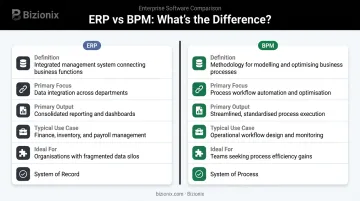
The core difference: ERP is data-centric (what information exists and where it lives), while BPM is process-centric (how work gets done and how to improve it).
| Attribute | ERP | BPM |
|---|---|---|
| Definition | Unified platform managing data across business functions | Methodology and/or toolset for optimising workflows |
| Primary Focus | Data integration and resource management | Process design, execution, and improvement |
| Primary Output | Consolidated reporting, data accuracy, cross-department visibility | Faster cycle times, fewer redundancies, agile workflows |
| Typical Use Case | Finance, payroll, inventory, procurement management | Approval workflows, exception handling, bottleneck resolution |
| Scalability | Grows with data volume and business functions | Grows with process complexity and improvement maturity |
| Ideal For | Businesses with fragmented data and no single source of truth | Businesses with data but slow or broken operational workflows |
Both tools carry real implementation demands:
- ERP requires significant upfront configuration and company-wide adoption
- BPM requires ongoing attention — processes must evolve as the business and market change
These demands matter more than most businesses anticipate. McKinsey's research on large IT projects found average budget overruns of 45% and value delivery 56% below predictions — a caution for any MSME tempted to rush or overcomplicate their implementation from day one.
The 5 Stages of BPM and How ERP Supports Each Stage
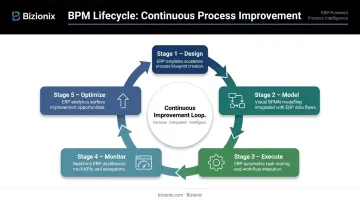
A common BPM lifecycle runs through five stages: Design, Model, Execute, Monitor, and Optimize. These aren't a one-time project — they form a continuous improvement loop that repeats as processes evolve.
Stage 1: Design
Teams map existing processes, document each step, and identify bottlenecks and gaps. This stage works best with real data — and that's exactly where ERP earns its place. Historical transaction records, approval logs, and workflow histories give process designers facts instead of assumptions, not guesswork.
Stages 2 and 3: Model and Execute
The modelled process gets tested, refined, and then deployed as a live workflow. ERP systems directly support execution by automating routine tasks:
- Invoice generation triggered by delivery confirmation
- Purchase approvals routed to relevant managers
- Stock replenishment alerts when inventory drops below threshold
- GST-compliant e-invoice submission to the IRP portal
Bizionix's document workflow module, for instance, enables digital approval chains that eliminate the manual follow-up loops MSMEs typically rely on.
Stage 4: Monitor
This is where ERP's data layer becomes indispensable to BPM. Real-time dashboards and reporting show whether processes are running as designed , flagging delays, exceptions, or deviations before they escalate.
Bizionix provides live dashboards and instant reporting across all modules, so managers see what's happening now, not at month-end. Complete activity logs track who did what and when, creating the audit trail that both compliance and ongoing process monitoring depend on.
Stage 5: Optimize
Insights from monitoring feed back into Stage 1, restarting the improvement cycle. If ERP data shows invoice approval times increasing, that triggers a workflow redesign , such as shorter approval chains, automated escalation, or clearer routing rules.
That feedback loop is what makes BPM sustainable. Without ERP data surfacing the problem, most businesses wouldn't know approval times had drifted until the delays were already affecting cash flow.
Key Benefits of Integrating ERP with BPM for Growing Businesses
Operational Efficiency Without Manual Oversight
When ERP data flows directly into BPM workflows, routine tasks run end-to-end without human intervention — approvals, alerts, escalations, task assignments. For MSMEs with lean teams, this matters enormously. Every hour spent chasing approvals or updating spreadsheets manually is an hour pulled away from customers and growth.
Bizionix's configurable workflows enforce process standardisation across departments, ensuring employees follow defined procedures rather than improvising — which is where most operational errors originate.
Faster, Better-Informed Decisions
ERP consolidates clean, real-time data. BPM turns that data into actionable process improvements. Together, they create a decision-making environment where problems surface early and managers act on facts.
McKinsey's customer analytics research found that intensive data users were 23 times more likely to outperform peers in customer acquisition and 19 times more likely to outperform in profitability. The same logic applies operationally: clean ERP data feeding structured BPM workflows gives growing businesses the same decision-making edge.

Compliance and Risk Built Into Processes
ERP ensures data integrity and audit trails — critical for GST compliance in India. A FICCI survey found that 59% of respondents experiencing GST compliance burdens were MSME firms, citing documentation, reconciliation, and process gaps as primary concerns.
Those gaps are process problems, not just technology ones — and that's where integrated ERP and BPM make a practical difference. Bizionix connects directly to the IRP via API, automating the full journey from invoice creation to IRN generation with real-time GST validation, eliminating manual JSON uploads and rejection risks.
Scalability Without Process Chaos
Growth creates process complexity. New branches, additional GST entities, growing headcounts — without structured workflows, scaling means scaling the chaos too.
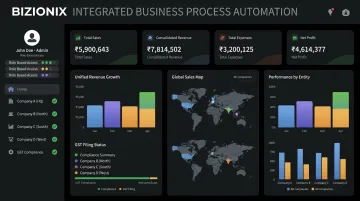
An ERP that supports configurable BPM workflows solves this systematically. Bizionix's multi-company management feature lets businesses manage multiple entities, branches, or franchise networks from a single login — each with independent books of accounts, GST compliance, and role-based access controls, but all visible through consolidated dashboards. The result: operational consistency at scale, without the coordination overhead that typically comes with it.
ERP or BPM: Which Does Your Business Actually Need?
The answer depends on where your primary pain lies.
Start with ERP if:
- Departments work from different data sources and nobody agrees on the numbers
- Invoices get missed, inventory counts don't match, or payroll errors are common
- You have no real-time visibility into cash flow or operations
Focus on BPM if:
- You have data, but approvals are slow, handoffs break down, and workflows are inconsistent
- The same process produces different outcomes depending on who handles it
- You can identify specific workflows that consistently create delays or errors
For most growing MSMEs, the practical answer is both — through one platform.
A cloud-based ERP with native workflow automation removes the need to manage separate tools, separate vendor relationships, and the integration risk that comes with stitching them together. Bizionix is built for exactly this: Indian MSMEs that need ERP's data discipline and BPM's workflow structure, without the cost or complexity of enterprise software — plans start from ₹999/year.
Quick Self-Assessment Checklist
- Are your teams working from different spreadsheets or data sources?
- Do you find out about operational problems at month-end rather than in real time?
- Do you have documented processes that consistently break down in practice?
- Do approvals or escalations depend on someone manually following up?
- Is compliance (GST, payroll, audit readiness) creating recurring stress?
If you answered yes to the first two, ERP is the immediate priority. If you answered yes to the last three with data already centralised, BPM workflows are your next step.
Frequently Asked Questions
What is ERP in business process management?
In the BPM context, ERP is the data and operational backbone that makes process management possible. It provides the centralised, real-time information needed to design, execute, and monitor business processes — without reliable ERP data, BPM is working with incomplete information.
What are the 5 stages of BPM?
The five stages are Design, Model, Execute, Monitor, and Optimize. These form a continuous improvement cycle rather than a one-time project — insights from monitoring feed back into design, keeping improvement ongoing.
What are L1, L2, L3, and L4 processes?
These represent a process hierarchy used in BPM. L1 covers high-level business functions (such as Finance), L2 breaks these into sub-processes (such as Accounts Payable), L3 defines specific activities within those, and L4 captures individual tasks. Each level lets teams analyse and improve processes without losing sight of the bigger picture.
What is the difference between ERP and BPM?
ERP is a system for integrating and managing data across business functions, while BPM is a methodology for optimising how specific workflows operate. In practical terms, ERP tracks what resources exist and what transactions occurred — BPM focuses on how work gets done and where it can be improved.
Can ERP replace BPM?
ERP doesn't replace BPM as a discipline, but many modern ERP platforms include BPM capabilities — workflow automation, approval routing, process monitoring, and dashboards. For most growing MSMEs, a well-chosen ERP with native workflow features makes a separate BPM tool unnecessary.