This guide covers everything you need to make a confident decision: what a cloud-based WMS is, the benefits it delivers, must-have features to evaluate, a practical implementation roadmap, and the common pitfalls to avoid.
Key Takeaways
- A cloud-based WMS is internet-hosted software that manages warehouse operations — inventory, orders, fulfilment — without on-premise servers
- Key benefits: real-time stock visibility, lower upfront costs, easy scalability, and integration with ERP and e-commerce systems
- Implementation has five core steps: assess requirements, select a vendor, migrate data, configure and test, then deploy in phases
- Common challenges (connectivity risk, staff resistance, legacy integration) are manageable with the right planning and vendor support
What Is a Cloud-Based WMS and How It Works
Gartner defines a warehouse management system as software that manages and intelligently executes warehouse, distribution centre, or fulfilment centre operations — covering receiving, putaway, storage, counting, picking, packing, and shipping. A cloud-based WMS delivers all of that through internet-hosted software, with no on-site servers, no local infrastructure to maintain.
Operationally, the system provides a centralised, real-time data repository. Every transaction — stock movements, pick confirmations, shipment dispatches — is logged instantly and visible to warehouse staff, managers, and operations heads alike, whether they're on the floor or in a head office three cities away.
Most cloud WMS solutions are delivered as SaaS (Software-as-a-Service), which means security patches, updates, and new features are deployed automatically by the vendor. You always run the latest version without scheduling a maintenance window or involving your IT team.
Cloud WMS vs. On-Premise WMS: Key Differences
| Aspect | Cloud WMS | On-Premise WMS |
|---|---|---|
| Deployment | Hosted remotely, accessed via browser | Runs on local servers at your facility |
| Cost model | Monthly or annual subscription (OpEx) | Large upfront licence + hardware (CapEx) |
| Scalability | Scales on demand — add users, locations, SKUs instantly | Requires hardware upgrades and IT projects |
| Maintenance | Vendor-managed: updates, security, backups | Your IT team handles everything |
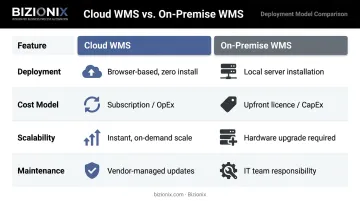
For Indian MSMEs, this shift from CapEx to OpEx is significant — subscription pricing means no large upfront outlay, which keeps working capital available for stock, staffing, and growth.
Key Benefits of a Cloud-Based WMS for Growing Businesses
Real-Time Inventory Visibility Across All Locations
Manual stock counts and spreadsheet reconciliation create a lag — by the time data is compiled, it's already outdated. A cloud WMS provides live stock-level data regardless of how many warehouses, godowns, or distribution points a business operates. Managers can spot shortfalls before they become stockouts, prevent overstocking, and make replenishment decisions based on actual movement rather than estimates.
For Indian MSMEs managing stock across multiple regional branches, this unified visibility replaces the confusion of separate location-specific registers with a single source of truth.
Scalability Without Infrastructure Overhead
As order volumes grow or new warehouse locations come online, a cloud WMS scales on demand. No servers to procure, no IT deployment project to manage. The platform accommodates more users, more SKUs, and higher transaction volumes under the same subscription structure. For a business moving from two to five godowns, this is the difference between a software upgrade and a capital project.
Lower Total Cost of Ownership
On-premise systems carry significant upfront costs before a single order is processed:
- Hardware procurement and server setup
- Software licences and annual renewal fees
- Dedicated IT staff for maintenance and upgrades
- Ongoing infrastructure and support budgets
Cloud WMS replaces this with a predictable subscription expense. The freed capital stays in the business rather than being tied up in IT infrastructure.
Better Order Accuracy and Fulfilment Speed
Automated picking guidance, barcode scanning support, and real-time order status updates reduce the manual errors that slow down warehouse operations. Research by Nucleus Research puts the average improvement in inventory accuracy at 20% for businesses that adopt warehouse management software. Fewer picking errors mean fewer returns, fewer customer complaints, and faster throughput.
Integration With ERP, E-Commerce, and Accounting Systems
A cloud WMS connects with ERP platforms for demand planning and financial reconciliation, e-commerce storefronts for automated order ingestion, and logistics providers for dispatch and tracking. For Indian businesses, integration with GST-compliant accounting and e-invoicing systems is a hard operational requirement — warehouse dispatches need to feed directly into compliant invoice workflows.
Platforms like Bizionix combine cloud ERP with integrated inventory and warehouse management modules, handling multi-location stock tracking, purchase orders, GRN workflows, and GST-compliant e-invoicing from a single platform. For many MSMEs, this removes the cost and complexity of maintaining a separate WMS and ERP side by side.
Must-Have Features to Look For in a Cloud WMS
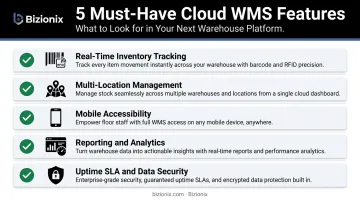
Not every cloud WMS is built the same. When evaluating platforms, these are the capabilities that separate functional systems from ones that create new problems:
- Real-time inventory tracking with barcode/RFID support — stock levels must update the moment a scan happens; confirm the platform natively supports barcode scanning and, for high-velocity SKUs, RFID
- Multi-location and multi-warehouse management — a unified dashboard showing inventory positions across all sites simultaneously, not separate siloed views per location
- Mobile accessibility — warehouse staff should be able to perform receiving, picking, putaway, and dispatch tasks from handheld devices or tablets; confirm whether the vendor offers a dedicated mobile app or a responsive browser interface
- Reporting and analytics with customisable dashboards — the platform should surface KPIs like order fill rates, inventory turnover, and dock-to-stock time; role-specific dashboards are more useful than a single generic view
- Vendor support, uptime SLAs, and data security — look for a 99.9% uptime commitment, clear data encryption standards, automated backup frequency, and responsive support during Indian business hours
Integration capability belongs on this checklist too. Zebra's 2024 warehouse study found 80% of warehouse operators planned WMS communication with transport management systems by 2024 — connectivity across the supply chain is now a baseline expectation.
For Indian MSMEs, that connectivity extends to compliance. GST compliance within the warehouse workflow is a hard requirement: when a dispatch note is generated, it should automatically trigger GST-compliant invoicing and e-way bill creation for applicable inter-state movements. Bizionix, for example, handles this through direct API integration with the GST e-Invoice system, enabling instant IRN generation without a separate compliance tool.
How to Implement a Cloud WMS: Steps and Best Practices
Step 1 — Assess Current Operations and Define Requirements
Before looking at any vendor, map your warehouse workflows: how goods are received, how picks are organised, how dispatches are confirmed. Document what systems need to connect (accounting software, e-commerce platforms, logistics providers) and list your non-negotiables versus nice-to-haves. This requirements document becomes your shortlisting filter.
Step 2 — Evaluate and Select the Right Vendor
Evaluate vendors against these criteria:
- Functional fit with your actual workflows (not just a feature list)
- Scalability roadmap as your business grows
- GST compliance and India-specific regulatory support
- Total cost of ownership over three years, not just year-one subscription fees
- Quality of implementation support and post-go-live assistance
- Vendor reputation and customer references in your industry
Request a live demo using your own use cases. A generic walkthrough tells you little about whether the system handles your specific picking logic or dispatch documentation requirements.
Step 3 — Prepare and Migrate Your Data
Bad data in equals bad data out. Before go-live, existing inventory data — SKUs, quantities, bin locations, supplier records — must be cleansed, deduplicated, and formatted for import. Skipping this step typically surfaces as phantom stock counts, duplicate SKUs, and mismatched bin locations in the first weeks after go-live. Budget two to four weeks for data preparation — it directly determines how clean your starting position is.
Step 4 — Configure, Integrate, and Test
Work with the vendor to configure the system to your warehouse layout and business rules. Run integrations with connected systems. Then conduct user acceptance testing (UAT) with real-world scenarios:
- Receive a shipment and verify GRN accuracy
- Process a customer order end-to-end through picking and dispatch
- Generate a GST-compliant dispatch document and invoice
- Run a stock count and reconcile discrepancies
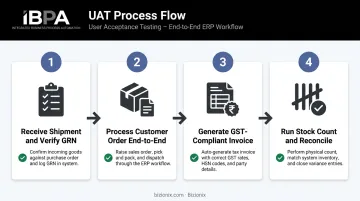
Only move to go-live once UAT scenarios pass consistently.
Step 5 — Train Staff and Go Live in Phases
Once testing passes, resist the urge to flip everything on at once. Start with one warehouse or one workflow, stabilise it, address issues, then expand. This phased approach reduces risk and gives staff time to build confidence before the full rollout.
Training must account for varying tech literacy levels — hands-on floor training matters far more than documentation. Identify super-users within each team who can support peers and own ongoing adoption. After go-live, that feedback loop between floor staff and your implementation contact is where configuration tweaks, report adjustments, and targeted retraining actually get done.
Common Challenges and How to Overcome Them
Internet Dependency and Connectivity Risk
A cloud WMS requires a stable connection. For businesses in locations where connectivity is inconsistent — TRAI data shows rural tele-density in India at 59.63% versus 148.92% in urban areas — this is a real operational risk.
Mitigation strategies:
- Deploy redundant connections: primary broadband plus a cellular backup that activates automatically on failure
- Select vendors whose platforms include offline sync modes that buffer transactions during outages and reconcile automatically when connectivity is restored
- Confirm offline capabilities explicitly before signing a contract, especially for warehouse operations in Tier 2 and Tier 3 locations
Resistance to Change and Low Staff Adoption
WMS implementations most often underperform because of change management failures, not technology failures. Warehouse staff who weren't involved in the selection process often view new systems as a threat rather than an improvement.
Address this by:
- Involving floor supervisors in the vendor evaluation process early
- Communicating clearly what changes for each role and why it makes their work easier
- Investing in hands-on training, not just orientation documents
- Appointing internal super-users with ownership over adoption metrics
Integration Complexity With Legacy Systems
Older accounting software, manual spreadsheets, and ERP systems without standard APIs create integration challenges. Before shortlisting any vendor, ask these questions directly:
- What integration methodology do you use?
- What pre-built connectors exist for Indian accounting platforms?
- How do you handle custom integrations and what is the typical timeline?
Factor integration timelines into your project plan from day one — they consistently take longer than initial estimates.
Frequently Asked Questions
What is a cloud-based warehouse management system?
A cloud-based WMS is internet-hosted software that manages warehouse operations — inventory tracking, order processing, picking, packing, and dispatch — without requiring on-premise servers. It provides real-time visibility accessible from any browser or mobile device, making it practical for businesses across multiple locations.
How much does a cloud WMS cost in India?
Cloud WMS pricing is subscription-based and varies by business size, feature set, and number of users. For Indian MSMEs, solutions range from a few thousand rupees per year for entry-level platforms to significantly higher for enterprise-grade systems. Bizionix's NEO plan, for example, starts at ₹999 per year. Get vendor-specific quotes based on your user count and warehouse complexity.
How long does it take to implement a cloud-based WMS?
Simple single-warehouse setups can go live in 4–8 weeks. Multi-location deployments with custom integrations typically take 3–6 months. Thorough data preparation and a phased rollout are the two factors that shorten timelines and reduce implementation risk.
Can MSMEs benefit from a cloud-based WMS?
Cloud WMS suits MSMEs well — no large upfront hardware costs, and it scales with the business. That said, an integrated cloud ERP like Bizionix may deliver comparable warehouse benefits more affordably, while also handling GST compliance and financial management in the same system.
What is the difference between a cloud WMS and a cloud ERP with inventory management?
A standalone WMS handles warehouse operations only. A cloud ERP with inventory modules adds finance, procurement, sales, and compliance — all from one platform. For MSMEs managing multiple functions, the ERP approach typically costs less and eliminates the overhead of integrating separate systems.
Is internet connectivity always required?
Most cloud WMS platforms require an active connection for full functionality. Many offer offline modes for core tasks that sync automatically once connectivity is restored. If your warehouses are in areas with unreliable connectivity, verify offline capabilities with each shortlisted vendor before making a decision.