For freelancers, MSMEs, and growing businesses in India, Excel remains a practical starting point for GST-compliant invoicing. But doing it right requires knowing exactly which fields are mandatory, how to structure your formulas, and where automation can save you from costly errors.
This guide covers all three: the mandatory fields under CGST Rule 46, free Excel templates you can customise today, and VBA macros that handle numbering, tax calculations, and PDF export automatically.
TL;DR: Key Takeaways
- A valid GST invoice must include 18 particulars under CGST Rule 46 — missing any can invalidate your buyer's ITC claim
- Excel templates (simple, advanced, service-based) can be set up in under 30 minutes
- VBA macros eliminate the three biggest manual errors: wrong invoice number, incorrect tax split, and unsaved PDFs
- Businesses with annual turnover exceeding ₹5 crore must generate IRN via the IRP; Excel cannot fulfill this requirement
- Dedicated GST software like Bizionix automates filing, IRN generation, and e-way bills — all through direct API integration
What Must a Valid GST Invoice Contain? (Mandatory Fields per CGST Rule 46)
The active CBIC Rule 46 text currently lists 18 particulars, running from (a) to (r). Older summaries citing 16 fields are outdated. Use the checklist below to audit your template.
The 18 Rule 46 Particulars
| Clause | Required Field | Notes |
|---|---|---|
| (a) | Supplier name, address, GSTIN | Header block |
| (b) | Consecutive serial number — max 16 characters, unique per financial year | VBA-controlled |
| (c) | Date of issue | Invoice date field |
| (d) | Recipient name, address, GSTIN or UIN (if registered) | B2B customer block |
| (e) | Recipient name, address, delivery address with state code (unregistered, value ≥ ₹50,000) | Conditional B2C |
| (f) | Same unregistered-recipient details if value < ₹50,000 and recipient requests | Conditional |
| (g) | HSN code for goods / SAC code for services | Use validation table |
| (h) | Description of goods or services | Line-item description |
| (i) | Quantity and unit (for goods) | Goods lines only |
| (j) | Total value of supply | Gross line value |
| (k) | Taxable value after discount or abatement | Tax base |
| (l) | Applicable tax rates (CGST, SGST, IGST, UT tax, cess) | Rate columns |
| (m) | Tax amounts charged | Amount columns |
| (n) | Place of supply with state name (for interstate) | Drives IGST logic |
| (o) | Delivery address if different from place of supply | Ship-to field |
| (p) | Whether tax is payable on reverse charge basis | RCM flag |
| (q) | Supplier's signature or authorized representative's signature | May be conditional for e-invoices |
| (r) | QR code with embedded IRN (where Rule 48(4) applies) | Mandatory for e-invoice cases |
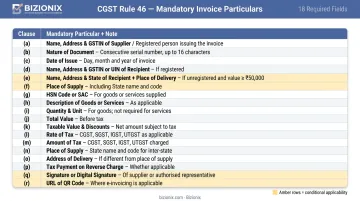
Clauses (e), (f), (q), and (r) are conditional — they apply based on your buyer's registration status and whether e-invoicing applies to your turnover threshold.
CGST/SGST vs. IGST: Which Tax Applies?
The CBIC FAQ summarizes it as:
| Supply Type | Tax Applied |
|---|---|
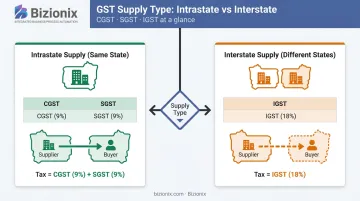
| Supplier and place of supply in the same state (intrastate) | CGST + SGST |
| Supplier and place of supply in different states (interstate) | IGST |
| Exports | IGST (treated as interstate under IGST law) |
Your Excel template needs separate columns for each scenario and a supply-type cell that drives the correct tax calculation. Getting this logic right also determines whether e-invoicing obligations apply — which brings us to the next threshold.
The E-Invoicing Threshold
Per Notification No. 10/2023 – Central Tax, effective 1 August 2023, e-invoicing applies to businesses with aggregate annual turnover exceeding ₹5 crore. Above this threshold, IRN generation via the Invoice Registration Portal (IRP) is mandatory — Excel cannot generate a valid IRN on its own.
HSN digit requirements also vary: businesses with turnover up to ₹5 crore must use 4-digit HSN codes for B2B supplies; those above ₹5 crore need 6-digit codes (per Notification No. 78/2020).
Free GST Invoice Templates in Excel: Download and Customise
Choosing the Right Template for Your Business Type
Three template types cover most use cases:
- Simple GST Invoice — few line items, single GST rate, CGST/SGST only. Best for local service providers and traders with straightforward intrastate billing
- Advanced GST Invoice — multiple tax rates, HSN code column, discount field, IGST option, bank details section. Suits businesses with varied product lines or interstate customers
- Service-Based GST Invoice — SAC codes, TDS deduction field, milestone billing rows. Designed for consultants, agencies, and professional service firms
Match the template to your transaction complexity. Starting with an advanced template when you only issue five invoices a month adds setup friction without benefit.
How to Customise the Downloaded Template
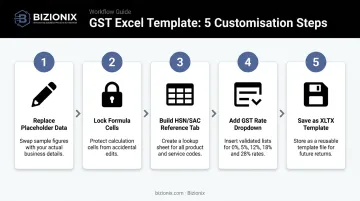
Follow these five steps to make any downloaded template your own:
- Replace placeholder data — company name, full address, GSTIN, phone, email, and logo (Insert → Pictures)
- Lock formula cells — select formula cells, go to Format Cells → Protection → Locked, then Protect Sheet with a password. This prevents accidental edits to tax calculation logic
- Build an HSN/SAC reference tab — list your commonly used codes in a separate sheet and use VLOOKUP or a dropdown to pull them into line items
- Add a GST rate dropdown — select the GST % cell, go to Data → Data Validation → List, and enter: 5%, 12%, 18%, 28%. This eliminates typed-in errors
- Save as .XLTX template file — each new invoice opens a clean copy rather than overwriting your last one
PDF export: Use File → Export → Create PDF/XPS, or Print → Save as PDF. Send clients the PDF, not the Excel file.
For file naming, use a consistent convention like INV-[FY]-[Number]-[ClientName]. CGST Act Section 36 requires records to be retained for 72 months from the due date of filing the annual return — a reliable naming system makes audit retrieval far easier across those six years.
How to Build a GST Invoice in Excel from Scratch
Step 1 — Sheet Setup
Open a blank workbook. Disable gridlines (View → uncheck Gridlines), set page orientation to Portrait, and define your print area. Removing gridlines gives the sheet a clean, document-like appearance rather than a raw spreadsheet look.
Step 2 — Header Block
Insert your company logo, then enter:
- Company name, full address, GSTIN, phone, email (left side)
- Invoice No., Invoice Date, Due Date, Place of Supply (right side)
Leave the Invoice No. cell empty for now — VBA will control this field.
Step 3 — Buyer Details Block
Create a "Bill To" section with:
- Customer name and address
- GSTIN (or "URD" for unregistered dealer)
- State code
The state code is what determines whether CGST/SGST or IGST applies. For an out-of-state buyer, enter their state code here — Step 4's IF formulas read this cell directly to route tax to the correct column.
Step 4 — Line Item Table
Set up these columns:
S.No. | Description | HSN/SAC | Qty | Unit | Rate | Discount | Taxable Value | GST % | CGST | SGST | IGST | Line Total
Core formulas:
Taxable Value  = (Qty × Rate) − Discount
CGST           = Taxable Value × (GST%/2)    [intrastate only]
SGST           = Taxable Value × (GST%/2)    [intrastate only]
IGST           = Taxable Value × GST%        [interstate only]
Use an IF formula to switch between tax types based on a supply-type cell (dropdown: "Intra" / "Inter"):
=IF(SupplyType="Intra", TaxableValue*(GST%/2), 0)   → CGST/SGST columns
=IF(SupplyType="Inter", TaxableValue*GST%, 0)         → IGST column
Step 5 — Summary and Footer
Add:
- SUM totals row for all tax columns
- Amount in Words (custom formula or macro)
- Bank details: account number, IFSC, UPI ID
- Terms and conditions
- Authorized signatory section
Save as .XLTX (Excel Template format). This prevents accidental overwrites — every time you open it, Excel creates a fresh copy instead of editing the master file.
VBA Solutions: Automate Your GST Invoicing in Excel
VBA (Visual Basic for Applications) lets you run automation scripts inside Excel without any external software. A few targeted macros can eliminate the three most common manual invoicing errors: wrong invoice number, incorrect tax split, and missing PDF copy.
Before enabling any macro file, verify the source. Microsoft's macro security guidance recommends keeping the default setting ("Disable all macros with notification") and only enabling macros you understand. Never switch to "Enable all macros" globally.
VBA Macro 1: Auto-Incrementing Invoice Number
Store the last-used invoice number in a hidden sheet (e.g., Sheet2!A1). When a "New Invoice" button is clicked:
- Read the current counter from
Sheet2!A1 - Increment by 1
- Write the new number to the invoice header cell (formatted as
FY2526-001) - Update the counter cell
The FY2526 prefix resets annually, keeping your numbering compliant with Rule 46(b)'s requirement for unique serial numbers per financial year. The counter persists in the workbook so it survives between sessions.
VBA Macro 2: Smart CGST/SGST vs. IGST Calculator
A macro reads the "Place of Supply" cell and compares it against the seller's state stored in a Settings sheet. Based on the match:
- Same state → shows CGST and SGST columns, hides IGST column
- Different state → shows IGST column, hides CGST/SGST columns
This prevents one of the most damaging GST errors: applying CGST/SGST on an interstate supply. When that happens, the buyer's ITC claim gets rejected because the tax was deposited under the wrong head.
VBA Macro 3: One-Click PDF Save
A "Save Invoice" button triggers a macro that:
- Exports the defined print area as a PDF using
ExportAsFixedFormat - Names the file automatically using invoice number + client name from the header cells
- Saves to a designated folder (e.g.,
Invoices\FY2526\) - Optionally opens the default email client with the PDF attached and client email pre-filled, using
Shell(runs an external command) to invokemailto:
The file name string is built from dynamic cell references, so no manual renaming is needed.
VBA Macro 4: Template Reset After Saving
After the PDF is confirmed saved, a "New Invoice" macro:
- Clears all customer-specific fields (buyer name, GSTIN, line items, amounts)
- Increments the invoice number counter
- Restores the blank template state
Always trigger PDF save before reset. Add a MsgBox confirmation — "Has the PDF been saved? Click OK to clear this invoice." — to prevent accidental data loss. One confirmation prompt takes two seconds and avoids recreating a client's invoice from memory.
These four macros cover the most error-prone steps in manual GST invoicing. If your invoice volume grows to the point where Excel workarounds start slowing you down, a dedicated GST billing tool handles all of this natively — without macros to maintain.
Limitations of Excel for GST Invoicing
Excel works well up to a point. Here's where it breaks down:
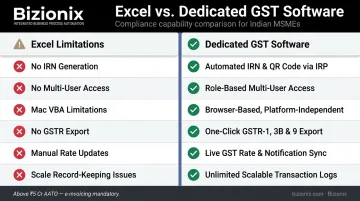
- No IRN generation — Excel cannot generate a valid Invoice Reference Number. Businesses above ₹5 crore AATO must use IRP portal tools, bulk JSON upload, API, ERP, or a GST Suvidha Provider (GSP). The official e-invoice portal's GePP tool is one official option, but it's not native Excel capability
- No multi-user access — shared workbooks cause file-locking conflicts. Two people cannot edit the same invoice file simultaneously without version chaos
- VBA has Mac limitations — Office for Mac supports VBA in principle, but sandboxed file access and other platform differences mean macros built for Windows often require testing and rework on Mac
- No GSTR-1 or GSTR-3B export — Excel has no native connection to the GST portal; return data must be manually compiled and uploaded
- GST rate changes require manual updates — when the government revises rates for specific HSN codes, every template and formula needs manual correction
- Record-keeping at scale — 72 months of invoice records in individual Excel files becomes unmanageable without a structured archive system
When to Consider Dedicated Software
There's no universal invoice-volume threshold backed by India MSME-specific data, but the practical signals are clear. Excel's time cost starts to exceed the cost of a proper tool when:
- Multiple people need simultaneous invoice access
- Turnover is approaching ₹5 crore and e-invoicing becomes mandatory
- Compiling GST returns takes a full working day each month
At that point, dedicated GST software handles what Excel cannot. Bizionix, for instance, connects directly with the IRP via API for instant IRN generation, auto-populates GSTR-1, handles CGST/SGST/IGST logic natively, and generates PDF invoices with embedded QR codes — without any manual steps between creating a sales entry and issuing a compliant invoice. The entry-level NEO plan starts at ₹999 per year and includes a 14-day free trial.
Frequently Asked Questions
Which software is used for GST billing?
Most businesses choose between dedicated GST billing software, cloud ERP platforms (such as Bizionix), or accounting tools with built-in GST modules. Excel with a well-built template works as a free starting point, but purpose-built tools handle IRN generation, GSTR filing, and multi-user access that Excel cannot.
Can I use VBA macros to automate GST invoice creation in Excel?
Yes. VBA macros can automate invoice numbering, CGST/SGST/IGST calculations, PDF export, and template reset. They require enabling macros in Excel's Trust Center settings and do not support e-invoicing (IRN generation) natively.
How do I auto-calculate CGST, SGST, and IGST in Excel?
Use a supply-type dropdown cell (Intra/Inter) with IF formulas. For intrastate: =TaxableValue*(GST%/2) for both CGST and SGST. For interstate: =TaxableValue*GST% for IGST. Set the other tax columns to zero using the same IF condition.
Is an Excel-generated GST invoice legally valid in India?
Yes. The CBIC FAQ confirms there is "no particular format" — only the content matters. An Excel invoice is valid if all Rule 46 particulars are present, the issuer is GST-registered, and (above the e-invoice threshold) an IRN and QR code are included.
What are the mandatory fields in a GST invoice per CGST Rule 46?
Rule 46 lists 18 particulars. Core requirements include supplier and buyer GSTIN, a unique serial number (max 16 characters), date of issue, HSN/SAC codes, taxable value, GST rates and amounts, place of supply, reverse charge flag, and authorized signature. IRN/QR code and unregistered-buyer clauses apply conditionally.
When is e-invoicing mandatory under GST?
Per Notification No. 10/2023 – Central Tax, e-invoicing is mandatory for businesses with aggregate annual turnover exceeding ₹5 crore, effective 1 August 2023. Above this threshold, businesses must generate IRN through the IRP — this cannot be done through Excel alone and requires API, ERP, or GSP integration.