ERP integration solves this by connecting your ERP system with other business applications — or consolidating all functions within a single ERP platform — so data flows automatically across operations without manual effort. For growing manufacturers, distributors, and service businesses in India, this isn't a luxury. Disconnected systems create billing delays, compliance gaps, and operational blind spots that get exponentially harder to manage as the business scales.
This guide covers how ERP integration works, which systems are typically connected, what determines success, and where projects commonly go wrong.
Key Takeaways
- ERP integration connects your ERP with other tools — or unifies all functions in one platform — so data flows automatically across departments
- Skip it, and you're left with manual re-entry, reconciliation errors, and decisions built on stale data
- Methods range from point-to-point connections to middleware/ESB and API-based platforms, each with different cost and scalability trade-offs
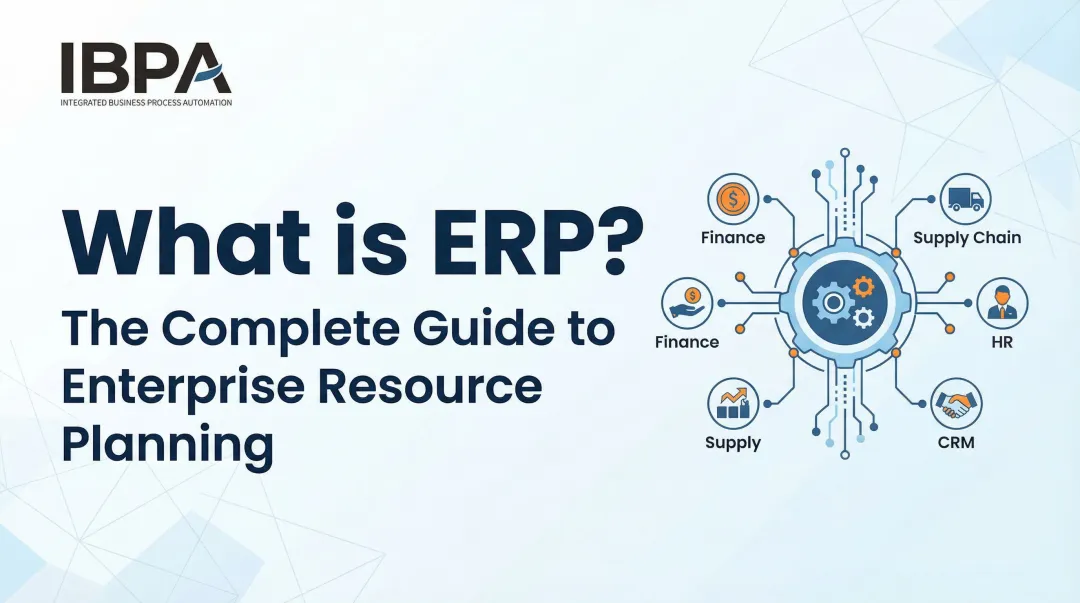
- Common integration points include accounting, CRM, GST/e-invoicing, e-commerce, HR, and supply chain systems
- Success depends on data quality, process mapping, and choosing an architecture that can grow with the business
What Is ERP Integration and Why Do Businesses Need It?
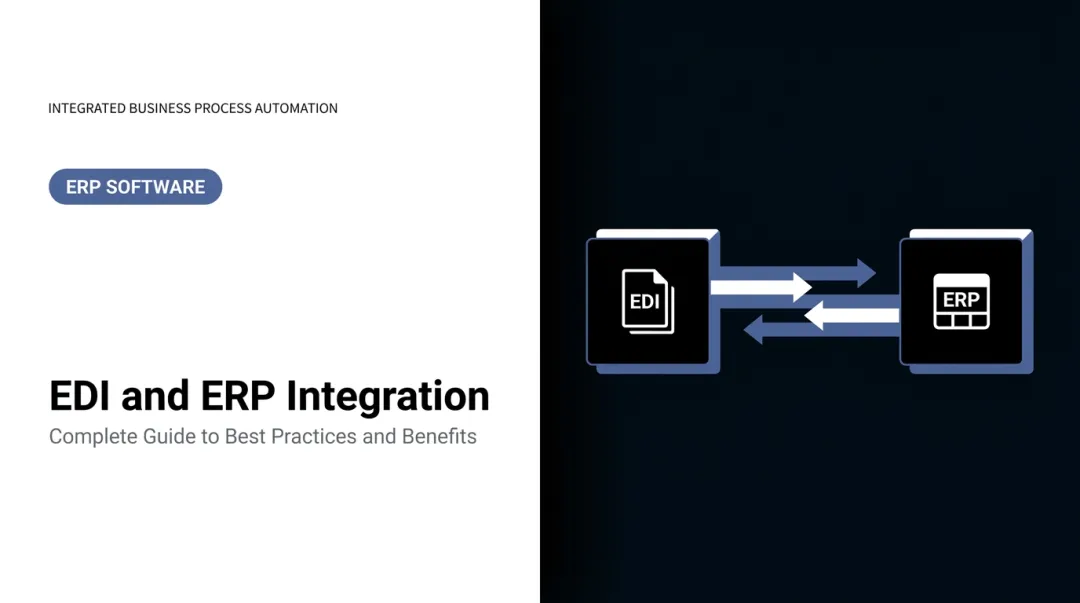
ERP integration is the process of linking an ERP system with other internal or external applications — such as CRM, accounting software, GST portals, or eCommerce platforms — so that data is shared automatically, creating a single source of truth across the business.
The distinction from a standalone ERP implementation matters here. A standalone ERP organises internal processes. Integration extends that by connecting the ERP to every other system the business relies on.
Some modern platforms sidestep this complexity by design. Bizionix, built specifically for Indian MSMEs, natively consolidates Finance & Accounting, Sales & CRM, Inventory, Warehouse Management, HRMS & Payroll, and GST compliance within one unified platform — reducing the need for complex third-party integrations from the outset.
ERP integration exists to eliminate data silos, automate cross-department workflows, and give every team real-time visibility into the same accurate information.
What Problems Does the Absence of ERP Integration Create?
Disconnected systems create a compounding cost. A sales order entered in one system may not automatically update inventory or trigger an invoice — someone has to manually re-enter that data, and that's where errors begin. According to Salesforce SMB research, SMB teams spent 23% of their average workday on manual data entry, and 53% said too much manual work was a direct challenge to business performance.
The operational fallout includes:
- Finance teams chasing mismatched numbers across systems
- Reports that are already outdated by the time they're compiled
- Duplicate records causing billing or inventory errors
- GST filing done manually because the accounting tool doesn't connect to the portal
At small volumes, this is annoying. At scale — more locations, more SKUs, more transactions — it becomes unmanageable. Bizionix customers describe pre-ERP operations as "WhatsApp approvals, Excel chaos, and verbal coordination." At that point, the business is one missed update away from a billing error, a compliance gap, or a shipment going out wrong.
How ERP Integration Works: Methods and Approaches
ERP integration captures data from one system, transforms it into a compatible format, and transfers it to another — either in real time or in scheduled batches — based on predefined business rules.
What goes into the process:
- Source systems: CRM, accounting software, GST portal, inventory tools
- Data fields synced: Customer records, purchase orders, invoice numbers, stock levels
- Business rules: When data moves, in what direction, and under what conditions
The integration layer — connectors, APIs, or middleware — acts as the bridge. The method chosen directly affects cost, flexibility, maintenance burden, and how well the setup holds up as the business grows.
Point-to-Point Integration
Point-to-point integration creates a direct connection between two specific systems using custom code or native connectors. For a single use case — say, syncing orders from one platform to a billing system — it's simple to set up.
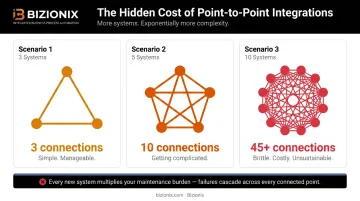
The problem is scale. MuleSoft's integration research makes this concrete: 3 systems need 3 connections, 5 systems need 10, and 10+ systems need 45 or more. Each new system requires a new connection to be built and maintained separately. This approach is only appropriate for businesses with three systems or fewer and no expected growth.
Middleware and ESB Integration
Middleware (including Enterprise Service Bus, or ESB) works differently — each system connects once to a central hub, which handles routing, transformation, and error management between all connected applications. Rather than building direct links between every pair, there's a single managed layer in the middle.
This is more scalable than point-to-point, but typically requires more infrastructure and IT expertise to set up and maintain. It suits larger environments where many systems need to share data reliably.
iPaaS and API-Based Integration
iPaaS (Integration Platform as a Service) is a cloud-based approach with pre-built connectors, visual workflow tools, and managed infrastructure. API-based integration uses standardised interfaces exposed by modern software to enable real-time data exchange.
For Indian MSMEs running cloud-first software stacks, this combination offers the most practical path to connecting ERP, GST IRP, logistics, and CRM data without heavy infrastructure overhead. The adoption numbers reflect this shift: 99% of organisations now use APIs to automate and connect business processes, according to MuleSoft's 2025 Connectivity Benchmark.
Key reasons MSMEs gravitate toward iPaaS and API-based approaches:
- Pre-built connectors reduce setup time compared to custom middleware
- Visual workflow tools lower the technical barrier for non-IT teams
- Cloud-managed infrastructure eliminates on-premise maintenance
- Real-time data exchange supports GST compliance and e-invoicing requirements
What Systems Are Commonly Integrated with an ERP?
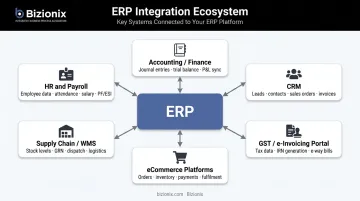
Growing businesses integrate their ERP with a predictable set of systems. The most common:
| System | What Gets Connected |
|---|---|
| Accounting / Finance | Automated bookkeeping, reconciliation, financial reporting |
| CRM | Customer records, sales orders, lead-to-invoice workflows |
| GST / e-Invoicing Portal | IRN generation, GSTR-1 auto-population, e-way bill linkage |
| eCommerce Platforms | Orders, inventory levels, fulfilment status, invoicing |
| Supply Chain / WMS | Purchase orders, stock movements, delivery tracking |
| HR & Payroll | Attendance, salary processing, cost accounting |
GST integration deserves specific attention for Indian businesses. Under GST Council Notification No. 10/2023, e-invoicing is mandatory for taxpayers with aggregate annual turnover exceeding ₹5 crore. GSTN's e-invoice system requires invoice data submitted to the Invoice Registration Portal (IRP), which generates an IRN and QR code. This can be done via direct API, GSP, or ERP service providers.
Bizionix connects directly to the IRP. When a sales invoice is created, it's validated against GST rules and the IRN and QR code are generated instantly, eliminating manual portal uploads and third-party tools. GSTR-1 is auto-populated, keeping sales, GST returns, and accounting in sync automatically.
Beyond compliance, supply chain integration addresses a different operational pressure: inventory accuracy. Connecting ERP with warehouse management or supplier portals gives real-time stock visibility, automates purchase order generation, and reduces both stockouts and overstock situations. Bizionix includes multi-location stock tracking, GRN management, and purchase workflows within its platform, so this coordination doesn't require external connectors.
Key Factors That Determine ERP Integration Success
Data Readiness Comes First
Before any integration can succeed, source data must be clean, consistently formatted, and free of duplicates. Poor data in one system will propagate errors into every connected system. Panorama Consulting's 2024 ERP Report found that 41% of organisations cited data quality and migration as their top implementation challenge. This isn't a technical detail — it's the most common reason integrations underperform after go-live.
Process Mapping Before Technical Setup
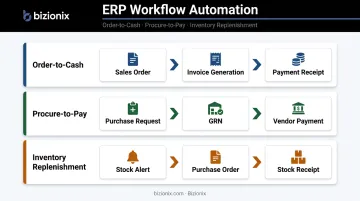
Integration should reflect how the business actually works — not just connect systems technically. Before deciding what to integrate and how, teams should document end-to-end workflows:
- Order-to-cash (from sales order through invoice to payment)
- Procure-to-pay (from purchase request through GRN to vendor payment)
- Inventory replenishment (from stock alert through purchase order to receipt)
Skipping this step means automated flows will encode existing workarounds rather than fixing them.
Architecture That Grows With the Business
The integration method chosen at the start should handle where the business is heading, not just where it is now. A point-to-point setup built for three systems becomes a maintenance burden at ten. Middleware and iPaaS architectures can accommodate new systems, higher transaction volumes, and new business lines without rebuilding from scratch.
Gartner's data is direct: by 2027, more than 70% of recently implemented ERP initiatives will fail to fully meet original business-case goals. Businesses that lock in a scalable architecture early are far less likely to be in that majority.
Security and Compliance Requirements
ERP systems hold sensitive financial, customer, and operational data. Any integration layer must enforce:
- Encrypted data transfers between systems
- Role-based access controls at the user and department level
- Audit trails for every transaction and data change
For Indian businesses, this includes maintaining GST data and e-invoice records in compliance with regulatory requirements. Bizionix enforces role-based access with entity-level permissions and department restrictions, and maintains full activity logs per entity — creating audit-ready records across all financial and operational transactions.
Common ERP Integration Challenges and Misconceptions
The most common misconception is that ERP integration is a one-time IT project. In reality, integrations require ongoing maintenance as systems are updated, business processes change, or new tools are added. Teams that treat integration as "done" after go-live regularly encounter data drift, broken workflows, or compliance gaps — especially when software vendors release updates that change API behavior.
Another common misstep: assuming a data export/import between two systems counts as integration. It doesn't. A scheduled CSV export still requires manual intervention, creates time lags, and isn't real-time. True integration means data moves automatically based on business rules, without anyone triggering the transfer.
Budget and timeline overruns are widespread. Panorama's 2024 ERP Report found that 46% of organizations exceeded their ERP project budget and 49% exceeded their original timeline, with a median project duration of 15.5 months. The causes are predictable: undiscovered data quality issues, unexpected customization needs, and internal resistance to process change.
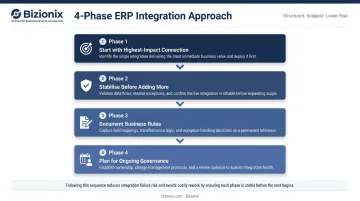
A phased approach manages this risk better than trying to connect everything at once:
- Start with the highest-impact connection — typically the system where manual data entry causes the most errors or delays
- Stabilise that integration before adding the next one
- Document business rules for each connection so they can be maintained when systems change
- Plan for ongoing governance — assign someone responsibility for integration health, not just go-live
For MSMEs weighing separate tools against an all-in-one platform, the maintenance arithmetic matters. Every integration built is an integration that needs to be maintained, tested, and updated when systems change.
Platforms that consolidate functions natively — like Bizionix, which covers accounting, CRM, inventory, and HRMS within a single architecture — shrink that maintenance burden while still offering direct API connectivity for external requirements like the GST IRP.
Frequently Asked Questions
What is the ERP integration process?
The ERP integration process involves identifying which systems need to connect, mapping data and business rules that govern information flow, selecting an integration method (API, middleware, or iPaaS), and then configuring, testing, and maintaining those connections over time. Unlike a one-time deployment, integration requires ongoing upkeep as systems and business needs evolve.
What is an ERP integration service?
An ERP integration service is a professional service or platform that connects an ERP to other business applications. It handles technical setup, data mapping, testing, and ongoing maintenance so businesses can sync their ERP with tools like CRM, accounting software, GST portals, and eCommerce platforms without building custom connections from scratch.
What is the role of ERP in business process integration?
An ERP system serves as the central system of record — holding financial, inventory, order, and operational data — and integrating it with surrounding systems ensures all departments work from the same data. This automates workflows that would otherwise require manual data transfers between disconnected tools.
What is an example of ERP integration?
When a customer places an order on an eCommerce platform, ERP integration automatically updates inventory levels, triggers invoice generation in the accounting module, and notifies the warehouse for fulfilment — all without anyone manually entering data into each system. This same logic applies across industries: one transaction in one system triggers coordinated updates across finance, operations, and logistics.
What are the key ERP business processes?
Core ERP processes include order management, procurement and purchasing, inventory and warehouse management, financial accounting and GST compliance, production planning (for manufacturers), and HR and payroll. Integration ensures these processes are connected rather than running in isolation across separate tools.
What are the 4 pillars of ERP?
Panorama Consulting defines the four pillars of ERP transformation as People, Processes, Technology, and Data. These reflect that successful ERP outcomes depend on organisational alignment and data quality as much as the software platform chosen.