Introduction
Growing MSMEs face a critical contradiction: they generate more data than ever before, yet still make decisions based on gut instinct, fragmented spreadsheets, and disconnected reports. Competitors who can read patterns in their numbers move faster. Businesses stuck in manual reporting fall behind — not from lack of ambition, but from lack of visibility.
Most business owners understand ERP as a system for managing day-to-day operations. Many are also exploring Business Intelligence tools to make sense of their data. Few recognise that using one without the other creates a dangerous gap — an ERP with no BI captures every transaction but reveals no insight, while BI with no ERP analyses data that is incomplete and inconsistent to begin with.
This article explains what ERP and BI each do, why they complement rather than duplicate each other, and why businesses that integrate both outperform those relying on only one. You'll see how the combination shifts decision-making from guesswork to evidence — and why the two tools are far more valuable together than either is alone.
Key Takeaways
- ERP centralizes and automates operations—finance, inventory, HR, sales—by consolidating data across departments into one system
- BI turns that operational data into strategic insights through dashboards, trend analysis, and forecasting
- ERP captures what's happening; BI explains the why and guides what to do next
- Together, ERP and BI deliver real-time visibility, faster decisions, and predictive capability — not reactive crisis management
- Neither replaces the other — ERP runs your operations, BI makes sense of them
ERP and BI: Two Systems, One Purpose
Understanding ERP
ERP is a unified software platform that consolidates critical business functions—accounting, inventory, procurement, HR, sales—into a single database. Instead of maintaining separate systems for each department, ERP eliminates the fragmented, department-by-department data problem that most growing businesses face. When your sales team closes a deal, the inventory system knows immediately, finance sees the revenue impact, and procurement understands what needs restocking—all without manual updates or spreadsheet exports.
Understanding BI
Business Intelligence is a layer of tools and methods that collects data from sources like ERP, organizes it, and presents it as visual dashboards, reports, and trend analyses. BI helps business leaders make faster, smarter decisions by surfacing patterns that raw transactional data hides. Rather than scrolling through hundreds of invoice records, a BI dashboard shows which customers pay late, which product lines drive margin, and which months historically see cash flow pressure.
The Technical Distinction That Matters
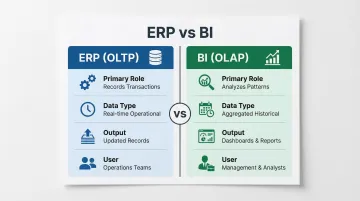
ERP operates as an OLTP system (Online Transaction Processing)—it records and manages transactions in real time with speed and accuracy. OLTP relies on row-oriented storage to handle high-frequency, simple queries like insertions, updates, and deletions while maintaining strict data integrity.
BI operates as an OLAP system (Online Analytical Processing)—it analyzes consolidated data for patterns, trends, and forecasting. OLAP systems extract data from relational sets and reorganize it into multidimensional formats for fast, insightful analysis.
In short: ERP records what happens in your business; BI explains what it means.
| ERP (OLTP) | BI (OLAP) | |
|---|---|---|
| Primary Role | Records transactions | Analyzes patterns |
| Data Type | Real-time operational | Aggregated historical |
| Output | Updated records | Dashboards, reports |
| User | Operations teams | Management, analysts |
For MSMEs using Bizionix, this distinction matters in practice. Because Bizionix consolidates GST compliance, accounting, inventory, HR, and sales into one database, the structured data it produces is ready for BI tools without the cleanup work that fragmented systems typically require.
The Key Advantages of Combining ERP and Business Intelligence
The advantages below aren't theoretical. Each maps directly to outcomes MSMEs track: decision speed, cost control, risk reduction, and operational efficiency. Together, ERP and BI compound over time — each new data point sharpening the next decision.
Advantage 1: Operational Data Becomes a Strategic Asset
ERP systems generate enormous volumes of raw transactional data — invoices, purchase orders, inventory movements, payroll entries. Without BI, this data sits in the system unused beyond compliance and reporting. BI transforms it into trends, patterns, and insights that leaders can act on, not just file away.
BI tools connect to the ERP database, pull historical and real-time data, and surface it through customizable dashboards. A business owner can see not just current inventory levels, but which SKUs are trending down, which suppliers are causing delays, and which product lines are driving margin — all from one view. Leaders no longer chase reports across departments or wait for an analyst to compile a monthly summary.
In a global survey of 1,300 decision-makers, 60% reported that half or more of their organization's data is "dark," and 33% said 75% or more goes completely unused. When ERP data flows through BI, it shifts from an operational record to a competitive input — enabling sharper decisions on pricing, product mix, supplier negotiation, and resource allocation.
This matters most for businesses managing multiple product lines, locations, or entities simultaneously, where manual data consolidation would otherwise take days.
KPIs impacted:
- Report generation time
- Decision cycle length
- Revenue per product line
- Margin analysis accuracy
- Cross-department data accessibility
Advantage 2: Real-Time Visibility Replaces Reactive Management
ERP provides live operational data — sales orders, stock levels, cash positions, pending payables. BI takes this data and surfaces it as continuous dashboards and automated alerts, giving leaders a current picture of business health rather than a delayed one.
Instead of monthly P&L meetings where problems surface after the fact, a business with integrated ERP and BI can set threshold-based alerts. When receivables aging crosses a set limit, when inventory drops below reorder points, or when a branch's sales fall below target — notifications arrive immediately. Catching a cash flow issue three weeks early is the difference between a course correction and a crisis.
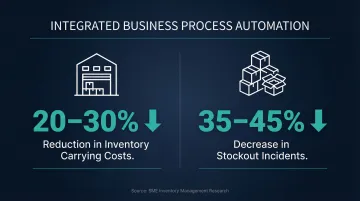
Studies show that SMEs implementing real-time, automated inventory visibility achieve a 20% to 30% reduction in inventory carrying costs, with stockout incidents decreasing by 35% to 45%. For MSMEs where a single large bad debt or stock-out can erase a quarter's margin, this shift from responding to problems after they've already cost money to preventing them is the core value of combining ERP with BI.
This advantage is most critical for businesses with high transaction volumes, multi-location operations, or fast-moving inventory.
KPIs impacted:
- Debtor days
- Cash conversion cycle
- Inventory turnover
- Stock-out frequency
- Financial close time
- Branch performance variance
Advantage 3: Forecasting and Planning Replace Guesswork
Historical ERP data — sales cycles, seasonal demand, supplier lead times, cost trends — is the raw material for BI's predictive capabilities. Applied together, they let businesses move from reporting on what happened to forecasting what is likely to happen, enabling better planning for demand, cash flow, staffing, and procurement.
The applications are concrete. A distributor can use 24 months of ERP sales data to predict next quarter's demand by product category and geography. A manufacturer can spot which raw material costs are trending up and lock in procurement before prices rise. A service business can forecast billing cycles and resource needs from pipeline data alone.
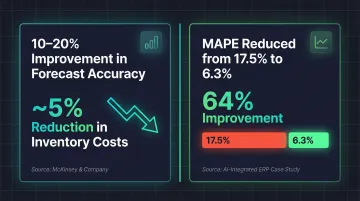
Purchasing too much stock, hiring too early, or missing a seasonal demand spike all carry measurable financial consequences. McKinsey estimates that a 10% to 20% improvement in demand forecast accuracy can trim inventory costs by approximately 5%. A separate study on AI-integrated ERP forecasting showed a reduction in Mean Absolute Percentage Error (MAPE) from 17.5% to 6.3% — a 64% improvement.
Businesses that forecast with data rather than assumptions are also better positioned when approaching lenders or making investment decisions — they can show projections backed by actual operational history, not spreadsheet guesses.
This advantage has the highest impact for businesses with seasonal demand cycles, long procurement lead times, or complex multi-entity financials.
KPIs impacted:
- Demand forecast accuracy
- Procurement cost variance
- Cash flow forecast accuracy
- Working capital efficiency
- Budget vs. actual variance
What Happens When ERP and BI Stay Disconnected
Many businesses implement ERP and assume the built-in reporting is sufficient. Others run BI tools fed by manual Excel exports. Both approaches limit what your reporting can actually do—and both carry real operational risk.
Common consequences include:
- Reports run on stale data when BI isn't directly connected to ERP—insights arrive hours, days, or even weeks late, making them retrospective rather than actionable.
- Manual ERP-to-spreadsheet exports introduce errors at every step. Peer-reviewed audits find that 94% of operational spreadsheets contain errors, with an average cell error rate of 5.2%—meaning staff spend time fixing data instead of analysing it.
- Without live dashboards tied to ERP data, problems surface only after the damage is done—a cash shortfall, an inventory imbalance, a revenue dip discovered too late to course-correct.
- Growth makes the problem worse, not better. Globally, 94% of finance teams still use Excel for month-end close, and 50% name it as the primary reason their close is slow—with cash reconciliation alone consuming 20 to 50 hours per month.
How to Get the Most Value from ERP + BI
ERP + BI integration delivers the most value when built on a few foundational principles—the technology is only as useful as the discipline around it.
ERP + BI works best when:
- ERP data is clean and consistently maintained. Standardize how data is entered—categories, cost centers, product codes—from day one. A unified ERP platform like Bizionix, which consolidates accounting, inventory, procurement, and GST compliance in one place, gives BI tools the consistent data structure they need to produce trustworthy outputs.
- Dashboards are tied to real decisions, not just reporting. Each dashboard should answer a question a decision-maker actually needs answered—"Are we collecting receivables on time?" or "Which product lines are growing vs. declining?"
- Insights are reviewed regularly and acted upon. Set a cadence—weekly or monthly—where specific KPIs are reviewed, owners are assigned, and actions are tracked. Presenting data in a meeting and moving on defeats the purpose.
Conclusion
ERP and BI are not competing systems. ERP is the operational foundation that captures and manages business data, while BI is the intelligence layer that makes that data useful for decisions, planning, and growth.
The benefits build on each other the longer both systems work in sync:
- Faster financial close cycles — teams report closing periods dropping from weeks to days
- Real-time visibility across inventory, sales, and cash flow — without manual consolidation
- Accurate forecasting grounded in live operational data, not end-of-month spreadsheets
Businesses that treat ERP + BI as an ongoing practice — not a one-time implementation — build the kind of organizational clarity that growing enterprises need to stay ahead. The goal isn't just better reports. It's running a business where decisions are grounded in facts, not gut feel or outdated data.
Frequently Asked Questions
Are business intelligence and ERP the same thing?
No. ERP manages and records business operations as an OLTP system, while BI analyzes and interprets that data to surface insights as an OLAP system. They are complementary, not interchangeable—ERP captures transactions, BI reveals what those transactions mean.
Will AI take over ERP?
AI enhances ERP rather than replacing it. It is being embedded within both ERP and BI tools to automate anomaly detection, demand forecasting, and reporting. Gartner forecasts that AI-enabled tools will account for 62% of cloud ERP spending by 2027, with ERP remaining the transactional backbone and AI adding intelligence on top.
Do small businesses need both ERP and BI?
Yes. Even for MSMEs, the combination matters—ERP brings order to operations and eliminates data silos, while BI provides the visibility needed to grow confidently. The scale of the tools can be right-sized, but the need for both functions is universal.
Can ERP work without business intelligence?
ERP can function operationally without BI, but its full value remains untapped. Without BI, businesses have the data but no structured way to interpret it strategically—operational records accumulate without ever driving decisions.
What data from ERP does business intelligence use?
BI typically draws on sales transactions, inventory levels, accounts receivable and payable, procurement records, payroll data, and financial statements from the ERP—essentially all structured operational data—to build reports, dashboards, and forecasts.
How does combining ERP and BI improve decision-making?
ERP + BI integration gives decision-makers a real-time, data-backed view of performance across all functions. It reduces dependence on manually compiled reports and enables faster, more confident decisions grounded in current and historical trends.