Introduction
For Indian MSMEs juggling GST filings, e-invoicing mandates, TDS/TCS tracking, and multi-entity compliance, accounting software implementation is a complex, multi-stage project. The difficulty scales with transaction volume, number of integrations, and the depth of your regulatory obligations.
The consequences of handling it poorly are concrete: data integrity failures, missed GST filings, incorrect IRN configurations, user resistance, and costly rework that takes months to untangle.
Ownership matters just as much as execution. A study on SME ERP implementations by Aalto University found that top management support appeared in 40 of 53 reviewed articles. In cases where a CFO owned the project, prioritisation and cross-functional direction improved measurably.
The vendor's role is to configure and support. Internal ownership is non-negotiable.
That ownership starts with knowing what the process actually involves. This guide walks through the complete implementation process, from readiness assessment to post-go-live review, with specific attention to the compliance requirements Indian MSMEs cannot afford to miss.
Key Takeaways
- Implementation spans five phases — planning, data prep, configuration, testing, and post-launch support — not a one-time event
- Confirm GST, e-invoicing, and TDS/TCS compliance readiness before configuration begins, not after
- Data migration carries the highest risk — bad data carried into a new system multiplies into larger errors downstream
- User training and change management matter as much as technical setup
- A structured 30/60/90-day post-go-live review cadence separates successful implementations from those that stall after launch
Before You Begin: Implementation Readiness Checklist
The work done before implementation begins determines whether go-live is smooth or chaotic. Businesses that skip readiness assessment face unexpected scope expansion, budget overruns, and delayed launches.
Assess Your Business and Process Readiness
Start by documenting every current accounting workflow — from invoice generation to bank reconciliation to month-end close — before touching any new software. Map who owns each step and where manual interventions occur. These maps become the baseline for process redesign later.
At the same time, audit your existing data. Common issues include:
- Duplicate vendor and customer records
- Inconsistent chart of accounts entries across periods
- Unreconciled transactions that will carry forward as errors
- Mismatched GSTIN or PAN details in master data
For Indian MSMEs, compliance readiness is a required checkpoint at this stage. Before selecting or configuring any system, confirm:
- Whether your aggregate annual turnover exceeds ₹5 crore (the e-invoicing threshold under GST Council Notification No. 10/2023-Central Tax, effective 1 August 2023)
- Whether you need multi-GSTIN support for operations across states
- Which GST return types apply — GSTR-1 (due 11th for monthly filers), GSTR-3B (due 20th for monthly filers), and GSTR-9 annually
- Whether TDS/TCS tracking must be integrated from day one
Skipping this audit is how businesses discover compliance gaps after go-live, not before.
Choose the Right Software for Your Business
Key selection criteria to evaluate:
- Deployment model: Cloud-based platforms reduce infrastructure overhead and are generally easier to deploy for MSMEs new to digital tools
- Compliance fit: Software built for Indian requirements — GST slab configuration, GSTR-1 auto-population, IRP API integration — cuts configuration time significantly versus adapting a generic international tool
- Integration capability: Confirm compatibility with existing inventory, payroll, and CRM systems before committing
- Total cost of ownership: Factor in implementation, data migration, configuration, training, and support costs beyond the subscription fee
- Vendor support quality: Assess whether the vendor provides hands-on implementation assistance or simply delivers a licence and leaves you to figure it out
Use a "needs vs. wants" classification during selection: identify features essential for current operations separately from those desirable for future growth. This prevents both over-purchasing and under-investing.
Bizionix, for example, is built specifically for Indian MSMEs with pre-built GST compliance, automated e-invoicing, and direct API integration for instant IRN generation. GSTR-1 auto-population and multi-company management from a single login come standard — reducing the configuration overhead that generic platforms typically require during implementation.
How to Implement Accounting Software: Step-by-Step
Implementation follows a defined sequence. Compressing or skipping any phase creates downstream problems that are far more expensive to fix. Most mid-sized MSME implementations take two to six months; multi-entity or integration-heavy setups take longer.
Phase 1: Planning, Stakeholders, and Timeline
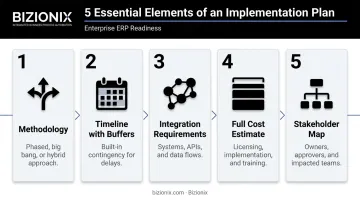
A viable implementation plan must address five elements:
- Methodology: Phased rollout (lower disruption risk), big bang (faster time-to-value), or hybrid (core modules first)
- Timeline with buffers: Build contingency into the schedule. Resource constraints are the most common cause of overruns
- Integration requirements: List every system that must connect to the new platform before configuration begins
- Full cost estimate: Include data cleansing, internal staff time diverted, and downtime, not just licence fees
- Stakeholder map: Name decision-makers, assign a finance owner with authority, and confirm sponsor availability
One scheduling rule worth treating as firm: avoid go-live windows near GST filing deadlines. GSTR-1 due dates (11th/13th), GSTR-3B deadlines (20th/22nd/24th), and the GSTR-9 annual deadline (31 December) are hard no-go periods. Cutting over during these windows while staff are still learning the system is a reliable way to miss filings.
Phase 2: Process Mapping and Redesign
The goal here is process redesign, not just digitisation of existing workflows. Before any configuration begins:
- Eliminate redundant approval steps identified during the readiness audit
- Automate manual tasks where the new system supports it
- Standardise coordination between departments
- Document redesigned workflows in flowcharts or swim lane diagrams
Configuration should reflect the improved process, not replicate the old one.
Phase 3: Data Preparation and Migration
Data migration is where most implementations accumulate their worst problems. The preparation steps are:
- Audit all historical records for inconsistencies and duplicates
- Decide what to migrate vs. archive (not everything needs to come across)
- Standardise formats: chart of accounts structure, GSTIN formats, HSN/SAC codes, TDS ledger categories
- Resolve all unreconciled transactions and close open periods before migration begins
The migration process requires working with your vendor to define data mapping and run multiple test migrations with validation reports. Reconcile trial balances between old and new systems before going live.
On record retention: Under Section 128 of the Companies Act 2013, companies must retain books of account for at least 8 financial years. The ICAI's 2024 Implementation Guide also requires audit trail preservation for 8 years for companies using accounting software from FY 2023–24 onward. Your archiving strategy for legacy data must meet this retention requirement.
Phase 4: System Configuration
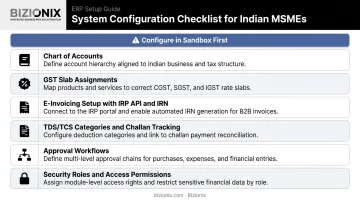
Always configure in a sandbox or staging environment. Never configure directly in production. Core configuration areas include:
- Chart of accounts and reporting hierarchies
- GST slab assignments by HSN/SAC code, including 5%, 12%, 18%, and 28% IGST schedules
- E-invoicing setup: IRP API connection, IRN generation, QR code embedding, and error handling for duplicate IRN or GSTIN mismatch errors
- TDS/TCS categories, section codes, and challan tracking
- Approval workflows and financial controls
- Security roles and entity-level access permissions
Avoid over-customisation. Standard functionality covers the majority of scenarios, and excessive customisation increases costs, complicates future upgrades, and makes the system harder for staff to use. Document every configuration decision and the reasoning behind it.
Phase 5: Testing and User Training
Testing should move in phases:
- Unit testing: Test individual workflows — a single invoice cycle, a payment run
- End-to-end testing: Run complete financial process scenarios using real transaction data
- Parallel running: Operate old and new systems simultaneously for a defined period to validate outputs before cutting over
Use test scripts based on actual business scenarios, not synthetic data. Include e-invoice IRN generation, GSTR-1 reconciliation, and TDS return data in your test scenarios.
On training: Keep it role-specific. Transaction processors, finance managers, and system administrators each need different content. Cover both system mechanics and the redesigned workflows from Phase 2. Experienced staff typically need more adjustment time than new hires — established habits create friction, so plan for it.
Phase 6: Go-Live and Post-Implementation Support
The go-live sequence:
- Formal go/no-go decision checkpoint against defined criteria
- Data entry freeze in the legacy system
- Final data load and validation
- System activation with a command centre staffed by finance, IT, and vendor contacts for the first 48–72 hours
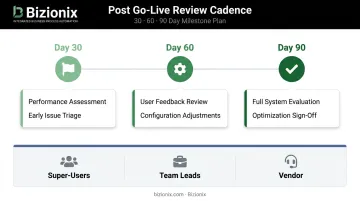
Post-go-live support works best in three tiers:
- Super-users: Trained internal staff handle first-level queries
- Team leads: Implementation leads address escalations
- Vendor: Handles technical issues and system-level fixes
Schedule structured check-ins at 30, 60, and 90 days to assess performance, gather user feedback, and adjust configuration before small issues compound.
Common Accounting Software Implementation Problems and How to Fix Them
Even well-planned implementations run into problems — these three come up most often.
Incomplete or Dirty Data Migration
Problem: Historical data transferred with inconsistencies — duplicate vendor records, mismatched account codes, unreconciled opening balances — causes reporting errors and compliance risks from day one.
Cause: Insufficient data auditing before migration, or timelines compressed to meet go-live deadlines.
Fix: Mandate a formal data sign-off checkpoint before migration begins. Require validation reports after every test migration run, and reconcile trial balances and key subledger totals between both systems before activating the new one.
Low User Adoption
Problem: Staff continue using spreadsheets or the old system long after go-live, undermining data integrity and making the implementation worthless in practice.
Cause: Insufficient change management, training focused on system mechanics without connecting to daily workflows, or late stakeholder involvement that left key users feeling excluded.
Fix: According to Prosci's change management research, projects with excellent change management are up to 7x more likely to succeed — with 88% meeting or exceeding objectives. To drive adoption:
- Involve department representatives early in the process
- Run role-specific training before go-live, tied to real daily workflows
- Designate internal super-users as peer champions
- Enforce a hard cutover date with visible management support

Scope Creep and Over-Customization
Problem: The implementation timeline and budget expand mid-project as new requirements appear — custom reports, non-standard workflows, or unscoped integrations.
Cause: Incomplete requirements gathering in the planning phase, or departments raising requirements only after seeing the configured system.
Fix: Lock requirements after the planning phase. Use a formal change-request process for anything added after configuration begins. Always evaluate whether standard functionality can handle the need before committing to a custom build.
Best Practices for a Successful Accounting Software Implementation
Done well, implementation comes down to four decisions made early. Get these right, and the technical work that follows becomes significantly more manageable.
- Secure executive buy-in before the project kicks off. Pre-implementation workshops where department heads can raise concerns and shape the rollout sequence turn sceptics into champions before pressure mounts. PMI research shows only 63% of projects have engaged executive sponsors — yet those that do are on time 53% of the time versus 41% for those that don't.
- Build a timeline with real buffers, not optimistic ones. Resource constraints are the most cited cause of implementation delays. Mark GST filing deadlines, year-end close, and audit windows as hard no-go periods for go-live at the start of planning — not as an afterthought.
- Verify the vendor's compliance roadmap, not just their feature list. Indian GST and e-invoicing rules change regularly — IRN error codes get updated, filing rules shift, and new notifications amend applicability thresholds. A platform with direct API integration to the GST e-Invoice system (such as Bizionix, which generates IRNs in real time) reduces the risk of falling out of compliance after go-live.
- Front-load readiness, not rework. The cost of fixing a failed or partial implementation — data reconciliation, retraining, compliance catch-up — typically exceeds what thorough preparation upfront would have cost.
Conclusion
Implementation quality — not the software feature list — determines the actual business outcome. A well-planned implementation that includes proper data preparation, structured go-live, and post-launch support delivers faster time to value, stronger compliance, and adoption that actually sticks.
Done right, implementation is a strategic project — not an IT task. To make it stick, keep three principles front of mind:
- Assign clear ownership with a finance leader at the centre of every decision
- Complete data cleanup and process mapping before configuration begins
- Plan for post-launch support, not just go-live
For Indian MSMEs managing GST compliance, multi-entity operations, or rapid growth, a clean first implementation avoids the far higher cost of rework, data correction, and re-training that comes from a rushed rollout.
Frequently Asked Questions
What is accounting software implementation?
Accounting software implementation is the structured process of selecting, configuring, migrating data into, and deploying a new financial management system. It covers everything from initial planning and stakeholder alignment through data migration, user training, and post-launch support — not just installing software.
What are the 6 components of AIS?
An Accounting Information System comprises six components: people, procedures and instructions, data, software, IT infrastructure, and internal controls. All six must be addressed during implementation — software alone, without proper people, processes, and controls in place, produces a system that works technically but fails operationally.
How long does accounting software implementation typically take?
Timelines range from 2–3 months for smaller businesses to 6–12+ months for larger organisations with complex integrations or multiple entities. The timeline depends heavily on readiness work completed upfront — data preparation, process mapping, and GST configuration and compliance setup — before actual configuration begins.
What are the most common reasons accounting software implementations fail?
The top causes are poor data quality going into migration, insufficient user training and change management, scope creep from late-stage requirement additions, and underestimating the internal time commitment required from finance and IT teams throughout the project.
What is the difference between phased and big bang implementation?
A phased approach rolls out features or departments gradually to reduce disruption risk, while a big bang approach launches all functionality simultaneously to accelerate time-to-value. A common approach is a hybrid — going live with core financial modules first, then adding inventory, payroll, or CRM in subsequent phases.
How should I prepare my data before switching to new accounting software?
Audit existing records for duplicates and inconsistencies, standardise formats and chart of accounts structure, decide which historical data to migrate versus archive, and resolve all unreconciled transactions before migration begins — dirty data carried into a new system compounds into larger problems post-launch.